
How to Use: Surfboard S33 Docsis® 3.1 Cable Modem S33 User Manual
Content
Surfboard S33 DOCSIS 3.1 Cable Modem S33 Overview
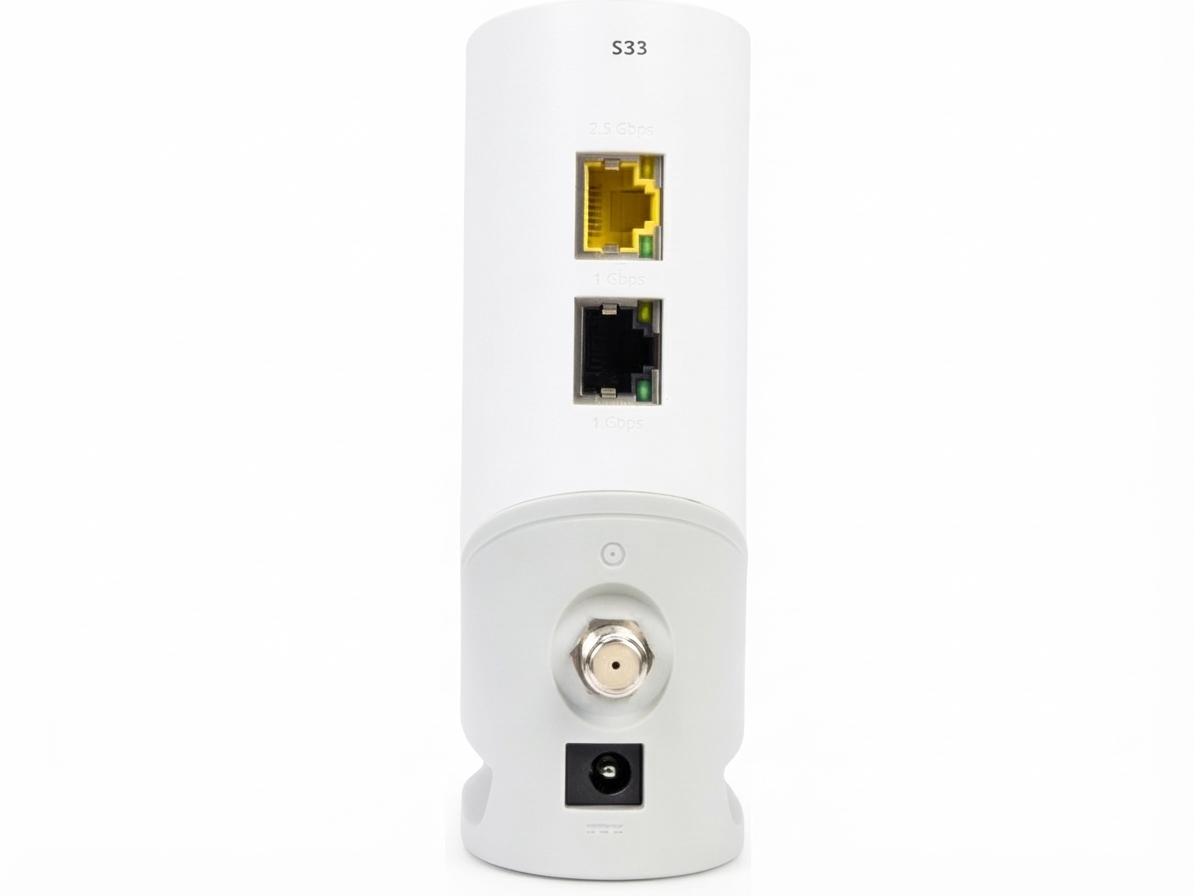
The Surfboard S33 DOCSIS 3.1 Cable Modem S33 is a high-performance standalone cable modem designed for users who want faster speeds, lower monthly rental costs, and reliable home networking without a built-in router. It supports DOCSIS 3.1 technology and is built for modern cable internet plans, including gigabit and multi-gigabit service tiers. With one 2.5 Gbps Ethernet port and one 1 Gbps Ethernet port, it is a strong choice for power users, remote workers, gamers, and households that stream 4K video across multiple devices.
This modem stands out for its clean, compact design, broad compatibility with major U.S. cable providers, and support for speeds up to 2.5 Gbps. It is especially appealing to users who already own a separate Wi-Fi router or mesh system and want to upgrade their internet backbone without paying for an all-in-one gateway. Compared with older DOCSIS 3.0 models, the Surfboard S33 DOCSIS 3.1 Cable Modem S33 offers better future-proofing and more headroom for faster plans.
Estimated pricing typically falls in the mid-range premium segment, often around $170 to $220 depending on retailer promotions, renewed stock, and seasonal discounts. It is widely available through major electronics retailers and online marketplaces, and it is commonly recommended for users looking to reduce rental fees while improving performance.
Detailed Specifications for the Surfboard S33 DOCSIS 3.1 Cable Modem S33
- DOCSIS version: DOCSIS 3.1 with backward compatibility for DOCSIS 3.0 networks
- Channel bonding: 32 downstream x 8 upstream DOCSIS 3.0 channels
- OFDM support: 2 downstream x 2 upstream OFDM channels
- Maximum wired speed: Up to 2.5 Gbps
- Ethernet ports: 1 x 2.5 GbE port and 1 x 1 GbE port
- Built-in Wi-Fi: No, requires a separate router or mesh system
- Digital voice support: No telephone or voice service capability
- Compatibility: Works with many major U.S. cable providers, including common gigabit service plans
- Physical size: Compact desktop modem with a small footprint
- Warranty: Typically 2 years
Compared with popular alternatives such as the Arris SB8200, the Surfboard S33 DOCSIS 3.1 Cable Modem S33 offers a newer 2.5 Gbps port that better matches multi-gig internet plans. It is best suited for users who need a simple modem rather than a modem-router combo.
Setup Guide: How to Install the Surfboard S33 DOCSIS 3.1 Cable Modem S33
Setting up the Surfboard S33 DOCSIS 3.1 Cable Modem S33 is straightforward. First, disconnect your old modem and connect the coaxial cable from your wall outlet to the modem’s coax port. Next, attach the power adapter and wait for the status lights to stabilize. Then connect the modem to your router using the 2.5 Gbps Ethernet port for maximum performance, or use the 1 Gbps port if your router or network equipment does not support multi-gig speeds.
After the physical setup, activate the modem with your internet provider. This usually requires logging into your account or calling customer support with the modem’s MAC address. For best results, reboot the modem and router after activation. If the modem fails to sync, check the coax connection, confirm the cable line is active, and verify that your ISP supports customer-owned modems.
Safety precautions matter during installation. Keep the modem in a ventilated area, avoid stacking it on heat-producing devices, and unplug it before moving cables. If you are unsure about provisioning or signal quality, contact your provider before assuming the hardware is faulty.
Troubleshooting the Surfboard S33 DOCSIS 3.1 Cable Modem S33
Common issues usually involve activation, signal loss, or slow speeds. If the modem shows no online connection, restart both the modem and router, confirm the coax cable is finger-tight, and ensure your ISP has approved the device. If speeds are lower than expected, test with a wired device, bypass the router temporarily, and confirm that your plan supports multi-gig speeds.
- No internet light: Check coax, reboot the modem, and re-provision with your ISP
- Slow speeds: Verify Ethernet port selection, router capability, and ISP speed tier
- Frequent disconnects: Inspect splitters, replace damaged coax, and reduce signal interference
- Activation failure: Confirm the modem MAC address is entered correctly by your provider
- Overheating: Improve airflow and keep the modem in a cool, open location
The Surfboard S33 DOCSIS 3.1 Cable Modem S33 is backed by manufacturer support and a typical two-year warranty, which adds value for long-term ownership. For unresolved issues, contact the modem manufacturer’s customer support or your internet service provider’s modem activation team. Regular firmware updates and proper ventilation help prevent most recurring problems.
Pros and Cons of the Surfboard S33 DOCSIS 3.1 Cable Modem S33
Pros
- Supports fast 2.5 Gbps cable internet plans
- Includes a 2.5 GbE port for multi-gig networking
- Compact design fits easily in a home office or media cabinet
- No monthly modem rental fee, improving long-term value
- Strong choice for users with separate routers or mesh systems
- Often recommended over older DOCSIS 3.0 modems for future-proofing
Cons
- No built-in Wi-Fi, so an additional router is required
- No phone or digital voice support
- Premium price compared with basic cable modems
- Best performance depends on ISP support and multi-gig equipment
For buyers comparing cable modem reviews, the Surfboard S33 DOCSIS 3.1 Cable Modem S33 offers excellent value for anyone seeking high speeds and long-term reliability, but it is less appealing for users who want an all-in-one gateway.
Customer Reviews and Real-World Feedback
Customer feedback for the Surfboard S33 DOCSIS 3.1 Cable Modem S33 is generally positive, with many users praising its strong performance, easy activation, and ability to handle fast internet plans. A common rating pattern is around 4 to 4.5 stars, especially among buyers who pair it with a quality Wi-Fi 6 or mesh router.
- “Installed quickly and immediately improved my wired speeds.”
- “Great modem for multi-gig service, especially if you already have a router.”
- “A little expensive, but the rental savings make it worthwhile.”
- “Works well, but you need a compatible router to see the full benefit.”
Common complaints usually mention the lack of Wi-Fi and voice support, along with occasional activation delays from some providers. Even so, most users recommend it for fast cable internet, especially when the goal is to reduce long-term costs and improve connection stability.
Faqs
How do I set up the surfboard S33 Docsis® 3.1 Cable Modem S33 for the first time?
What should I do if the surfboard S33 Docsis® 3.1 Cable Modem S33 is online but I still have no internet?
Is the surfboard S33 Docsis® 3.1 Cable Modem S33 compatible with all cable internet providers?
Why is the surfboard S33 Docsis® 3.1 Cable Modem S33 connection speed slower than expected?
What do the status lights on the surfboard S33 Docsis® 3.1 Cable Modem S33 mean during startup?
How can I troubleshoot activation problems with the surfboard S33 Docsis® 3.1 Cable Modem S33?
Can I use the surfboard S33 Docsis® 3.1 Cable Modem S33 with my own router for faster home Wi‑Fi?
How should I maintain the surfboard S33 Docsis® 3.1 Cable Modem S33 to keep it reliable long term?
Leave a Comment