
Usage: Switchbot Air Purifier Table User Manual
Content
SwitchBot Air Purifier Table
Introduction
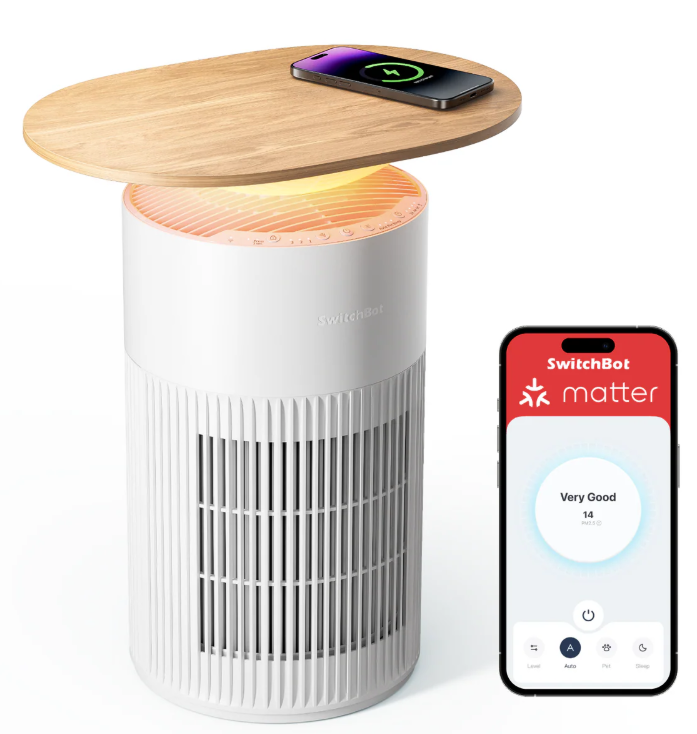
The SwitchBot Air Purifier Table is an innovative air purification device that uniquely combines functionality and style, serving as both an effective air purifier and a modern coffee or side table. Designed to seamlessly blend into living spaces, it offers a multi-purpose solution for those seeking cleaner air without compromising on home aesthetics. This versatile appliance is especially ideal for pet owners and individuals in urban environments who face challenges with odors, allergens, and airborne pollutants.
Equipped with a high-efficiency HEPA filter that removes 99.97% of airborne particles,, including PM2.5, dust, and pet hair, alongside an activated carbon filter for powerful odor elimination, the device can purify rooms up to 360 square feet efficiently. Its quiet operation, on starting at 20 decibels and smart airflow adjustment based on detected air quality, makes it suitable for bedrooms, living rooms, and pet-friendly households. Additional features include a wireless charging surface for compatible devices, adjustable ambient RGB lighting with 10 color options, and a sleek, waterproof table top with a wood grain finish that enhances any decor.
Priced around $258 for the full table version, with a purifier-only option at approximately $220, the SwitchBot Air Purifier Table is available through select online retailers and the official SwitchBot website. This product targets tech-savvy consumers looking for a stylish, space-saving air purifier that integrates smart home convenience and wellness benefits.
Specifications
- Material: ABS+PC
- Power: 100 to 240 V AC, 50 to 60 Hz
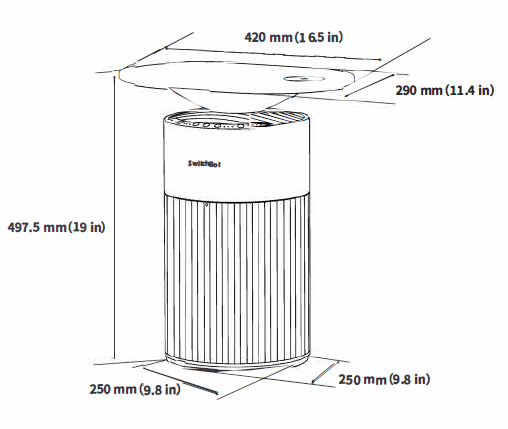
- Size with table: 290 x 420 x 497.5 mm (11.4 x 16.5 x 19 in.) Size of the main unit: 250 x 250 x 497.5 mm (9.8 x 9.8 x 19 in.) Weight: 4.8 kg (11 lb.)
- Operating Temperature: 0 °C to 40 °C (32 °F to 104 °F) Connectivity: 2.4 GHz Wi-Fi + Bluetooth 4.2
Package Contents
List of Components
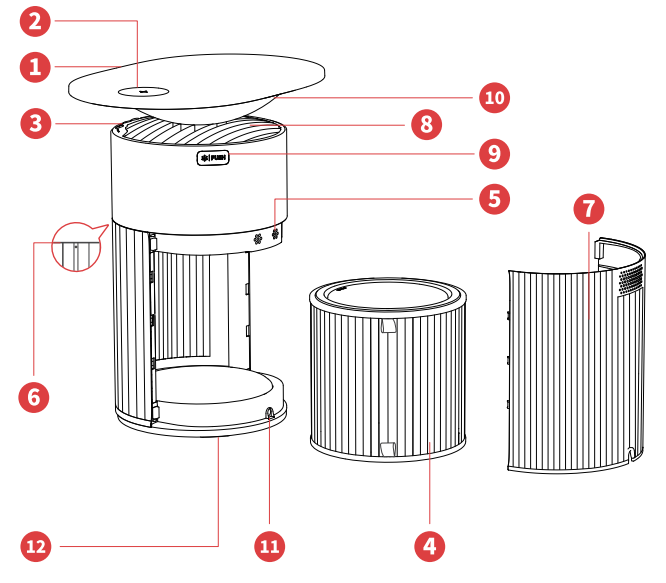
- Table
Max. load bearing: 5 kg (11 lb.)
Note: Avoid placing any liquids on the table to prevent accidental spills that could damage the device. - Wireless charging unit
Used to charge electronic devices supports wireless charging. - Control panel
Set or adjust functions. - Filter
Removes ultra-fine dust particles, possible sources of sick house syndrome, smog, and odors. - PM2.5 sensor
Detects the PM (particulate matter) density for very fine particles. - Light sensor
Detects ambient light and adjusts the button backlight accordingly. - Air inlet
The back cover is removable. - Air outlet
Exhausts the purified air. - Aroma pad box
You can add essential oils to it. - Ambient light
Displays air quality. - Power port
Connects to an power outlet. - Auxiliary device port
Connects to other Switch Bot devices for power supply.
Filters
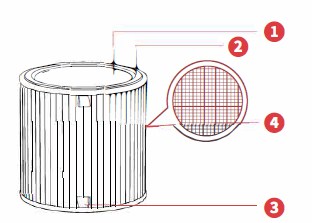
- Activated carbon filter
Removes unpleasant everyday odors from sources such as diapers, cigarette smoke, and strong-smelling foods. - HEPA filter
Removes allergens such as dust, pollen, mold, cigarette smoke (particles), danders, etc. - Filter handle
Used to remove the filter from the product. - Pre-filter
Attached on the outside of the filter; used to remove large airborne pa rticu [ates.
Note: Do not discard the filter carelessly or use it for other purposes.
Installation
Product Assembly
- Find the main body and the table from the box and remove the protective vinyl.
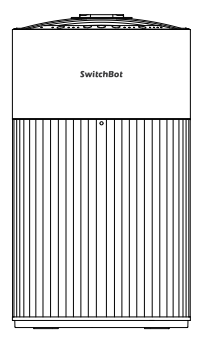
Prepare the main body and the table. The side with the Switch Bot logo is the front of the product.
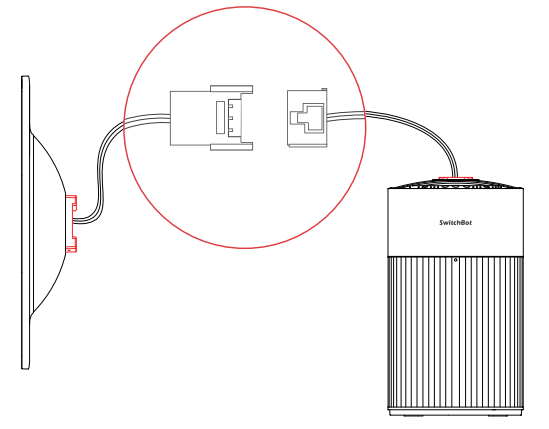
Connect the cable between the main body and the table.
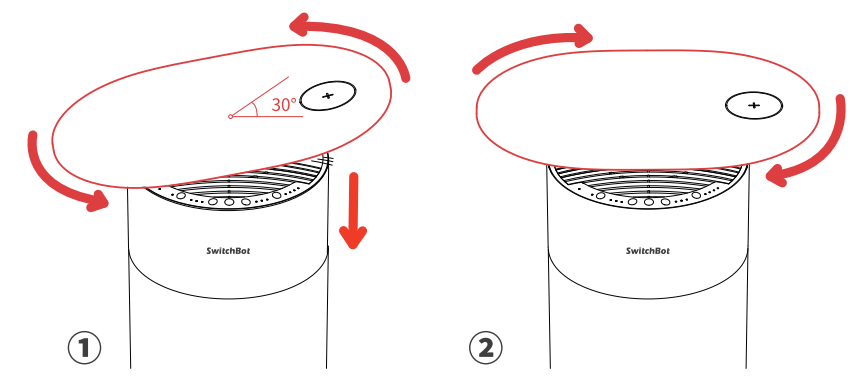
Assemble the table to the main body. Ensure the wireless charging unit is on the right.
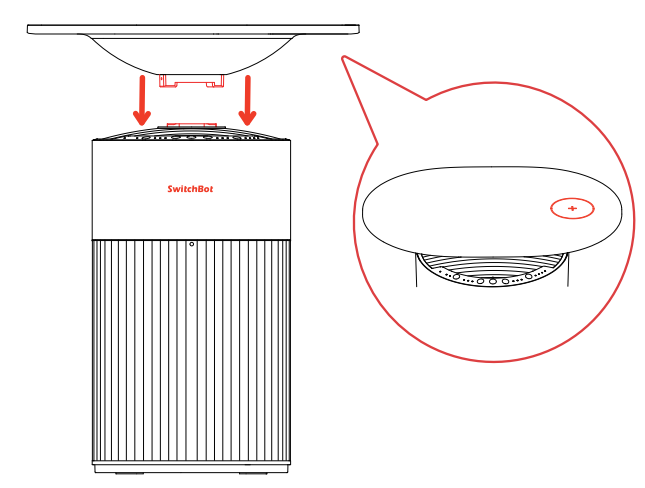
Rotate the table 30° counterclockwise until it is in position. Then, continue rotating clockwise to fasten the connection.
Install the screws on both sides.
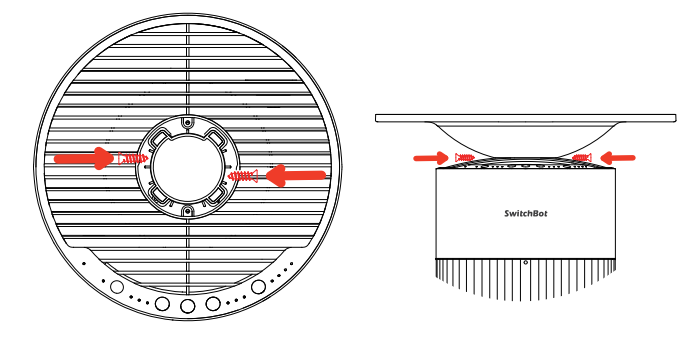
Note: Ensure the cable between the main body and the table is correctly connected to use the wireless charging and light functions.
Care and Maintenance
If used in environments with strong odors such as air fresheners, essential oils, cigarette smokes, or barbecue, the filter may absorb these odors and develop a strange smell over time (several weeks to several months). Increase maintenance frequency as needed. For best results, use this product in odorous environments alongside indoor ventilation. Note that odors take longer to remove than dust.
Maintain the Main Unit (Once a Month)
- Unplug the power cord before maintenance.
- Wipe the exterior of the device with a dry soft cloth. If necessary, wipe with a slightly moist cloth and completely dry it.
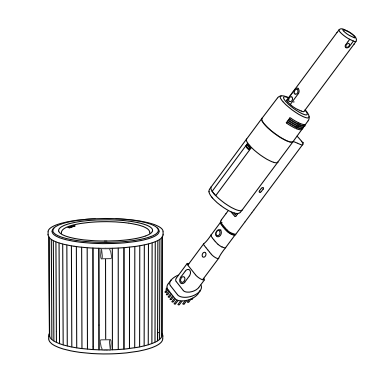
- Use a vacuum cleaner to clean the interior.
- Do not clean the product with an alkaline detergent
Maintain the Filters

Note: Do not use liquids such as water to clean the filter.
Warranty
We warrant to the original owner of the product that the product will be free from defects in materials and workmanship. Please note that this limited warranty does not cover:
- Products submitted beyond the original limited warranty period.
- Products on which repairs or modifications have been attempted.
- Products subjected to falls, extreme temperatures, water, or other operating conditions outside the product specifications.
- Damage due to natural disaster (including but not limited to lightning, flood, tornado, earthquake, or hurricane, etc.).
- Damage due to misuse, abuse, negligence, or casualty (e.g,. fire).
- Other damage that is not attributable to defects in the manufacture of product materials.
- Products purchased from unauthorized resellers.
- Consumable parts (including but not limited to batteries).
- Natural wear of the product.
Troubleshooting Common Issues with the SwitchBot Air Purifier Table
Users may occasionally encounter issues such as the air purifier not powering on, unusual noises, or ineffective odor removal. Common solutions include:
- Device Won't Turn On: Ensure the power cable is securely connected and the outlet is functional. Reset the device by unplugging for 30 seconds and reconnecting.
- Increased Noise at High Fan Speeds: This is normal at maximum airflow; use night mode to reduce noise during sleep hours.
- Persistent Odors: Check and replace the activated carbon filter if clogged or at the end of its one-year lifespan. Vacuum the pre-filter monthly to maintain airflow.
- Error Codes: Refer to the user manual for specific LED error indicators; commonly, a blinking light signals filter replacement is due.
Preventive maintenance includes regular filter cleaning, avoiding placing the table in dusty or wet areas, and ensuring proper ventilation in the room. The SwitchBot Air Purifier Table comes with a standard one-year warranty covering manufacturing defects. For support, customers can contact SwitchBot’s customer service via their official website or support hotline.
Pros & Cons of the SwitchBot Air Purifier Table
Pros
- Multi-functional Design: Combines air purification, wireless charging, ambient lighting, and a functional table surface.
- Effective Filtration: Triple-layer filtration (pre-filter, HEPA, activated carbon) ensures high removal rates of dust, pet hair, and odors.
- Quiet Operation: Low noise levels starting at 20 dB make it suitable for bedrooms and quiet environments.
- Smart Features: Includes app and voice control integration, and automatic airflow adjustment based on odor and air quality sensors.
- Stylish Aesthetics: Modern, compact size with a wood grain tabletop that fits well with home decor.
Cons
- Noise at Max Speed: Can be noticeably louder at highest fan settings, potentially disruptive without night mode enabled.
- Coverage Limitations: Suitable for small to medium rooms (up to ~360 sq ft), less effective in large open spaces.
- Filter Replacement Cost: Annual filter changes add to maintenance expenses.
- Price Point: Higher cost compared to basic air purifiers without multifunctional features.
- Limited Energy Star Certification: Not certified, which may impact energy-conscious buyers.
Customer Reviews and User Feedback on the SwitchBot Air Purifier Table
Users commonly praise the SwitchBot Air Purifier Table for its sleek design and quiet operation, highlighting the convenience of integrated wireless charging and ambient lighting. Many pet owners report significant improvement in pet hair and odor control, appreciating the 360° air intake and efficient HEPA filtration. The adjustable lighting modes receive positive remarks for creating cozy atmospheres in bedrooms and living rooms.
Typical complaints include the noise at maximum fan speed and the premium price compared to standalone purifiers. Some users note that the filter replacement schedule requires attention to maintain peak performance. Overall, the product holds an average user rating around 4 out of 5 stars, with recommendations focused on those seeking a stylish, multifunctional device for small to medium indoor areas.
Faqs
How do I set up the switchbot Air Purifier Table for the first time?
What should I do if the switchbot Air Purifier Table is not removing odors effectively?
Can the switchbot Air Purifier Table be controlled via smart home apps or voice assistants?
How often should I clean or replace the filters in the switchbot Air Purifier Table?
What are the key features of the switchbot Air Purifier Table that benefit pet owners?
Why is the switchbot Air Purifier Table louder at high fan speeds, and how can I manage noise levels?
Does the switchbot Air Purifier Table require any special power or Wi-Fi settings?
How do I maintain the wireless charging surface on the switchbot Air Purifier Table?
Leave a Comment