
Setup: Szhelejiam AK55 Android Smart Watch User Manual
Content
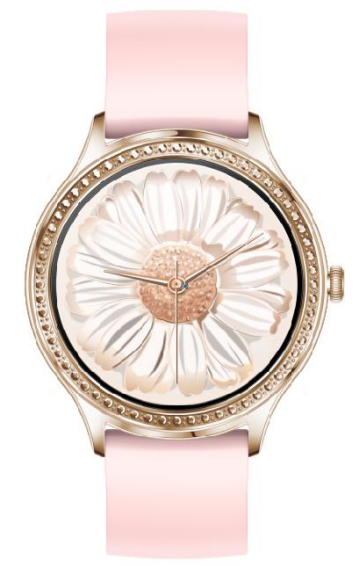
SZHELEJIAM AK55 Android Smart Watch
Introduction
Meet the SZHELEJIAM AK55 Android Smart Watch, a versatile and feature-rich wearable designed for those seeking a balance between style and functionality. This smartwatch is compatible with both Android (5.0 and above) and iOS (9.0 and above) devices, making it a great choice for users across different platforms. Key benefits include a 1.32-inch round HD screen, a robust RTL8762DK main control chip, and a range of health and fitness features such as body temperature testing, sleep monitoring, and music control.
The SZHELEJIAM AK55 is perfect for fitness enthusiasts and those who want to stay connected on the go. It supports notifications from various apps, allowing users to stay informed without needing to constantly check their phones. With an estimated price range between $50 and $100, it offers excellent value for money, making it accessible to a wide audience. The watch is available on various online platforms and retailers, offering users multiple options for purchase.
Product parameters
- Compatible mobile phone system:
- Android 5.0 (inclusive)or higher, iOS 9.0 (inclusive) or higher
- Main control:RTL8762DK
- Screen: 1.36 full circle Resolution: 390*390
Operating instructions
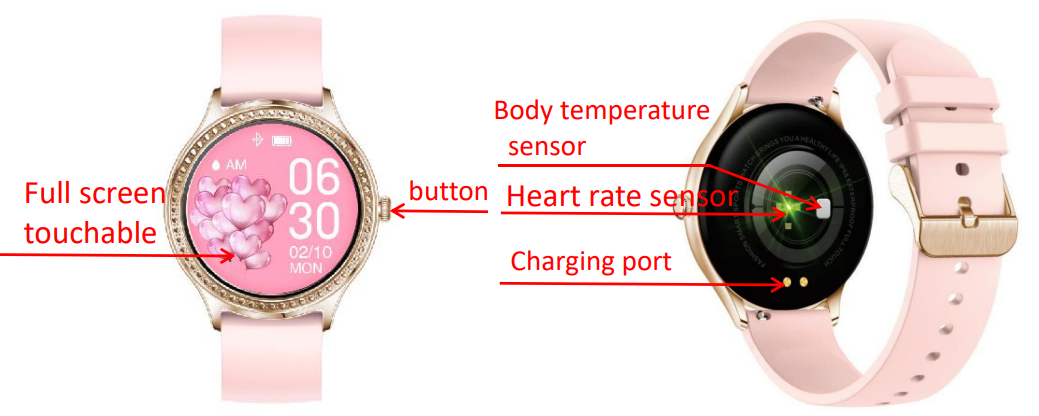
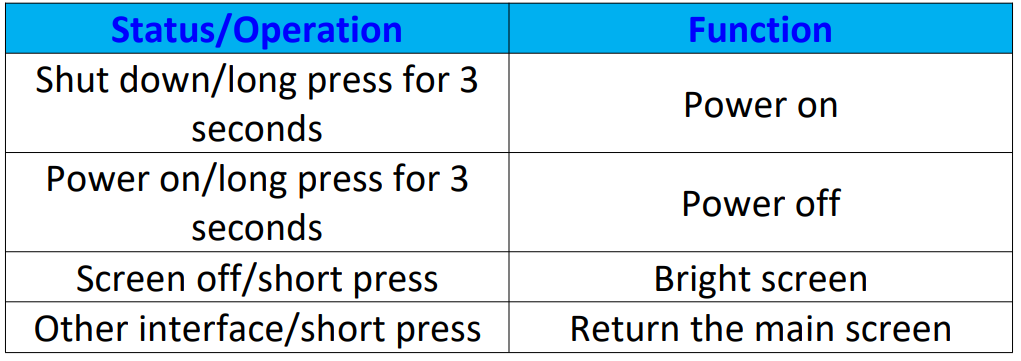
Button operation
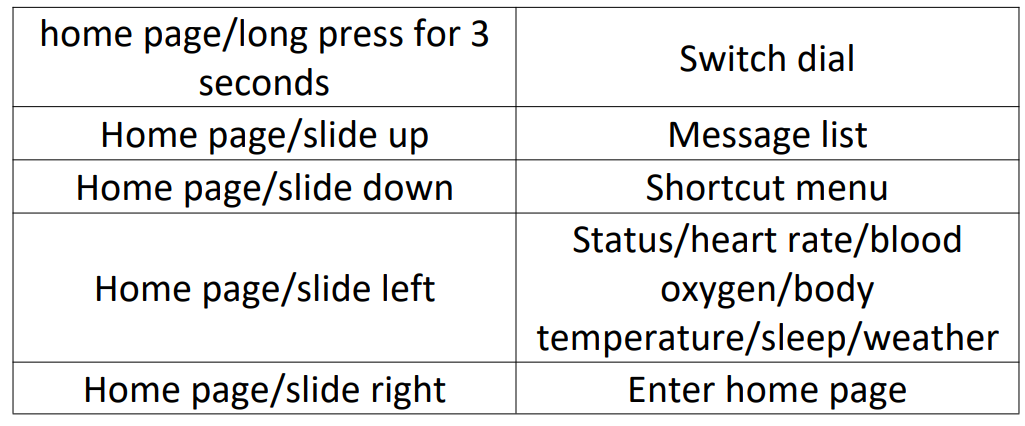
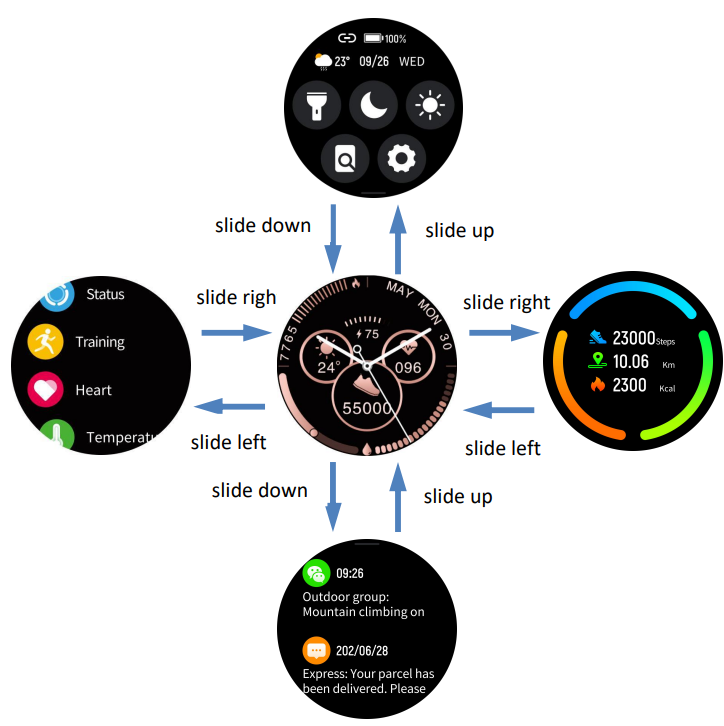
Screen operation

Charging instructions
- Please use the charging cradle equipped with the product to align the contacts on the back of the host to charge (please ensure that the battery is sufficient for the first use. If the battery cannot be turned on normally at low power, please charge it before operating. Please charge correctly as shown in the right picture)
- Do not use a power adapter with an output current of more than 2A to charge..e
Download and install the "GloryFit" APP
- Scan to download and install by scanning the QR code on the right
- Download and install through the application market: Android system: search for "GloryFit" APP" through App Store, Google Play, Android Market,, and other application markets to download and install; IOS system: search for "GloryFit" APP"" through the App Store to download and install.
APP Registration and Login
After opening the "GloryFit" APP, enter the registration /login interface, log in through the email or mobile phone number, and set the password. You can also log in without an account (after login, follow the prompts to improve your personal information in turn).
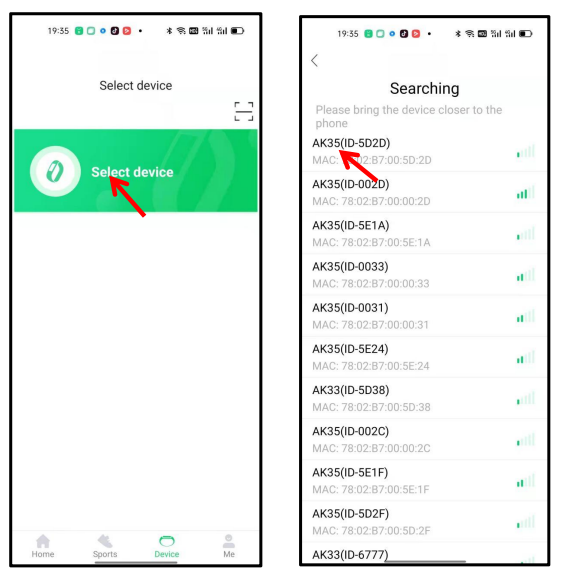
APP connection: When using the "GloryFit" APP to
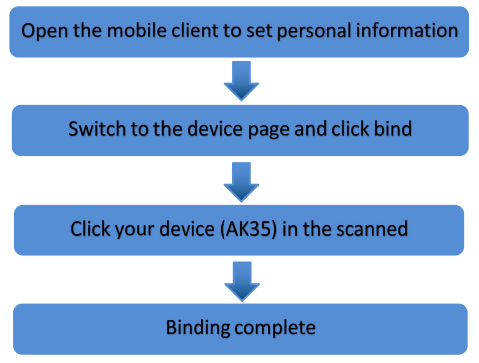
Connect to the watch, please turn on the phone's Bluetooth, enter the "GloryFit" APP and log in, then click "Click to connect to the device" -> select "AK35" to connect and bind (as shown below). When pairing, please confirm that it is consistent with the Bluetooth address displayed on the watch.
Precautions:
- It is forbidden to use an adapter with a charging voltage greater than 5V and a charging current greater than 2A, and the charging time is 2-3 hours.
- It is forbidden to charge in the presence of water stains
- This product is an electronic product, not as a medical reference; the measurement data is for reference only
- Blood pressure test method:: You need to rest quietly for more than 5 minutes before the test, and do not enter it 2 hours before the test.Eat, smoke, take medicine,e and drink caffeine; sit comfortably and still in a stable position during the test. At Attitude, speech is forbidden. Make sure that the bracelet is at the same height as the heart.
Specifications of the SZHELEJIAM AK55 Android Smart Watch
The SZHELEJIAM AK55 Android Smart Watch boasts impressive specifications that make it a strong contender in the smartwatch market. Here are some of its key features:
- Compatibility: Supports Android 5.0 and above, iOS 9.0 and above.
- Display: 1.32-inch round HD screen with a resolution of 390x390 pixels.
- Main Control Chip: RTL8762DK for efficient processing.
- Health Features: Body temperature test, sleep monitoring, and heart rate tracking.
- Connectivity: Bluetooth support for seamless connectivity.
- Notifications: Supports notifications from phone/SMS/WeChat/QQ and other apps.
- Music Control: Allows control over music playback from the watch.
Compared to similar smartwatches, the SZHELEJIAM AK55 offers a unique blend of affordability and functionality, making it a compelling choice for budget-conscious users.
Troubleshooting the SZHELEJIAM AK55 Android Smart Watch
Occasionally, users may encounter issues with their smartwatch. Here are some common problems and solutions:
- Connection Issues: Ensure that Bluetooth is enabled on both the watch and the phone. Restart both devices if necessary.
- Notification Delays: Check if the app permissions are correctly set to allow notifications.
- Warranty and Support: Contact the manufacturer for any warranty claims or technical support. They can assist with troubleshooting and repair.
To prevent issues, regularly update the watch's software and ensure proper charging and storage.
Pros and Cons of the SZHELEJIAM AK55 Android Smart Watch
Pros
- Affordable Price: Offers excellent value for money compared to other smartwatches.
- Feature-Rich: Includes multiple health and fitness features, music control, and notification support.
- Compatibility: Works with both Android and iOS devices.
Cons
- Limited Battery Life: May require frequent charging depending on usage.
- Software Updates: Regular updates might be necessary to maintain performance.
Overall, the SZHELEJIAM AK55 Android Smart Watch provides a solid balance of features and affordability, making it a good choice for those seeking a budget-friendly smartwatch.
Customer Reviews and Feedback
Users have praised the SZHELEJIAM AK55 for its ease of use, stylish design, and comprehensive feature set. However, some users have noted issues with battery life and occasional connectivity problems. Overall, it averages a solid rating of 4 out of 5 stars among customers.
For those looking for a reliable and affordable smartwatch, the SZHELEJIAM AK55 is a great option. It offers a mix of style, functionality, and value that appeals to a wide range of users.
Faqs
How do I set up the szhelejiam AK55 Android Smart Watch for the first time?
What are the key features that make szhelejiam AK55 Android Smart Watch different?
Can I use szhelejiam AK55 Android Smart Watch with my iPhone?
How do I troubleshoot connectivity issues with szhelejiam AK55 Android Smart Watch?
What maintenance is required for szhelejiam AK55 Android Smart Watch?
Can I use szhelejiam AK55 Android Smart Watch for fitness tracking?
How do I reset the szhelejiam AK55 Android Smart Watch to its factory settings?
Is szhelejiam AK55 Android Smart Watch water-resistant?
Leave a Comment