
T Mobile REVVL 5G Smartphone User Manual
Content
t-Mobile REVVL 5G: Complete Product Manual and Buyer’s Guide
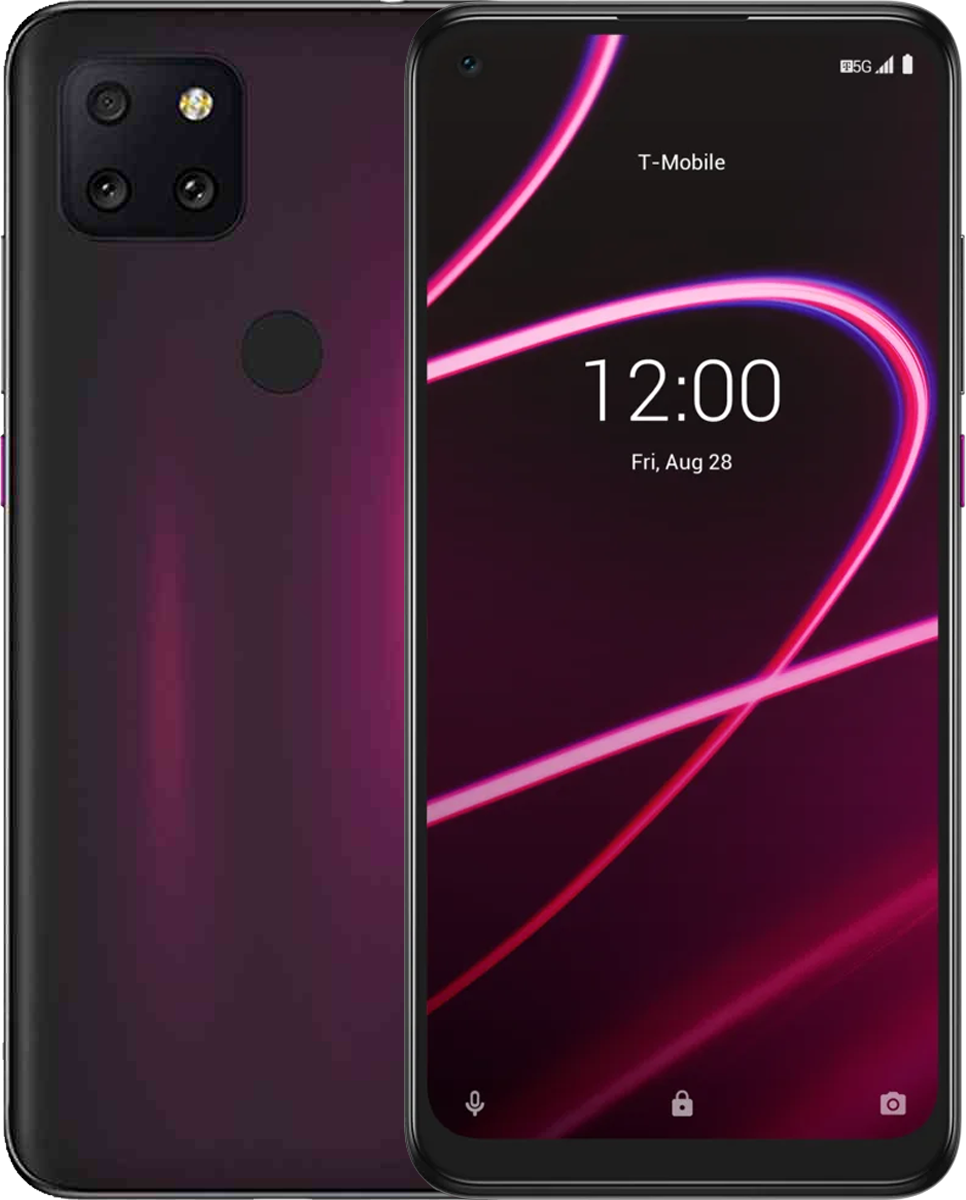
Introduction to the T-Mobile REVVL 5G
The t mobile REVVL 5G is a budget-friendly 5G smartphone designed for users who want modern connectivity, a large display, and reliable everyday performance without paying flagship prices. Built for T-Mobile customers, it combines a 6.53-inch Full HD+ screen, a Snapdragon 765 processor, 6GB of RAM, and a triple rear camera system into a value-focused package that still covers the essentials well. It is especially appealing for first-time 5G buyers, students, casual users, and anyone who needs a practical Android phone for streaming, browsing, messaging, video calls, and social media.
One of the biggest selling points of the t mobile REVVL 5G is its balance of features and affordability. You get 5G support, a large battery, fast enough performance for everyday apps, and useful extras like a fingerprint sensor, face unlock, and expandable storage support. The 48MP main camera also makes it more versatile than many entry-level phones in the same price bracket. In real-world use, it works well for daily commuting, mobile entertainment, online classes, and basic productivity tasks.
When launched, the phone carried a full retail price around $399.99, while carrier deals often lowered the upfront cost. In 2026, availability is generally limited to resale, refurbished, or remaining carrier stock, so pricing varies widely depending on condition and seller. For shoppers searching for an affordable 5G Android phone with a familiar T-Mobile focus, the t mobile REVVL 5G remains a practical option.
t mobile REVVL 5G specifications and key features
- Display: 6.53-inch IPS LCD, 1080 x 2340 resolution, Full HD+ clarity, about 395 ppi density
- Processor: Qualcomm Snapdragon 765 5G chipset, built on a 7nm process
- Memory: 6GB RAM with 128GB internal storage on many configurations
- Storage expansion: microSD support for additional media and app storage
- Rear cameras: 48MP main camera, 8MP ultra-wide camera, 5MP macro camera
- Front camera: 16MP selfie camera for video calls and social media
- Battery: 4,500mAh battery designed for all-day use
- Security: fingerprint sensor and face unlock support
- Operating system: Android 10 at launch
- Connectivity: 5G support on key T-Mobile bands, plus LTE and Wi-Fi connectivity
- Audio: 3.5mm headphone jack support on many listings and user reports
In performance terms, the Snapdragon 765 placed the phone in the upper mid-range category, making it faster than many low-cost 4G devices but below premium 5G models. Compared with similar budget 5G phones, the t mobile REVVL 5G stood out for its larger display and stronger camera setup, while competitors often offered newer software or slightly lighter designs. It is best viewed as a value-oriented 5G handset rather than a performance-first device.
Pros and cons of the t mobile REVVL 5G
Pros
- Affordable way to get 5G access on T-Mobile’s network
- Large 6.53-inch Full HD+ display is good for video, reading, and browsing
- Triple camera setup offers more flexibility than many budget phones
- 6GB RAM helps with everyday multitasking and smoother app switching
- 4,500mAh battery supports long daily use for calls, streaming, and messaging
- Strong value for users who want practical features without premium pricing
Cons
- Android 10 is dated compared with newer budget phones
- Camera quality is decent in daylight but less impressive in low light
- Performance is good for basics, but not ideal for heavy gaming or demanding apps
- Availability is now mostly limited to used or refurbished units
- Some alternatives offer newer chipsets, lighter software, or longer update support
For value-conscious buyers, the t mobile REVVL 5G still makes sense if the price is right. Compared with newer affordable 5G phones, it is less future-proof, but it can still be a solid pick for light-to-moderate users who prioritize screen size, battery life, and network support over premium extras.
Customer reviews and user feedback on t mobile REVVL 5G
Average user sentiment: 3.8/5 stars
Customer feedback tends to split into two clear camps. Many users praise the phone for being a “good price” device that delivers dependable everyday performance, while others criticize it as one of the weakest phones they have used, especially when expectations are too high. Positive reviews often mention the large screen, decent battery life, and smooth handling of calls, texting, streaming, and social media. A common positive comment is that it “just works” for daily use.
Complaints usually focus on camera consistency, software age, and overall speed during heavier multitasking. Some buyers also point out that newer budget phones can offer better long-term support. If you want a low-cost 5G phone for basic use, the t mobile REVVL 5G is often recommended. If you want better gaming, newer Android support, or stronger camera performance, a newer alternative may be the smarter purchase.
Who should buy the t mobile REVVL 5G?
- Buy it if you want an affordable T-Mobile 5G smartphone for everyday use
- Buy it if you need a large display for streaming, reading, and browsing
- Buy it if battery life and simple performance matter more than premium features
- Skip it if you want the newest Android version and long update support
- Skip it if you need advanced gaming performance or flagship-level cameras
For shoppers comparing budget 5G phones, the t mobile REVVL 5G remains a practical, straightforward option with strong core features and broad everyday appeal.
Faqs
How do I set up t mobile REVVL 5G for the first time after unboxing?
Why is my t mobile REVVL 5G not connecting to mobile data or 5G service?
How can I improve the battery life on t mobile REVVL 5G during heavy daily use?
What should I do if t mobile REVVL 5G is running slow or apps keep freezing?
How do I transfer contacts, photos, and apps to t mobile REVVL 5G from my old phone?
Is t mobile REVVL 5G compatible with Wi-Fi calling, hotspot, and Bluetooth accessories?
How do I fix charging problems on t mobile REVVL 5G when it charges slowly or not at all?
What is the best way to maintain t mobile REVVL 5G for long-term reliability?
Tags
Leave a Comment