
Takdir V32S Robot Vacuum Cleaner User Manual
Content
takdir V32S Robot Vacuum Cleaner Manual
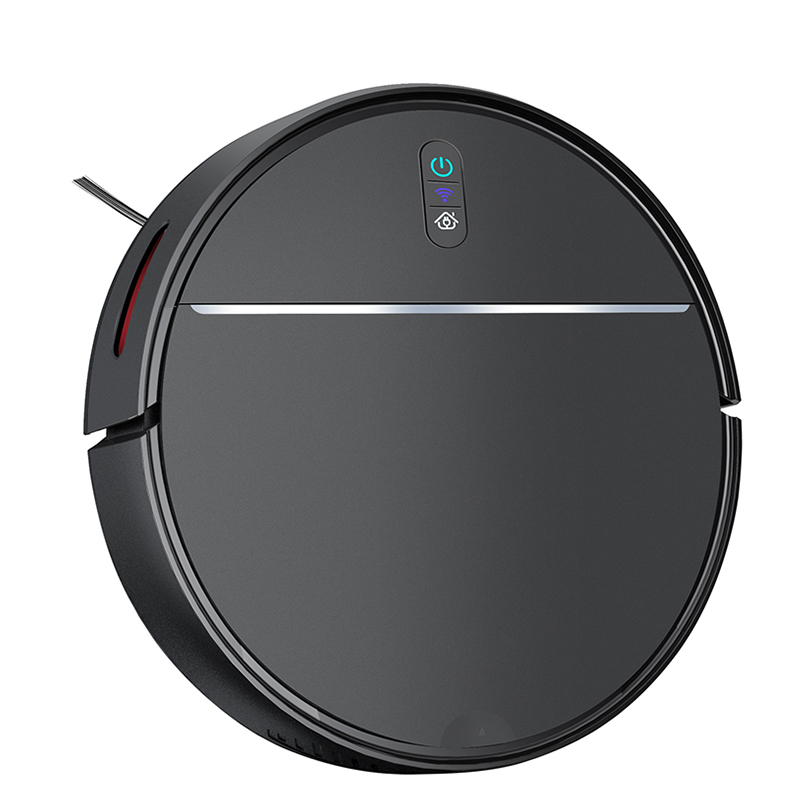
Introduction
The takdir V32S Robot Vacuum Cleaner is a compact smart cleaning robot designed for everyday dust, pet hair, and hard-floor maintenance. Built for busy households, apartments, and light-duty commercial spaces, it combines automatic navigation, edge cleaning, and hands-free charging in a simple, user-friendly package. For buyers searching for a budget-friendly robot vacuum cleaner with vacuum-and-mop style convenience, the V32S stands out as a practical option for routine floor care.
This model is especially appealing for users who want automated cleaning without the complexity of premium systems. It supports automatic cleaning, fixed-point cleaning, and edge cleaning, making it suitable for kitchens, living rooms, bedrooms, and small offices. Its low-profile design helps it clean under furniture, while its rechargeable battery and auto-docking function reduce manual effort. The takdir V32S Robot Vacuum Cleaner is also a strong fit for first-time robot vacuum users who want straightforward operation with physical buttons and simple setup.
Estimated pricing typically falls in the entry-level to mid-range category, with availability varying by region and seller. In many markets, the product is offered through online retailers, importers, and local appliance distributors. For shoppers comparing robot vacuum cleaner price, suction power, and ease of use, the V32S offers a solid balance of value and functionality.
Specifications: takdir V32S Robot Vacuum Cleaner Features and Performance
- Model: V32S
- Diameter: 320 mm
- Height: 78 mm
- Net weight: 2 kg
- Voltage: 7.4 V
- Power: 15 W
- Dust collector volume: 600 ml
- Water tank capacity: 200 ml
- Charging type: Automatic charging and manual charging
- Cleaning modes: Automatic cleaning, fixed-point cleaning, edge cleaning
- Full charge time: 4 to 6 hours
- Working time: About 60 to 90 minutes
- Control type: Physical buttons
- Noise level: Commonly listed around 65 dB in retail listings
In practice, the takdir V32S Robot Vacuum Cleaner is best positioned against other compact entry-level robot vacuums that prioritize simplicity over advanced mapping. Compared with higher-end models that offer laser navigation, app-based zoning, and stronger suction, the V32S focuses on essential cleaning tasks and easy operation. That makes it a good choice for users who value affordability, basic automation, and low-maintenance floor cleaning.
Setup Guide: How to Set Up the takdir V32S Robot Vacuum Cleaner
Start by removing the vacuum, charging dock, adapter, and accessories from the box. Place the charging dock on a flat surface near a wall, leaving enough open space around it for the robot to return smoothly. Plug in the dock, then position the robot so its charging contacts align properly. Allow a full charge before the first cleaning cycle.
To begin cleaning, use the physical buttons on the unit to select automatic or edge cleaning. If your package includes a remote or regional accessory kit, follow the supplied pairing instructions for any connected controls. For best results, clear cables, loose rugs, and small objects from the floor before starting. Keep water away from electrical parts and never operate the robot on wet surfaces unless the manufacturer’s mopping instructions specifically allow it.
If the robot fails to dock, check for obstacles around the charging base, verify that the dock is powered, and clean the charging contacts. If suction is weak, empty the dust collector and inspect the filter. For safety, keep the robot away from stairs without supervision, and do not let children play with moving parts.
Troubleshooting: takdir V32S Robot Vacuum Cleaner Common Problems and Fixes
If the robot does not start, confirm that the battery is charged and that the main power switch is turned on. If it stops during cleaning, check for tangled hair, blocked wheels, or an overfilled dust bin. Reduced suction usually points to a dirty filter, clogged intake, or full dust container. Uneven cleaning often improves after removing floor clutter and resetting the device on a level surface.
Because the V32S relies on simple controls, error codes are not always displayed in a detailed digital format. If your unit shows a flashing indicator or warning light, restart the device, clean the sensors, and re-seat the dustbin. If the robot cannot find the dock, move the charging station to a more open area and make sure the floor around it is unobstructed.
Preventive care helps avoid most issues. Clean the brush, wheels, dust container, and charging contacts regularly. Replace worn filters when airflow drops. For warranty and support, use the seller’s service channel or the manufacturer’s customer contact listed on the packaging, invoice, or official product documents. Keep your proof of purchase, serial number, and order details ready when requesting help.
Pros and Cons of the takdir V32S Robot Vacuum Cleaner
Pros
- Affordable entry point for buyers who want a robot vacuum cleaner without paying premium prices
- Compact 78 mm profile helps it clean under beds, sofas, and cabinets
- Large 600 ml dust collector reduces frequent emptying
- Simple physical button controls are easy for beginners and older users
- Automatic docking adds convenience for routine cleaning
- Suitable for hard floors, light debris, and daily maintenance cleaning
Cons
- Not designed for advanced smart mapping or app-based room control
- Working time of 60 to 90 minutes is modest compared with premium models
- Best performance is on simple floor layouts rather than heavily cluttered homes
- May require more manual oversight than high-end robot vacuum and mop systems
- Limited feature set compared with laser navigation alternatives
For value for money, the takdir V32S Robot Vacuum Cleaner makes the most sense for users who want reliable everyday cleaning at a lower cost. Compared with premium competitors, it trades advanced automation for ease of use and lower ownership cost.
Customer Reviews: What Buyers Say About the takdir V32S Robot Vacuum Cleaner
Customer feedback for the V32S is generally positive among budget-conscious buyers. Many users rate it around 4 out of 5 stars for convenience, compact size, and easy operation. Common praise includes strong everyday dust pickup, useful auto-charging, and a dustbin size that works well for small homes. One typical comment is: “It handles daily crumbs and pet hair well, and the simple controls make it easy to use.”
Common complaints usually focus on battery runtime, limited navigation intelligence, and the lack of advanced app features. Some users also note that the robot performs best when the floor is kept clear. Another frequent remark is: “Good for basic cleaning, but not ideal for large or very cluttered rooms.”
Overall, the takdir V32S Robot Vacuum Cleaner is a sensible purchase for users who want an affordable, straightforward robot vacuum with solid everyday performance. It is best recommended for apartments, small homes, and anyone prioritizing simple automation over premium smart features.
Faqs
How do I set up the takdir V32S Robot Vacuum Cleaner for the first time?
What should I do if the takdir V32S Robot Vacuum Cleaner is not charging properly?
How can I fix suction loss on the takdir V32S Robot Vacuum Cleaner?
Why does the takdir V32S Robot Vacuum Cleaner keep getting stuck on furniture or carpets?
How do I connect the takdir V32S Robot Vacuum Cleaner to Wi-Fi and the mobile app?
What cleaning modes does the takdir V32S Robot Vacuum Cleaner support and when should I use them?
How often should I maintain the takdir V32S Robot Vacuum Cleaner to keep it working well?
What should I do if the takdir V32S Robot Vacuum Cleaner shows a sensor or wheel error?
Leave a Comment