
Tascam BD-MP1 Blu-Ray Disc Player User Manual
Content
Tascam BD-MP1 Blu-Ray Disc Player: Professional Overview and Product Manual
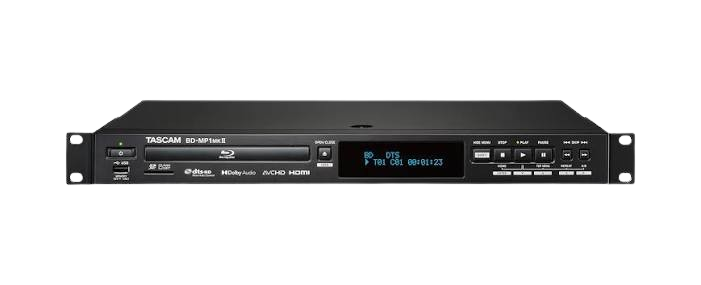
The Tascam BD-MP1 Blu-Ray Disc Player is a rackmount professional media player built for installations that need reliable disc playback, USB/SD media support, and flexible audio/video connectivity. Designed for commercial environments, worship spaces, conference rooms, educational facilities, and touring setups, it combines Blu-ray, DVD, CD, USB, and SD playback in a compact 1U chassis. The Tascam BD-MP1 Blu-Ray Disc Player supports standard video formats such as NTSC, PAL, and multi-system output, with HDMI resolution options up to 1080p, making it a strong fit for projectors, monitors, and AV distribution systems.
One of its biggest advantages is connectivity. The unit includes HDMI output, balanced XLR stereo outputs, unbalanced RCA outputs, coaxial digital audio, RS-232C control, and Ethernet control, which makes it easy to integrate into professional AV installations. It also supports common media formats across disc, USB, and SD sources, giving users a versatile playback solution for presentations, training content, and performance environments. The Tascam BD-MP1 Blu-Ray Disc Player is especially appealing to users who need dependable operation rather than consumer-focused smart features.
In terms of pricing, the unit typically falls in the mid-range professional category, with estimated street prices around $459 to $499 depending on seller, region, and stock. Availability can vary because it is often sold through pro audio retailers and specialist AV distributors rather than mass-market electronics stores. For buyers who need a durable, rackmount Blu-ray player with broad compatibility, the BD-MP1 remains a practical and well-equipped choice.
Pros and Cons of the Tascam BD-MP1 Blu-Ray Disc Player
Pros
- Professional rackmount design: The 1U form factor fits cleanly into AV racks, making it ideal for installations where space and organization matter.
- Flexible playback support: Plays Blu-ray, DVD, CD, SD cards, and USB media, which is useful for mixed-format environments.
- Strong connectivity: HDMI, XLR, RCA, coaxial digital audio, RS-232C, and Ethernet provide excellent integration options.
- Installation-friendly features: Network and serial control make it suitable for commercial AV systems and remote operation.
- Good value for pro users: For facilities that need reliable disc playback and system integration, the price is competitive versus many professional alternatives.
Cons
- Not a smart media player: It lacks streaming apps and consumer-style smart TV functions.
- Best suited to installed systems: The rackmount design is less convenient for casual home entertainment use.
- Feature set is specialized: Users wanting advanced picture enhancements or modern streaming convenience may prefer a consumer Blu-ray player or a network media streamer.
- Price may feel high for basic playback: Compared with entry-level Blu-ray players, the cost is justified mainly by pro-grade outputs and control features.
Overall, the Tascam BD-MP1 Blu-Ray Disc Player offers better installation flexibility than most consumer alternatives, while staying more affordable than some premium broadcast-oriented players. For professional AV environments, it delivers solid value for money.
Customer Reviews and Real-World Feedback for the Tascam BD-MP1 Blu-Ray Disc Player
Customer feedback for the Tascam BD-MP1 Blu-Ray Disc Player is generally positive, with many users praising its dependable playback, clean audio output, and easy rack integration. A common theme in reviews is appreciation for the balanced XLR outputs and HDMI connectivity, which simplify setup in classrooms, churches, and conference spaces. Typical user ratings cluster around 4.3 out of 5 stars, especially from buyers who prioritize professional connectivity over consumer extras.
Common praise includes “works reliably in our AV rack,” “excellent sound output for presentations,” and “the control options make installation simple.” Frequent complaints are usually about the lack of streaming apps, the higher price compared with basic Blu-ray players, and the fact that it is designed more for installation than casual use. Some users also mention that firmware or setup documentation can feel more technical than expected.
For buyers seeking a professional Blu-ray disc player with dependable performance, the Tascam BD-MP1 Blu-Ray Disc Player is a strong recommendation. It is especially worth considering if you need HDMI video, balanced audio, and remote control integration in one unit.
Featured Snippet Answer: What Is the Tascam BD-MP1 Blu-Ray Disc Player Best For?
The Tascam BD-MP1 Blu-Ray Disc Player is best for professional AV installations, including schools, churches, corporate training rooms, and event venues that need reliable disc playback, USB/SD support, and rackmount control options.
Key Specifications at a Glance
- Playback formats: Blu-ray, DVD, CD, USB, and SD media
- Video output: HDMI with up to 1080p resolution support
- Audio outputs: Balanced XLR, unbalanced RCA, and coaxial digital audio
- Control: RS-232C and Ethernet
- Form factor: 1U rackmount chassis
- Power consumption: 30W
- Dimensions: 482.6 mm wide, 44 mm high, 280.7 mm deep
Buying Advice
If you need a professional Blu-ray disc player that can handle installation workflows, the Tascam BD-MP1 Blu-Ray Disc Player is a smart purchase. It is most cost-effective for users who will benefit from balanced audio, remote control integration, and reliable media playback in a rack system. If your priority is streaming apps, voice assistants, or living-room convenience, a consumer Blu-ray player may be a better fit.
Faqs
How do I set up the tascam BD-MP1 Blu-Ray Disc Player for the first time in a rack or AV system?
What should I check if the tascam BD-MP1 Blu-Ray Disc Player does not play a disc?
Which connection options work best with the tascam BD-MP1 Blu-Ray Disc Player for professional AV use?
How can I fix no-signal or black-screen issues with the tascam BD-MP1 Blu-Ray Disc Player?
Can the tascam BD-MP1 Blu-Ray Disc Player handle both Blu-ray and standard audio discs reliably?
What settings should I optimize on the tascam BD-MP1 Blu-Ray Disc Player for smoother playback?
How should I clean and maintain the tascam BD-MP1 Blu-Ray Disc Player to avoid playback problems?
Why does the tascam BD-MP1 Blu-Ray Disc Player keep stopping, skipping, or freezing during playback?
Tags
Leave a Comment