
Thermaltake Series-600 ATX Mid-Tower PC Gaming Case User Manual
Content
Thermaltake Series-600 ATX Mid-Tower PC Gaming Case Manual
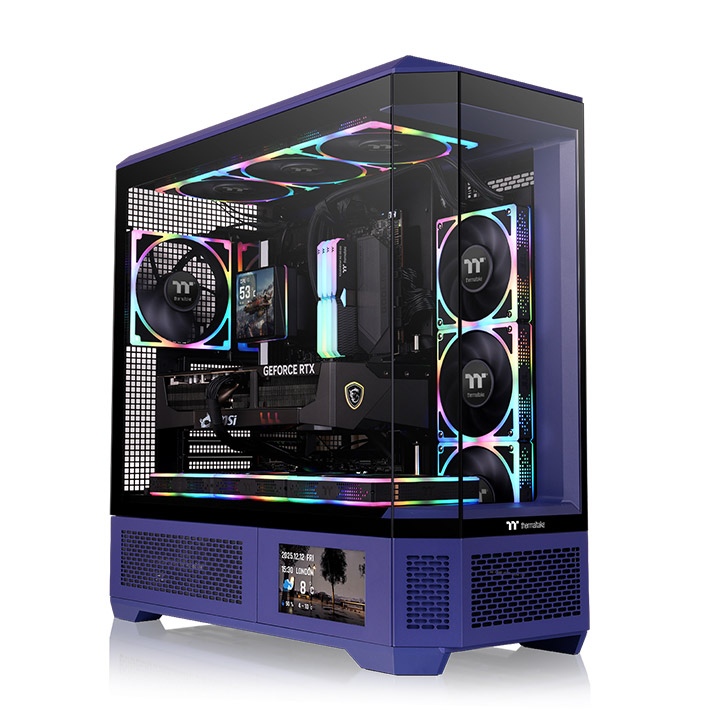
Introduction to the Thermaltake Series-600 ATX Mid-Tower PC Gaming Case
The Thermaltake Series-600 ATX Mid-Tower PC Gaming Case is a premium showcase chassis built for gamers, PC enthusiasts, and content creators who want a high-performance build with a standout visual design. Its vertical layout and octagonal prism-inspired frame create a distinctive look, while the tempered glass panels make it ideal for RGB-heavy systems, custom cooling loops, and clean cable-managed builds. This case is designed to support modern hardware, including ATX, Micro-ATX, and Mini-ITX motherboards, plus hidden-connector motherboards for an even cleaner appearance.
One of its biggest selling points is cooling flexibility. The Thermaltake Series-600 ATX Mid-Tower PC Gaming Case supports large radiator setups and multiple fan configurations, making it suitable for air-cooled systems as well as advanced liquid cooling builds. It also offers generous GPU clearance, rotational PCIe support, and roomy internal spacing for high-end graphics cards and oversized CPU coolers. This makes it a strong choice for users building a powerful gaming PC, a streaming workstation, or a visually polished showcase rig.
Availability is generally strong through major PC hardware retailers and Thermaltake’s own product channels, with an estimated price range of about $170 to $220 depending on color, region, and promotions. Popular use cases include gaming desktops, creator systems, and themed showcase builds where aesthetics matter as much as performance. For builders searching for a thermaltake Series-600 ATX Mid-Tower PC Gaming Case review, the key appeal is the balance of style, airflow potential, and component compatibility.
Troubleshooting the Thermaltake Series-600 ATX Mid-Tower PC Gaming Case
If your build is not fitting correctly, start by checking motherboard form factor, PSU length, GPU thickness, and radiator placement. A common issue is cable congestion around hidden-connector boards; reroute power leads through the rear chamber and verify that the motherboard tray has enough clearance before tightening the panel. If front-panel buttons or USB ports do not respond, reseat the internal I/O header connections and confirm that the motherboard manual matches the case wiring layout.
There are no built-in case error codes, but system error messages may appear during first boot. For example, CPU fan errors usually mean the cooler is connected to the wrong header, while GPU-related boot failures often point to an underseated card or PCIe power cable issue. Preventive measures include pre-planning radiator thickness, confirming fan direction before installation, and leaving enough slack for 24-pin and EPS cables in vertical builds.
The Thermaltake Series-600 ATX Mid-Tower PC Gaming Case typically includes warranty coverage through Thermaltake, and support is usually available through the manufacturer’s official support channels and retail seller service teams. For help, use Thermaltake’s customer support portal, your retailer’s order support page, or the product documentation included with the chassis. Keep your purchase receipt, model number, and serial label handy when requesting assistance.
Pros and Cons of the Thermaltake Series-600 ATX Mid-Tower PC Gaming Case
Pros
- Excellent showcase design with three tempered glass panels for premium visual impact.
- Supports ATX, Micro-ATX, and Mini-ITX builds, including hidden-connector motherboards.
- Strong cooling potential with large radiator and multiple fan support.
- Roomy interior makes it easier to build high-end gaming systems with large GPUs.
- Vertical layout improves presentation for RGB builds and custom liquid cooling.
Cons
- Large footprint may not suit compact desks or small rooms.
- Tempered glass panels can show fingerprints and require regular cleaning.
- Premium styling often means a higher price than basic mid-tower alternatives.
- Vertical orientation may require more careful cable planning than standard tower cases.
In terms of value for money, the Thermaltake Series-600 ATX Mid-Tower PC Gaming Case is best for buyers who want aesthetics, hardware flexibility, and cooling headroom in one package. Compared with more traditional airflow cases from Corsair, NZXT, or Lian Li, it offers a more display-focused design and stronger visual identity, though some alternatives may provide simpler layouts or lower prices.
Customer Reviews of the Thermaltake Series-600 ATX Mid-Tower PC Gaming Case
Customer feedback is generally positive, with many users giving it a 4.5 out of 5 star rating for design, build quality, and component support. Builders frequently praise the premium look, spacious interior, and compatibility with modern gaming hardware. One common testimonial style comment is: “It looks like a display piece, but it still feels practical for a serious gaming build.”
Common complaints include the size of the chassis, the need for careful cable routing, and the effort required to keep the glass clean. Some users also note that first-time builders may need extra time to plan fan and radiator placement. Overall, the Thermaltake Series-600 ATX Mid-Tower PC Gaming Case is recommended for enthusiasts who value presentation and upgrade flexibility over compactness. Buyers who want a budget-focused or minimal-airflow case may prefer a simpler alternative.
Frequently Asked Questions
What motherboards fit in the Thermaltake Series-600 ATX Mid-Tower PC Gaming Case?
It supports ATX, Micro-ATX, and Mini-ITX motherboards, including hidden-connector designs for cleaner cable management.
Is the Thermaltake Series-600 ATX Mid-Tower PC Gaming Case good for liquid cooling?
Yes. Its large radiator support and flexible fan layout make it a strong option for AIO and custom liquid cooling builds.
Who should buy this case?
This case is ideal for gamers, streamers, and PC enthusiasts who want a premium-looking chassis with modern hardware support and strong cooling potential.
Faqs
How do I set up the thermaltake Series-600 ATX Mid-Tower PC Gaming Case for the first time without missing any steps?
What motherboard sizes and components are compatible with the thermaltake Series-600 ATX Mid-Tower PC Gaming Case?
Why is my thermaltake Series-600 ATX Mid-Tower PC Gaming Case airflow weak, and how can I improve cooling performance?
How do I install a GPU and avoid clearance problems in the thermaltake Series-600 ATX Mid-Tower PC Gaming Case?
What should I do if the thermaltake Series-600 ATX Mid-Tower PC Gaming Case front panel buttons or USB ports are not working?
How many fans or liquid cooling radiators can I add to the thermaltake Series-600 ATX Mid-Tower PC Gaming Case?
How do I reduce noise while using the thermaltake Series-600 ATX Mid-Tower PC Gaming Case for gaming?
What is the best way to clean and maintain the thermaltake Series-600 ATX Mid-Tower PC Gaming Case over time?
Tags
More thermaltake manuals
Leave a Comment