
Thinkpad Xl Tablet Gen-3 User Manual
Content
ThinkPad X1 Tablet Gen 3 Review and Product Manual
Introduction
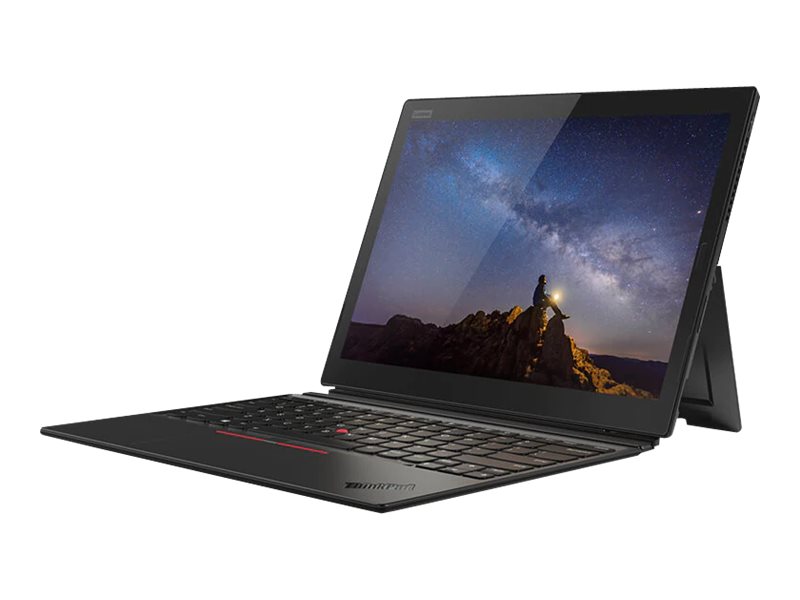
The ThinkPad X1 Tablet Gen 3 is a premium 2-in-1 Windows device designed for professionals who want a tablet that can also function like a lightweight laptop. Built around a 13-inch 3:2 touchscreen and Intel 8th Gen Core processors, it delivers strong productivity performance in a compact form factor. The detachable keyboard, ThinkPad Pen Pro support, and business-focused security features make it especially appealing for executives, remote workers, designers, and field teams who need flexibility without giving up enterprise-grade reliability.
One of the biggest strengths of the ThinkPad X1 Tablet Gen 3 is its balance of portability and capability. The 3000 x 2000 QHD+ display offers sharp detail and excellent multitasking space, while the Thunderbolt 3 ports support fast docking, external displays, and high-speed storage. Optional LTE connectivity and biometric login options add convenience for mobile professionals. In real-world use, this model works well for note-taking, document editing, video calls, presentations, and light creative work.
At launch and in refurbished or resale markets, the estimated price range typically falls between $150 and $800 depending on processor, memory, storage, and condition. Availability is now mostly through certified refurbished sellers, used marketplaces, and remaining business inventory rather than wide retail distribution. For buyers searching for a premium detachable tablet with ThinkPad durability, the thinkpad Xl Tablet Gen-3 remains a compelling option.
Specifications: ThinkPad X1 Tablet Gen 3 technical details
- Display: 13-inch IPS touchscreen with 3000 x 2000 QHD+ resolution, 3:2 aspect ratio, 400 nits brightness, anti-reflection coating, and Corning Gorilla Glass
- Processor options: Intel Core i5-8250U, i5-8350U, i7-8550U, and i7-8650U, all quad-core 8th Gen chips
- Memory: Up to 16GB LPDDR3 RAM
- Storage: Up to 1TB M.2 PCIe NVMe SSD depending on configuration
- Graphics: Intel UHD Graphics 620
- Ports: 2 x Thunderbolt 3 USB-C, microSD card reader, nano SIM slot on LTE models, and 3.5 mm audio jack
- Wireless: Wi-Fi 802.11ac and Bluetooth, with optional LTE mobile broadband
- Cameras: Front 2MP and rear 8MP cameras
- Battery: 42Wh with up to about 9.5 hours claimed runtime
- Weight: About 1.96 lb as a tablet and 2.8 lb with keyboard attached
- Dimensions: 304.1 x 226 x 8.9 mm as tablet only; 304.1 x 226 x 14.4 mm to 15.1 mm with keyboard
Performance is solid for office work, browser-heavy multitasking, and meeting workflows, though it trails modern tablets and ultrabooks in graphics-heavy workloads. Compared with the Microsoft Surface Pro line, the ThinkPad X1 Tablet Gen 3 offers a more business-oriented design and better port flexibility, while the iPad Pro remains stronger for touch-first creative tasks.
Pros and Cons of the thinkpad Xl Tablet Gen-3
Pros
- Excellent 3:2 display for reading, spreadsheets, and document editing
- Strong business-grade build quality with ThinkPad durability
- Thunderbolt 3 support makes docking and external connectivity easy
- Detachable keyboard and pen support improve productivity on the move
- Optional LTE keeps remote workers connected without relying on Wi-Fi
- Lightweight tablet design is practical for travel and meetings
Cons
- Integrated Intel UHD Graphics 620 limits creative and gaming performance
- Battery life is decent, but not class-leading by modern standards
- Memory and storage are not designed for easy upgrades
- Used-market pricing can vary widely by condition and included accessories
- Keyboard and pen are essential for best value, which can raise total cost
For value for money, this device makes the most sense when purchased refurbished at a fair price. Buyers who need a premium detachable laptop for work will get more out of it than users looking for a casual media tablet. Compared with newer alternatives, it is less future-proof, but still practical for everyday business use.
Customer Reviews: what users say about the ThinkPad X1 Tablet Gen 3
Overall user sentiment is positive, especially among professionals who value portability, keyboard quality, and the sharp display. Typical ratings from owners cluster around 4 out of 5 stars for work-focused use, with praise centered on the premium feel and versatile 2-in-1 design. A common testimonial theme is that it feels like a “real business tablet” rather than a consumer gadget.
- Praise: “The display is bright and crisp, and the keyboard feels excellent for long typing sessions.”
- Praise: “Great for travel, meetings, and note-taking with the pen.”
- Complaint: “Battery life is good, but not exceptional when used all day.”
- Complaint: “Graphics performance is limited for heavier creative tasks.”
- Complaint: “Finding a complete package with keyboard and pen can be tricky on the used market.”
Purchase is recommended for office users, consultants, and students who want a premium Windows tablet with laptop flexibility. Buyers focused on gaming, video editing, or maximum battery endurance should consider newer alternatives instead.
Faqs
How do I set up thinkpad Xl Tablet Gen-3 for the first time?
Why is my thinkpad Xl Tablet Gen-3 not turning on or charging properly?
How do I fix slow performance on thinkpad Xl Tablet Gen-3?
What accessories work best with thinkpad Xl Tablet Gen-3 for productivity?
How do I connect thinkpad Xl Tablet Gen-3 to an external monitor or dock?
Why is the touchscreen on thinkpad Xl Tablet Gen-3 not responding correctly?
How can I improve battery life on thinkpad Xl Tablet Gen-3 during travel?
What routine maintenance keeps thinkpad Xl Tablet Gen-3 in good condition?
Tags
Leave a Comment