
Setup & Connection: Tiejus Smart Video Doorbell Video Bell-J9 User Manual
Content
Tiejus Smart Video Doorbell Video Bell-J9
Introduction
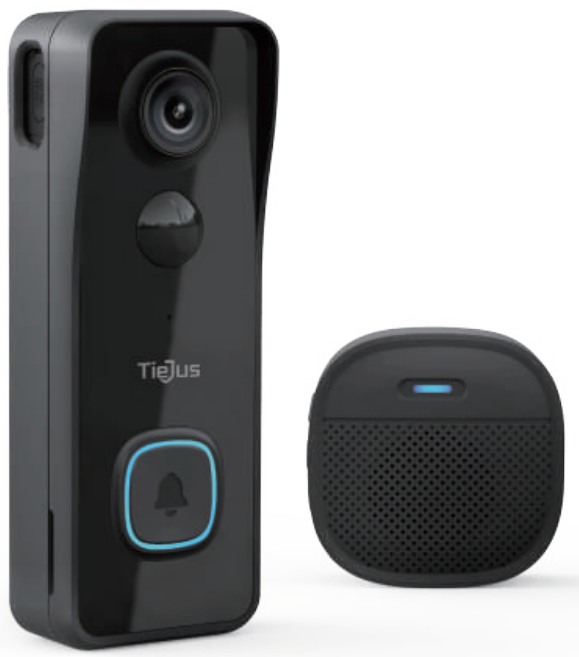
The tiejus Smart Video Doorbell Video Bell-J9 is a feature-rich, wireless smart doorbell designed to enhance home security and convenience for modern households. Whether you're at home or away, this device keeps you connected to your doorstep with crisp 2K video resolution, reliable motion detection, and seamless two-way audio communication—all accessible from your smartphone via the ZUMIMALL app.
Standout features include customizable motion detection zones, infrared night vision for around-the-clock monitoring, and both local (microSD) and optional cloud storage for video recordings. The Bell-J9 is battery-powered, offering easy installation without the need for complicated wiring, and boasts a robust IP65 waterproof rating for year-round durability. Integration with Alexa and Google Home enables smart home compatibility, while the included wireless chime ensures you never miss a visitor.
This smart video doorbell is ideal for homeowners, renters, and small businesses seeking an affordable yet capable security solution. Typical use cases include monitoring deliveries, screening visitors, and deterring package theft. Priced competitively at around $59.99, the Tieju Bell-J9 offers excellent value compared to premium brands, with wide availability through major online retailers.
With its combination of high-definition video, flexible storage options, smart home integration, and user-friendly setup, the tiejus Smart Video Doorbell Video Bell-J9 is a smart choice for anyone looking to upgrade their home security effortlessly.
Specification
| Spec | Value / Details |
|---|---|
| Video Resolution | 1080p Full HD in some listings. Some variants may claim “2K” |
| Field of View | ~130° wide-angle (for some versions) |
| Night Vision | Infrared night vision; one listing says up to ~8 m. |
| Wifi | 2.4 GHz only. |
| Power | Built-in rechargeable Li-ion battery. Lab test: full charge lasts more than ~2-3 months (10 events/day, 15 s video) in their claim. |
| Weather Resistance / Outdoor Use | Yes; designed for outdoor door use. (Exact IP rating: one listing shows IP65 for a variant). |
| Storage | Local micro-SD card (TF card) support (card not typically included). Also free cloud trial (7 days) in some versions. |
| Wireless Chime Distance | Wireless chime can transmit signal from doorbell to indoor chime over “more than 100 meters (open space)” in their spec.) |
What’s in the Box
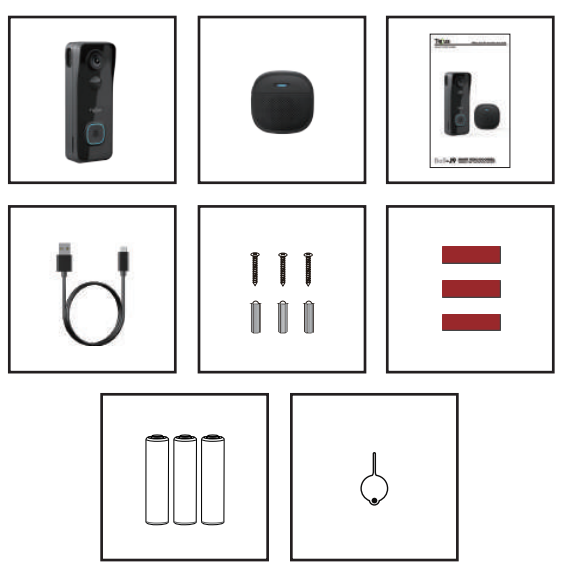
- Doorbell*1
- Quick User Guide*1
- Screws Set*1
- AAA Batteries*3
- DingDong*1
- USB Cable*1
- 3M Tape*3
- Unlock Pin*1
- NOTE: Micro SD card and power adapter are not included.
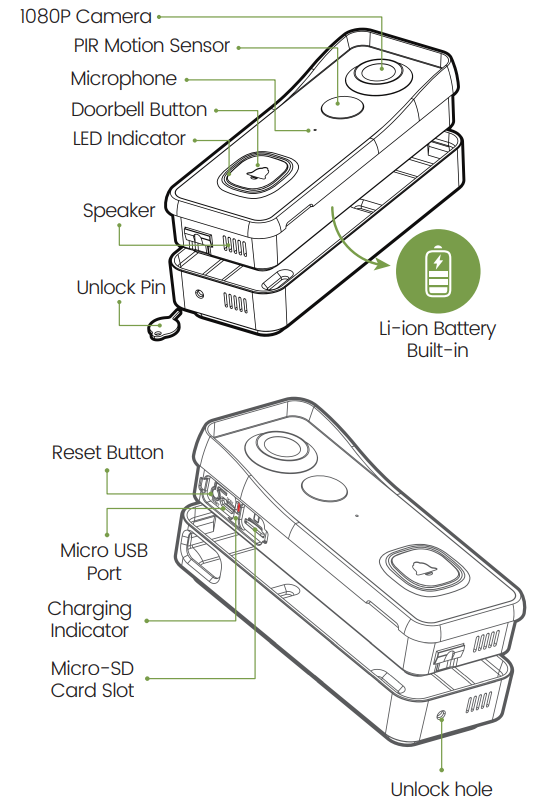
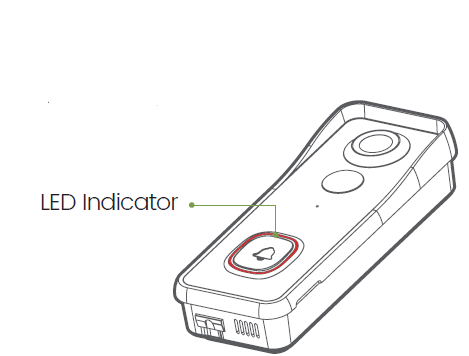
Meet the Doorbel
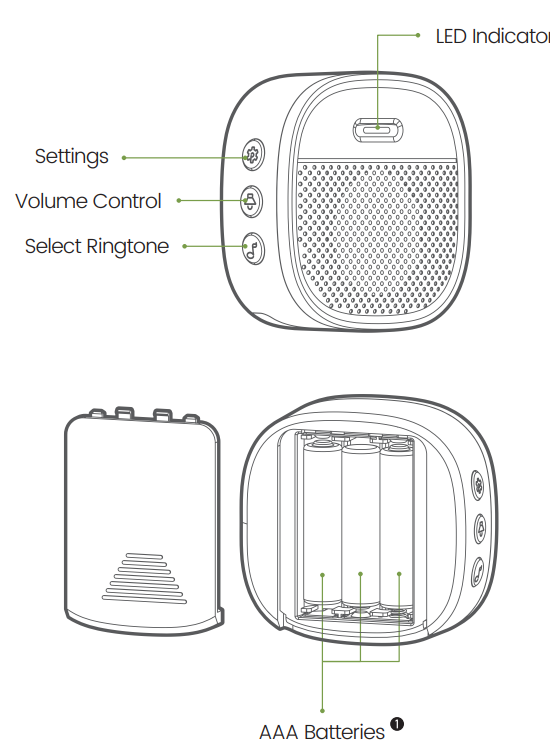
Meet the Chime
Set up Doorbell
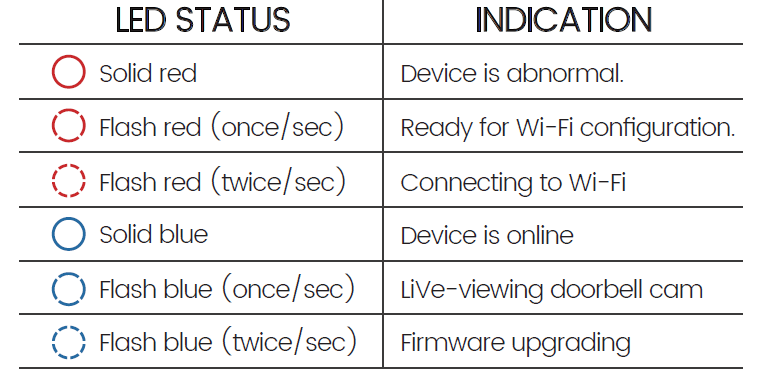
- Press your doorbell to activate, and you will see the LED indicator flashes red (once per second). If not, press and hold the reset button for 5 seconds to restore factory defaults.
- Start setting up your doorbell following the in-app instructions.
- Tips
- Please operate the setup near your Wi-Fi router.
- Make sure your phone is connecting to a 2.4GHz Wi-Fi.
- Make sure the doorbell is turned on, and its indicator LED is flashing red. If not, press and hold RESET for 5 seconds.
- Ensure the Wi-Fi signal is good, and the Wi-Fi password is correct.
Install your doorbell
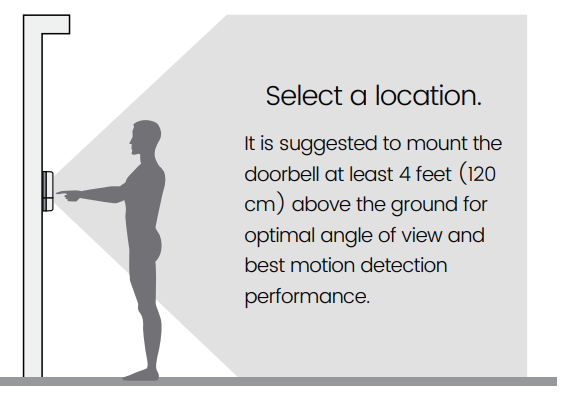
Select a location for your doorbell.
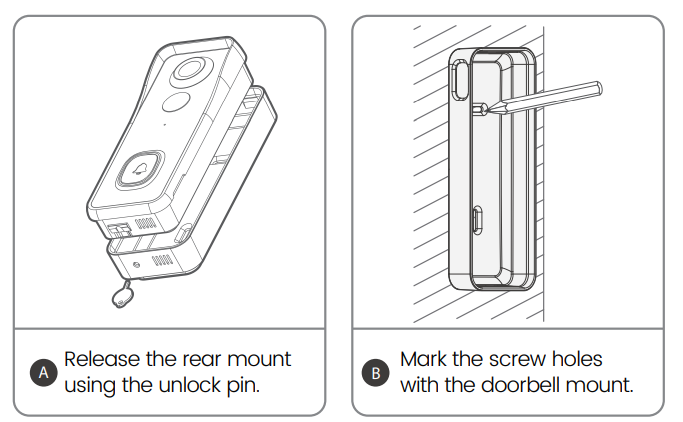
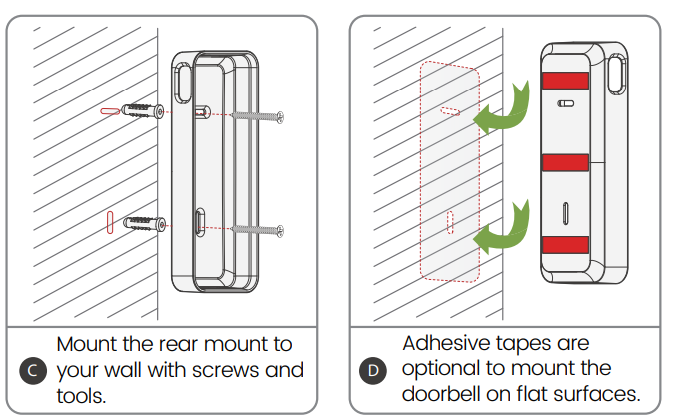
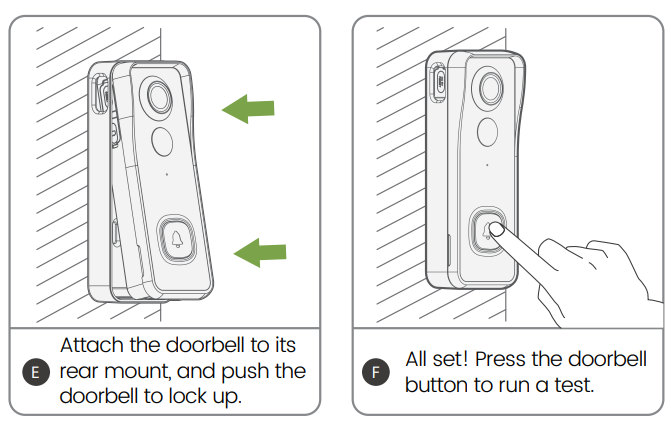
Mount your doorbell.
Accessory
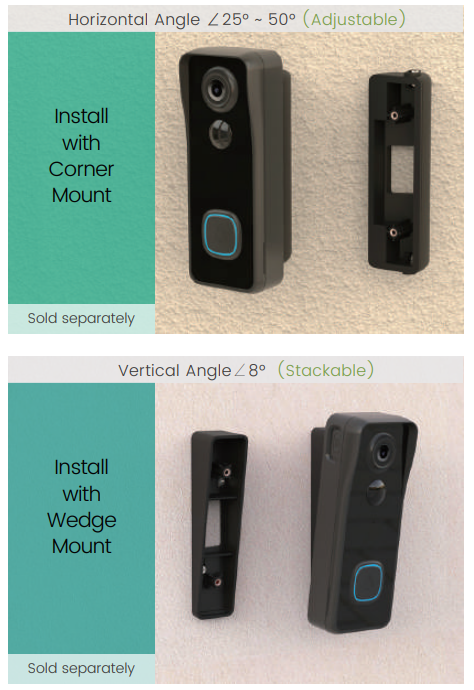
Doorbell Angle Mounts
You can purchase the following angled brackets so as to point your doorbell to a specific view angle.
Troubleshooting
Q1: Is the video doorbell powered by a battery?
A1: Yes, there is a Li-ion battery built in. Thanks to the low power consumption technology, a full charge lasts for more than 2 to 3 months in our lab test environment (Lab test condition: 10 events per day, 15-second video recording per event).
Q2: Does it support legacy hard-wired power sources?
A2: No, it doesn’t. If you need longer battery endurance, suggest that adding a solar battery charger for your doorbell, if only there is sunshine in your doorbell location. You can contact our after-sales service to know where to buy.
Q3: Does it work with the existing mechanical chime?
A3: No. The doorbell comes with a battery-powered wireless chime to notify people when your visitor presses the doorbell button. And our wireless chime is 100% wireless; you can place it almost everywhere you like. The transmission distance in open space is more than 100 meters (328 feet).
Q4: How many wireless chimes can be added to the doorbell?
A4: You can add several wireless chimes to work with your video doorbell. And one chime can be paired with up to 8 video doorbells.
Q5: Does it support a customized Motion Detection Zone?.
A5: Yes, it does. You can customize the detection zone in the doorbell settings.
Q6: Does the doorbell support cloud storage?
A6: Your doorbell supports local video storage on a TF card . And you can also activate the cloud storage service in the App so as to back up video clips to the cloud server. There is a 7-day free cloud recording trial service.
Preventive Measures
Regularly update the device firmware via the app, keep the camera lens clean, and avoid exposing the doorbell to extreme weather despite its waterproof rating. Use a high-quality microSD card for reliable local storage.
Warranty and Support
The tiejus Smart Video Doorbell Video Bell-J9 typically comes with a standard manufacturer’s warranty. For issues not resolved by the manual, contact Tiejus customer support through the ZUMIMALL app or the retailer where you purchased the device. Always keep your proof of purchase for warranty claims.
Contact Information
For further assistance, consult the official user manual PDF, visit the Tiejus website, or reach out to customer service via the contact details provided in the app or on the product packaging.
Pros & Cons
Advantages
- High-Quality Video: 2K resolution and a wide 130° viewing angle deliver clear, detailed footage of visitors.
- Easy Installation: Wireless, battery-powered design eliminates complex wiring—perfect for renters and DIY users.
- Smart Home Integration: Works with Alexa and Google Home for voice control and smart display notifications.
- Flexible Storage: Save clips locally via microSD or use optional cloud storage for added security.
- Customizable Alerts: Adjust motion detection zones and receive real-time notifications on your phone.
Disadvantages
- No 5GHz Wi-Fi Support: Limited to 2.4GHz networks, which may affect performance in crowded Wi-Fi environments.
- Battery Maintenance: Requires periodic recharging, though battery life is generally good under normal use.
- Basic Cloud Features: Cloud storage is not permanent by default—local storage or subscription is needed for continuous recording.
- No Continuous Recording: Only records during motion events or when the doorbell is pressed.
Value for Money
At around $60, the tiejus Smart Video Doorbell Video Bell-J9 offers robust features typically found in more expensive models, making it a cost-effective alternative to brands like Ring or Nest. While it lacks some premium integrations, its core functionality and ease of use provide excellent value for budget-conscious buyers.
Customer Reviews
User feedback for the tiejus Smart Video Doorbell Video Bell-J9 is generally positive, with many praising its easy setup, clear video quality, and reliable motion detection. Buyers highlight the convenience of wireless installation and the helpfulness of two-way audio for communicating with visitors remotely.
Common praises include the doorbell’s affordability, sharp night vision, and responsive customer support. However, some users note minor complaints, such as occasional Wi-Fi connectivity issues and the need to recharge the battery every few months. The average star rating is around 4.5 out of 5, reflecting strong satisfaction with the product’s performance relative to its price.
Frequently mentioned issues include delayed notifications and the limitation to 2.4GHz Wi-Fi. Most reviewers recommend the Bell-J9 for those seeking a reliable, budget-friendly smart doorbell, especially as a first smart home device or for secondary entrances.
If you prioritize ease of use, solid video quality, and smart features without a premium price tag, the tiejus Smart Video Doorbell Video Bell-J9 is a smart purchase. For advanced smart home ecosystems or continuous recording, consider higher-end alternatives, but for most users, this model delivers excellent value and peace of mind.
Faqs
How do I set up my tiejus Smart Video Doorbell Video Bell-J9 for the first time?
What should I do if the tiejus Smart Video Doorbell Video Bell-J9 is not connecting to Wi-Fi?
Can I use the tiejus Smart Video Doorbell Video Bell-J9 with cloud storage, and how does it work?
How do I pair the wireless indoor chime with the tiejus Smart Video Doorbell Video Bell-J9?
What are the best installation methods for the tiejus Smart Video Doorbell Video Bell-J9?
How long does the battery last on the tiejus Smart Video Doorbell Video Bell-J9, and how often should I recharge it?
What troubleshooting steps can I take if the tiejus Smart Video Doorbell Video Bell-J9 video feed is delayed or not loading?
How should I maintain and clean my tiejus Smart Video Doorbell Video Bell-J9 to ensure optimal performance?
Leave a Comment