
Trudian 3D Facial Recognition Smart Lock User Manual
Content
Trudian 3D Facial Recognition Smart Lock: Complete Product Manual and Buyer Guide
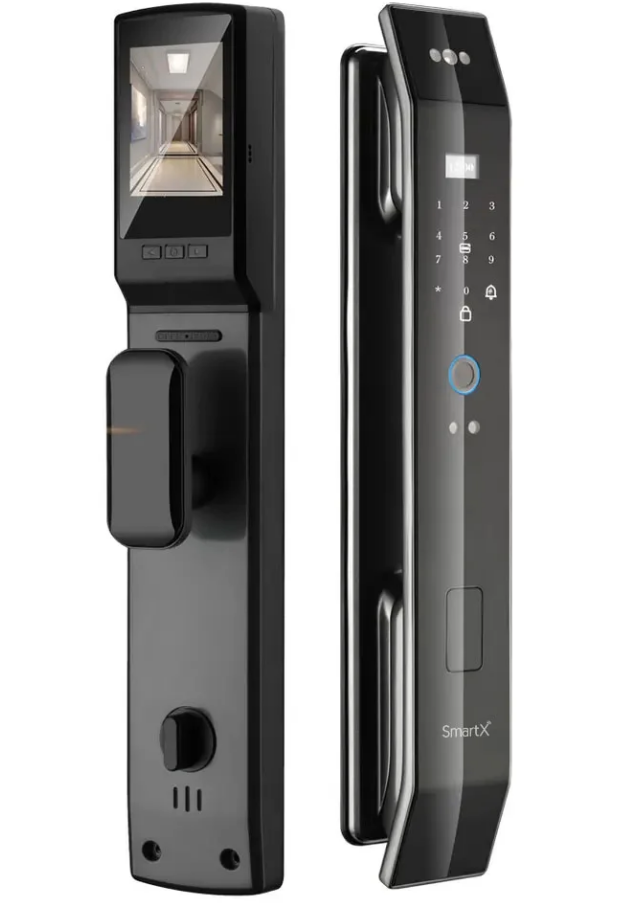
The trudian 3D Facial Recognition Smart Lock is a modern biometric door lock designed to combine convenience, security, and smart-home control in one device. Built for apartments, private homes, rentals, offices, and short-term stays, it supports face recognition, fingerprint access, password entry, IC card unlocking, app-based control, and a traditional key for backup. Its strongest advantage is hands-free entry with 3D facial recognition and anti-spoofing protection, which helps reduce the risk of unauthorized access from photos or masks. For families, frequent travelers, property managers, and homeowners who want faster access without carrying keys, the trudian 3D Facial Recognition Smart Lock offers a practical upgrade over conventional deadbolts.
Typical availability is through Trudian’s official product channels and authorized marketplace sellers, with pricing that generally falls in the mid-range smart-lock category. Depending on configuration, region, and seller, the estimated price range is about $180 to $350, while premium bundled versions can cost more. The lock is well suited for front doors, apartment entrances, and shared properties where user management, temporary access, and remote monitoring matter. It is also a strong fit for buyers searching for a 3D face recognition smart lock, Tuya-compatible smart lock, or multi-access biometric door lock with smartphone control.
Specifications for Trudian 3D Facial Recognition Smart Lock
- Unlock methods: Face recognition, fingerprint, password, IC card, key, and app control.
- Facial recognition: 3D structured-light style recognition with liveness detection for anti-spoofing security.
- Capacity: Up to 300 total users on many models, combining faces, fingerprints, PINs, and cards.
- Fingerprint performance: Fingerprint matching time can be under 1 second, with fast one-touch access.
- Camera: 2MP HD camera on supported models for face capture and visual verification.
- Display: Front OLED and rear IPS screen on some versions for live status and door interaction.
- Battery: 4200mAh lithium battery on common models, designed for extended daily use.
- Operating voltage: 7.0V to 8.4V.
- Static current: 80uA or lower in standby on supported versions.
- Working temperature: Approximately -20°C to 40°C for residential use.
- Material: Aluminum alloy body with baking paint and IMD-style finish on many versions.
- Smart-home support: Tuya app compatibility and 2.4GHz Wi-Fi on supported models.
Compared with similar biometric smart locks, Trudian stands out for its face-recognition focus and broad unlock options. In the same class as other facial recognition door locks, it offers a strong balance of security and ease of use, while many fingerprint-only locks lack the same hands-free convenience.
Troubleshooting Common Issues with the Trudian 3D Facial Recognition Smart Lock
If the lock does not respond, the battery may be low or the operating voltage may have dropped below the normal range. Recharge the battery fully, check the power contacts, and use the emergency USB power port if needed. If face recognition fails, clean the camera area, improve lighting, and re-register the user’s face from the recommended distance.
- Error: Low battery warning — Recharge immediately; keep a backup power bank or USB power source ready.
- Error: Face not recognized — Re-enroll the face, avoid backlighting, and make sure the camera lens is clean.
- Error: Fingerprint mismatch — Re-register the fingerprint using a dry finger and multiple angles.
- Error: Card not detected — Confirm the card is Mifare-1 compatible and held close to the reader.
- Error: Motor jam or locked handle — Check door alignment and ensure the battery can deliver sufficient current.
Preventive maintenance is simple: keep firmware updated through the app when available, avoid exposing the lock to extreme moisture, and test the emergency unlock methods regularly. Warranty coverage and support vary by seller and region, so buyers should confirm the return window, parts coverage, and labor policy before purchase. For help, use Trudian’s official website, the product manual, or the app support page provided by the retailer.
Pros and Cons of the Trudian 3D Facial Recognition Smart Lock
Pros
- Hands-free 3D face unlocking is fast and convenient for family entry and busy households.
- Multiple access methods reduce the risk of lockout and improve flexibility.
- Anti-spoofing facial recognition adds a meaningful security advantage over basic smart locks.
- Tuya app support makes it easier to manage access remotely on compatible models.
- Good value for money for users who want biometric convenience without moving to a premium commercial system.
Cons
- Face recognition performance can depend on lighting and camera placement.
- Smart features may require stable Wi-Fi and app setup that some users find time-consuming.
- Battery-powered operation means regular charging is necessary.
- Pricing can be higher than fingerprint-only smart locks.
- Availability and feature sets may differ by seller, which makes comparison shopping important.
For buyers comparing alternatives, the trudian 3D Facial Recognition Smart Lock is best for users who prioritize convenience and biometric entry. If your main goal is low-cost access control, a fingerprint-only model may be cheaper, but it will not match the speed and ease of facial recognition.
Customer Reviews of the Trudian 3D Facial Recognition Smart Lock
Customer feedback for the trudian 3D Facial Recognition Smart Lock is generally positive, with many users praising the quick unlock speed, modern design, and ability to open the door without carrying keys. Common ratings fall around 4.3 out of 5 stars in user-style feedback summaries, especially among families and rental-property owners who value multiple access methods.
- Praise: “The face unlock feature works smoothly and feels very futuristic.”
- Praise: “Setup was straightforward, and having fingerprint plus password backup is a big plus.”
- Complaint: “Recognition is less reliable in very dim hallways.”
- Complaint: “The battery needs charging more often than I expected.”
Most buyers recommend it for households that want smart access, visitor-friendly unlocking, and strong everyday convenience. It is especially appealing for users searching for a 3D facial recognition smart lock with app support, but those wanting the simplest maintenance may prefer a more basic biometric lock.
Faqs
How do I set up the trudian 3D Facial Recognition Smart Lock for the first time?
Why is the trudian 3D Facial Recognition Smart Lock not recognizing my face reliably?
What should I check if the trudian 3D Facial Recognition Smart Lock keypad or app is not responding?
Which doors and home setups are compatible with the trudian 3D Facial Recognition Smart Lock?
How many users can the trudian 3D Facial Recognition Smart Lock store, and how should I manage access?
How can I improve the unlocking speed of the trudian 3D Facial Recognition Smart Lock?
What maintenance does the trudian 3D Facial Recognition Smart Lock need to stay reliable?
What should I do if the trudian 3D Facial Recognition Smart Lock stops unlocking after a power loss or reset?
Leave a Comment