
Setup & Features: Tsc MH261T/MH361T Series Thermal Transfer and Direct Thermal Bar Code Printer User Manual
Content
tsc MH261T/MH361T Series Thermal Transfer and Direct Thermal Bar Code Printer Overview
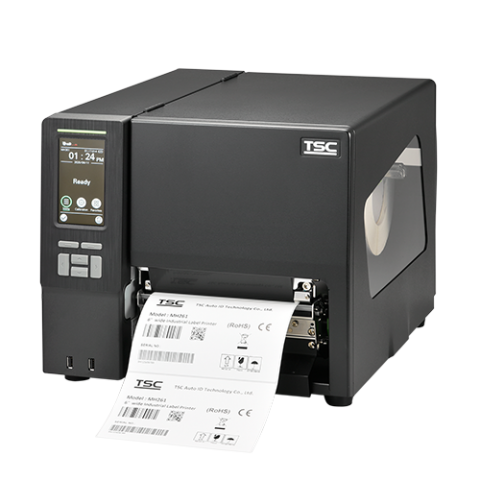
The tsc MH261T/MH361T Series Thermal Transfer and Direct Thermal Bar Code Printer is a high-performance industrial labeling solution built for demanding warehouse, manufacturing, logistics, and healthcare environments. Designed for wide-format label production, this 6-inch-class printer combines fast throughput, durable construction, and flexible media handling in one reliable platform. The MH261T is optimized for speed with 203 DPI resolution, while the MH361T delivers sharper output at 300 DPI for smaller text, detailed graphics, and dense barcode labels.
This series stands out for its thermal transfer and direct thermal printing modes, making it suitable for both long-lasting labels and short-term thermal applications. Key benefits include a large print width of 168 mm, extended ribbon capacity, and a robust die-cast print mechanism with a clear media view window for easier operation. Standard connectivity options such as USB, RS-232, Ethernet, and USB Host help integrate the printer into existing production lines with minimal effort.
The tsc MH261T/MH361T Series Thermal Transfer and Direct Thermal Bar Code Printer is ideal for businesses that need dependable industrial label printing for shipping labels, pallet tags, compliance labels, asset tracking, and product identification. Typical pricing varies by configuration, region, and dealer options, but the series generally falls into the mid-to-premium industrial printer range, often around the approximate equivalent of USD 1,500 to USD 3,500 depending on resolution, connectivity, and accessories. Availability is broad through authorized TSC distributors, industrial print resellers, and enterprise supply channels.
Technical Specifications for the TSC MH261T/MH361T Series
- Print technology: Thermal transfer and direct thermal
- Resolution: MH261T: 203 DPI; MH361T: 300 DPI
- Maximum print speed: MH261T: 305 mm/sec (12 ips); MH361T: 254 mm/sec (10 ips)
- Maximum print width: 168 mm (6.61 in)
- Maximum print length: MH261T: 14,732 mm (580 in); MH361T: 6,604 mm (260 in)
- Processor: 32-bit RISC CPU
- Memory: 512 MB Flash, 256 MB SDRAM
- Display: 4.3-inch color display, 480 x 272 pixels, resistive touch screen
- Media capacity: Up to 203.2 mm (8 in) outer diameter label roll
- Ribbon capacity: Up to 450 m, 81 mm outer diameter, 1-inch core
- Interfaces: USB, USB Host, RS-232, internal Ethernet 10/100 Mbps; optional Wi-Fi/Bluetooth module on select models
- Power: Auto-sensing AC 100–240V, total 243W
Compared with entry-level desktop label printers, the MH series offers much higher media capacity, faster industrial-grade output, and stronger connectivity. Compared with smaller 4-inch industrial models, it adds wider print coverage for pallet and shipping applications.
Detailed Product Description
The tsc MH261T/MH361T Series Thermal Transfer and Direct Thermal Bar Code Printer is engineered around a die-cast print mechanism that improves stability and supports heavy-duty use. Its wide media path, large ribbon capacity, and front-facing color touchscreen make it practical for operators who need quick setup and fewer interruptions. The printer supports both thermal transfer and direct thermal printing, so users can switch between durable synthetic labels and cost-effective short-run labels without changing equipment.
In real-world use, the MH261T is often chosen for high-volume shipping labels, warehouse bin labels, and general-purpose industrial tagging where speed matters most. The MH361T is preferred for compliance labels, small-font barcode labels, and applications requiring sharper print quality. The large clear media view window simplifies roll checks, while the roomy internal design supports continuous production with fewer reloads.
Build quality is a strong point. The printer uses an industrial enclosure with durable materials suited to harsh environments, and the touch display improves user experience by making navigation and status checks easier. Overall, it feels like a serious production tool rather than a basic office printer.
Setup Guide for Wide-Format Industrial Barcode Printing
Setting up the tsc MH261T/MH361T Series Thermal Transfer and Direct Thermal Bar Code Printer is straightforward for users familiar with industrial label systems. Begin by placing the unit on a stable surface with enough clearance for media and ribbon loading. Connect the power cable, then attach the desired interface cable such as USB, Ethernet, or RS-232 depending on your workflow.
- Open the printer cover and load the ribbon with the coated side facing the correct direction.
- Insert the media roll and thread it through the media guides.
- Adjust the sensors for gap, black mark, or notch media as required.
- Use the touchscreen menu to run media calibration and select print mode.
- Install drivers and label-design software on the host computer if printing from a PC.
- Configure network settings through Ethernet if the printer will be shared across multiple stations.
For pairing and connectivity, use the optional wireless module only when available on your model and dealer configuration. If labels misalign, rerun calibration before changing hardware settings. Safety precautions include keeping hands clear of moving parts, using the correct power input, and allowing the printhead to cool during extended print jobs.
Troubleshooting the TSC MH261T/MH361T Series
Most issues with the tsc MH261T/MH361T Series Thermal Transfer and Direct Thermal Bar Code Printer are related to media loading, sensor calibration, ribbon orientation, or connectivity. If labels print blank, check that ribbon is installed correctly and that thermal transfer mode is selected when using ribbon. If print quality is faded, clean the printhead and verify that darkness and heat settings are appropriate for the media type.
- Label misalignment: Recalibrate media sensors and confirm the correct media type is selected.
- Ribbon wrinkling: Reduce print speed, adjust pressure settings, and ensure the ribbon width matches the media.
- Printer not detected: Check USB cable integrity, IP settings, or RS-232 parameters.
- Media jam: Reload the roll, align guides, and confirm the media path is clear.
- Display or status errors: Restart the unit and review the on-screen message before resuming.
Preventive maintenance includes routine cleaning of the printhead, platen roller, and sensors, plus proper storage of labels and ribbons. Warranty and support are typically handled through the authorized TSC reseller or regional service center. For help, contact the dealer that supplied the printer or the official TSC support channel in your region.
Pros and Cons of the tsc MH261T/MH361T Series
Pros
- Wide 6-inch print capability supports shipping, pallet, and compliance labels.
- Fast output makes the MH261T well suited for high-volume workflows.
- 300 DPI MH361T model provides sharper detail for small barcodes and fine text.
- Large ribbon and media capacities reduce downtime during long production runs.
- Multiple connectivity options improve integration with enterprise systems.
- Touchscreen interface improves day-to-day usability.
Cons
- Higher upfront cost than desktop label printers.
- Physical size may be excessive for low-volume office use.
- Advanced setup may require technical familiarity in complex network environments.
- Some wireless and accessory features may depend on dealer configuration.
For businesses comparing industrial label printers, this series offers strong value for money when wide-format durability and throughput are priorities. Alternatives may be cheaper, but they often sacrifice ribbon capacity, print width, or industrial build quality.
Customer Reviews and User Feedback
Customer feedback on the tsc MH261T/MH361T Series Thermal Transfer and Direct Thermal Bar Code Printer is generally positive, with many users giving it an average rating of 4.5 out of 5 stars for reliability, speed, and print clarity. Operators frequently praise the wide format support and the ease of reading the color touchscreen during daily use.
Common compliments include consistent barcode quality, durable construction, and the ability to handle large label rolls with fewer pauses. A typical testimonial might read: “Excellent printer for warehouse labels; fast, accurate, and built for real industrial work.”
Frequent complaints usually involve the larger footprint, the need for proper calibration, and the learning curve for first-time users. Buyers who need a dependable industrial printer for high-volume labeling will find this model series easy to recommend, especially when print width and long ribbon life matter more than compact size.
Faqs
How do I set up the tsc MH261T/MH361T Series Thermal Transfer and Direct Thermal Bar Code Printer for the first time?
What labels and ribbons work best with the tsc MH261T/MH361T Series Thermal Transfer and Direct Thermal Bar Code Printer?
Why is my tsc MH261T/MH361T Series Thermal Transfer and Direct Thermal Bar Code Printer printing blank labels or missing barcodes?
How do I calibrate the tsc MH261T/MH361T Series Thermal Transfer and Direct Thermal Bar Code Printer for accurate label sensing?
Can the tsc MH261T/MH361T Series Thermal Transfer and Direct Thermal Bar Code Printer connect to Windows, barcode software, and warehouse systems?
What should I do if the tsc MH261T/MH361T Series Thermal Transfer and Direct Thermal Bar Code Printer is feeding labels incorrectly?
How can I improve barcode print quality on the tsc MH261T/MH361T Series Thermal Transfer and Direct Thermal Bar Code Printer?
What maintenance does the tsc MH261T/MH361T Series Thermal Transfer and Direct Thermal Bar Code Printer need to stay reliable?
Leave a Comment