
Setup & Pairing: Ttfone TT950 Mobile Phone User Manual
Content
TTFone TT950 Mobile Phone
Introduction
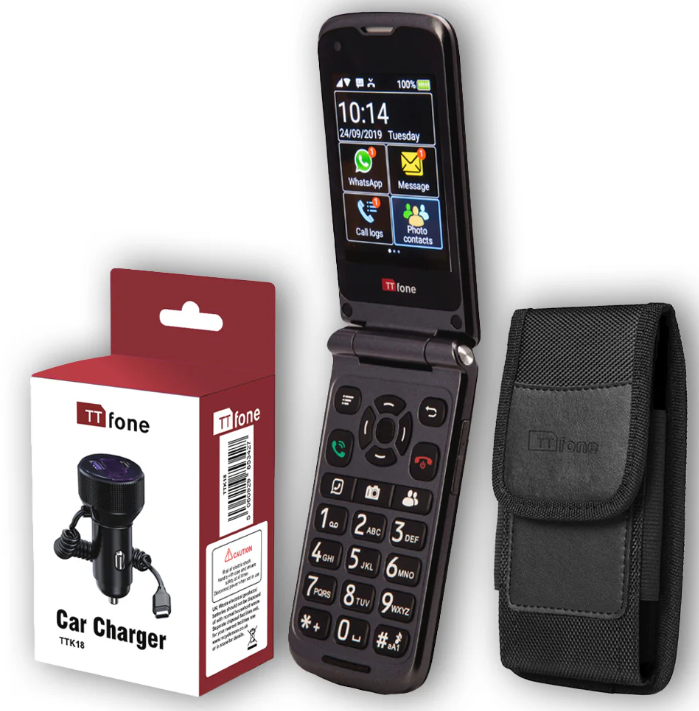
The ttfone TT950 Mobile Phone, also known as the TTfone Titan TT950, combines ease of use with essential smartphone functionality tailored primarily for seniors and users seeking a simple yet modern mobile device. This flip-style phone features large, clearly labeled buttons alongside a responsive 2.8-inch touchscreen, empowering users to navigate its simplified Android operating system effortlessly. Designed with safety and communication convenience in mind, it includes an emergency SOS button that sends real-time location information to preset contacts, making it ideal for older adults or those needing quick emergency access.
With compatibility across most 3G networks worldwide, the TT950 offers unlocked flexibility, allowing users to use their existing SIM cards, whether pay-as-you-go or contract-based. The device supports popular apps such as WhatsApp and Facebook Lite, enabling video calls and messaging, thus bridging the gap between basic phones and smartphones. Additional practical features like photo contacts for quick dialing, voice memos for reminders, and a loud phone enhance its appeal to the target audience.
Available typically in the price range of £70 to £90, the ttfone TT950 is competitively priced for users who prioritize simplicity and reliability over complex smartphone features. It is widely available in the UK and online, making it accessible for senior users or those needing a straightforward, dependable mobile phone solution.
Specifications of the ttfone TT950 Mobile Phone
- Design: Flip phone style with dual screens (2.8-inch internal touchscreen, 1.8-inch external screen)
- Operating System: Simplified Android 8.1 version for ease of use
- Network Compatibility: 3G (900/2100 MHz) and 2G (850/900/1800/1900 MHz); unlocked for use with most carriers
- Memory: 4GB internal storage with 512MB RAM; expandable via microSD card slot up to 32GB
- Display: Colour TFT touchscreen, 240 x 320 pixels with backlight
- Camera: Dual cameras, including a 5-megapixel rear camera for photos and video calls
- Key Features: Large tactile buttons, talking buttons for accessibility, speed dial, vibration alert, keypad backlight
- Emergency Features: Dedicated SOS button sends emergency texts and current GPS location
- Connectivity: Bluetooth support, Micro USB charging dock included
- Language Support: English, French, Spanish, German, Italian, Arabic
- Battery: Long-lasting lithium-ion battery with a dock charging system for convenience
Compared to similar senior-friendly phones, the TT950 excels with its combination of touchscreen and large physical buttons, plus added app functionality like WhatsApp video calling, setting it apart from basic feature phones that lack smart app support.
GETTING STARTED
Remove the Back Cover
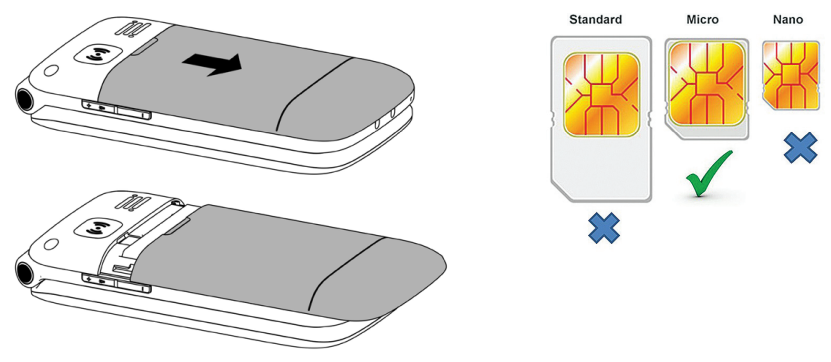
Open the battery cover carefully by sliding down the back cover of the phone.
Install the SIM card and battery.
For availability and information about using SIM card services, contact your SIM card vendor. This may be the service provider, network operator, or other vendor.
Note: The SIM card and its contacts are easily damaged by scratches or bending, so please be careful when handling, inserting, or removing the card.
Note: Keep all SIM cards out of the reach of small children.
- Ensure the phone is switched off and the charger is disconnected before removing the battery.
With the back cover removed, install the SIM card by locking it into the metal plate. Gently slide the locking plate to the right to unlock and left to lock. Ensure the angled corner of the SIM card is on the bottom left side. Please note you can only use a Micro SIM card, not a Standard or Nano SIM. You can also install a microSD memory card into the slot next to the SIM slot. (this is optional)
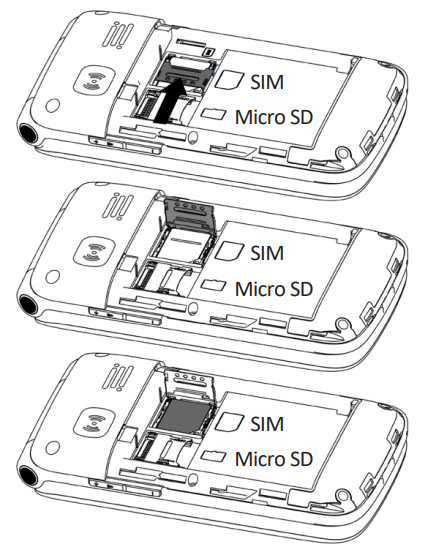
- Install the battery into the battery slot, ensuring that the three metallic stripes on the battery align with the three metallic prongs in the battery slot.
- Put on the battery cover and slide up. Ensure the cover is completely closed,d and the matching sound (click) can be heard.
- Plug the phone in to charge it fully. You can also use the included dock charger to charge the phone easily.

Turning the Phone On
To turn the phone on, press and hold the red key until the screen lights up. If you switch on the mobile phone before inserting
the SIM card, it prompts you to insert the SIM card. The mobile phone checks whether the SIM card is valid automatically after it is inserted.
The following prompts appear on the screen in sequence when the mobile phone is just switched on:
- Input phone password - If the password of the phone has been set.
- Input PIN - If the password of the SIM card has been set.
- Language settings - Default to English, so just select Start to confirm.
- Wifi Settings - Connect to the available wifi network.
Turning the Phone Off
To turn the phone off, press and hold the red key until the screen turns blank.
Charging the Battery
The battery can be charged when the phone is either on or off. Please ensure the battery is inserted into the phone before charging. The charging time is four hours.
To connect the charger:
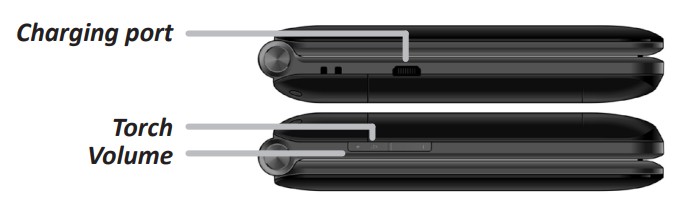
- Insert the cord into its port on the left-hand side of the phone
- Plug the charger into an electrical outlet.
To disconnect the charger:
- Unplug the wall charger.
- Remove the cord from the phone.
Charging Using the Docking Charger
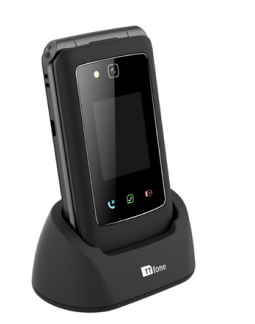
You can also use the included docking charger for easy charging.
- Simply plug the charger into the back of the dock
- Place the phone into the dock to start charging.
- Remove the phone when charging is complete.
Battery Level Indication

Low Battery Alert
The phone will sound an alert when the battery is low and display a message of low battery on the screen.
Low Battery Notification
When the battery level on the phone goes down to 10% the phone can send reminder texts to up to three set numbers. See page 34.
YOUR PHONE
FETURES
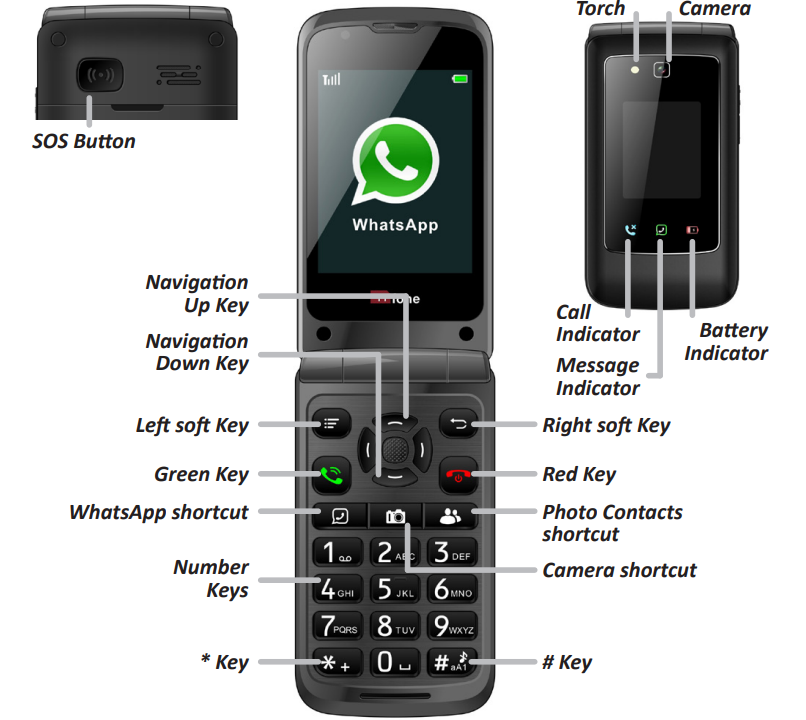
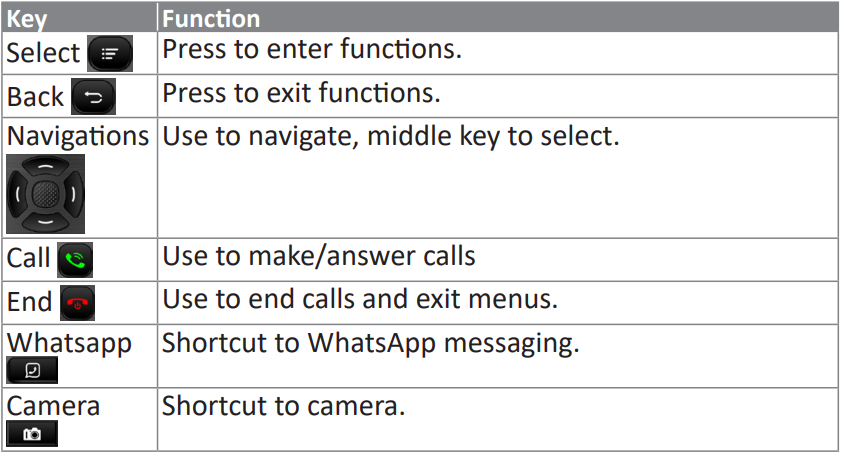
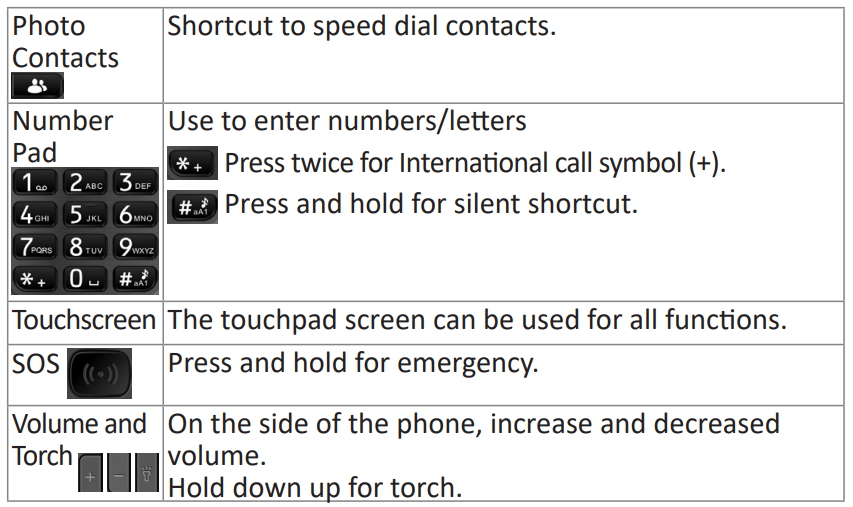
Key Functions
Icons on Screen
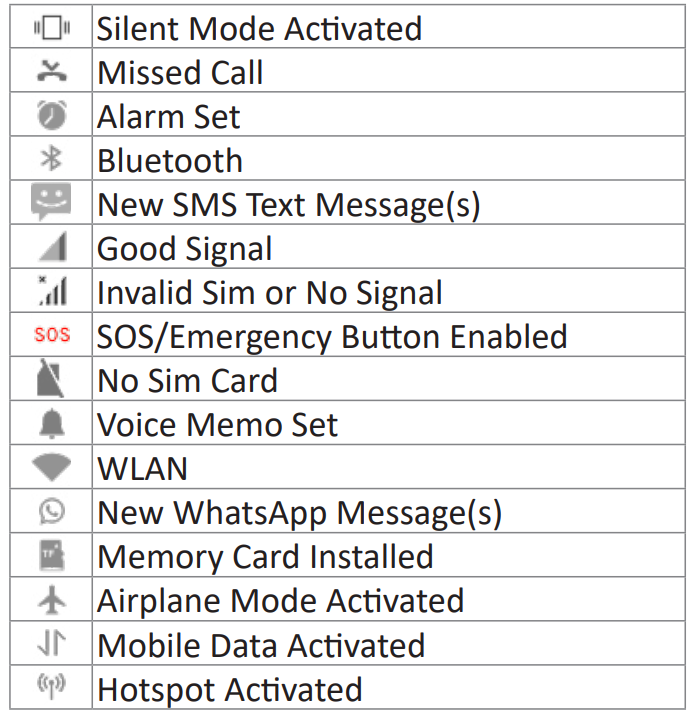
USING THE PHONE
- Navigating the menu
The navigation keys work to help you through the menu home screen. You can also use the touchscreen if you find it easier. To select an option, you can press the middle navigation key, or you can touch the option using your finger on the touchscreen. - Making Calls
To make a call, simply type the phone number and press the green call key. Alternatively, you can call someone who has been saved in your photo contacts by either selecting from the menu or pressing the photo contacts shortcut button. Press the green call key once you have chosen whom you wish to call. - Receiving Calls
To answer an incoming call,l you can simply open the file. This will answer the call, all and you can start speaking to the caller right away. Note: You can change this in the settings if you wish to press a button to answer the call instead. Simply go to Settings>Flip Answer. - Changing the Volume during a call
To increase or decrease the volume of the speaker, use the volume buttons on the side of the phone. To reach maximum volume,e press the Options or the left soft key and select Speaker on the screen to switch on the speaker phone. - Mobile Internet and Wifi
To get the most out of all the features of the TT9,50, including WhatsApp, Facebook, andYouTubee you will need a mobile data plan with your network provider. Please contact your provider
for details. You can also use Wifi, but that will restrict some of the APPs from working when you are no longer in the Wifi area. To set Wifi go to Settings/WLAN and choose your network from the list. Enter the password for your Wifi network and click Connect. - Torch
The TT950 comes with a handy torch flashlight feature, which you can switch on by holding down the up volume key on the right side of the phone. Hold it down again to switch off. - Menu Visibility
You can use this to hide menu items that you do not use on the home screens by simply going to Settings/Menu Visibility and choosing the menu items you want to hide. You can easily unhide these later by coming back to the same menu.
Please note that if you have hidden certain apps, you will still be able to use the app e, especially if there is a shortcut button on the keypad, and you will still receive notifications as well (for WhatsApp, Messages,, and Call logs).
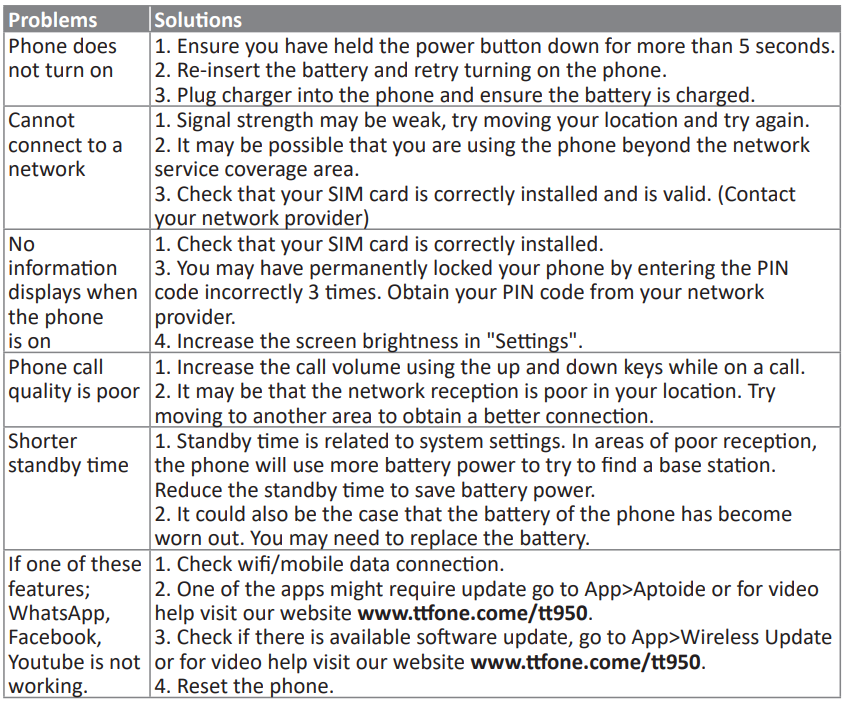
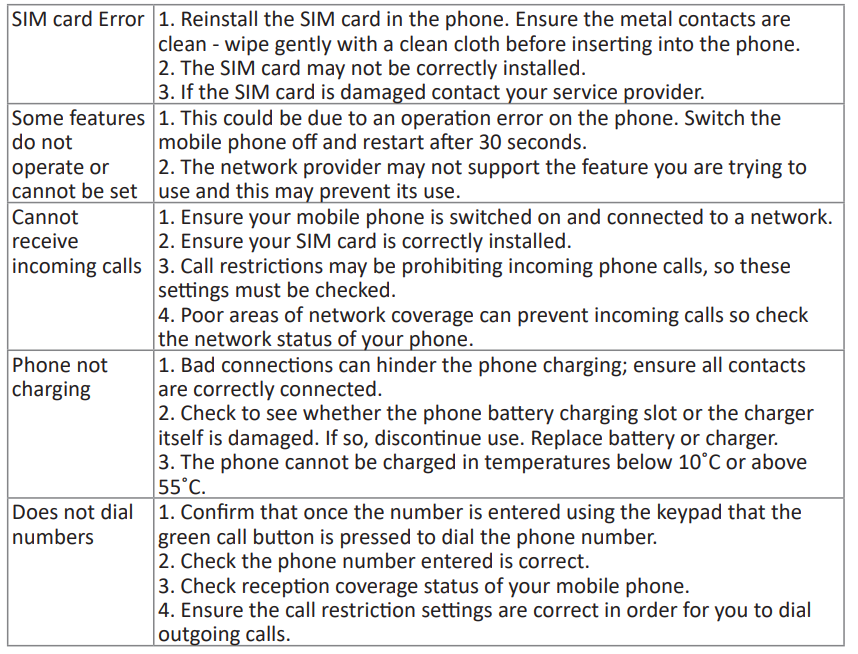
Troubleshooting the ttfone TT950 Mobile Phone
- Common Issue: Phone not turning on — ensure battery is charged via the dock charger; try a different power outlet.
- Error Code: No network signal — verify SIM card is correctly inserted; check network coverage and compatibility (3G).
- App Problems: WhatsApp or Facebook Lite not working — confirm active data plan and stable 3G connection.
- Emergency SOS Button: If the SOS alert does not send location, check GPS settings and ensure SMS permissions are enabled.
- Preventive Measures: Regularly charge the phone using the dock, keep software updated via support pages, and use protective cases to avoid damage.
The ttfone TT950 comes with a 2-year manufacturer’s warranty covering defects under normal use. For support, users can access online tutorials or contact TTfone customer service via their official website or phone helpline.
Pros & Cons of the ttfone TT950 Mobile Phone
Pros
- Easy to use: Combines large physical buttons with touchscreen navigation for accessibility.
- Emergency SOS button: Provides peace of mind with instant location sharing to trusted contacts.
- App support: Enables WhatsApp and Facebook Lite for video calling, unique for a senior flip phone.
- Unlocked and versatile: Works with most 3G networks worldwide, suitable for travelers.
- Dock charging: A Convenient charging mechanism ideal for users with dexterity challenges.
Cons
- Limited RAM and storage: 512MB RAM and 4GB storage may restrict the installation of many modern apps.
- 3G-only network: Lack of 4G support could affect future network compatibility as carriers phase out 3G.
- Camera quality: Basic 5MP camera suitable only for casual photos.
- Price point: Slightly higher than some basic feature phones, but offers additional functionality accordingly.
Customer Reviews of the ttfone TT950 Mobile Phone
Users generally praise the ttfone TT950 for its user-friendly interface and dependable emergency SOS feature. Many senior customers appreciate the combination of large buttons with touchscreen options and the ability to use WhatsApp for video calls, enhancing connectivity with family.
Common complaints include the small internal storage limiting app installations and occasional network compatibility issues on certain carriers. Overall, the phone receives an average rating of 4 out of 5 stars for balancing simplicity with modern features.
Reviewers recommend this phone for seniors or those needing an uncomplicated device with safety features and basic smart functionality.
Faqs
How do I set up the ttfone TT950 Mobile Phone for the first time?
What should I do if my ttfone TT950 Mobile Phone isn’t recognizing the SIM card?
Can I use WhatsApp and Facebook on the ttfone TT950 Mobile Phone?
Is the ttfone TT950 Mobile Phone compatible with all UK mobile networks?
How can I optimize battery life on my ttfone TT950 Mobile Phone?
What should I do if the emergency SOS button on the ttfone TT950 Mobile Phone is not working?
Can I expand the storage on the ttfone TT950 Mobile Phone and how?
How do I maintain and care for my ttfone TT950 Mobile Phone to ensure longevity?
Leave a Comment