
Setup: Turonic PH950 Air Purifier and Humidifier User Manual
Content
Turonic PH950 Air Purifier and Humidifier
Introduction
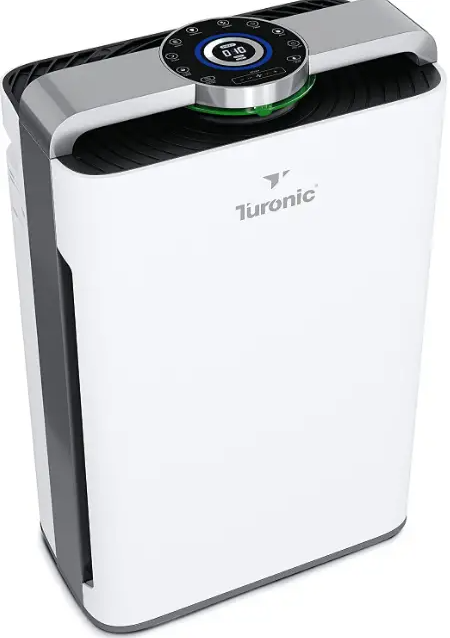
The Turonic PH950 Air Purifier and Humidifier is a premium, multi-functional device designed to deliver clean, fresh, and comfortable air for homes and offices. With its advanced 8-stage purification system, built-in humidifier, and smart home compatibility, this unit stands out as a top choice for those seeking comprehensive air quality improvement. The Turonic PH950 Air Purifier and Humidifier effectively removes pet dander, smoke, dust, allergens, and odors, making it ideal for pet owners, allergy sufferers, and anyone concerned about indoor air pollution.
Equipped with a True HEPA 13 filter, activated carbon, cold catalyst, cotton filter, and mesh prefilter, the PH950 ensures up to 99.97% particle capture down to 0.1 microns. Its integrated humidifier helps maintain optimal humidity levels, preventing dryness and protecting furniture. The device features Wi-Fi app control, remote operation, a 12-hour timer, a filter health indicator, and a real-time air quality display. With a coverage area of up to 4,200 sq ft and whisper-quiet operation at just 36 dB, the Turonic PH950 Air Purifier and Humidifier is suitable for large rooms and light sleepers alike. Priced around $250–$560, it offers excellent value for money and is widely available online and in major retailers.
SPECIFICATIONS
- Rated power:
- 95W
- Rated Voltage:
- 110-120V, 60Hz
- CADR (Particles)*:
- 287.2 ft%/min (488 m%/h)
Speed modes:
- 8 speedsNoise level:
- ≤ 61 dB
- Dimensions:
- 2.03 x 1.31 x 0.75 ft / 620 x 400 x 230 mm
- Weight:
- 23.8 lbs / 10.8 kg
PACKAGE CONTENT
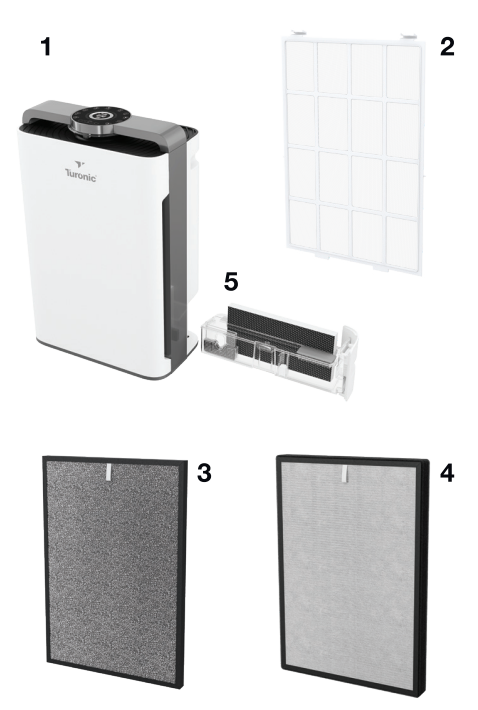
- Air purifier
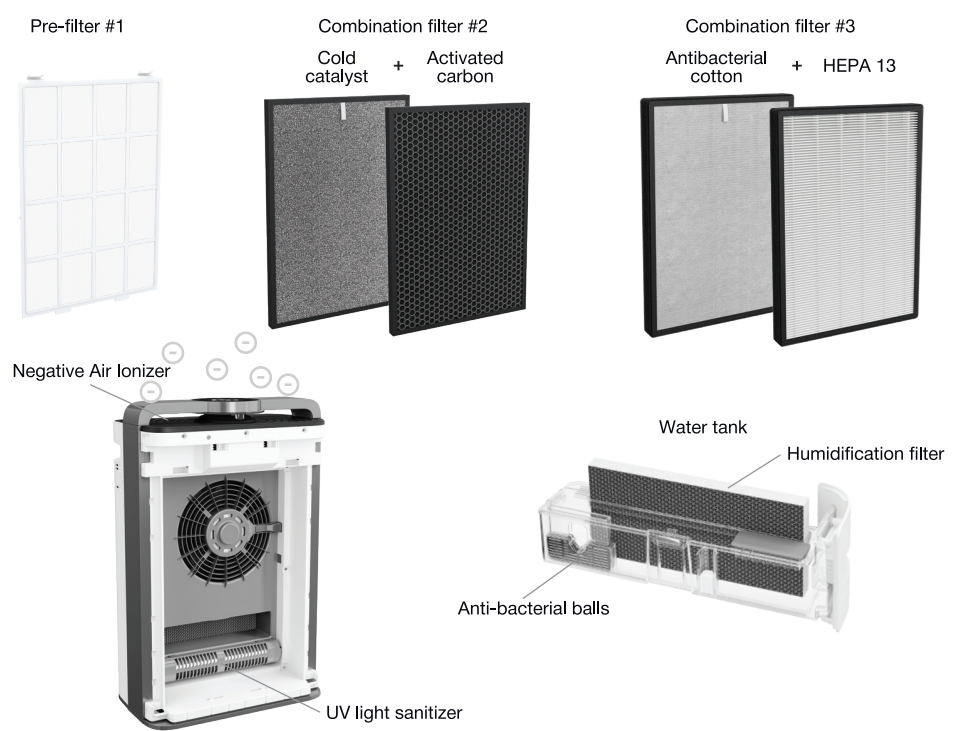
- Mesh pre-filter #1
- Combination filter #2 (cold catalyst + activated carbon filter)
- Combination filter #3 (antibacterial cotton + HEPA filter)
- Water tank with humidification filter
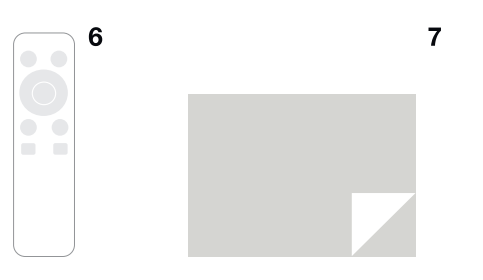
- Remote control
- User's guide
Structure
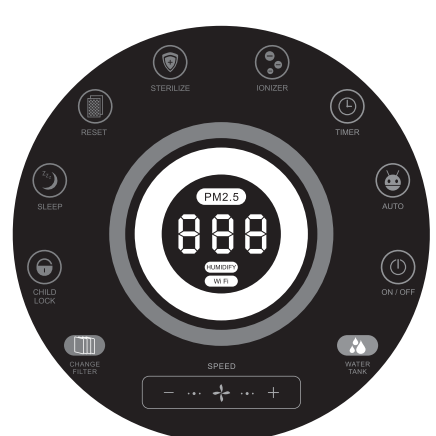
DISPLAY AND TOUCH CONTROL PANEL
- ON/OFF - turns on/off the purifier
- AUTO - turns on the Auto mode
- TIMER - sets 1-12 hours to turn off the machine
- IONIZER - turns on/off the ionization STERILIZE - turns on/off the UV
- RESET - shows purifier runtime/resets the filter life management function
- SLEEP - turns on/off the Sleep mode (machine runs at low speed - low noise) CHILD LOCK - turns on/off the Child Lock mode
- SPEED+/- - changes the fan speed CHANGE FILTER - filter cleaning/replace ment reminder indicator
- WATER TANK - low water level indicator
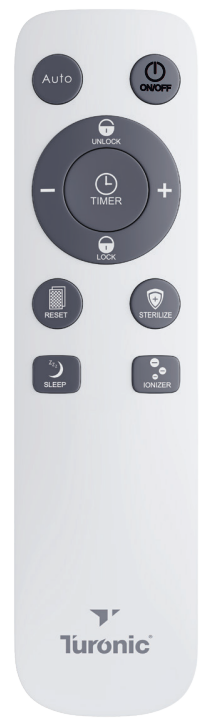
REMOTE BUTTONS
- ON/OFF - turns the unit on/off.
- AUTO - turns on the Auto mode SPEED+/- - changes the fan speed TIMER - sets 1-12 hours to turn off the machine UNLOCK - disables the Child Lock mode LOCK - enables the Child Lock mode IONIZER - turns on/off the ionization STERILIZE - turns on/off the UV
- RESET - shows purifier runtime/resets the filter life management function
- SLEEP - turns on/off the Sleep mode (machine runs at low speed - low noise)
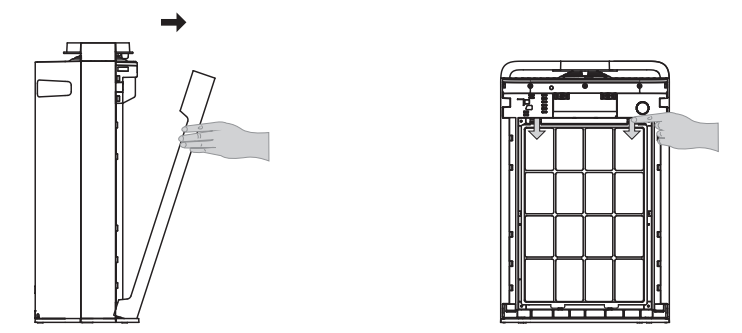
HOW TO START
The new TURONIC PH950 already comes with two combination filters inside it. To start using it:
- Open the filter cover.
- Remove the pre-filter.
- Take off two polybags containing the combination filters
- Remove the combination filters from the polybags.
- Install the first combination filter marked with digit 3 (antibacterial cotton + HEPA) into the purifier. Please note that the side with the pull tab should be directed outwards.
- Install the second combination filter marked with digit 2 (cold catalyst + activated carbon) into the purifier. Please note that the side with the pull tab should be directed outwards.
- Install the pre-filter back in its place.
- Close firmly the filter cover.
- Connect the power plug to a power source.
- Press the ON/OFF button on the purifier's control panel or on the remote control.
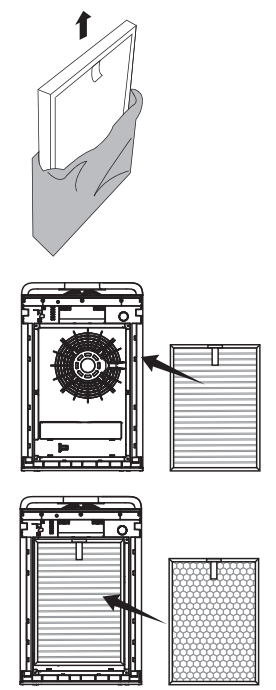
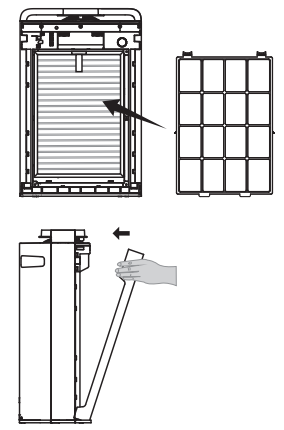
The purifier will start working. You will see the LED light indication (green, blue, yellow, red depending on the air quality) and altering digits standing for the air pollution index.
Note:
When placing the unit, make sure to allow at least 11.8 inches (30 cm) clearance between the air inlets/outlets and any obstacle.
HOW TO CLEAN
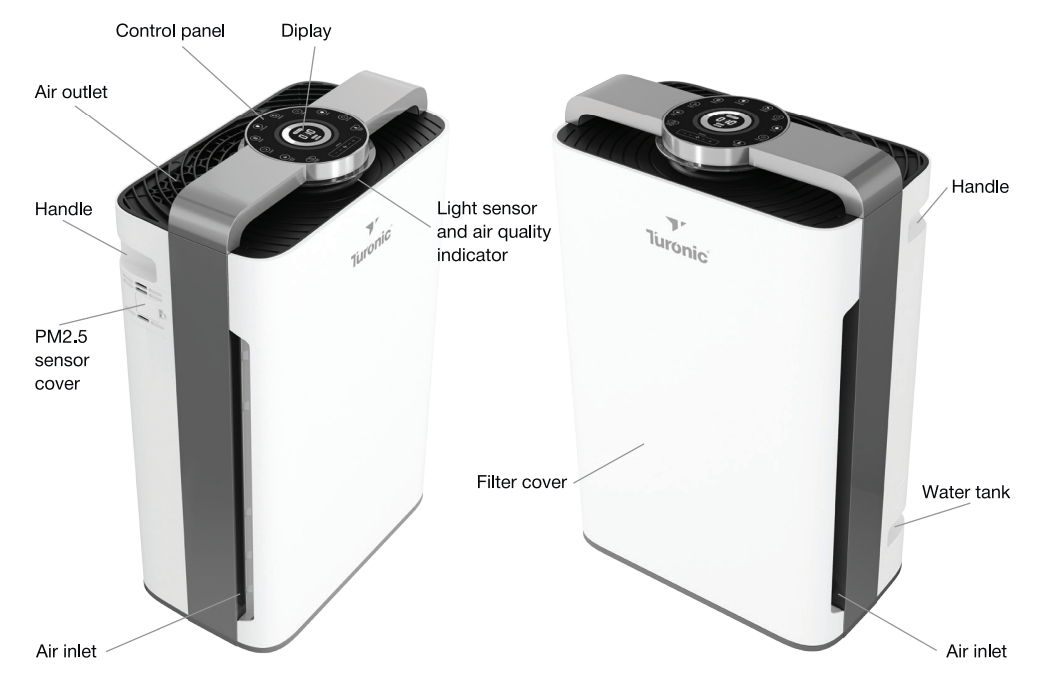
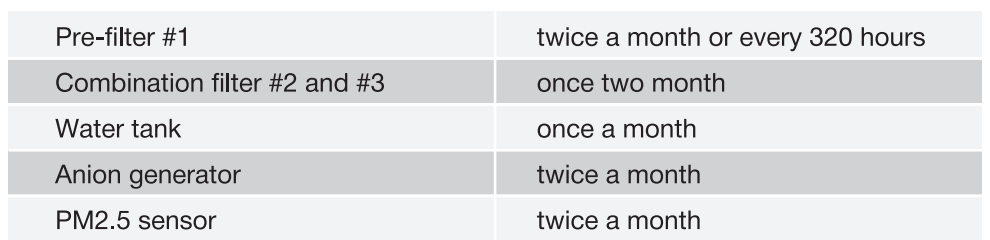
There are several things that should be regularly cleaned: air inlets/outlet grill, filters + pre-filter, water tank, anion generator,r and PM2.5 sensor.
To clean the inlets/outlet grill:
- Shut down the unit and disconnect the power plug from a power source.
- Wipe the inlets and outlet grill with a slightly damp cloth or vacuum them.
To clean the filters:
- Shut down the unit and disconnect the power plug from a power source.
- Open the filter cover and carefully remove the pre-filter #1 .
- Clean the surface of the pre-filter with a vacuum cleaner or hand wash it with soapy water. Let it dry well.
- Take out the combination filter #2 (activated carbon + cold catalyst filter) and clean the front side (cold catalyst layer) using a vacuum cleaner.
- Place the combination filter #2 in a well-ventilated area. DO NOT wash the filter with water.
- Take out the combination filter #3 (antibacterial cotton + HEPA filter) and place it in a well-ventilated area. DO NOT wash the filter with water.
- Install the combination filter #3 and the combination filter #2 back into the purifier.
- Install the dried pre-filter #1.
- Close the filter cover and power on the purifier.
To clean the water tank:
- Remove the water tank from the side of the purifier.
- Remove the humidification filter and hand-wash it with water.
- Open the water tank by unclipping three clips on the sides.
- Wash the water tank with water. Make sure that the anti-bacterial ball capsule and water level indicator are in their places.
- Install the water tank lid back in its place.
- Put the water tank into the purifier.
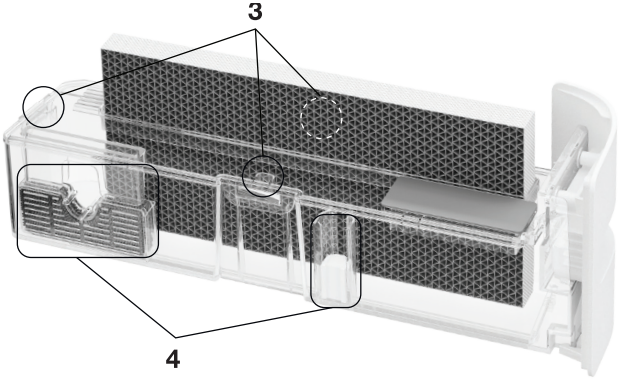
To clean the anion generator:
- Shut down the unit and disconnect the power plug from a power source.
- Using a #1 or #2 paint brush, clean the anion emission head through the outlet grill.
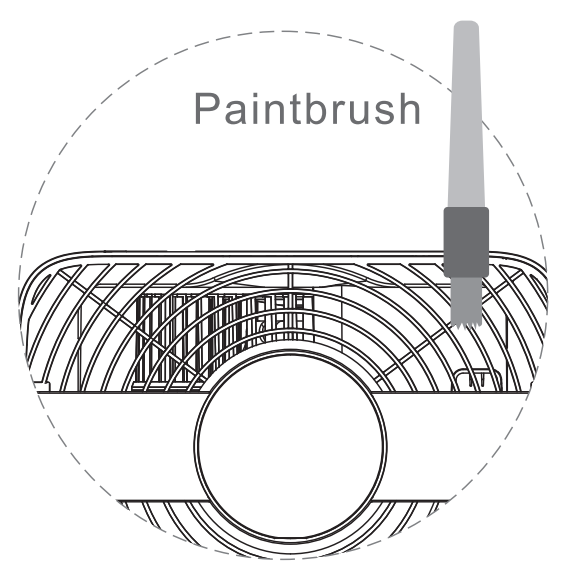
To clean the PM2.5 sensor:
- Shut down the unit and disconnect the power plug from a power source.
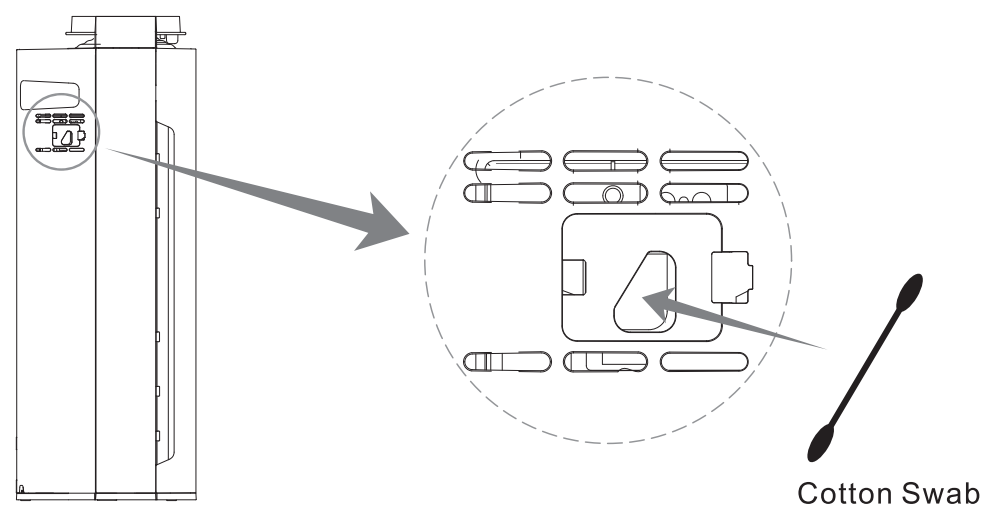
- Open carefully the sensor cover on the left side of the unit.
- Wipe the lens of the sensor and its surface by using a dry cotton swab.
- Close the sensor cover.
Cleaning intervals:
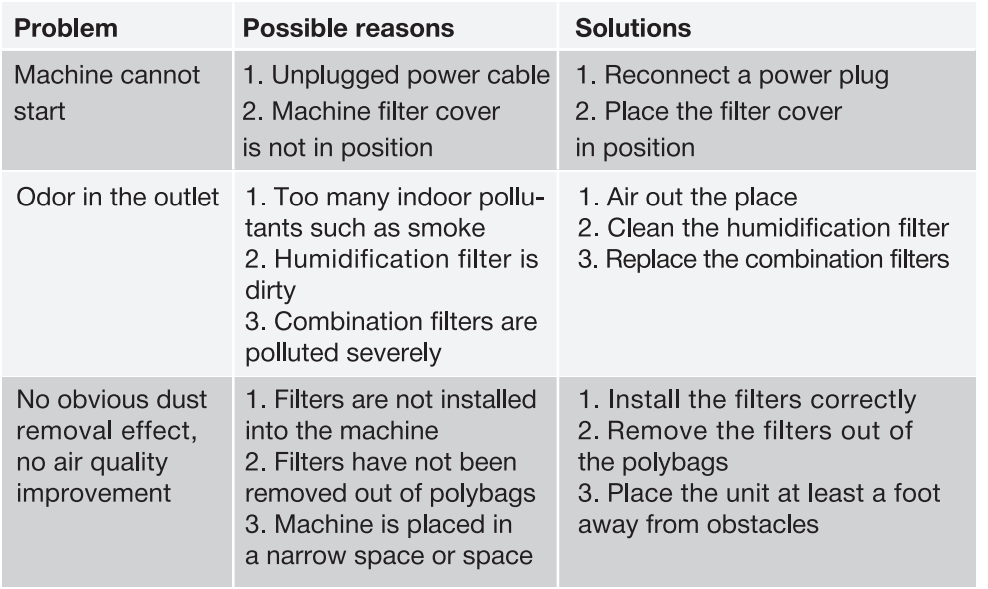
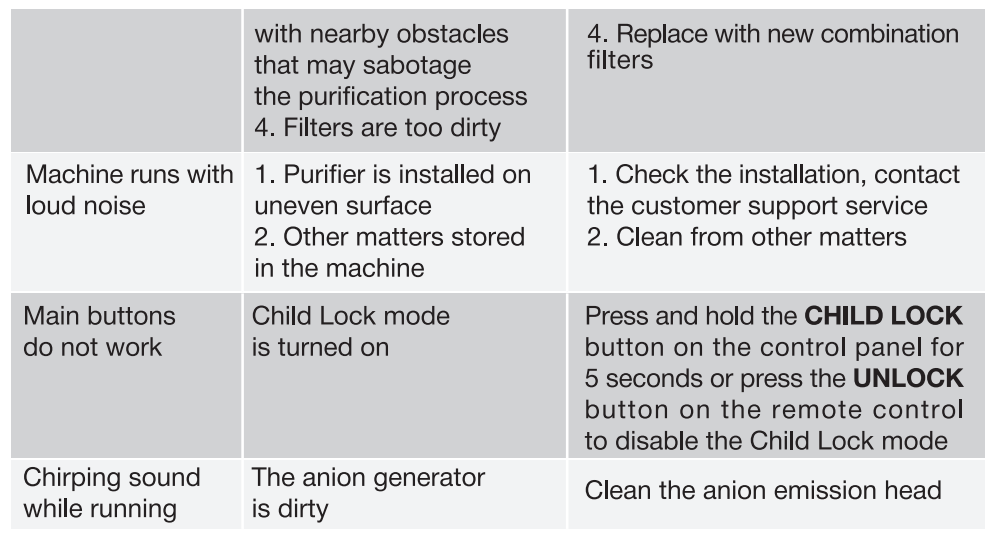
TROUBLESHOOTING
If the air purifier does not run smoothly, please check out the following guidelines.
Pros & Cons of the Turonic PH950 Air Purifier and Humidifier
Pros
- Advanced 8-stage filtration system with True HEPA 13, activated carbon, and cold catalyst for superior air cleaning.
- Built-in humidifier maintains comfortable humidity levels, ideal for dry climates and winter months.
- Smart home compatibility allows remote control via app and voice assistants.
- Whisper-quiet operation at 36 dB, perfect for bedrooms and light sleepers.
- Large coverage area cleans up to 4,200 sq ft in 2 hours.
- Real-time air quality display and filter health indicator for easy monitoring.
- Includes UV-A light and negative ionizer for enhanced air purification.
Cons: A relatively bulky design may not fit in smaller spaces.
- Wi-Fi setup can be tricky and requires a 2.4GHz network.
- Filters need regular replacement, adding to long-term costs.
- Some users report minor connectivity issues with the app.
- Not a medical device; does not treat or cure health conditions.
Overall, the Turonic PH950 Air Purifier and Humidifier offers exceptional value for its price, outperforming many competitors in both air purification and humidification capabilities.
Customer Reviews: Turonic PH950 Air Purifier and Humidifier
The Turonic PH950 Air Purifier and Humidifier has received overwhelmingly positive feedback, with an average rating of 4.9 stars from over 40 verified reviews. Customers praise its powerful filtration, quiet operation, and smart features. Many pet owners highlight its effectiveness in reducing pet dander and odors, while allergy sufferers appreciate the noticeable improvement in air quality. The humidifier function is frequently mentioned as a welcome addition, especially during dry seasons.
Common complaints include the device’s size and occasional Wi-Fi connectivity issues. However, most users find these minor compared to the overall benefits. Testimonials often mention the ease of use, reliable performance, and excellent customer support. The Turonic PH950 Air Purifier and Humidifier is highly recommended for those seeking a reliable, feature-rich air purifier and humidifier combo.
Faqs
How do I set up the turonic PH950 Air Purifier and Humidifier for the first time?
What can I do if the turonic PH950 Air Purifier and Humidifier is not connecting to Wi-Fi?
What are the key features of the turonic PH950 Air Purifier and Humidifier that improve indoor air quality?
How often should I clean and replace filters in the turonic PH950 Air Purifier and Humidifier?
Can the turonic PH950 Air Purifier and Humidifier effectively cover large rooms or open spaces?
Why is my turonic PH950 Air Purifier and Humidifier making noise, and how can I reduce it?
How does the humidifier function work on the turonic PH950 Air Purifier and Humidifier, and what maintenance does it require?
Is the turonic PH950 Air Purifier and Humidifier compatible with smart home systems and mobile devices?
Leave a Comment