
Setup: Turtlebeach Elite 800X Headset User Manual
Content
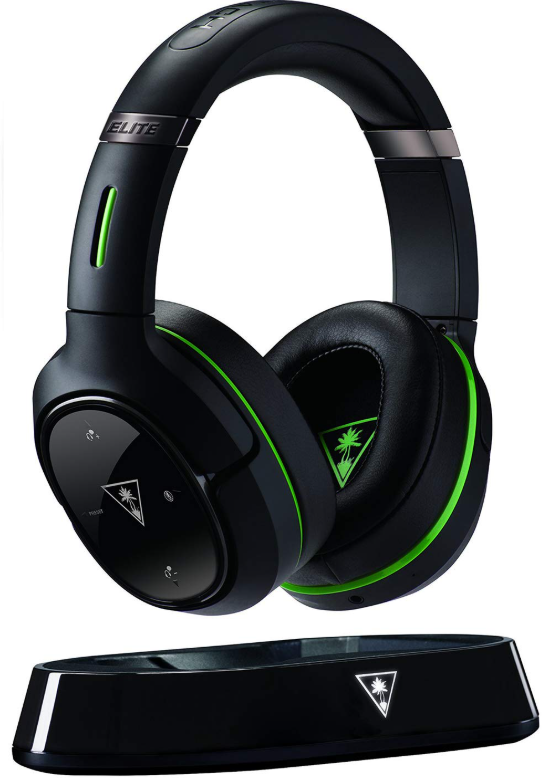
Turtle Beach Elite 800X Headset
Introduction
The Turtle Beach Elite 800X Headset is a premium, fully wireless gaming headset designed specifically for Xbox One users, blending cutting-edge audio technology with comfort and seamless connectivity. Featuring DTS Headphone X 7.1 surround sound, the Elite 800X delivers an immersive audio experience that enhances gaming, music, and movie enjoyment. With its proprietary Superhuman Hearing audio mode, players gain a tactical advantage by amplifying distant and subtle sounds such as enemy footsteps and weapon reloads, providing unmatched situational awareness in competitive games.
Designed with active noise-cancelling technology, this headset minimizes external distractions whether gaming at home or on the go, making it equally suitable for mobile devices via Bluetooth. The Elite 800X's ergonomic over-ear design includes memory foam cushions covered in synthetic leather for long-lasting comfort during extended sessions. Independent volume controls for both game audio and chat, dual noise-cancelling hidden microphones, and mic monitoring further enhance usability and communication clarity.
Targeted at serious Xbox One gamers and multimedia enthusiasts looking for premium sound quality and wireless freedom, the Elite 800X suits a variety of use cases,, including competitive gaming, streaming, and casual entertainment. It is typically priced in the premium headset range, around $250-$300 USD, and is widely available through major electronics retailers and online stores.
Specifications
HEADSET
- Speakers: 50 mm with Neodymium Magnets
- Frequency Response: 20 Hz – 20 kHz
- Earcup Design: Around-Ear (Closed)
- Microphone Design: Dual Hidden Noise-Cancelling Microphones Bluetooth: Bluetooth Radio with Dual-Pairing Mode and A2DP Compatibility Battery: Rechargeable Lithium Polymer
TRANSMITTER
- Game Input: Digital Optical (Toslink) with Digital Optical Pass-through Chat/Mic Input/Output: USB
- Surround Sound Processing: DTS Headphone X 7.1
- Wireless Connection: RF with Intelligent Channel Hopping
- Wireless Range: Up to 30 ft. (9 m)
- Power: USB
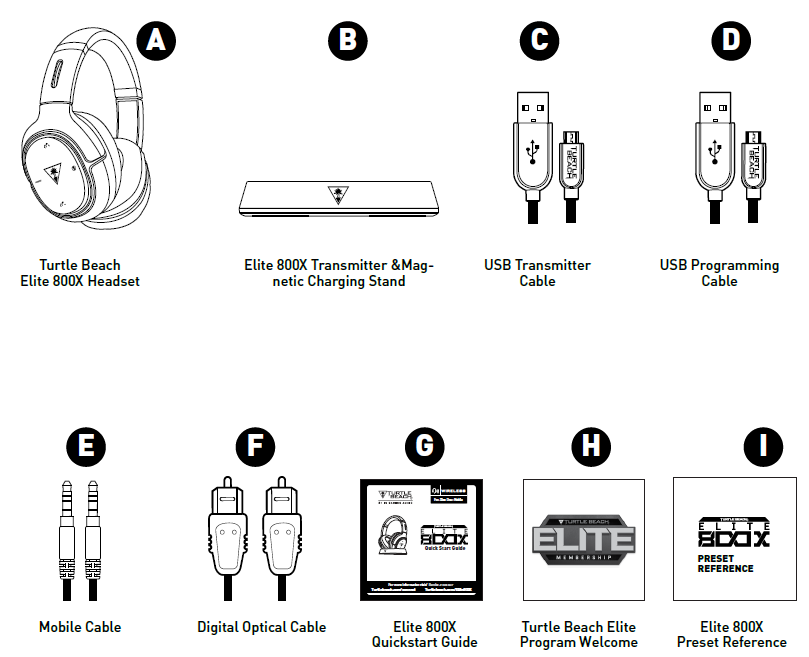
Package Contents
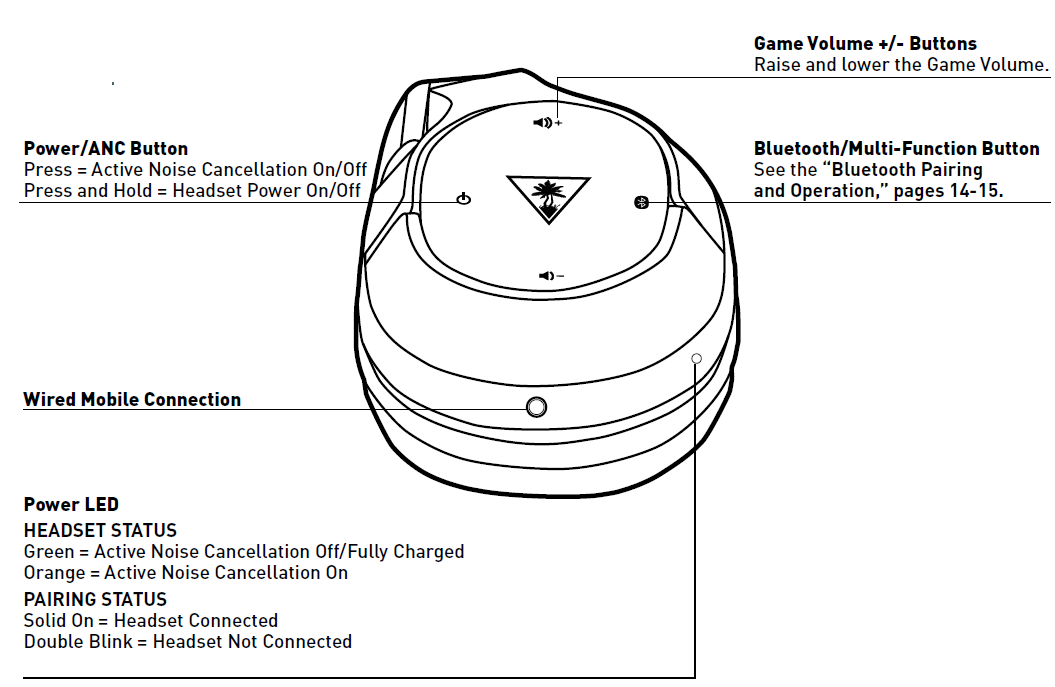
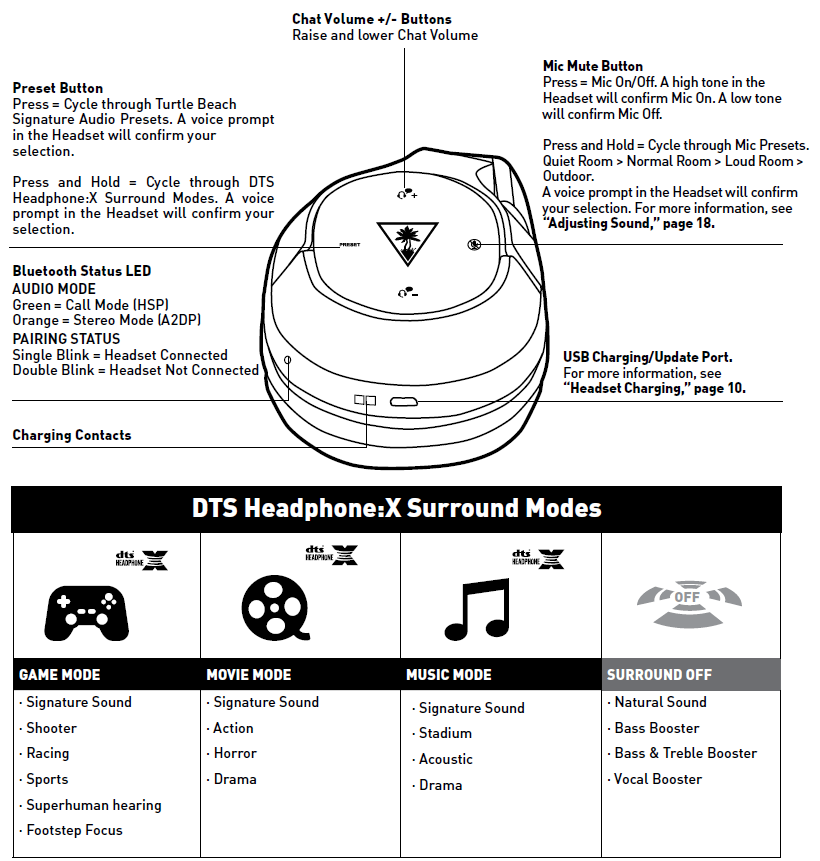
Parts and controls
Headset Controls: Left Earcup
Headset Controls: Right Earcup
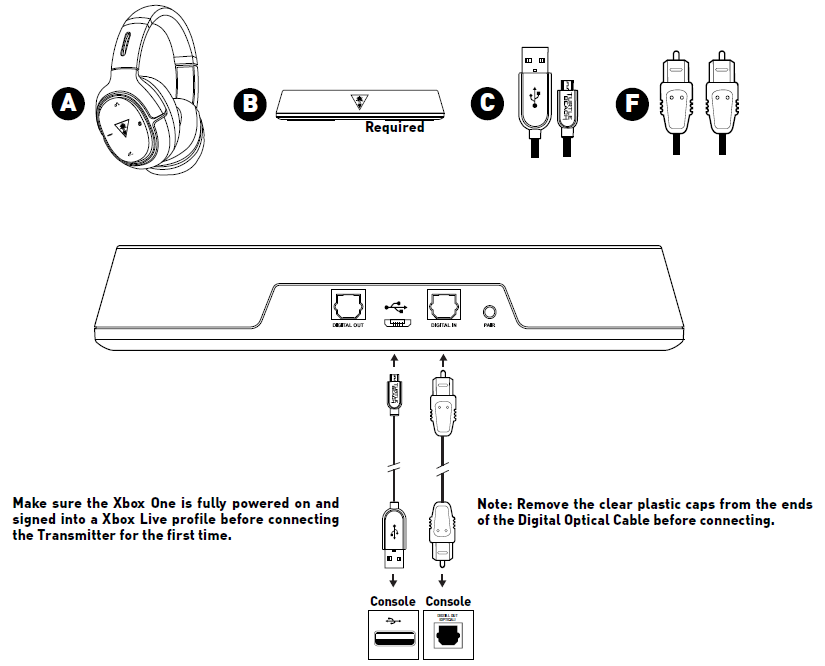
Xbox One Setup
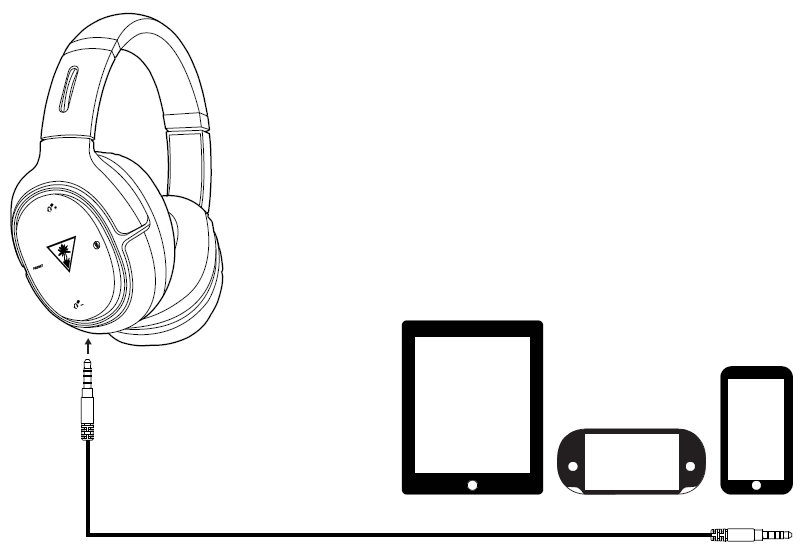
Wired Setup
The Turtle Beach Elite 800X is equipped to take advantage of game audio, music, and video soundtracks from portable devices, including laptops, tablets, mobile phones, and handheld gaming consoles, via the supplied Mobile Cable.
Connect one end of the Mobile Cable to the Mobile Connection on the left earcup of the Headset and the other end to the headphone jack of your mobile device.
NOTE: You can continue to enjoy stereo audio via wired connection, even when the Headset power is off. When the Headset power is on, you can also take advantage of the built-in microphones and Active Noise Cancellation.
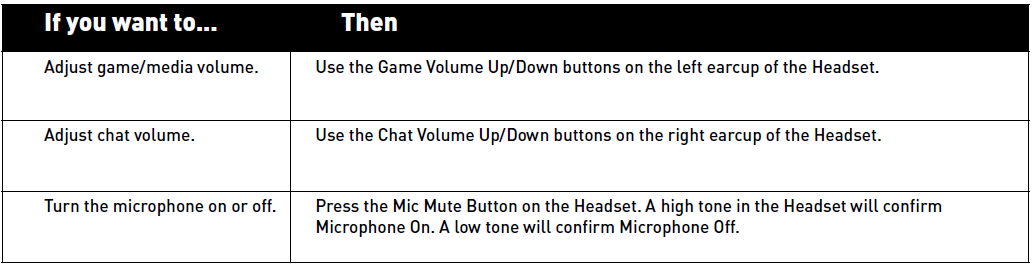
Adjusting the Sound
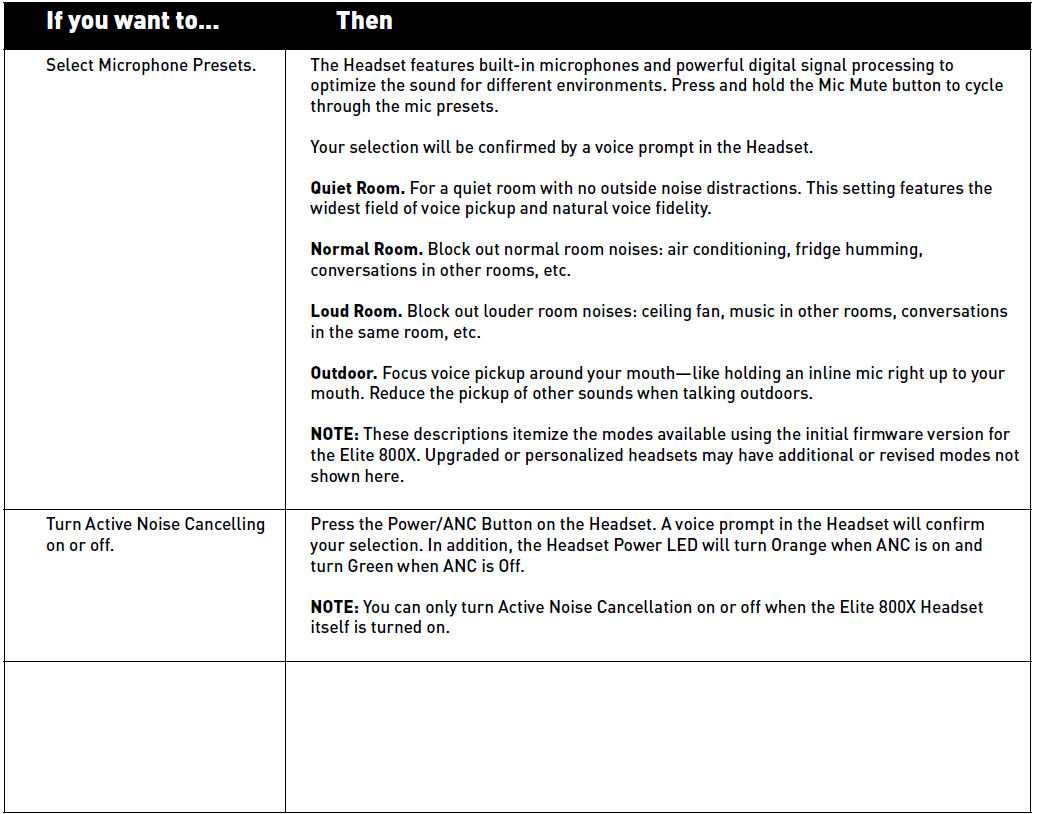
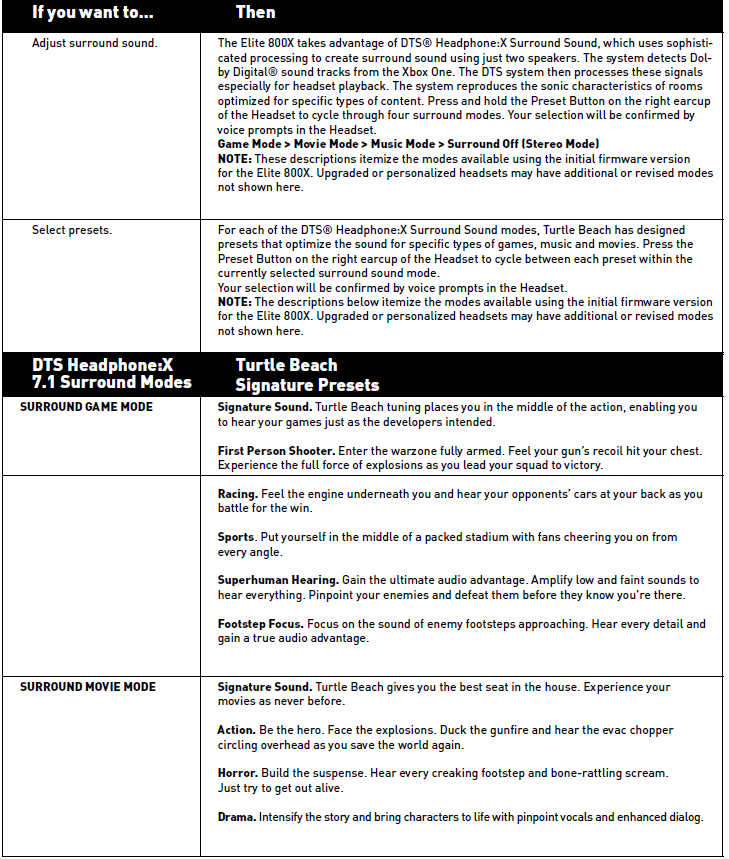
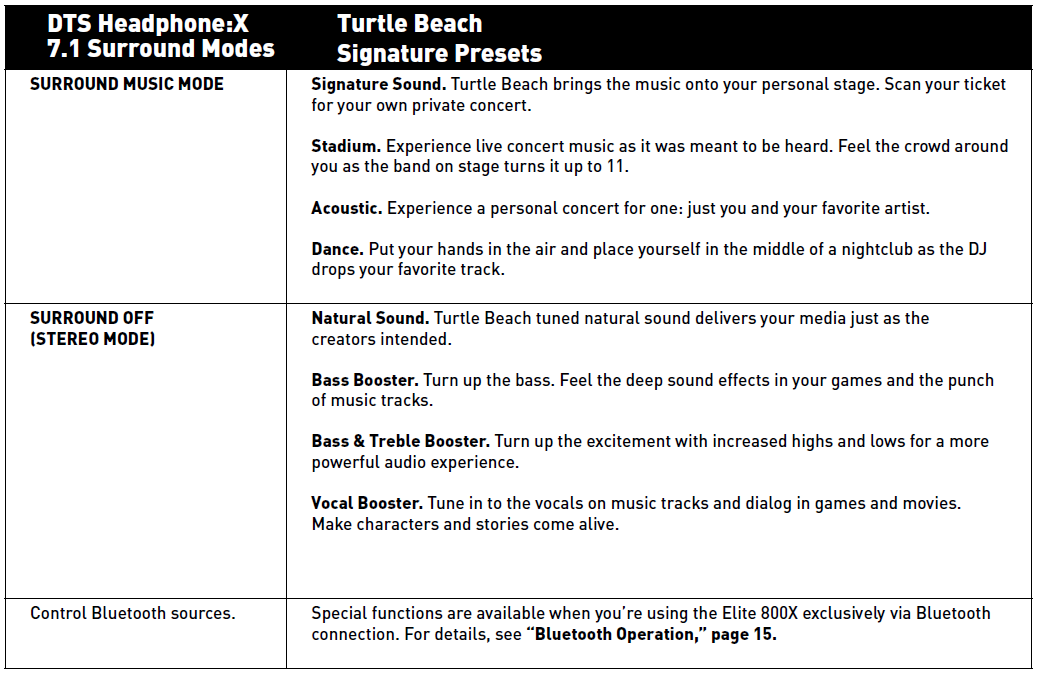
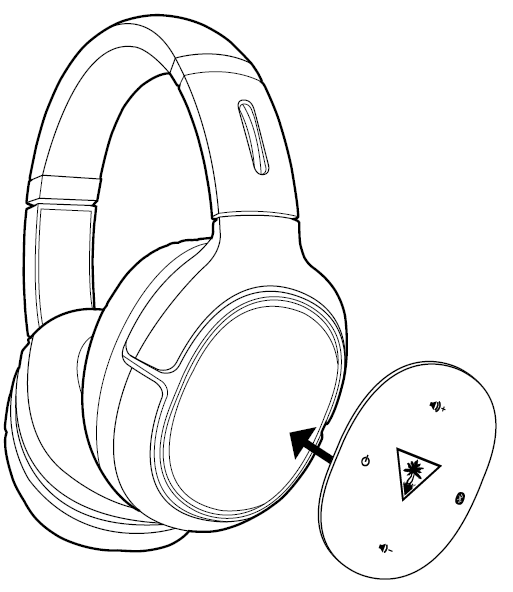
Replacing Rocker Plates
Important Safety Information
To avoid potential damage to the device, always disconnect all cables before transporting it.
WARNING: Permanent hearing damage can occur if a headset is used at high volumes for extended periods of time, so it is important to keep the volume at a safe level. Over time, your ears adapt to loud volume levels, so a level that may not cause initial discomfort can still damage your hearing. If you experience ringing in your ears after listening with the headset, it means the volume is set too loud.
The louder the volume is set, the less time it takes to affect your hearing. So, please take care to listen at moderate levels.
- Before placing a headset on your ears, turn the volume down completely, then slowly increase it to a comfortable level.
- Turn down the volume if you can’t hear people speaking near you.
- Avoid turning up the volume to block out noisy surroundings.
Troubleshooting Tips
No sound
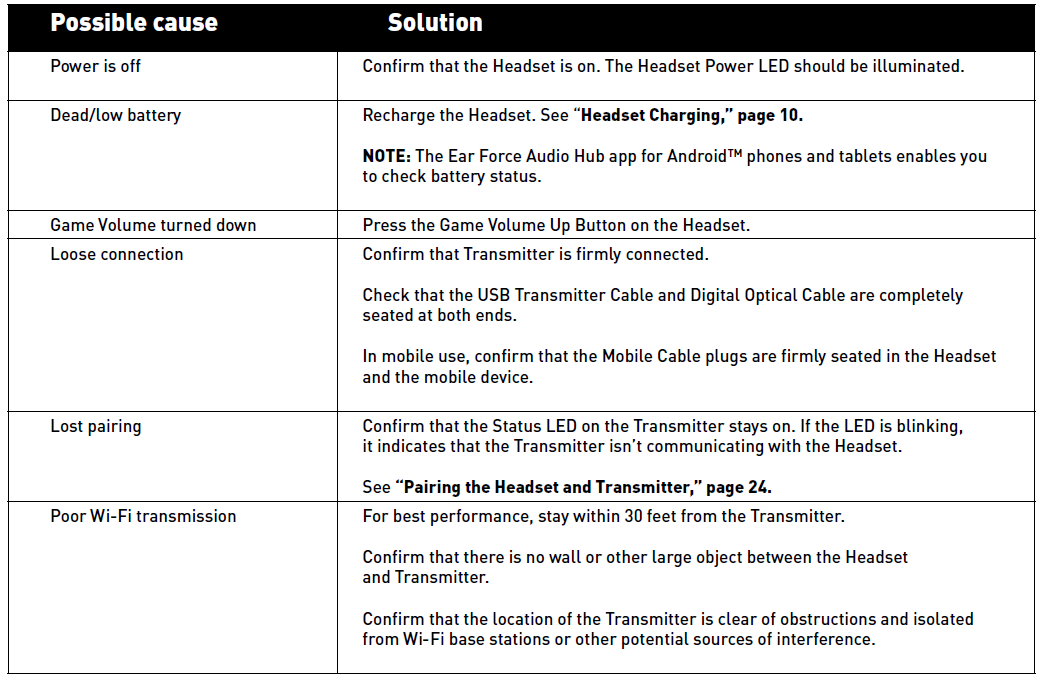
Audio Drops, Popping or Clicking Sounds

Voice Chat Drops
Most in-game voice chat drops are caused by network congestion or “lag.” They usually subside after a few moments,, so please be patient. In extreme cases, you may need to leave the game and return to reset the chat function.
If you use a wireless internet connection, low signal strength from your modem/router can cause the voice chat to malfunction. For best results, we recommend a wired connection from your modem/router to your Xbox One.
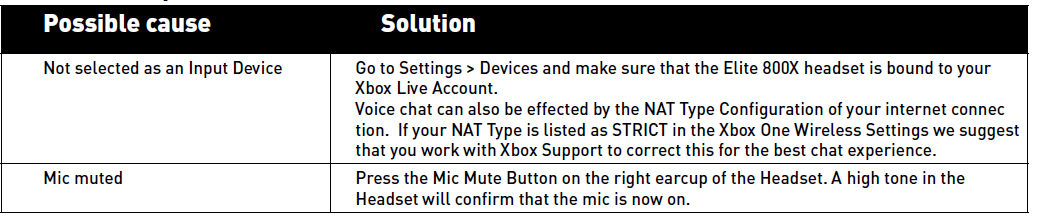
Voice Chat Drops
Bluetooth not working
Try using the Bluetooth pairing instructions (see “Bluetooth Pairing” on page 22) to pair your headset to a different Bluetooth-ready mobile phone than the one you usually use. With the headset paired to the phone, call a friend/relative.
Is the person you are calling able to hear you?
Are you able to hear the person you are calling? If you’re experiencing the same issue with two different phones, you will want to contact our support team via the link below.
If your issue is not resolved by these steps, please visit turtlebeach.com/support
LIMITED ONE-YEAR WARRANTY FOR TURTLE BEACH PRODUCTS
Voyetra Turtle Beach, Inc. (“VTB”) warrants to the original end-user purchaser (“Purchaser”) that the retail Turtle Beach hardware product herein (“Product”) will be free of defects in materials and workmanship for a period of one year from the date of purchase by the Purchaser (“Warranty Period”). Any Extended Warranty or Service Plans purchased through a Retail store are not honored by VTB. The Warranty refers to the repair/replacement of a defective product during this period and not a refund.
This limited warranty is extended only to the original Purchaser of a new product, which was not sold “AS IS”. It is not transferable or assignable to any subsequent purchaser. This limited warranty is applicable only in the country or territory where the Product was purchased from an authorized VTB retailer and does not apply to a Product that has been purchased as used or refurbished, or was included as part of a non-VTB product.
WARRANTY SERVICE:
In the USA and Canada, Warranty Service is provided by our Turtle Beach USA offices,, and in all other Countries,, it is provided by our local International Distributors when available. Refurbished/Recertified products are sold on an AS IS basis with a 90-day Warranty or less in accordance with each vendor’s policy.
VTB does not warrant uninterrupted or error-free operation of the Product and is under no obligation to support the Product for all computer operating systems or future versions of such operating systems.
If a defect should occur during the Warranty Period, Purchaser must contact VTB to obtain a Return Merchandise Authorization (“RMA”) number on the basis of the dated purchase receipt. Purchaser will be responsible for shipping costs incurred in returning the defective Product to an authorized VTB service center, or to the repair facility located at VTB’s corporate headquarters. VTB will not be responsible for other products or accessories included with the defective Product sent to VTB. The RMA number must be clearly indicated on the outside of the package. Packages without an RMA number will be refused by VTB or its representatives and returned to the sender at the sender’s expense.
In the event of a defect, Purchaser’s sole and exclusive remedy, and VTB’s sole liability, is expressly limited to the correction of the defect by adjustment, repair, or replacement of the Product at VTB’s sole option and expense. VTB owns all Products it has replaced and all parts removed from repaired Products. VTB uses new and reconditioned parts made by various manufacturers in performing warranty repairs and building replacement products. If VTB repairs or replaces a product, the original Warranty Period is not extended; however, VTB warrants that repaired or replacement parts will be free from defects in material and workmanship for a period of thirty (30) days from the date of repair or replacement, or for the remainder of the Warranty Period, whichever is greater.
This warranty does not apply to any Product that has had its serial number altered, removed or defaced, or any Product damage caused by shipping, improper storage, accident, problems with electrical power, abuse, misuse, neglect, ordinary wear, acts of God (e.g. flood), failure to follow directions, improper maintenance, use not in accordance with product instructions, unauthorized modification or service of the Product or damage resulting from the use of the Product with hardware, software or other products not provided by or specifically recommended by VTB.
NOTES:
- Replacement Parts and accessories that are subject to “wear and tear”,, such as earpads, mic foam covers, talkback cables, etc., have a three (3) month Warranty.
- Replacement Parts for Discontinued Products are sold on an AS IS basis; they are not supported and come with a 30-day Warranty.
EXCLUSIONS FROM LIMITED WARRANTY:
This Limited Warranty shall not apply, and VTB has no liability under this Limited Warranty if the Turtle Beach Product:
- is used for commercial purposes such as “LAN, Call Centers” (including rental or lease);
- is modified or tampered with;
- is damaged by Acts of God, power surge, misuse, abuse, negligence, accident, wear and tear, mishandling, misapplication, or other causes unrelated to defective materials or workmanship;
- serial number is defaced, altered, or removed;
- is not used in accordance with the documentation and use instructions; or
- is repaired, modified,,d or altered by other than an authorized repair centers.
- It is no longer available because it was discarded.
Pros & Cons of the Turtle Beach Elite 800X Wireless Gaming Headset
Pros
- Fully Wireless Convenience: No cables from console or controller, providing freedom of movement up to 30 feet.
- Advanced Audio Features: DTS Headphone: ne: X 7.1 surround sound with multiple presets, including Signature Sound, Shooter, Racing, and Superhuman Hearing, enhances immersion and competitive edge.
- Active Noise-Cancelling (ANC): Effectively reduces ambient noise for focused gameplay and media consumption.
- Comfortable Design: Memory foam ear cushions with synthetic leather ensure comfort during long play sessions.
- Versatile Connectivity: Supports Xbox One wireless, Bluetooth for mobile devices, and a 3.5mm wired connection for broader device compatibility.
Cons
- Price Point: Positioned in the higher price bracket, which may not represent the best value-for-money for casual gamers compared to alternatives like the Astro A50.
- Complex Sound Preset Navigation: The 18 sound presets, while comprehensive, can be overwhelming and require multiple button presses to toggle, which some users find cumbersome.
- Battery Life: Up to 10 hours per charge, which is decent but may require frequent recharging for marathon gaming sessions.
- Limited Warranty: Manufacturer's warranty covers only 90 days for parts and labor, shorter than some competitor offerings.
Customer Reviews of the Turtle Beach Elite 800X Headset
Users of the Turtle Beach Elite 800X Headset frequently praise its excellent wireless freedom and immersive surround sound capabilities, often highlighting the Superhuman Hearing mode for providing a competitive advantage in games like Halo and Call of Duty. The comfort level receives positive remarks, especially the cushioned ear cups,, suitable for long play periods.
Common complaints include the complicated navigation of sound presets and relatively short battery life, which some feel interrupts longer gaming sessions. A few users also mention that the headset's premium price might not justify the incremental benefits over other wireless gaming headsets.
Overall, the headset averages around 4 out of 5 stars across major retailers, with many recommending it for Xbox One gamers seeking high-end audio performance and reliable wireless connectivity. Frequent suggestions encourage new buyers to familiarize themselves with the extensive preset options to maximize the headset's utility.
Faqs
How do I set up my turtlebeach Elite 800X Headset with Xbox One for the first time?
What should I do if my turtlebeach Elite 800X Headset is not pairing with the Xbox One?
Can I use the turtlebeach Elite 800X Headset with mobile devices via Bluetooth or wired connection?
What are the main features of the turtlebeach Elite 800X Headset that enhance gaming audio?
How can I optimize the audio performance of my turtlebeach Elite 800X Headset on Xbox One?
What common problems might cause sound issues with the turtlebeach Elite 800X Headset, and how can I fix them?
How do I properly maintain and care for my turtlebeach Elite 800X Headset to ensure longevity?
Is the turtlebeach Elite 800X Headset compatible with devices other than Xbox One?
Tags
More turtlebeach manuals
Leave a Comment