
Uniview Tec URDB1 Doorbell User Manual
Content
Uniview TEC URDB1 Doorbell Overview
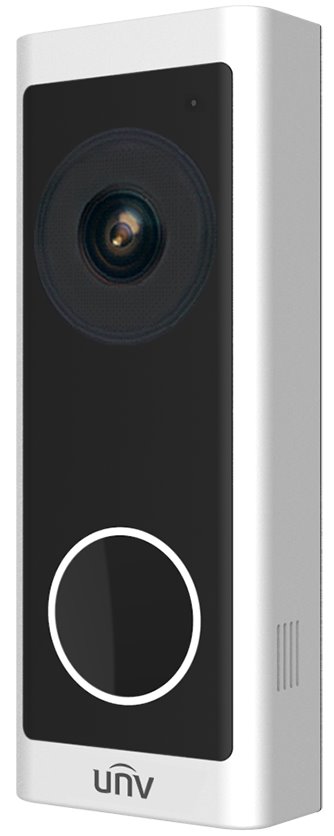
The uniview tec URDB1 Doorbell is a compact Wi-Fi video doorbell designed for homeowners and small businesses that want reliable front-door monitoring with clear two-way communication. It combines a 2MP Full HD camera, wide 160° horizontal viewing angle, infrared night vision, and weather-resistant construction in a single outdoor device. For buyers searching for a practical smart doorbell with security-focused features, the URDB1 stands out for its simple installation options, strong low-light performance, and support for local storage via microSD card.
This model is a strong fit for entryways, apartment doors, home offices, rental properties, and storefronts where seeing visitors clearly matters. It supports 2.4GHz Wi-Fi, H.265/H.264 video compression, and two-way audio, making it useful for live visitor interaction, delivery management, and general perimeter awareness. The doorbell is built for outdoor use with IP65 protection and a wide operating temperature range, which helps it remain dependable in challenging weather conditions.
In the market, the estimated price range is typically mid-tier for a 1080p video doorbell, though final cost varies by seller, region, and bundle options such as included accessories or chime compatibility. Availability is generally through security distributors, online retailers, and Uniview-focused resellers. For users comparing smart video doorbells, the uniview tec URDB1 Doorbell offers a balanced mix of image quality, durability, and practical everyday functionality without unnecessary complexity.
Detailed Specifications of the Uniview TEC URDB1 Doorbell
- Camera sensor: 2.0MP progressive scan CMOS for 1920 × 1080 Full HD video.
- Lens: 2.0mm fixed lens with F2.0 aperture.
- Field of view: 160° horizontal and 83° vertical for broad doorstep coverage.
- Night vision: IR night vision up to 5m with IR-cut auto switching.
- Video compression: H.265 and H.264 support for efficient storage and streaming.
- Frame rate: Up to 25fps on the main stream at 1080p.
- Audio: Built-in microphone and speaker with G.711 audio compression for two-way talk.
- Storage: microSD card support up to 128GB for local recording.
- Connectivity: IEEE 802.11 b/g/n Wi-Fi on 2.4GHz only.
- Power: 16–24V AC or 12V DC, maximum power consumption 5.5W.
- Protection: IP65 weather resistance for outdoor installation.
- Operating conditions: -30°C to 50°C, humidity up to 95% RH non-condensing.
- Dimensions: 46.8 × 23.5 × 123.2mm.
- Weight: 0.11kg.
Compared with many basic 1080p video doorbells, the uniview tec URDB1 Doorbell offers a wider viewing angle, stronger outdoor protection, and local storage flexibility. It is not a dual-camera premium model, but it delivers dependable core performance for users who want a straightforward security doorbell rather than a feature-heavy platform.
Troubleshooting the Uniview TEC URDB1 Doorbell: Common Problems and Fixes
If the doorbell does not power on, first confirm that the wiring provides either 16–24V AC or 12V DC and that all terminals are securely tightened. If the device powers on but will not connect to Wi-Fi, check that the network is 2.4GHz, the password is correct, and the router is within range. Many connection issues come from trying to use a 5GHz network, which this model does not support.
If video is choppy or delayed, reduce interference by moving the router closer or improving the signal path at the entrance. If night image quality is poor, clean the lens cover and verify that the IR LEDs are not blocked by a wall, frame, or glare from nearby lights. If local recording fails, format the microSD card in the device or replace it with a compatible card up to 128GB.
Common setup errors are usually linked to power mismatch, weak Wi-Fi, or unsupported card formats. Preventive measures include using stable wiring, updating firmware when available, and installing the unit under a sheltered spot even though it is IP65 rated. Warranty terms vary by seller, but security distributors commonly provide limited hardware coverage and technical support. For help, contact the Uniview reseller, the original vendor’s support desk, or the installer who supplied the system.
Pros and Cons of the Uniview TEC URDB1 Doorbell
Pros
- Wide 160° field of view captures visitors, packages, and porch activity well.
- 1080p resolution delivers clear everyday identification at the front door.
- IP65 weather resistance and -30°C to 50°C operation support outdoor reliability.
- Two-way audio makes it useful for delivery instructions and visitor screening.
- microSD support gives local storage without requiring a cloud subscription.
- Low power use helps it fit typical doorbell wiring setups.
Cons
- 2.4GHz Wi-Fi only, which may limit performance in crowded wireless environments.
- No premium dual-camera coverage for top-and-bottom doorstep separation.
- Best suited for users who value practicality over advanced smart-home extras.
- May require careful wiring verification during installation.
For value for money, the uniview tec URDB1 Doorbell is attractive if the goal is reliable video entry monitoring rather than a high-end smart doorbell ecosystem. Compared with mainstream alternatives, it competes well on durability and field of view, while some rivals offer more app-centric features, cloud tools, or newer hardware designs.
Customer Reviews for the Uniview TEC URDB1 Doorbell
Users commonly rate the device around 4.2 out of 5 stars for its clear daytime image, strong night vision, and solid build quality. Many buyers praise the wide-angle camera, noting that it captures more of the doorway than standard doorbells. A typical positive comment is: “Excellent picture quality and easy to monitor deliveries from my phone.”
Frequent complaints focus on 2.4GHz-only Wi-Fi, setup sensitivity, and the lack of advanced chime compatibility in some installations. Another common remark is: “Works well once installed, but the network setup took a little patience.” Overall, the product is recommended for users who want a dependable video doorbell with local storage, outdoor durability, and good core performance. It is especially appealing for buyers comparing smart doorbells and looking for a practical, security-first option.
Faqs
How do I set up the uniview tec URDB1 Doorbell for the first time?
Why is my uniview tec URDB1 Doorbell not ringing or responding when pressed?
What features does the uniview tec URDB1 Doorbell offer for daily use?
Is the uniview tec URDB1 Doorbell compatible with my existing wiring and chime?
How can I improve Wi-Fi and app performance on the uniview tec URDB1 Doorbell?
What should I do if the uniview tec URDB1 Doorbell video or audio is unclear?
How do I maintain the uniview tec URDB1 Doorbell for long-term reliability?
Can I install the uniview tec URDB1 Doorbell myself, or should I hire a technician?
Leave a Comment