
Veiik Battert Free Graphic Pen Tablet A15Pro User Manual
Content
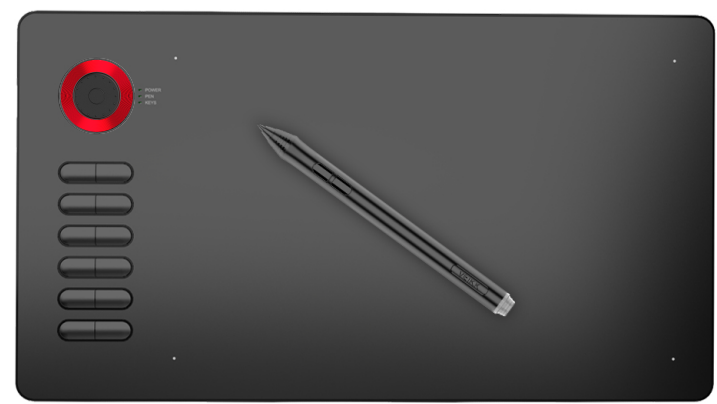
Veiik Battery Free Graphic Pen Tablet A15Pro
Introduction
The Veiik Battery Free Graphic Pen Tablet A15Pro is a cutting-edge digital drawing tool designed for artists, designers, and creatives. This tablet stands out for its battery-free pen, eliminating the need for constant recharging or battery replacements. The A15Pro is intended for use with computers and laptops, making it an ideal choice for graphic design, digital painting, and other creative tasks.
The estimated price of the Veiik Battery Free Graphic Pen Tablet A15Pro is around $100-$150, making it a competitive option in the market. As of the latest updates, the product is available for purchase and has been well-received by the creative community.
The A15Pro offers a large drawing area, high sensitivity, and precise control, making it suitable for both beginners and professional artists. With its ergonomic design and user-friendly interface, this tablet is set to enhance your creative workflow significantly.
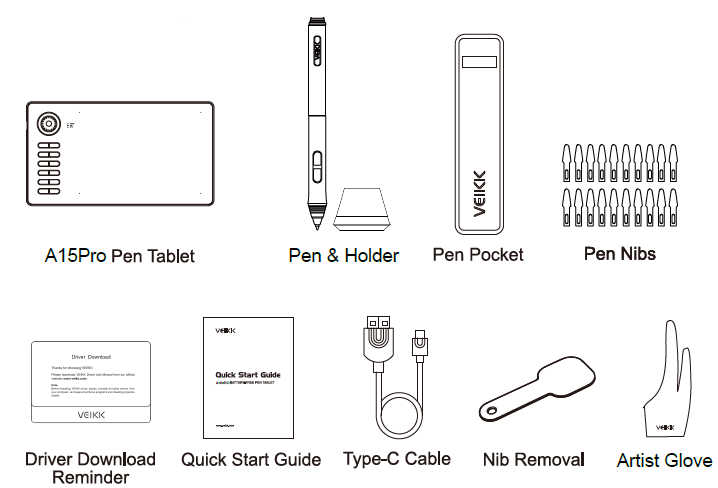
Packing List
Product Overview
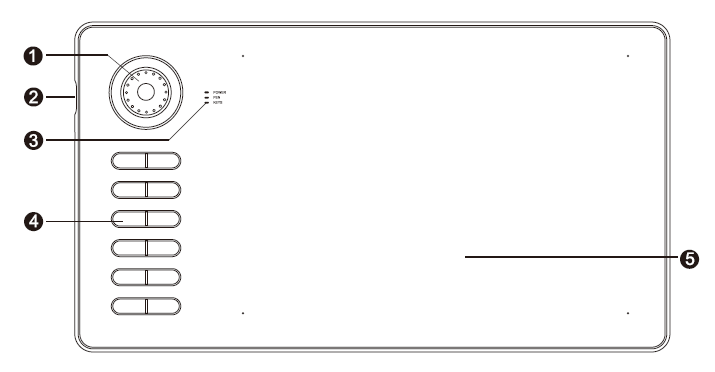
- Quick Dial
- Type-C Port
- Led Indicator
- Hotkeys
- Active Area
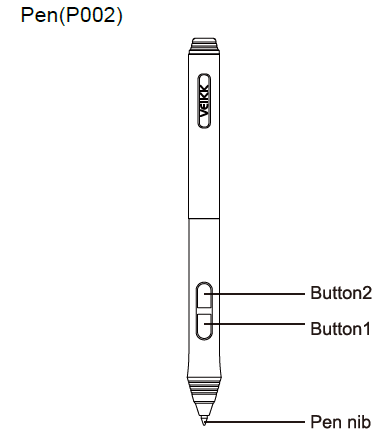
Pen(P002)
Specifications
- Model: A15 Pro
- Dimension: 358mm x 200mm x 9mm
- Working Area: 10 x 6 inch
- Pressure Sensitivity: 8192 levels
- Report Rate: 250 PPS
- Resolution: 5080 LPI
- Reading Height: 10 mm
- Interface: Type-C
- Keys: 12 Hotkeys + Quick Dial
Safety Precautions
- Do not use this product in a control system that requires a high degree of safety and reliability.
- In such a system, this product may negatively affect other electronic devices and malfunction due to the effect of those devices.
- Turn the power off in the areas where electronic devices are prohibited.
- On board an aircraft or in any other location where electronic devices are prohibited, please unplug the USB connector from the tablet to turn it off.
- Keep out of reach of children to avoid danger.
- Make sure that a child does not put the pen or the pen in his/her mouth.
- The pen tip or side switch cover could be detached and be accidentally swallowed.
- Do not place this product on an unstable surface.
- Placing this product on an unstable or tilted surface or in a location exposed to excessive vibrations could cause it to fall off, which may damage the product.
- Do not place heavy objects on top of this product.
- Do not step on or place heavy objects on this product, as this could damage it.
- Avoid high or low-temperature locations for storage.
- Do not store this product in a location where the temperature drops below 5℃ or goes above 40℃ and in locations subject to excessive temperature fluctuations, to avoid damage to the product.
- Do not disassemble.
- Do not disassemble or modify this product as this could expose you to heat, fire, electric shock,, and injury. Disassembling the product will also void your warranty.
- Do not use alcohol for cleaning.
- Never use alcohol, thinner, benzene, or other mineral solve,,nts as they could discolor or cause deterioration to the product.
- Do not expose to water.
- Do not place glasses or vases filled with water or other liquids near this product. Exposure to water or liquid could damage the product.
- Do not place metal objects on this product during operation.
- Placing metal objects on this product during operation could cause it to malfunction or damage it.
- Do not strike the pen against hard objects.
- Striking the pen against a hard object could damage it.
- Do not handle the pen with soiled hands.
- The pen is a high-precision instrument. Handling it with soiled hands or using it in locations exposed to dust or strong odors may cause the entry of foreign matter,, which will result in breakdown.
Installing Driver
OS Support
Windows 10/8/7(32/64 bits) Mac OS 10.12 or later
Installation
- Before installing the tablet driver, please uninstall all tablet drivers from your computer that you installed before, and keep all antivirus programs and drawing programs closed.
- Connect the tablet to your computer before installation (Please refer to 4. Tablet Connection).
- Please download the updated driver from www.veikk.com.
- Click Set up.exe and follow the onscreen instructions.
- After installation then restart your computer.
Tablet Connection
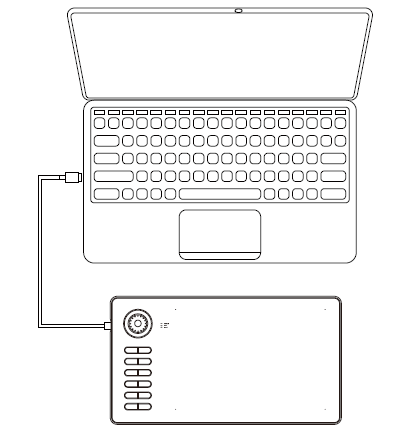
- Take out the A15 Pro from the pack and age, connect the tablet to your computer with the USB cable.
- Open the driver interface; the upper left corner shows the product model(just like “A15 Pro”), indicating that the tablet has been successfully mounted to the driver. You can start using your tablet now.
Replacing the Nibs
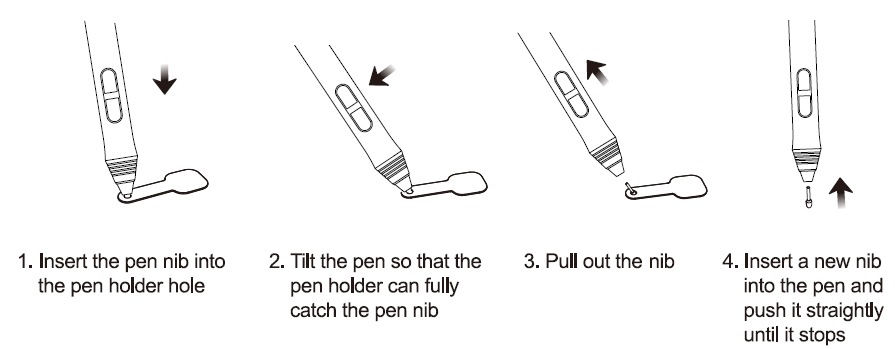
When the pen nib is heavily worn, please replace the nib with the nib removal.
Troubleshooting
If you encounter any issues with your Veiik Battery Free Graphic Pen Tablet A15Pro, here are some common solutions:
- Pen Not Recognized: Ensure the pen is correctly aligned with the tablet and that the drivers are up-to-date.
- Connection Issues: Check the USB connection and try using a different port if necessary.
- Calibration Problems: Re-calibrate the tablet following the on-screen instructions.
Always refer to the user manual for detailed troubleshooting steps and follow safety instructions to avoid any damage to the device.
Pros & Cons
Pros:
- Battery-Free Pen: No need for recharging or battery replacements.
- High Sensitivity: Supports up to 8192 levels of pen pressure.
- Large Drawing Area: Spacious 10 x 6.25-inch surface.
- Multi-Platform Compatibility: Works with Windows, macOS, and Linux.
- Ergonomic Design: Comfortable and durable construction.
Cons:
- Initial Calibration Required: May take some time to set up correctly.
- Dependent on Software: Performance can vary based on the software used.
- No Touchscreen Functionality: Limited to pen input only.
Customer Reviews
Customers have praised the Veiik Battery Free Graphic Pen Tablet A15Pro for its precision and comfort. Many have noted the convenience of the battery-free pen, which eliminates downtime and ensures an uninterrupted creative workflow. However, some users have reported initial calibration issues and varying performance depending on the software used.
Most Common Complaints
- Some users have experienced difficulties during the initial calibration process.
- A few customers have reported that the tablet's performance can be affected by the software they use.
Faqs
What is the drawing area of the Veiik Battery Free Graphic Pen Tablet A15Pro?
Does the pen require batteries or charging?
What operating systems is the Veiik Battery Free Graphic Pen Tablet A15Pro compatible with?
How do I set up the Veiik Battery Free Graphic Pen Tablet A15Pro?
Why is my pen not recognized by the tablet?
Can I use the Veiik Battery Free Graphic Pen Tablet A15Pro with any software?
Is the Veiik Battery Free Graphic Pen Tablet A15Pro ergonomic?
How sensitive is the pen of the Veiik Battery Free Graphic Pen Tablet A15Pro?
What if I encounter connection issues with my Veiik Battery Free Graphic Pen Tablet A15Pro?
Is there a warranty available for the Veiik Battery Free Graphic Pen Tablet A15Pro?
Tags
Leave a Comment