
Velofox Color IPS Display DM06 User Manual | Specs
Content
Velofox Color IPS Display DM06

Introduction
The Velofox Color IPS Display DM06 is a cutting-edge cycling computer designed to enhance your riding experience with its vibrant color IPS display and extensive range of features. This device is intended for serious cyclists who need detailed metrics and navigation during their rides. With an estimated launch date in early 2024, the Velofox DM06 is expected to hit the market with a competitive price point, likely around $200-$300, making it an attractive option for both professional and enthusiast cyclists.
The DM06 is built to provide real-time data such as speed, distance, heart rate, and GPS navigation, helping riders optimize their performance and stay on track. Its user-friendly interface and customizable screens ensure that cyclists can focus on their ride while having all the necessary information at their fingertips.
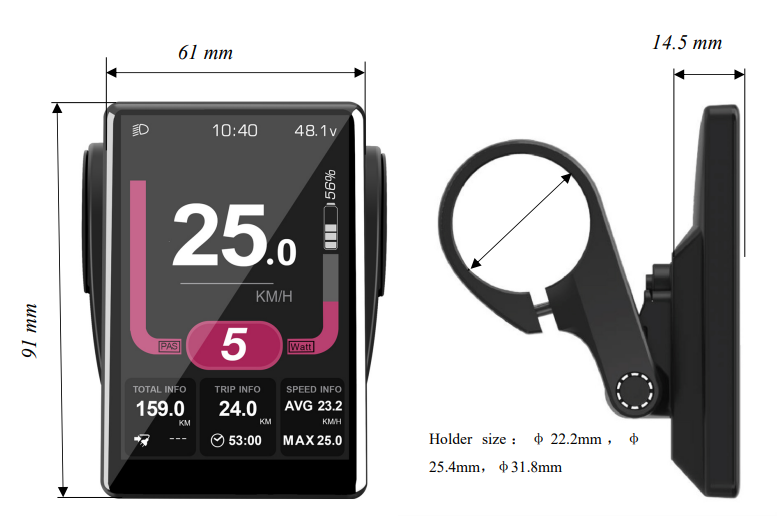
Specifications
- Power supply:DC 24V/36V/48V
- Rated current:42 mA
- Shutdown leakage current:<1uA
- Screen specification:3.5:3.5-inchch IPS LCD, resolution 320*480
- Communication method: UART/ CAN-BUS
- Operating temperature:-10°C ~ 60°C
- Storage temperature:-20°C ~ 70°C
- Waterproof level: IP65
Installation
- Display locking clip includes three handlebars, size A,, Φ31.8mm, Φ25.4mm, and Φ22, 2. Please include the requested locking clip size in the purchase order. Installing DM06 display: Adjust the display to a position easy to operate, using the M3*10 hex set to the screws and tighten. Tightening torque: 0.8N.m
Note: Damage caused by excessive torque is not covered by the warranty. - Place the remote button on the left side of the horizontal tube, using the M3*10 hex set to the screws and tighten. For more remote button models, please refer tthe to the Velofox product catalogue.
- Connect the t5-pinn plug to the docking plug of the controller
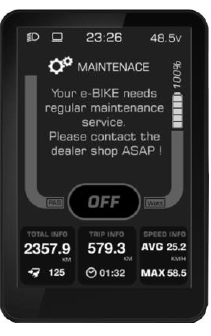
Maintenance reminder interface
The display can be set with regular maintenance reminders, and when it reaches the set mileage value, the display will notify the user through the maintenance reminders. After the maintenance reminder mileage is reached, the display will show a notification interface every time it is turned on to prompt the user to carry out daily vehicle maintenance. The notification interface can be cancelled by pressing the M button manually. After connecting to the service tool, ox the maintenance reminder can be reset through the after-sales diagnostic tool, and meanwhile, the maintenance record will be registered.
Setup Guide
To set up your Velofox DM06, follow these steps:
- Mount the device on your bike handlebars using the provided bracket.
- Turn on the device by pressing and holding the power button.
- Follow the on-screen instructions to complete the initial setup, including language selection and unit preferences.
- Pair your DM06 with your smartphone or cycling accessories via Bluetooth or ANT+.
- Download the Velofox app to sync your data and access additional features.
Troubleshooting
If you encounter any issues with your Velofox DM06, here are some common problems and solutions:
- Device Not Turning On: Ensure the battery is charged. Press and hold the power button for at least 10 seconds to force a restart.
- GPS Signal Weak: Move to an open area away from tall buildings or trees. Restart the device and wait for it to reacquire the GPS signal.
- Pairing Issues: Check that both devices are in pairing mode and restart the pairing process if necessary.
Always refer to the user manual for detailed troubleshooting steps and instructions.
Pros & Cons
Pros:
- High-resolution color IPS display for excellent visibility
- Multi-satellite system support for accurate navigation
- Customizable data screens to suit individual needs
- Long battery life of up to 24 hours in GPS mode
- Water-resistant design with IPX7 rating
Cons:
- Higher price point compared to some competitors
- Limited compatibility with certain third-party apps
- No built-in music storage or playback capabilities
Customer Reviews
Early adopters and reviewers have praised the Velofox DM06 for its vibrant display, accurate GPS tracking, and robust feature set. Some users have noted that the interface can take some time to get used to, but overall, the device has received positive feedback for its performance and durability. Common complaints include occasional lag in the user interface and the need for more comprehensive app support.
Faqs
What is the screen size of the Velofox DM06?
Does the Velofox DM06 support turn-by-turn navigation?
How long does the battery last on the Velofox DM06?
Is the Velofox DM06 water-resistant?
Can I customize the data screens on the Velofox DM06?
Does the Velofox DM06 support Strava Live Segments?
How do I pair my Velofox DM06 with my heart rate monitor?
What satellite systems does the Velofox DM06 support?
Does the Velofox DM06 have internal storage for maps and data?
Can I sync my data from the Velofox DM06 to my smartphone?
Leave a Comment