
Vigros Cat Ear Gaming Headphone B52 User Manual
Content
vigros Cat Ear Gaming Headphone B52: Full Product Manual and Buying Guide
Introduction
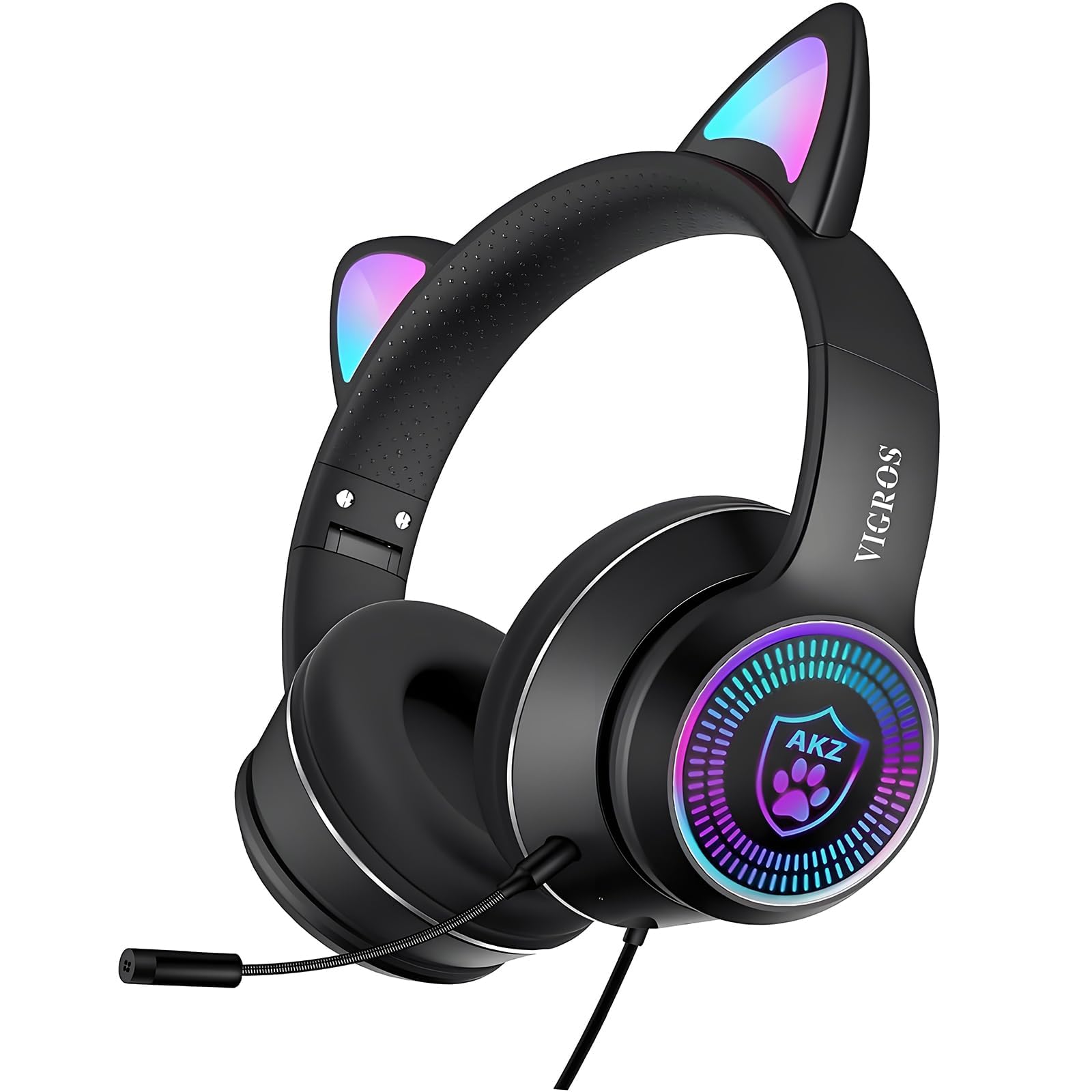
The vigros Cat Ear Gaming Headphone B52 is a wired gaming headset designed for players who want a fun style, reliable compatibility, and everyday comfort in one package. Its cat-ear design and flashing LED accents make it especially appealing for kids, teens, and casual gamers, while the over-ear build and built-in microphone support long gaming sessions, voice chat, and multimedia use. This headset is commonly positioned as an affordable option for users who want a colorful accessory without paying premium gaming-headset prices.
The main strengths of the vigros Cat Ear Gaming Headphone B52 are its stereo sound output, simple plug-and-play setup, and broad device support across PC, laptops, PS4, Switch, tablets, and mobile devices with a 3.5 mm audio port. The model is also popular for online classes, music listening, streaming, and social gaming, making it a practical everyday headset for home use. Estimated pricing typically falls in the budget range, around $20 to $35 depending on the seller, region, and included accessories. Availability is generally strongest through online marketplaces and third-party electronics retailers.
If you are searching for a stylish entry-level gaming headset with LED cat ears, basic noise reduction, and easy wired connectivity, the vigros Cat Ear Gaming Headphone B52 is a solid value-focused choice.
Specifications
Technical specifications of vigros Cat Ear Gaming Headphone B52
- Model: B52
- Brand: VIGROS
- Connection type: USB plus 3.5 mm 4-pin audio jack
- Driver size: 40 mm
- Sensitivity: 108 dB ± 3 dB
- Frequency response: 20 Hz to 20 kHz
- Microphone: Built-in or detachable-style boom microphone depending on package version
- Microphone element size: Φ6.0 x 5.0 mm
- Cable length: Approximately 1.8 m
- LED power: DC 5V
- Weight: About 272 g
- Design: Over-ear with adjustable headband and cat-ear lighting
- Compatibility: PC, laptop, PS4, PS5, Switch, Xbox controller, tablets, and phones with supported audio input
In practical use, the B52 is best compared with other budget cat-ear gaming headsets such as generic wired LED gaming headphones. It usually offers better styling and similar sound performance at the same price point, but it does not match the stronger bass, padding quality, or advanced mic filtering found in mid-range gaming headsets. For casual gaming and voice chat, however, it delivers dependable performance.
Setup Guide
How to set up the vigros Cat Ear Gaming Headphone B52
- Unbox the headset and check for the audio cable, USB lighting cable, adapter, and microphone accessories.
- Adjust the headband so the ear cups sit comfortably over both ears.
- Connect the 3.5 mm plug to your device’s headset or audio port.
- If your device requires separate mic and headphone inputs, use the included splitter adapter.
- Connect the USB plug to a powered USB port to activate the LED cat ears and lighting effects.
- On PC or console, open sound settings and confirm the headset is selected as the playback and input device.
- Test the microphone in voice chat, recording software, or system audio settings before gaming.
For best results, keep the volume at a moderate level to avoid distortion. Do not pull the cable sharply, and avoid bending the microphone boom repeatedly. If there is no sound, check whether your device supports a combined 3.5 mm TRRS headset jack or needs the splitter adapter. If the LEDs do not light up, confirm that the USB cable is fully connected to an active power source.
Safety note: do not use the headset at high volume for extended periods, especially for children. Keep the cables away from heat, water, and sharp edges.
Troubleshooting
Common problems and fixes for the vigros Cat Ear Gaming Headphone B52
- No audio output: Check the 3.5 mm plug, confirm the correct sound device is selected, and test the headset on another device.
- Microphone not working: Make sure the mic is unmuted, connected correctly, and enabled in the device audio settings.
- LED lights not turning on: Plug the USB cable into a powered port; some ports only supply partial power.
- One side of the headset is silent: Inspect the cable for damage and verify the jack is fully inserted.
- Static or weak sound: Lower the system volume slightly, clean the audio port, and try another source device.
If the product shows no response after connection, there is usually no special error code system; the fix is typically related to port selection, power, or cable seating. Prevent issues by storing the headset carefully, unplugging it by the connector instead of the wire, and avoiding twisting the headband aggressively. Warranty coverage and support depend on the retailer, so keep your order details and packaging. For help, contact the seller, marketplace support, or the brand support channel listed on the product packaging or user manual.
Pros & Cons
Advantages of the vigros Cat Ear Gaming Headphone B52
- Eye-catching cat-ear design with LED lighting
- Budget-friendly price for gaming and casual media use
- Simple wired setup with low-latency audio
- Broad compatibility with common gaming and mobile devices
- Good choice for kids, teens, and gift purchases
- Comfortable over-ear fit for short to moderate sessions
Disadvantages of the vigros Cat Ear Gaming Headphone B52
- Sound quality is solid but not premium
- Microphone clarity is basic compared with higher-end gaming headsets
- Some versions may have mixed accessory bundles
- LED features require USB power and add cable clutter
- Not ideal for competitive gamers who need advanced audio separation
Overall, the B52 offers strong value for money if style, comfort, and affordability matter more than studio-grade audio. Compared with standard budget headsets, it wins on design appeal and gift factor, while more expensive alternatives usually provide better mic noise reduction, stronger build materials, and richer bass response.
Customer Reviews
Average user feedback for the vigros Cat Ear Gaming Headphone B52 is generally positive, with many buyers giving it around 4 out of 5 stars for design, ease of use, and value. Customers often praise the colorful LED cat ears, lightweight feel, and easy plug-and-play setup. Parents also like it as a fun headset for school calls, gaming, and entertainment.
Common complaints include average microphone quality, occasional fit issues for larger heads, and the need to connect USB separately for lighting. One typical review says, “My daughter loves the cat-ear lights, and it works perfectly for her games and online classes.” Another common comment is, “Great for the price, but the mic is only decent, not amazing.” For buyers wanting an affordable, playful headset, the B52 is usually recommended. For serious esports players, a higher-end wired gaming headset may be a better fit.
Faqs
How do I set up the vigros Cat Ear Gaming Headphone B52 for the first time?
Why is my vigros Cat Ear Gaming Headphone B52 microphone not working on PC?
Can vigros Cat Ear Gaming Headphone B52 work with PS4, PS5, Nintendo Switch, and mobile devices?
How do I stop audio from sounding too low or unbalanced on vigros Cat Ear Gaming Headphone B52?
What should I do if the LED lights on vigros Cat Ear Gaming Headphone B52 are not turning on?
Are vigros Cat Ear Gaming Headphone B52 headphones good for long gaming sessions?
How do I clean and maintain the vigros Cat Ear Gaming Headphone B52 safely?
What are the most common vigros Cat Ear Gaming Headphone B52 compatibility problems and how can I fix them?
Leave a Comment