
Setup & Usage: Vrpefit SMART WATCH User Manual
Content
VRPEFIT Smart Watch
Introduction
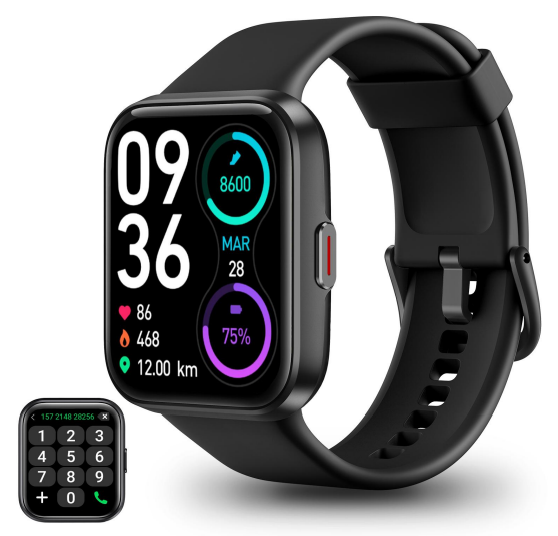
Discover the VRPEFIT Smart Watch, a cutting-edge wearable designed for fitness enthusiasts and everyday users alike. This smartwatch offers a blend of style, functionality, and advanced health monitoring features, making it an ideal companion for your daily life. With its sleek 1.8-inch full-touch HD screen and compatibility with both Android and iOS devices, it seamlessly integrates with your smartphone. The VRPEFIT Smart Watch is equipped with features like Bluetooth 5.3 connectivity, built-in voice assistants, and over 100 customizable sports modes, making it perfect for tracking various activities. It also includes essential features such as heart rate, blood oxygen, and sleep monitoring, providing comprehensive insights into your health and fitness journey. Available in a price range of approximately $50 to $100, this smartwatch is an excellent value for money. It is widely available on online platforms like Amazon.
Getting started
- Open the package and check its contents.
- Delivery content: 1) ID208 BT smart watch (with built-in lithium battery); 2) user manual; 3) original charging cable.
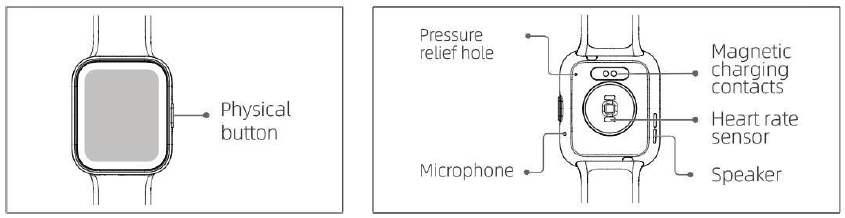
- Charge the watch to activate and turn it on before first use. To charge, simply connect the magnetic charging cable to the charging contacts located on the back of the watch.
Search for “veryfit” on the App Store, Google Play, ay or scan the QR code to download and install the app.

- Log in to the app and set your personal information, as well as your step and weight goals.
- On the “Device” interface, tap the “+” icon in the upper right corner, and your phone starts searching. From the device list found, choose your smart watch name to pair with. You may also link the device directly by scanning the device’s QR code using the scan function.
Health
a) Watch - The watch will automatically record your data.
- You can measure your heart rate, blood oxygen, stress level, body temperature, and ambient sound level on the watch, or turn on automatic measurement of heart rate, blood oxygen, stress, ambient sound level, and sleep on the app to track these data the whole day. You can manually or make the watch automatically monitor your health status continuously.
- To start an exercise:
- When the watch face interface is displayed, short-press the physical button to access the application list. Tap the Sport icon to access the icons of different exercise types, then tap the icon of an exercise (such as Outdoor Running) to start the exercise.
- The watch can display up to 24 exercise types by default. On the app's Multi exercise mode, you can add or delete the exercise types displayed on the watch or change their order.
App - Start “veryfit”, enable the Bluetooth feature, and grant the GPS positioning permission.;
- Light up the bracelet screen and bring it close to your phone.
- Click the “+” icon on the App, and select the smart watch model in the search results to bind;
- Confirm the binding request on the smart watch.
Fill in your information and set your step goal on the App to complete the binding.
Basic Operations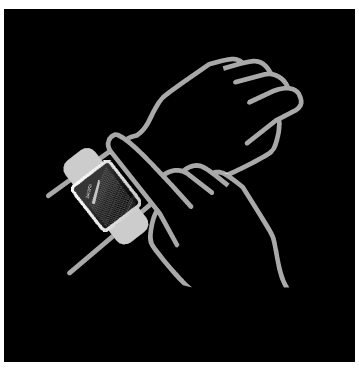
- Wear the watch correctly: ensure that your watch is at least one finger above your wrist bone and that the sensor on the back touches your skin.
- Screen operation: ID208 BT has a full touch screen, which supports operations including short tap, swipe left/right, and swipe up/down.
Button operation: ID208 BT has a physical button, which supports “short press” and “long press” operations. Short press: to return to the home page/pause exercise. Long press: for 2 seconds to turn on the watch when it is off; to turn on Alexa when the watch is on.
Specifications of the VRPEFIT Smart Watch
The VRPEFIT Smart Watch boasts impressive specifications that set it apart from other fitness trackers in its class.
- Display Type: LCD, Full Touch HD
- Display Resolution: 240 x 284 pixels
- Connectivity: Bluetooth 5.3
- Operating System Compatibility: Android (6.0+), iOS (9.0+)
- Battery Capacity: 300 mAh Lithium Polymer
- Battery Life: Up to 7 working days
- Waterproof Rating: IP68
- Special Features: Bluetooth Call, Alexa Voice Control, Heart Rate Monitor, Blood Oxygen Monitor, Sleep Tracker, 100+ Sports Modes, Camera Control, GPS via Smartphone
Troubleshooting and Support
While the VRPEFIT Smart Watch is designed to be reliable, here are some common issues and solutions:
- Bluetooth Connectivity Issues: Restart both the watch and your phone, then try reconnecting.
- Heart Rate Monitoring Errors: Ensure proper fit and restart the watch.
- Water Damage: Avoid exposing the watch to deep water despite its IP68 rating.
For any technical issues, refer to the warranty details provided with your purchase or contact VRPEFIT customer support via their official website or product packaging.
Pros and Cons
Pros:
- Advanced Health Monitoring: Tracks heart rate, blood oxygen, and sleep patterns.
- Customizable Sports Modes: Over 100 modes for various activities.
- Long Battery Life: Up to 7 days on a single charge.
- Value for Money: Affordable price with comprehensive features.
Cons:
- Limited Third-Party App Support: Limited compatibility with some apps.
- No Built-in GPS: Requires a smartphone for GPS tracking.
Customer Reviews
Users have praised the VRPEFIT Smart Watch for its ease of use, stylish design, and comprehensive fitness tracking features. Common praises include its Bluetooth calling functionality and the variety of sports modes available. However, some users have mentioned limitations in third-party app support and the lack of built-in GPS. Overall, the VRPEFIT Smart Watch is highly recommended for those seeking a reliable and feature-rich fitness companion.
Star Rating: 4.2/5
"The VRPEFIT Smart Watch is an excellent choice for fitness enthusiasts. It's comfortable, packed with features, and easy to use. I highly recommend it!"
Faqs
How do I set up the vrpefit SMART WATCH for the first time?
What should I do if my vrpefit SMART WATCH is not syncing data with the smartphone app?
Can I use the vrpefit SMART WATCH to make and receive calls directly from the watch?
What are the key health monitoring features available on the vrpefit SMART WATCH?
Is the vrpefit SMART WATCH compatible with all smartphones?
How can I optimize battery life on the vrpefit SMART WATCH?
What maintenance is recommended to keep the vrpefit SMART WATCH in good condition?
How do I use the Alexa voice assistant feature on the vrpefit SMART WATCH?
Leave a Comment