
How to Use: Wac Smart Fans F-054L User Manual
Content
WAC Smart Fans F-054L: Complete Product Manual and Buying Guide
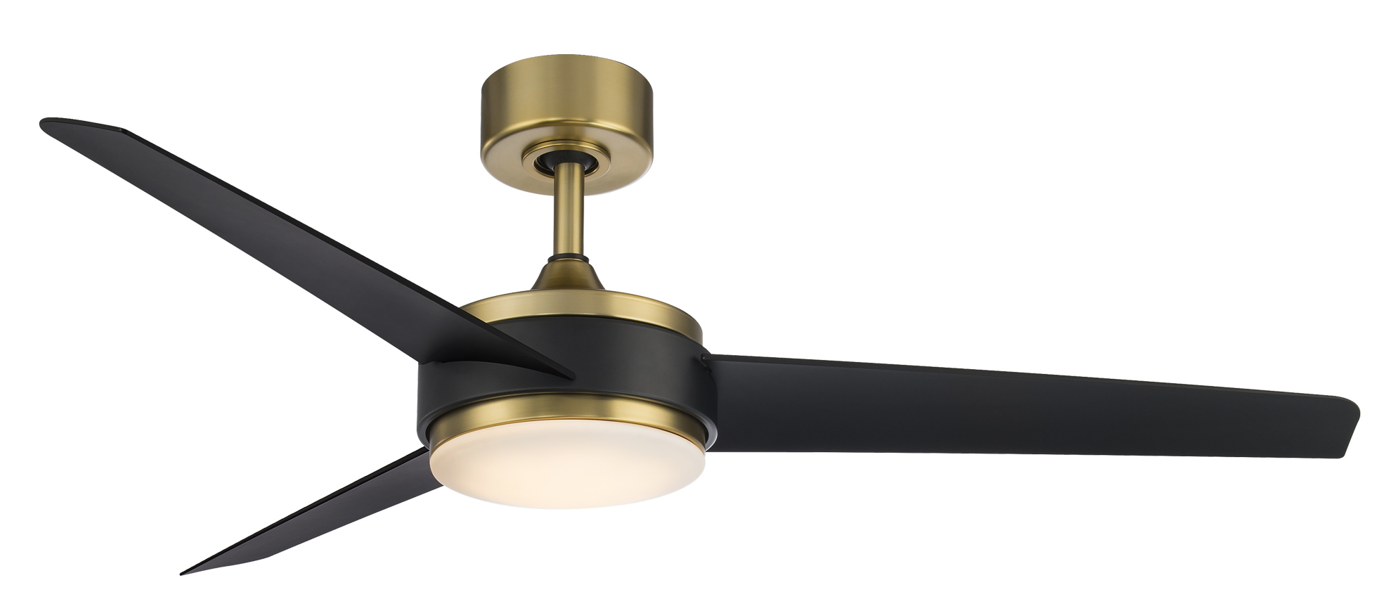
The WAC Smart Fans F-054L is a 54-inch smart ceiling fan designed for modern homes that need powerful airflow, energy-efficient performance, and integrated lighting in one premium package. This model combines a DC motor, Wi-Fi-enabled smart control, and a dimmable LED light kit, making it a strong fit for living rooms, bedrooms, covered patios, and open-plan spaces where comfort and convenience matter. With a sleek three-blade design, wet-location rating, and compatibility with app-based and voice control systems, it offers a practical upgrade over traditional ceiling fans.
One of the biggest advantages of the WAC Smart Fans F-054L is its balance of performance and efficiency. It delivers strong airflow while using relatively low power, which can help reduce energy consumption compared with older AC-motor fans. The included LED light produces bright, warm illumination that works well for everyday use, while the fan’s reversible operation and multiple speed settings improve year-round comfort. This makes it especially appealing to homeowners who want a quiet, stylish, and low-maintenance ceiling fan with smart-home capabilities.
The product is aimed at users who want premium ceiling fan performance with modern connectivity. It is a good match for tech-savvy homeowners, interior designers, and anyone looking for a quiet smart fan with integrated lighting. Typical pricing for the WAC Smart Fans F-054L falls in the premium mid-range, usually around $400 to $500 depending on finish, retailer, and bundle options. Availability is generally good through lighting retailers, home improvement stores, and online fan specialty shops, though exact stock may vary by color combination and region.
Specifications for WAC Smart Fans F-054L 54-Inch Ceiling Fan
- Fan size: 54-inch blade span for medium to large rooms.
- Motor type: Energy-efficient DC motor with six speed settings.
- Airflow: Up to 6,817 CFM high airflow with strong circulation performance.
- Efficiency: High airflow efficiency for low operating cost and quieter performance.
- Power use: Approximately 17W average and 24.5W on high speed.
- Lighting: Integrated LED light with 3,000K color temperature and high color accuracy.
- Brightness: Around 2,100 lumens for general room illumination.
- Materials: Aluminum housing with ABS blades for durability and reduced weight.
- Control: Smart control support with remote, wall control, app, and voice options depending on configuration.
- Installation: Includes a 6-inch downrod and supports sloped ceilings up to 30 degrees without an optional kit.
- Location rating: Wet-location listed for flexible indoor and outdoor installation.
- Speed range: Six speeds with reversible operation for seasonal use.
Compared with standard ceiling fans in the same size class, the WAC Smart Fans F-054L stands out for quieter operation, higher efficiency, and integrated smart controls. Many conventional 54-inch fans still use less efficient AC motors and offer fewer automation features, while this model is better suited to connected homes and premium interiors.
Detailed Description of the WAC Smart Fans F-054L
The WAC Smart Fans F-054L is built around a modern DC motor and a streamlined three-blade design that promotes strong, steady airflow with minimal noise. The fan’s blade pitch and motor pairing are engineered to move air efficiently across larger spaces without the heavy hum commonly associated with older fan designs. Its integrated LED module adds functional lighting, making the unit suitable as both a cooling appliance and a primary room light source.
In everyday use, the fan is ideal for bedrooms, great rooms, kitchens, and covered outdoor areas where humidity or occasional moisture may be present. The smart-control features make it especially convenient for users who want to adjust speed, lighting, or direction from a remote or connected device. The reversible motor helps improve comfort in summer by pushing air downward and in winter by circulating warm air more evenly.
Build quality is one of the strongest selling points. The aluminum and ABS construction keeps the fixture lightweight yet durable, while the clean finish options give it a polished, designer-style appearance. Users generally appreciate the quiet motor, smooth speed transitions, and the fact that the fan feels refined rather than purely utilitarian. For buyers seeking a premium smart ceiling fan, the WAC Smart Fans F-054L offers a strong mix of performance, style, and convenience.
Setup Guide: How to Install and Configure WAC Smart Fans F-054L
Before installation, turn off power at the breaker and confirm that the ceiling junction box is fan-rated. Unpack all components carefully and verify that the blades, downrod, remote hardware, and LED module are included. Read the wiring diagram fully before beginning to avoid installation errors.
- Attach the mounting bracket securely to the ceiling junction box.
- Connect the fan wires according to the labeled wiring guide.
- Install the downrod and ensure all threaded connections are tightened properly.
- Mount the motor assembly to the bracket and secure the canopy.
- Attach the blades evenly to maintain balance and reduce wobble.
- Install the LED light module and glass diffuser if included.
- Restore power and pair the remote or smart control system.
For smart configuration, follow the app pairing steps included with the controller or smart-home setup instructions for your selected system. If pairing fails, reset the fan and confirm that the Wi-Fi network is compatible with the controller requirements. Common setup issues include loose wire connections, reversed blade mounting, and incorrect dip-switch or pairing settings.
Safety precautions are essential. Do not install the fan on an unsupported ceiling box, and avoid using damaged wiring or cracked blades. When mounting on a sloped ceiling, confirm the angle stays within the supported limit or use the appropriate slope kit. If the fan is installed outdoors, make sure the location is wet-rated and not exposed to unsafe electrical conditions.
Troubleshooting WAC Smart Fans F-054L Common Problems and Fixes
If the fan does not power on, check the breaker, wall switch, and all wire connections first. A loose canopy connection or miswired neutral line is often the cause. If the remote is unresponsive, replace the battery, verify the pairing mode, and make sure no signal interference is blocking communication.
- Fan wobbles: Tighten blade screws, confirm blade alignment, and inspect the mounting bracket.
- Weak airflow: Increase speed, check for reversed rotation mode, and confirm the blades are installed correctly.
- Light does not turn on: Inspect the LED connector and verify power to the light module.
- Remote not syncing: Re-pair the remote and check the battery orientation.
- Noise during operation: Tighten all hardware and ensure the fan is level.
There are no widely documented public error codes for this model, so most issues are resolved through basic electrical checks, remote resets, and hardware inspection. Preventive maintenance includes tightening screws every few months, cleaning blades regularly, and keeping the motor housing free of dust. Warranty and support coverage usually depend on the retailer and authorized dealer, so keep the purchase receipt and product model information available when contacting support. For help, contact the retailer, the lighting dealer, or WAC customer support through the official brand service channel.
Pros and Cons of WAC Smart Fans F-054L
Pros
- Strong airflow performance makes it suitable for medium and large rooms.
- DC motor delivers quieter operation than many standard AC ceiling fans.
- Integrated LED light reduces the need for separate overhead lighting.
- Smart-home compatibility adds convenience for modern households.
- Wet-location rating increases installation flexibility indoors and outdoors.
- Premium design and finish options improve overall room aesthetics.
Cons
- Higher price than basic ceiling fans may not fit every budget.
- Installation can be more involved than non-smart fan models.
- Smart features may require extra setup time for app or voice integration.
- Replacement parts and accessories may need to be sourced through specialty retailers.
For value for money, the WAC Smart Fans F-054L is best suited to buyers who want efficiency, quiet performance, and premium styling in one unit. Compared with lower-cost alternatives, it offers better build quality and smarter controls, but shoppers focused only on airflow and price may find simpler models more economical.
Customer Reviews Summary for WAC Smart Fans F-054L
Customer feedback for the WAC Smart Fans F-054L is generally positive, with many users giving it around 4 to 5 stars for its quiet motor, stylish appearance, and strong cooling performance. Reviewers often praise the fan’s modern look and the convenience of app or remote control. One common testimonial is that it “looks high-end and runs much quieter than expected,” which reflects the fan’s premium positioning.
Frequent complaints usually focus on installation complexity and the learning curve for smart setup. Some users mention that pairing the controls takes patience, while others note that the price is higher than average. Despite those concerns, the most common recommendation is to buy it if smart-home integration, design quality, and quiet operation are top priorities.
Final Verdict on WAC Smart Fans F-054L
The WAC Smart Fans F-054L is a premium smart ceiling fan that combines high airflow, modern styling, and efficient performance in a well-built package. It is a strong choice for homeowners who want a reliable, quiet, and visually refined fan with integrated lighting and smart controls. For buyers comparing premium 54-inch smart fans, this model offers one of the best blends of design, utility, and long-term value.
Faqs
How do I set up wac Smart Fans F-054L for the first time?
Why is my wac Smart Fans F-054L not responding to the remote or smart controls?
What are the main features of wac Smart Fans F-054L and how do I use them correctly?
Can wac Smart Fans F-054L work with my smart home setup or mobile app?
How can I improve airflow and cooling performance on wac Smart Fans F-054L?
What should I do if wac Smart Fans F-054L is making unusual noise or vibrating?
How often should I clean and maintain wac Smart Fans F-054L for best results?
Is wac Smart Fans F-054L suitable for bedrooms, offices, or small apartments?
Tags
Leave a Comment