
Waterpik Sensonic STW Series Toothbrush User Manual
Content
Waterpik Sensonic STW Series Toothbrush: Complete Product Manual
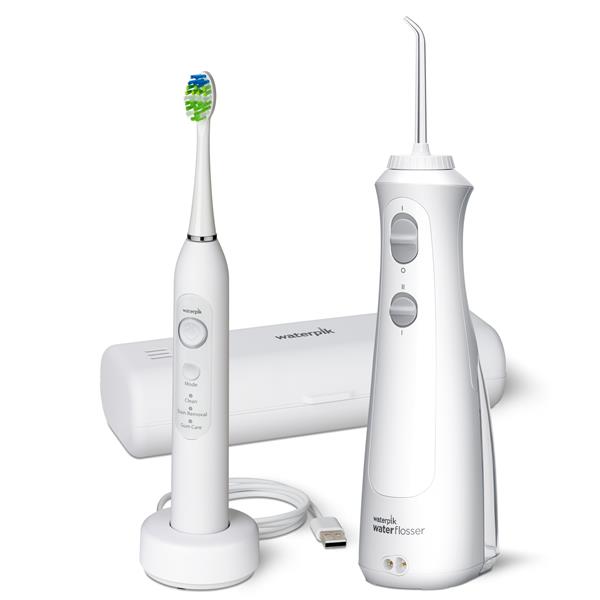
Introduction to the Waterpik Sensonic STW Series Toothbrush
The Waterpik Sensonic STW Series Toothbrush is a sonic electric toothbrush designed to deliver a deep, effective clean with a simple, user-friendly experience. Built for everyday oral care, it combines high-frequency sonic brushing with a compact, travel-friendly design that appeals to users who want better plaque removal without adding complexity to their routine. The Waterpik Sensonic STW Series Toothbrush is especially suitable for adults looking for a dependable upgrade from a manual toothbrush, as well as anyone who wants multiple brushing modes for daily cleaning, whitening support, and gum care.
One of its biggest strengths is its balance of performance and convenience. The brush head is engineered to reach back teeth more effectively than a standard manual brush, and the Sonic technology helps support better coverage across tooth surfaces and along the gumline. Depending on the model variant, users may also get features such as a timer, charge indicator, display, and multiple cleaning modes. This makes the Waterpik Sensonic STW Series Toothbrush a practical choice for home use, travel, and routine oral hygiene upgrades.
Estimated pricing typically falls in the mid-range electric toothbrush category, often around $30 to $100 depending on retailer, region, and bundle contents. Availability is generally good through Waterpik’s official store and major online and retail partners, though stock can vary by color and model variant.
Specifications and Key Features of the Waterpik Sensonic STW Series Toothbrush
- Product type: Sonic electric toothbrush
- Series: Sensonic STW Series
- Height: 10.50 inches with brush installed
- Base width: 2.50 inches
- Base depth: 2.50 inches
- Unit weight: 0.80 lb
- Charging system: Charging base / dock
- Battery type: Rechargeable lithium-ion in supported variants
- Cleaning modes: Commonly includes 3 modes such as daily clean, gum care, and whitening or stain removal
- Smart features: Select versions include a timer, battery indicator, and display
- Performance: Sonic brushing action designed for effective plaque removal and hard-to-reach areas
- Travel use: Compact enough for carry-on bags and travel kits
In practical use, the Waterpik Sensonic STW Series Toothbrush competes with other mid-range sonic brushes from Philips Sonicare and Oral-B. Compared with basic entry-level models, it offers more polish and mode variety; compared with premium smart brushes, it usually focuses on simplicity, comfort, and value rather than app connectivity or advanced pressure analytics.
Troubleshooting the Waterpik Sensonic STW Series Toothbrush
If the Waterpik Sensonic STW Series Toothbrush will not turn on, first place it on the charging base and allow it to charge for several hours. A dead battery or poor dock contact is the most common cause. Make sure the charger is plugged in securely and the brush handle is seated correctly on the base.
If brushing power feels weak, rinse the brush head, check for debris around the handle connection, and replace worn brush heads. For inconsistent charging, clean the charging contacts and avoid using damaged cords or unstable power outlets. If the timer or indicator lights behave unexpectedly, reset the unit by fully charging it and testing again.
- No power: Charge for several hours and verify outlet function.
- Weak vibration: Replace the brush head and check for buildup.
- Charging failure: Reposition the handle and clean contacts.
- Modes not changing: Power cycle the toothbrush and retry.
There are no commonly published error codes for standard user-facing troubleshooting. Preventive care includes rinsing the brush head after each use, storing the handle upright, and replacing the head every three months. Warranty coverage varies by region, but support is typically available through Waterpik customer service and authorized retailers. For help, use the official Waterpik support contact page or the retailer that sold the product.
Pros and Cons of the Waterpik Sensonic STW Series Toothbrush
Pros
- Effective sonic cleaning: Helps remove plaque and improve everyday brushing performance.
- Multiple modes: Useful for users who want clean, whitening, and gum care options.
- Comfortable design: Lightweight build makes it easy to handle during longer brushing sessions.
- Travel-friendly: Compact size works well for frequent travelers and small bathrooms.
- Good value: Often priced below many premium smart toothbrushes while still offering strong core features.
Cons
- Limited advanced features: Usually lacks app integration and detailed pressure tracking found in higher-end alternatives.
- Model variation confusion: Different regional versions may include different accessories and battery details.
- Replacement heads: Ongoing accessory costs can add up over time.
- Not the most premium finish: Compared with flagship brushes, it feels more functional than luxurious.
Overall, the Waterpik Sensonic STW Series Toothbrush offers strong value for money if the goal is reliable sonic cleaning without paying for premium smart features. It is a practical alternative to similarly priced models from major competitors, especially for users who prefer straightforward operation.
Customer Reviews and Real-World Feedback
Customer feedback for the Waterpik Sensonic STW Series Toothbrush is generally positive, with many users praising the comfortable brushing feel, strong cleaning action, and easy setup. A common rating pattern is around 4 out of 5 stars, especially among buyers who want a simple sonic brush without app features.
Typical praise includes cleaner-feeling teeth after a few days, a lightweight handle, and helpful brushing modes for daily use. Common complaints focus on battery life variation by model, limited accessories in some bundles, and the lack of advanced smart features found in premium brushes.
- “Leaves my mouth feeling very clean.”
- “Easy to use and much better than a manual toothbrush.”
- “Good value, but I wish the battery lasted longer.”
Purchase recommendation: the Waterpik Sensonic STW Series Toothbrush is a solid buy for users who want dependable sonic cleaning, simple controls, and a fair price. It is especially appealing for first-time electric toothbrush buyers and travelers who need a compact daily brushing solution.
Faqs
How do I set up the Waterpik Sensonic STW Series Toothbrush for the first time?
What should I do if my Waterpik Sensonic STW Series Toothbrush is not turning on or charging?
Which brushing modes are available on the Waterpik Sensonic STW Series Toothbrush, and when should I use them?
Is the Waterpik Sensonic STW Series Toothbrush compatible with standard replacement brush heads?
How long does the battery last on the Waterpik Sensonic STW Series Toothbrush, and how can I maximize runtime?
Why does my Waterpik Sensonic STW Series Toothbrush feel weak or less powerful than expected?
How do I clean and maintain the Waterpik Sensonic STW Series Toothbrush properly?
Does the Waterpik Sensonic STW Series Toothbrush work well for sensitive gums and hard-to-reach back teeth?
More waterpik manuals
Leave a Comment