
Waterpik STW Series Sensonic Toothbrush User Manual
Content
Waterpik STW Series Sensonic Toothbrush Product Manual
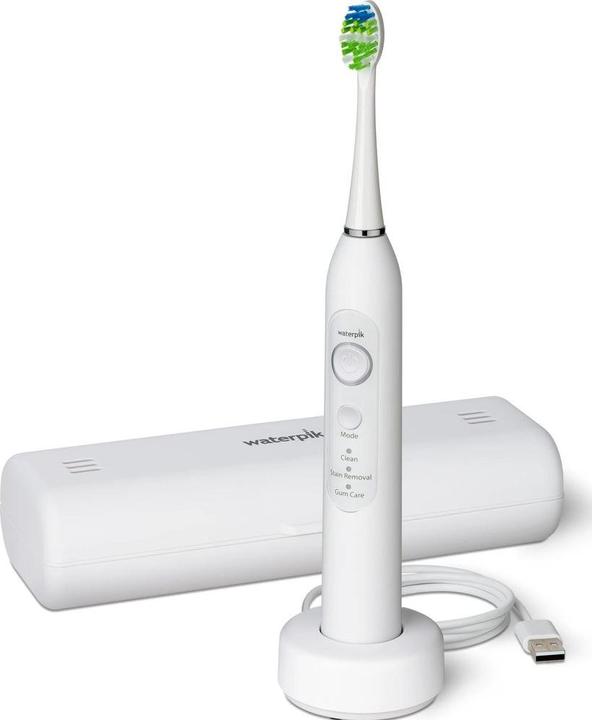
Introduction to the Waterpik STW Series Sensonic Toothbrush
The Waterpik STW Series Sensonic Toothbrush is a rechargeable sonic electric toothbrush designed to deliver a deep, comfortable clean for everyday oral care. Built with a lightweight handle, soft bristles, and an ultra-quiet motor, it is a strong choice for users who want effective plaque removal without the harsh feel of some rotating brushes. The waterpik STW Series Sensonic Toothbrush is especially appealing for adults, teens, and anyone looking to improve brushing consistency with built-in timer features and multiple cleaning modes.
Key advantages include a gentle sonic brushing motion, three speed or mode options on current STW models, a two-minute timer with a 30-second pacer, and USB-C charging for flexible use at home or while traveling. The design is also water resistant, making it practical for bathroom use and easy daily cleaning. Depending on the retailer and bundle, the estimated price range is typically in the mid-range electric toothbrush category, often around $50 to $100, with availability through major online and oral care retailers.
For shoppers comparing sonic toothbrushes, the waterpik STW Series Sensonic Toothbrush stands out for balancing performance, portability, and value. It is a smart option for users who want a simple, effective replacement for a manual brush or a quieter alternative to more aggressive electric models.
Specifications and Key Features of the Waterpik STW Series Sensonic Toothbrush
- Type: Sonic electric toothbrush with gentle high-speed brushing action
- Power source: Rechargeable lithium-ion battery
- Charging: USB-C to USB-A cable, 5.0V DC, 1.0A
- Battery performance: Up to 90 minutes of run time on supported models
- Cleaning modes: 3 brushing modes, including daily cleaning, stain removal, and gum care
- Timer: 2-minute timer with 30-second pacer for quadrant brushing
- Water resistance: Yes, designed for bathroom and sink-area use
- Indicator: LED charging indicator for battery status
- Brush heads: Replaceable brush heads, typically one included in the box
- Dimensions: Approx. 10.5 inches tall with brush tip installed
- Base size: Approx. 2.5 x 2.5 inches
- Weight: Approx. 0.80 lb for the unit
Compared with many entry-level electric toothbrushes, the waterpik STW Series Sensonic Toothbrush offers better battery convenience and a more polished feature set. Compared with premium oscillating models, it is usually quieter and easier to handle, though it may not feel as intense as some rotation-based brushes. For users who want a simple sonic toothbrush with modern charging and practical everyday features, it delivers solid value.
Troubleshooting the Waterpik STW Series Sensonic Toothbrush
If the toothbrush does not turn on, check whether the battery needs charging and confirm the USB cable is firmly connected. If the LED indicator does not light, try a different power source such as a wall adapter, laptop, or power bank. If brushing feels weak, the brush head may be worn or not seated correctly.
- Problem: Toothbrush will not start. Solution: Charge for several hours and confirm the power button is held long enough.
- Problem: Short battery life. Solution: Fully recharge the unit and avoid leaving it constantly on the charger.
- Problem: Weak cleaning performance. Solution: Replace the brush head every 3 months or sooner if bristles fray.
- Problem: Charging light not working. Solution: Inspect the cable, clean the charging contacts, and test another adapter.
- Problem: Brush feels noisy or rough. Solution: Remove and reinstall the brush head and rinse away buildup.
Common consumer models in this series do not typically display error codes, so most issues are resolved through charging, cleaning, and brush head replacement. Preventive care includes rinsing the handle after use, drying the unit, and storing it upright in a ventilated place. Warranty coverage and support options are generally available through Waterpik customer service and product support channels. For help, users should contact Waterpik support through the official website or the toll-free customer care number listed in the product documentation and retailer packaging.
Pros and Cons of the Waterpik STW Series Sensonic Toothbrush
Pros
- Gentle sonic cleaning is ideal for sensitive teeth and gums
- Quiet operation makes it comfortable for early morning or shared spaces
- Timer and pacer help build better brushing habits
- USB-C charging is convenient for travel and modern households
- Lightweight handle improves control and reduces hand fatigue
- Good value for users seeking a dependable mid-range sonic toothbrush
Cons
- May feel less aggressive than premium oscillating brushes
- Typically includes only one brush head, so replacements add to ownership cost
- No advanced app connectivity or smart tracking features
- Charging accessories may vary by bundle and region
Overall, the waterpik STW Series Sensonic Toothbrush is a practical choice for users who want reliable daily cleaning without paying for extra smart features. It compares favorably with basic drugstore electric toothbrushes and offers a more refined experience than many low-cost alternatives.
Customer Reviews and User Feedback for the Waterpik STW Series Sensonic Toothbrush
Customer feedback is generally positive, with many users giving it around 4 out of 5 stars for comfort, quiet operation, and battery convenience. A common praise is that it cleans well without irritating gums, especially for people switching from manual brushes. Users also like the timer feature because it helps maintain consistent brushing time.
Frequent complaints include the lack of advanced features, limited brush head accessories in the box, and the fact that it may not feel as powerful as some competing sonic or rotating toothbrushes. A typical testimonial sounds like this: “It is easy to use, quiet, and perfect for everyday brushing.” Another common reaction is: “The battery lasts well, but I wish it came with extra brush heads.”
For most buyers, the waterpik STW Series Sensonic Toothbrush is a strong recommendation if the goal is comfortable, effective brushing with a simple learning curve.
Frequently Asked Questions About the Waterpik STW Series Sensonic Toothbrush
How long does the battery last? Supported models offer up to about 90 minutes of run time per charge.
Does it have a timer? Yes, it includes a 2-minute timer with a 30-second pacer.
Is it good for sensitive gums? Yes, the sonic brushing action and soft bristles make it a good option for gentle daily cleaning.
How often should brush heads be replaced? Replace brush heads about every 3 months or sooner if the bristles wear out.
Faqs
How do I set up the Waterpik STW Series Sensonic Toothbrush for the first time?
Why is my Waterpik STW Series Sensonic Toothbrush not turning on, and what should I check first?
How do I use the Waterpik STW Series Sensonic Toothbrush to get a deeper clean without irritating my gums?
What brush heads are compatible with the Waterpik STW Series Sensonic Toothbrush?
Why does my Waterpik STW Series Sensonic Toothbrush feel weak or less powerful than before?
How often should I replace the brush head on the Waterpik STW Series Sensonic Toothbrush?
Can the Waterpik STW Series Sensonic Toothbrush be used safely with braces, crowns, or dental work?
How do I clean and maintain the Waterpik STW Series Sensonic Toothbrush to extend battery life and hygiene?
More waterpik manuals
Leave a Comment