
How to Use: Waterrower Performance Ergometer User Manual
Content
WaterRower Performance Ergometer Manual: Features, Setup, Troubleshooting, and Buyer Guide
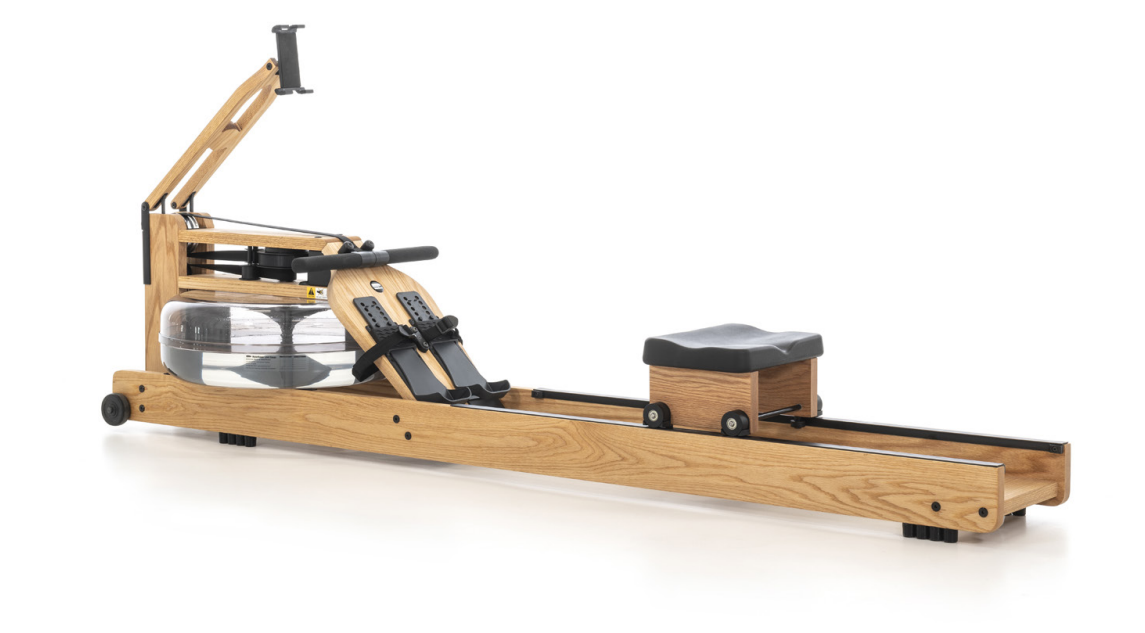
The WaterRower Performance Ergometer is a premium water-resistance rowing machine designed for users who want a realistic rowing feel, smart app-based training, and a refined wooden frame that looks as good as it performs. Built around WaterRower’s SmartRow system, this model replaces the traditional monitor found on the Original Series with connected performance tracking, making it a strong choice for home gyms, studio spaces, and serious cardio training. It is especially well suited to athletes, endurance users, and anyone who wants low-impact full-body conditioning with precise workout feedback.
Key benefits include smooth water resistance, a commercial-style footboard, XL rails, an extended handle for a more comfortable grip, and a foldable phone/tablet holder arm for connected workouts. The machine stores upright when not in use, which makes it practical for smaller spaces despite its full-size footprint. The WaterRower Performance Ergometer is typically priced in the premium range, with common retail pricing starting around $1,299 in the US and £1,299 in the UK depending on wood finish, region, and retailer availability. Oak is usually the entry option, while walnut versions cost more. For shoppers comparing rowing machines, it offers a more natural rowing sensation than many magnetic rowers and a more elegant design than most commercial cardio equipment.
Technical Specifications and Key Features of the WaterRower Performance Ergometer
- Resistance type: patented water resistance with a water flywheel for smooth, progressive load.
- Monitor and connectivity: SmartRow technology with app-based performance tracking and Bluetooth-style connected training support.
- Dimensions: approximately 218 to 220 cm long, 56 to 57 cm wide, and 52 to 84 cm high depending on storage position and region.
- Weight: about 33 kg without water.
- User weight capacity: up to 150 kg.
- Seat height: approximately 31 cm.
- Materials: premium hardwood construction, commonly available in oak and walnut finishes.
- Storage: upright storage supported for space-saving use.
- Power: no mains power connection required; battery-powered operation for the connected monitor system.
- Included hardware: XL rails, wider grip handle, smart device holder arm, and commercial-style footboard.
Compared with the WaterRower Original Series, the Performance Ergometer emphasizes connected training and upgraded accessories rather than the S4-style onboard display. Compared with magnetic rowers such as Concept2-style indoor rowers or compact home rowing machines, it is quieter in feel, visually more furniture-like, and better suited to users who value water resistance and app-based tracking over maximum console simplicity.
How to Set Up the WaterRower Performance Ergometer
Start by placing the rowing machine on a level surface with enough clearance for the rail and handle movement. Unbox the two packages carefully and confirm that the frame, tank, rails, footboard, monitor components, and accessories are present. Attach the front and rear sections according to the assembly guide, tighten all fasteners, and check that the seat rolls freely along the rail.
Next, fill the tank with clean water using the supplied pump or filling kit until the recommended level is reached. Do not overfill, since excess water can affect resistance and cause leakage. Once assembled, install batteries if required for the SmartRow system, then open the companion app on your phone or tablet and pair the ergometer through the device’s connection settings. Configure your profile, units, and workout goals inside the app before your first session.
Safety warnings: keep fingers away from the seat track during adjustment, do not use the machine with loose bolts, and avoid placing it near heat sources or direct sunlight. If pairing fails, restart Bluetooth on your mobile device, replace the batteries, and move closer to the rowing machine before trying again.
WaterRower Performance Ergometer Troubleshooting Guide
Common issues usually involve connectivity, water level, or basic mechanical setup. If the app will not detect the machine, confirm that the batteries are installed correctly, Bluetooth is enabled, and the rowing machine is awake. If stroke data appears inaccurate, check that the device is paired to the correct profile and that the handle sensor or monitor connection is seated properly.
- No resistance: inspect the tank for low water level or internal leaks.
- Unstable seat movement: clean the rails and verify that all bolts are tightened evenly.
- Unusual noise: check for debris on the slide rail or loose footboard hardware.
- App connection failure: restart the app, move the device closer, and replace weak batteries.
- Water discoloration: use approved tablet treatment and refresh water as recommended by the manufacturer.
There are no widely reported generic error codes for the frame itself; most issues are resolved through app reset, battery replacement, or mechanical inspection. Prevent problems by wiping the rails after each workout, checking hardware monthly, and keeping the tank properly treated. Warranty terms vary by region, but WaterRower products are typically backed by frame and parts coverage through authorized dealers. For help, contact the retailer or regional WaterRower support team using the service details provided on your purchase invoice or regional website.
Pros and Cons of the WaterRower Performance Ergometer
Pros
- Excellent water resistance feel that closely mimics real rowing.
- Premium wooden design that suits home gyms and living spaces.
- SmartRow connectivity supports performance tracking and structured training.
- XL rails and wider handle improve comfort for taller or stronger users.
- Upright storage helps save floor space.
- Strong value for buyers who want both training quality and furniture-grade aesthetics.
Cons
- Higher price than many entry-level rowing machines.
- Assembly and water filling take more effort than plug-and-play cardio equipment.
- App-based monitoring may feel less immediate than a built-in console for some users.
- Best suited to users who appreciate water resistance; those wanting ultra-precise power metrics may prefer other performance rowers.
For value for money, the WaterRower Performance Ergometer makes the most sense for buyers who want a premium rowing experience and are willing to pay for materials, design, and smart training features. Compared with more basic magnetic rowers, it offers a more immersive stroke and superior styling. Compared with competition-style ergs, it prioritizes feel and aesthetics over a race-focused console.
Customer Reviews and Real-World Feedback on the WaterRower Performance Ergometer
Typical customer feedback is very positive, especially for the smooth rowing motion, attractive finish, and quiet water sound. Many users rate it around 4.5 out of 5 stars for home use, noting that it feels natural and looks premium in a room. One common testimonial is that it is “the only cardio machine I leave in the living room because it looks like furniture.”
Frequent praise includes comfort on longer sessions, stable construction, and the motivation that comes from connected workout tracking. Common complaints focus on the price, the effort needed for setup, and the fact that app-based operation may not suit users who want a simple built-in display. For most buyers seeking a premium home rowing machine, the WaterRower Performance Ergometer is an easy recommendation, especially if design, realism, and low-impact cardio are top priorities.
Faqs
How do I set up the waterrower Performance Ergometer for the first time?
Why is my waterrower Performance Ergometer display not turning on or showing data correctly?
How do I connect the waterrower Performance Ergometer to fitness apps or training software?
What resistance settings should I use on the waterrower Performance Ergometer for beginner, intermediate, and advanced training?
How can I improve stroke consistency and performance on the waterrower Performance Ergometer?
What should I do if the seat, rail, or handle on the waterrower Performance Ergometer feels rough or noisy?
How often should I maintain the waterrower Performance Ergometer to keep it working properly?
What accessories or setup options help the waterrower Performance Ergometer fit my space and training goals?
More waterrower manuals
- 570-OAK WaterRower Lite Oak User Manual
- How to Use: Waterrower Hybrid Performance Rower User Manual
- Setup: Waterrower Performance Ergometer Rower Owner Manual
- Waterrower A1 Studio Pro Rowing Machine Owner Manual
- Setup: Waterrower A1 CityRow Connect Rower Owner Manual
- Setup: Waterrower Monorail Repackaging Instruction Manual
Leave a Comment