
How to Use: Weidmuller PrintJet Pro User Manual
Content
Weidmuller PrintJet Pro Product Manual
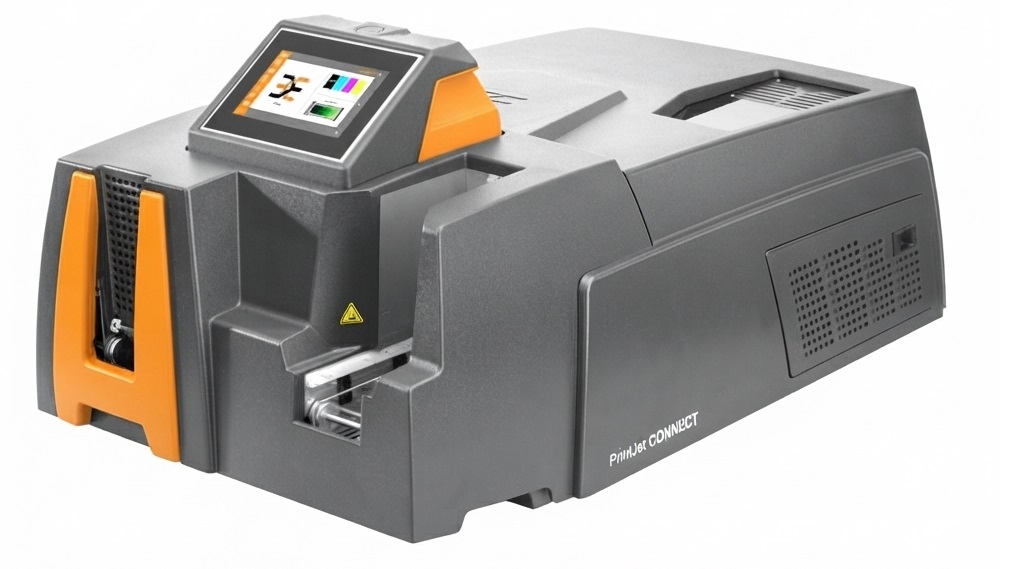
Introduction to the Weidmuller PrintJet Pro
The Weidmuller PrintJet Pro is a professional industrial tag and marker printer designed for high-quality labeling of MultiCards, terminal markers, and identification accessories used in electrical and automation environments. Built for dependable office-style operation in technical workspaces, it combines inkjet printing with heat fixing to produce durable, sharply defined labels that resist everyday handling. For control panel builders, electrical contractors, maintenance teams, and industrial labeling departments, this printer is a practical solution when consistent identification quality matters.
One of the biggest advantages of the PrintJet Pro is its strong print resolution, reaching up to 1200 dpi in supported workflows, which helps deliver crisp text, symbols, and barcodes. The system is designed to work with M-Print Pro software, making label creation and batch printing straightforward. It also supports automatic card feeding, helping users improve throughput during repetitive labeling jobs. Typical use cases include terminal block marking, device identification, project-based panel building, and structured maintenance labeling.
Estimated market pricing for a Weidmuller PrintJet Pro unit typically falls in the professional industrial range, often around USD 3,500 to USD 5,000 depending on configuration, condition, and regional availability. New stock may be limited in some markets, while refurbished and surplus units can appear through industrial distributors and secondary sellers. For organizations that need a reliable tag printer with long-term service value, the Weidmuller PrintJet Pro remains a strong contender.
Specifications and Key Features
- Printing technology: inkjet process with heat fusing for durable marker output.
- Print quality: 600 dpi to 1200 dpi, depending on settings and media.
- Supported media: Weidmuller MultiCards and related marking systems.
- Automatic loader capacity: up to 20 MultiCards for efficient batch printing.
- Connectivity: USB 1.1/2.0 and Ethernet 10/100 Base-T.
- Software integration: M-Print Pro labeling software for layout and print management.
- Operating environment: office-like conditions with moderate ambient temperature.
- Power options: available in 115V and 230V configurations depending on region.
- Physical size: approximately 1060 x 500 x 300 mm without output rail.
- Weight: approximately 32 kg.
Compared with compact desktop label printers, the PrintJet Pro is heavier, larger, and more production-oriented. Compared with newer Weidmuller marking systems, it offers proven reliability and strong output quality, but may have fewer modern connectivity conveniences than newer platforms. For users prioritizing print clarity and industrial labeling consistency, it remains competitive in its class.
Setup Guide: How to Install and Configure the PrintJet Pro
Start by placing the printer on a stable, level surface with enough ventilation and space for card loading and output handling. Connect the power cable to the correct regional supply and confirm that the voltage matches the model rating before switching it on. Next, connect the printer to your PC or network using USB or Ethernet, depending on your setup.
Install or open M-Print Pro, then select the PrintJet Pro printer profile and follow the on-screen device detection steps. Configure your label format, card type, print quality, and feed settings before starting a test print. If you are using network printing, assign the printer an address that fits your office or plant network rules and verify that the workstation can reach it.
For best results, load MultiCards according to the tray guidance and avoid forcing media into the loader. Keep hands clear of moving parts while the printer is operating. If the printer is not detected, check the cable, restart the software, and confirm that the correct driver and printer profile are selected. Never operate the unit in damp areas, near liquids, or outside the recommended temperature range.
Troubleshooting Common PrintJet Pro Problems
If print quality looks faded, streaked, or uneven, check the ink cartridges, confirm the media is supported, and run a test print at a higher quality setting. Dirty feed rollers or improper card loading can also cause alignment problems, so inspect the loader path and reload the cards carefully. If the printer is not responding, verify power, network, and USB connections before reinstalling the device in the software.
When the printer does not recognize media or stops mid-job, power cycle the unit, remove any jammed cards, and make sure the tray is not overloaded. If you see software communication errors, confirm that M-Print Pro is using the right printer profile and that your operating system still supports the installed driver version. Common issues are often caused by outdated drivers, loose connections, or incorrect print settings rather than major hardware faults.
Preventive maintenance helps reduce downtime: keep the printer clean, store consumables properly, and avoid overloading the feeder. Warranty terms may vary by region and seller, especially for used units. For help, contact Weidmuller technical support through the official customer service channels listed by the company, or work with your local Weidmuller distributor for service, parts, and replacement consumables.
Pros and Cons of the Weidmuller PrintJet Pro
Pros
- High-resolution output suitable for detailed industrial labeling.
- Durable inkjet-with-heat-fusing process improves readability over time.
- Automatic MultiCard loading supports more efficient batch production.
- Strong software integration with M-Print Pro simplifies label design.
- Well-suited for control panel shops and electrical documentation workflows.
Cons
- Large footprint and 32 kg weight make it less portable than compact printers.
- Older platform design may feel less modern than newer labeling systems.
- Availability can be limited in some regions.
- Replacement parts and consumables may depend on distributor stock.
For industrial users, the value for money is strongest when the printer is used regularly in structured labeling workflows. Compared with lightweight desktop alternatives, the PrintJet Pro offers better production capability, but it is less convenient for small, occasional jobs. It is best for teams that need dependable, repeatable labeling rather than casual use.
Customer Reviews and User Feedback
Typical user feedback for the Weidmuller PrintJet Pro is generally positive, with many industrial buyers rating it around 4 out of 5 stars. Users often praise the sharp print quality, reliable media handling, and strong integration with M-Print Pro. One common comment is that it feels like a true workshop-grade printer rather than an office accessory.
Frequent complaints center on the machine’s size, weight, and the learning curve for first-time setup. Some users also note that consumables and parts can be harder to source than mainstream office printer supplies. Even so, buyers who need professional terminal and marker printing usually recommend it for panel building and plant maintenance environments.
It is a good purchase for teams that want durable industrial labeling and are prepared for a larger, purpose-built machine. For smaller operations with occasional print needs, a lighter labeling system may be more practical.
Faqs
How do I set up weidmuller PrintJet Pro for the first time?
Why is my weidmuller PrintJet Pro not printing correctly, and what should I check first?
Which software and drivers are needed to use weidmuller PrintJet Pro with a Windows PC?
What types of labels and printing materials are compatible with weidmuller PrintJet Pro?
How can I improve print quality and speed on weidmuller PrintJet Pro?
What maintenance does weidmuller PrintJet Pro need to stay reliable over time?
Why does weidmuller PrintJet Pro keep showing a media or alignment error?
Can weidmuller PrintJet Pro handle repeated industrial label printing without frequent interruptions?
Tags
Leave a Comment