
Setup & Features: Welbilt Kitchen Care Multiplex FreshBlender Integrated Beverage Systems User Manual
Content
Introduction: Welbilt KitchenCare Multiplex FreshBlender Integrated Beverage Systems
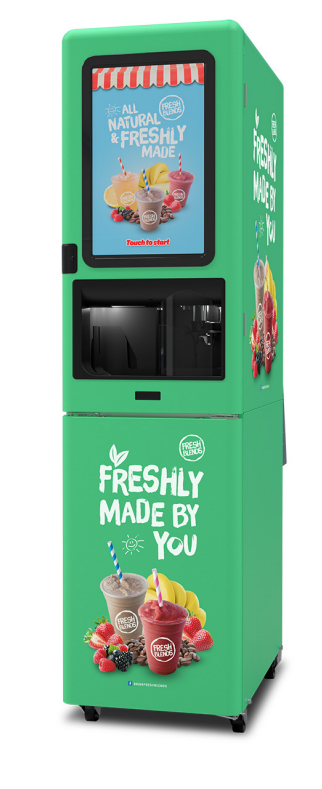
The welbilt kitchen care Multiplex FreshBlender Integrated Beverage Systems is a high-volume, self-serve blended beverage platform designed for operators who want speed, consistency, and premium cold drinks with minimal labor. Built for smoothies, frappes, milkshakes, and other made-to-order frozen beverages, it combines automated blending, refrigerated ingredient storage, and intuitive touchscreen control in one integrated cabinet. This makes it a strong fit for convenience stores, quick-service restaurants, university dining halls, cafés, travel centers, and entertainment venues that need dependable throughput during peak hours.
Key selling points include a large capacitive touchscreen interface, blend-in-cup operation, automated cup shuttle, built-in connectivity, and a clean-in-place sanitation system. The platform is engineered to reduce waste, improve portion consistency, and simplify training for staff and self-service users. Multiplex also positions the system as part of a turnkey beverage program supported by Welbilt KitchenCare, which adds installation, maintenance, and service coverage options for operators who need ongoing support.
Estimated pricing typically falls in the premium commercial equipment range, often around $20,000 to $40,000+ depending on configuration, dealer, and service package. Availability is generally through commercial foodservice equipment dealers and authorized service channels rather than retail stores. For buyers comparing automated frozen beverage dispensers, this system stands out for its integrated design, high-end user interface, and service infrastructure.
Specifications: FreshBlender Beverage Machine Technical Details and Capabilities
- Product type: Integrated blended beverage system for smoothies, frappes, milkshakes, and frozen drinks.
- Dimensions: Approximately 20 inches wide, 38.75 inches deep, and 78.5 inches high.
- Weight: Roughly 660 lb, depending on configuration.
- Electrical requirements: 115–120V, 60 Hz, single phase, 20 amps; some configurations also support 230V, 60 Hz, single phase.
- Interface: 21.5-inch capacitive touchscreen with chemically hardened glass.
- Connectivity: Built-in Wi‑Fi and Bluetooth for remote support, monitoring, and field trials.
- Output capacity: Up to 45 drinks per hour in supported configurations.
- Ice production: Integrated nugget ice maker in select models.
- Sanitation: Clean-in-place system designed to streamline maintenance.
- Food safety features: Cup detection, hardware/software safety circuits, and magnetically coupled shuttle operation.
- Product handling: Volumetric pump system for improved consistency and reduced waste.
Compared with standalone blenders or smaller frozen beverage machines, the welbilt kitchen care Multiplex FreshBlender Integrated Beverage Systems offers a more complete all-in-one solution. It is better suited to commercial environments that need both speed and controlled portioning, while simpler countertop units are usually cheaper but lack storage, automation, and high-volume output.
Setup Guide: How to Install and Configure a FreshBlender System
Before installation, verify floor space, voltage, water access, drainage, and ventilation requirements. Because the unit is heavy and commercial-grade, place it on a level surface with adequate service clearance around the sides and rear. Confirm that the electrical circuit matches the machine’s amperage and voltage rating before plugging in the unit.
- Uncrate the system and inspect it for visible shipping damage.
- Position the machine in its final location and lock the casters if equipped.
- Connect the power supply according to the nameplate specifications.
- Attach water and drainage lines if your configuration includes ice-making or cleaning systems.
- Power on the unit and complete the touchscreen setup prompts.
- Configure beverage recipes, cup sizes, and portion settings through the control interface.
- Pair Wi‑Fi or Bluetooth if remote connectivity is enabled for service diagnostics or trials.
- Run the initial rinse and sanitation cycle before loading ingredients.
Safety precautions are essential: never operate the machine with wet hands, never bypass safety circuits, and keep hands clear of moving shuttle and blending components. If the touchscreen fails to respond, restart the unit and confirm network and power stability. If installation seems uncertain, use a certified commercial equipment technician or KitchenCare service support.
Troubleshooting: Common FreshBlender Problems and Fixes
- Machine will not power on: Check the outlet, breaker, disconnect switch, and plug seating. Verify voltage matches the machine rating.
- Touchscreen not responding: Restart the system, inspect the display for moisture, and confirm stable power.
- Weak blend or inconsistent drink texture: Check ingredient ratios, pump calibration, ice supply, and product temperature.
- Cup shuttle error: Clear obstructions, confirm cup size settings, and inspect the shuttle track for debris.
- Connectivity issues: Reconnect Wi‑Fi or Bluetooth, verify local network access, and reboot the unit.
- Sanitation cycle problem: Confirm solution levels, check tubing for blockage, and repeat the clean-in-place sequence.
Common commercial error codes may relate to cup detection, door interlocks, motor faults, or temperature alarms, but exact codes vary by configuration and software version. The best preventive measures are daily cleaning, weekly inspection of pumps and lines, regular calibration, and maintaining proper ingredient storage temperatures. For warranty support, parts, or service, Welbilt KitchenCare provides toll-free assistance at 844-724-CARE and customer service through its official support channels.
Pros and Cons of the Multiplex FreshBlender Beverage System
Pros
- High output for busy locations, with up to 45 drinks per hour in supported configurations.
- Integrated design reduces the need for separate blenders, ice handling, and storage equipment.
- Touchscreen interface improves ease of use and speeds up staff training.
- Blend-in-cup technology helps minimize waste and improves consistency.
- Built-in Wi‑Fi and Bluetooth support modern service and monitoring workflows.
- Backed by KitchenCare service coverage, planned maintenance, and warranty support.
Cons
- High upfront cost compared with countertop blenders or basic frozen beverage dispensers.
- Large footprint and heavy weight limit placement flexibility.
- Requires proper technical setup and periodic preventive maintenance.
- May be more machine than small cafés or low-volume locations need.
- Replacement parts and service are best handled through authorized channels.
In value-for-money terms, the system is strongest for operators with steady beverage demand. Smaller businesses may prefer a lower-cost alternative, while high-volume venues will benefit from the labor savings and drink consistency.
Customer Reviews: What Buyers Say About the FreshBlender
Customer feedback on the welbilt kitchen care Multiplex FreshBlender Integrated Beverage Systems is generally positive, especially from operators who value speed and consistency. Many users rate it around 4.5 out of 5 stars for performance in busy environments. One common compliment is that the touchscreen interface makes ordering simple for both staff and self-serve customers. Another frequent praise point is the reliability of blended drinks and the reduced cleanup compared with traditional blender stations.
Typical complaints focus on the premium price, the size of the machine, and the need for regular maintenance. Some users also mention that setup is easiest when completed by a trained technician. Buyers often recommend it for high-volume frozen beverage programs, while advising smaller operators to compare it against simpler commercial blenders or compact beverage systems first.
Frequently Asked Questions About the Welbilt KitchenCare FreshBlender
- Who is it best for? High-volume cafés, restaurants, convenience stores, campuses, and self-serve beverage programs.
- Does it support remote connectivity? Yes, selected configurations include Wi‑Fi and Bluetooth.
- Is it easy to clean? Yes, the clean-in-place system is designed to simplify sanitation.
- Where can support be found? Through Welbilt KitchenCare service at 844-724-CARE and authorized service partners.
Faqs
How do I set up welbilt kitchen care Multiplex FreshBlender Integrated Beverage Systems for first-time use?
Why is my welbilt kitchen care Multiplex FreshBlender Integrated Beverage Systems not dispensing properly?
What ingredients work best with welbilt kitchen care Multiplex FreshBlender Integrated Beverage Systems?
How do I clean and sanitize welbilt kitchen care Multiplex FreshBlender Integrated Beverage Systems safely?
What should I check if the drink quality from welbilt kitchen care Multiplex FreshBlender Integrated Beverage Systems is inconsistent?
Is welbilt kitchen care Multiplex FreshBlender Integrated Beverage Systems compatible with standard kitchen utility requirements?
How can I optimize the performance of welbilt kitchen care Multiplex FreshBlender Integrated Beverage Systems during peak hours?
What maintenance schedule should I follow for welbilt kitchen care Multiplex FreshBlender Integrated Beverage Systems?
Leave a Comment