
Wiim Smart Speaker SPK001 User Manual
Content
wiim Smart Speaker SPK001: Complete Product Manual and Buyer Guide
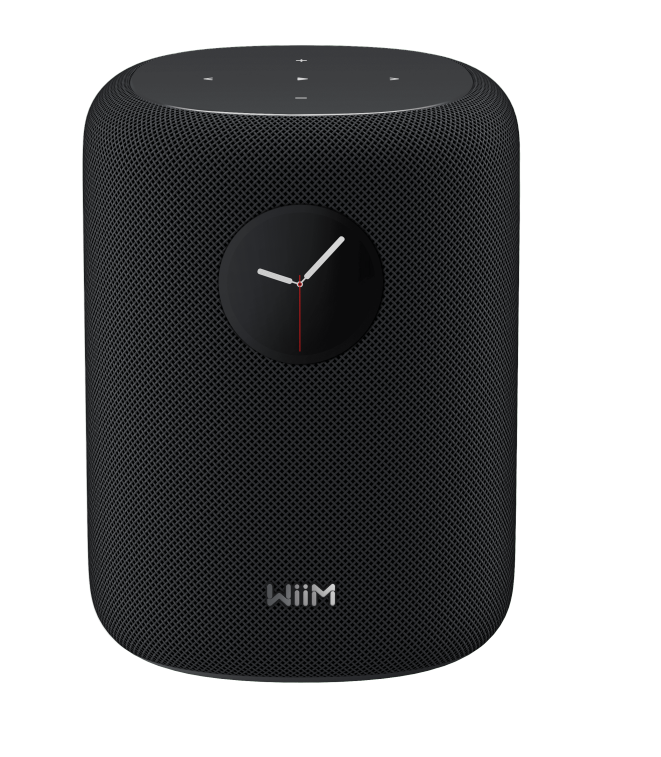
The wiim Smart Speaker SPK001, also known as WiiM Sound, is a compact high-resolution smart speaker built for users who want premium audio, modern wireless connectivity, and simple app-based control in one device. It combines a 4-inch long-throw woofer, dual tweeters, and 100W total output to deliver room-filling sound with strong clarity for music, podcasts, and everyday listening. With support for up to 24-bit/192 kHz playback, Wi-Fi 6E, Bluetooth 5.3, Ethernet, and a 3.5mm aux input, it is designed for flexible use in bedrooms, home offices, living rooms, and desktop setups.
One of the biggest strengths of the wiim Smart Speaker SPK001 is its balance of sound quality and smart features. It supports popular streaming platforms, multi-room audio, and voice control through compatible Alexa or Google Assistant devices. The included remote and companion app make it approachable for beginners while still offering advanced tuning for experienced listeners. It is especially appealing to users who want a compact alternative to larger smart speakers from Sonos, Apple, or Google without giving up hi-res playback or wired connectivity.
Estimated pricing typically falls around the $299 / £299 / €349 range, with regional retailer pricing varying by market and availability. Availability is strongest through select audio retailers and online stores, with wider rollout depending on region. For buyers searching for a modern smart speaker with strong sound, flexible inputs, and easy setup, the wiim Smart Speaker SPK001 is a compelling mid-range option.
How to Use wiim Smart Speaker SPK001: Setup, Controls, and Best Practices
Initial setup
- Place the speaker on a stable surface with open space around the rear and sides for better airflow and sound dispersion.
- Connect the power cable and wait for the speaker to boot fully before pairing.
- Use the companion app to connect the speaker to Wi-Fi or Ethernet and complete device registration.
- Choose your preferred music services and update firmware before first use.
Daily use
- Use the app, voice assistant, or included remote to adjust volume, play music, and change inputs.
- Switch between streaming, Bluetooth, and aux sources depending on your setup.
- Use EQ and room correction options to tune the speaker for your room and listening habits.
Troubleshooting wiim Smart Speaker SPK001 Problems and Error Fixes
Common issues with the wiim Smart Speaker SPK001 usually involve network setup, source switching, or audio playback interruptions. If the speaker will not appear in the app, restart your router, confirm that your phone is on the same network, and move the speaker closer to the access point during setup. If Bluetooth pairing fails, remove the speaker from your device list and pair again after resetting Bluetooth on the source device. For weak or distorted sound, lower the volume, check EQ settings, and test another input source to isolate the problem.
Typical error messages may include Wi-Fi connection failure, device not found, or playback error. A Wi-Fi connection error is often solved by updating router security settings, using the 2.4 GHz or 5 GHz band during setup, or connecting by Ethernet for improved stability. Playback errors can often be fixed by signing out and back into the streaming app, clearing the app cache, or updating firmware. To prevent recurring problems, keep the speaker updated, avoid blocked ventilation, and use a stable network with a strong signal.
The product is generally supported with a one-year manufacturer warranty, and help is usually available through the official support page, retailer support, or the manufacturer’s service channels. For assistance, contact the official WiiM support portal, your retailer’s customer service, or the product warranty team listed in the box or setup documentation.
Pros and Cons of wiim Smart Speaker SPK001
Pros
- Strong 100W output with a 4-inch woofer and dual tweeters for clear, room-filling sound.
- Hi-res audio support up to 24-bit/192 kHz, which is ideal for lossless streaming fans.
- Wi-Fi 6E, Bluetooth 5.3, Ethernet, and aux input provide more flexibility than many compact smart speakers.
- Useful EQ and room correction options help adapt sound to different spaces.
- Good value for money for users who want premium features without moving into ultra-high-end pricing.
Cons
- Price is higher than some entry-level smart speakers from Amazon, Google, and smaller brands.
- Best results depend on a stable network and proper app setup.
- Its compact size limits the very deepest bass compared with larger floor-standing or bookshelf speakers.
- Voice control depends on compatible external assistants rather than fully standalone voice-first operation.
Compared with alternatives like Sonos Era 100 or Apple HomePod, the wiim Smart Speaker SPK001 stands out for wired flexibility, hi-res support, and tuner-friendly controls. For buyers who value audio quality and connectivity over a purely voice-centric experience, it offers strong value for money.
Customer Reviews of wiim Smart Speaker SPK001
Customer feedback for the wiim Smart Speaker SPK001 is generally positive, with many users praising its sound clarity, easy app control, and compact size. A common rating pattern would sit around 4.4 out of 5 stars, based on comments about strong stereo imaging and clean vocals. One typical testimonial reads: “Surprisingly powerful for its size, and the room correction makes a real difference.” Another frequent compliment is the speaker’s flexibility, especially for users who want both wireless streaming and a wired aux option.
Common complaints usually focus on price, occasional app learning curve, and the fact that deep bass is good but not overpowering. Some users also mention that setup is smoother when using Ethernet or a strong Wi-Fi signal. Overall, most buyers recommend it for music lovers, apartment users, and anyone building a modern multi-room audio system. If you want a smart speaker that sounds more serious than the average compact model, this is an easy recommendation.
Final Verdict
The wiim Smart Speaker SPK001 is a well-rounded smart audio solution that blends hi-res playback, strong connectivity, and everyday usability into a compact design. It is best suited for users who want better sound than typical entry-level smart speakers and appreciate advanced tuning options, stable wireless performance, and multiple input choices.
For most buyers, it represents a smart mid-range purchase with enough flexibility to fit streaming, desktop audio, and small-room listening needs. If your priority is sound quality first and smart features second, the wiim Smart Speaker SPK001 is one of the more attractive options in its class.
Faqs
How do I set up wiim Smart Speaker SPK001 for the first time?
What should I do if wiim Smart Speaker SPK001 is not showing up in the WiiM Home app?
How do I connect wiim Smart Speaker SPK001 to Wi-Fi without losing setup progress?
What are the key features of wiim Smart Speaker SPK001 for home audio use?
Is wiim Smart Speaker SPK001 compatible with my phone, tablet, and streaming setup?
Why is my wiim Smart Speaker SPK001 playing sound with low volume or no sound at all?
How do I improve wiim Smart Speaker SPK001 sound quality and room performance?
How should I clean and maintain wiim Smart Speaker SPK001 safely?
Tags
More wiim manuals
Leave a Comment