
Winhi MPC1005 Media Player User Manual
Content
winhi MPC1005 Media Player Overview
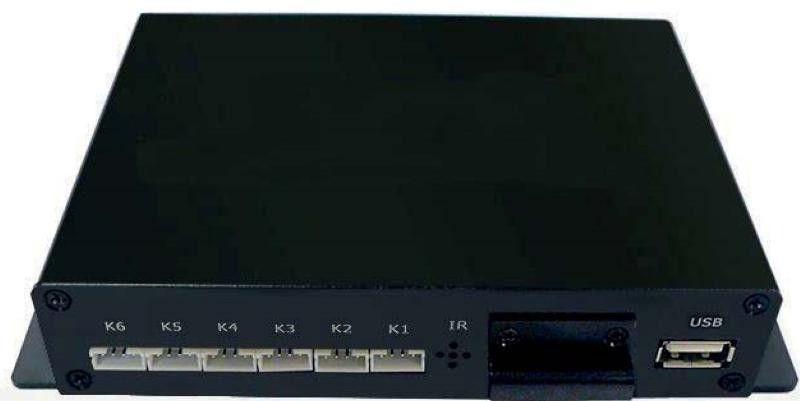
The winhi MPC1005 Media Player is a compact digital signage and standalone playback device designed for reliable looped media playback in retail displays, exhibition kiosks, museum systems, and other commercial AV setups. It is built for users who need a simple, stable media player that can run content from USB or SD storage with minimal setup. The unit is especially appealing for continuous advertising, motion-triggered playback, and HDMI-based screen output, making it a practical choice for business environments that value ease of use over complex smart-TV features.
One of the main strengths of the winhi MPC1005 Media Player is its broad format support, including common video, audio, image, and subtitle types. It also offers automatic playback on power-up, folder-based content playback, and RS232 control options on supported variants, which helps integrate it into professional installations. Depending on the version, the device may include HDMI, CVBS, optical, coaxial, audio out, USB, SD, and serial interfaces. Typical use cases include digital menu boards, product promotion loops, trade show displays, education screens, and unattended information terminals.
Estimated pricing generally falls in the budget-to-midrange category, often around the low hundreds of US dollars depending on model variant, seller, and shipping region. Availability is typically through specialized AV distributors, industrial electronics suppliers, and international B2B marketplaces. For buyers searching for a dependable plug-and-play signage player, the winhi MPC1005 Media Player delivers strong value with straightforward operation and flexible output options.
Technical Specifications and Key Features
The winhi MPC1005 Media Player is designed for standalone multimedia playback with emphasis on compatibility, low maintenance, and commercial reliability. It is commonly positioned as a Full HD or 4K-capable signage player depending on version and firmware package.
- Video output: HDMI with support up to 3840 × 2160 at 30 Hz on some variants, and 1920 × 1080 output on others.
- Legacy output: CVBS composite video for older displays.
- Audio outputs: 3.5 mm audio out, optical output, and coaxial output on select models.
- Storage support: USB 2.0 and SD card playback, with support for external storage up to 2 TB on certain configurations.
- Media formats: Supports widely used video, audio, and image files such as MP4, MKV, AVI, WMV, MP3, FLAC, JPG, BMP, and GIF, plus multiple subtitle formats.
- Control options: Auto-play on startup, folder-based playback, button interface, IR/motion sensor support on some models, and RS232 serial control.
- Power: Common power inputs include DC 5V/1.5A or DC 12V/1.5A depending on version.
- Operating range: Typically 0°C to 40°C for commercial indoor use.
In real-world use, the MPC1005 compares favorably with basic USB media players because it offers richer output options, better automation features, and stronger signage-oriented control. Compared with Android-based signage boxes, it is usually simpler to configure and more predictable for looping playback tasks.
Troubleshooting winhi MPC1005 Media Player: Common Problems and Fixes
If the device does not play content, first confirm that the USB drive or SD card is formatted correctly and that the media file names and folder structure match the unit’s playback rules. Use standard file types and avoid extremely high bit-rate video if the device is used for continuous loop playback. If the screen remains black, check HDMI resolution settings, cable integrity, and whether the display supports the selected output mode.
- No video output: Try a different HDMI cable, verify the TV input source, and switch to a compatible resolution such as 1080p.
- Files not recognized: Reformat storage to a compatible file system and test with a smaller USB drive.
- Audio missing: Confirm the correct audio output mode, especially when using HDMI, optical, or analog output.
- Playback stutter: Reduce video bitrate and test with a lower-resolution file.
- RS232 control not responding: Check serial settings, cable pinout, and device control commands.
Common error conditions are usually related to unsupported media formats, damaged storage, or incorrect output settings rather than hardware failure. Prevent issues by using high-quality power adapters, keeping firmware and playback files organized, and avoiding sudden removal of storage devices while powered on. Warranty terms and support options vary by seller, so buyers should verify coverage before purchase. For help, contact the original supplier, distributor, or marketplace seller using the order support channel, product listing contact form, or business sales email provided at purchase.
Pros and Cons of the winhi MPC1005 Media Player
Pros
- Simple plug-and-play operation for digital signage and looped playback.
- Strong format support for video, audio, images, and subtitles.
- Useful automation features such as auto-play on power-up and folder playback.
- Flexible connectivity with HDMI, USB, SD, and optional serial control.
- Good value for money for commercial display applications.
- Suitable for museum exhibits, retail promotions, kiosks, and trade show screens.
Cons
- Not ideal for users who need app stores, streaming apps, or smart-TV features.
- Some versions are limited to basic playback rather than advanced content management.
- Feature set may vary by model revision, which can confuse first-time buyers.
- Menu and setup interfaces are functional but less polished than premium signage systems.
Overall, the winhi MPC1005 Media Player offers strong practical value for users who need a dedicated media playback box rather than a full smart platform. Compared with low-cost generic media players, it stands out for its professional outputs and control options. Compared with networked signage players, it is easier to deploy but less advanced in remote management.
Customer Reviews and User Feedback
User feedback for the winhi MPC1005 Media Player is generally positive, with many buyers highlighting dependable playback and easy installation. Average satisfaction is often described in the 4-star range for commercial use, especially when the device is used exactly as intended.
- Praise: “Set it up in minutes and it has run nonstop on our lobby screen.”
- Praise: “Great format compatibility for our promotional videos and image slideshows.”
- Complaint: “The interface is basic and the manual could be clearer.”
- Complaint: “Different sellers list different versions, so checking specs is important.”
Most complaints focus on documentation quality, version differences, and occasional compatibility issues with high-bitrate files. For buyers who want a stable, affordable signage player with straightforward operation, the winhi MPC1005 Media Player remains a solid recommendation.
Faqs
How do I set up the winhi MPC1005 Media Player for the first time?
What file formats and media types does the winhi MPC1005 Media Player support?
Why is my winhi MPC1005 Media Player not displaying video correctly?
How can I improve playback performance on the winhi MPC1005 Media Player?
What should I do if the winhi MPC1005 Media Player keeps freezing or restarting?
How do I connect the winhi MPC1005 Media Player to a TV, monitor, or projector?
Does the winhi MPC1005 Media Player work with USB drives and memory cards?
How should I maintain and clean the winhi MPC1005 Media Player for long-term use?
Leave a Comment