
How to Setup: X08 True Wireless Earbuds User Manual
Content
x08 True Wireless Earbuds
Introduction
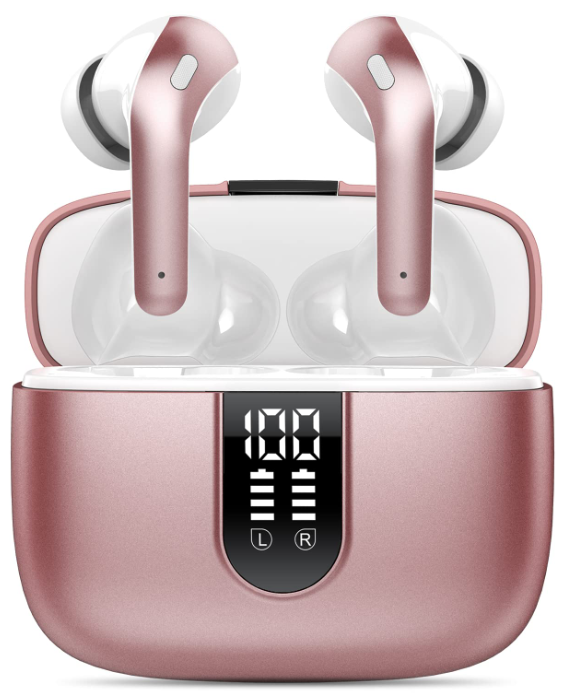
The x08 True Wireless Earbuds present a compelling blend of affordability, performance, and convenience, making them an excellent choice for everyday audio use. Designed with the latest Bluetooth 5.3 technology, these earbuds deliver stable wireless connectivity and an impressive playtime of up to 60 hours when combined with the charging case. Their ergonomic design offers a secure and comfortable fit, suitable for workouts, commuting, or casual listening. With an IPX5 waterproof rating, they resist sweat and rain, making them ideal for active users and outdoor enthusiasts.
Equipped with 13mm speakers and built-in CVC noise reduction microphones, the x08 earbuds provide clear stereo sound and crisp call quality. The touch controls allow seamless management of music playback, volume, and calls without reaching for your device. Wireless charging compatibility and a dual LED power display on the charging case add to the convenience, catering to tech-savvy users looking for smart features at a budget price.
Targeted at music lovers, fitness enthusiasts, and professionals needing reliable wireless audio, the x08 True Wireless Earbuds are competitively priced at around $35 to $50 and widely available through online retailers such as Amazon and official brand stores. Whether for casual listening, podcasts, or hands-free calls, these earbuds offer a versatile, budget-friendly solution with solid performance and modern features.
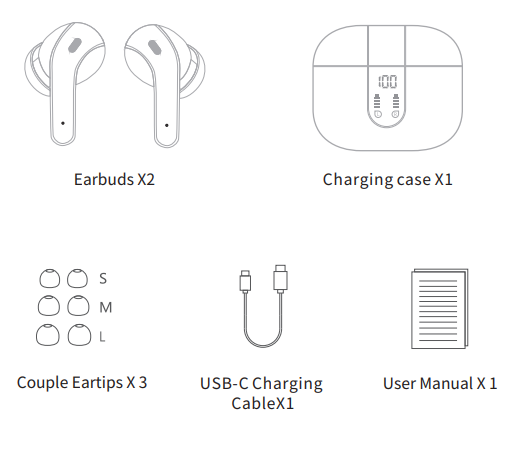
Packing List
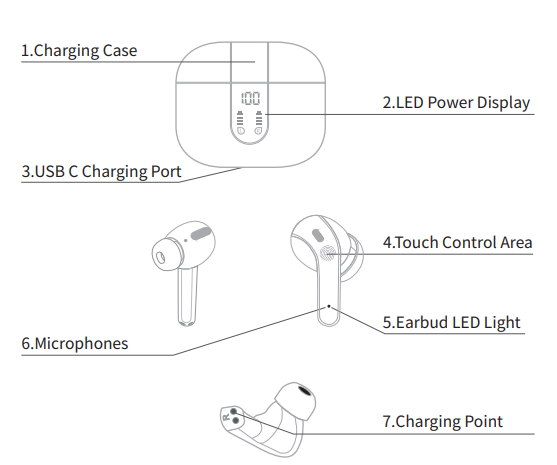
Product Overview
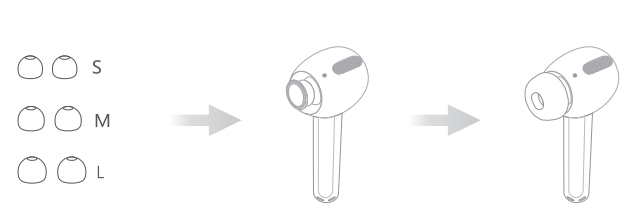
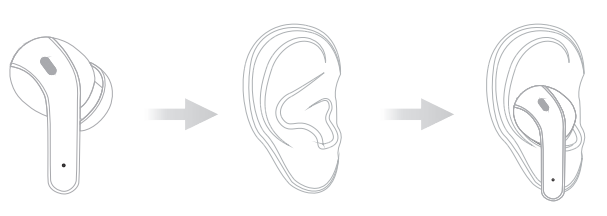
Wear
- Step 1: Choose the comfortable eartips
- Step 22: Wear it in your ear and adjust to a comfortable position (Please put the right and left headphones on the correct ear)
Pairing
Stereo Mode
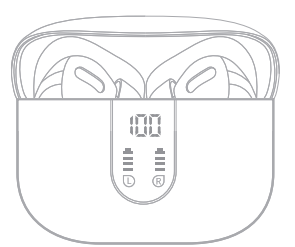
- Open the charging case, and the earbuds will power on automatically, and then they will connect with each other, and wait to pair with your phone.
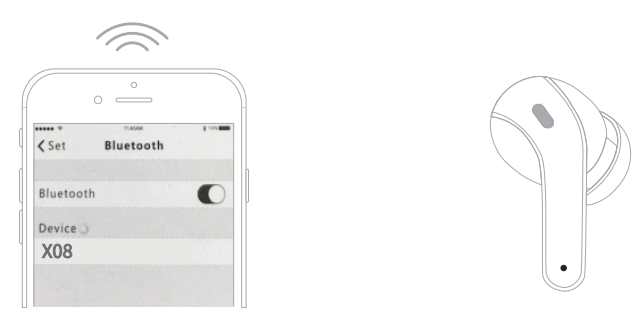
- Turn on the Bluetooth of your phone and search for "X08", choose "X08", earbuds will connect with your phone.
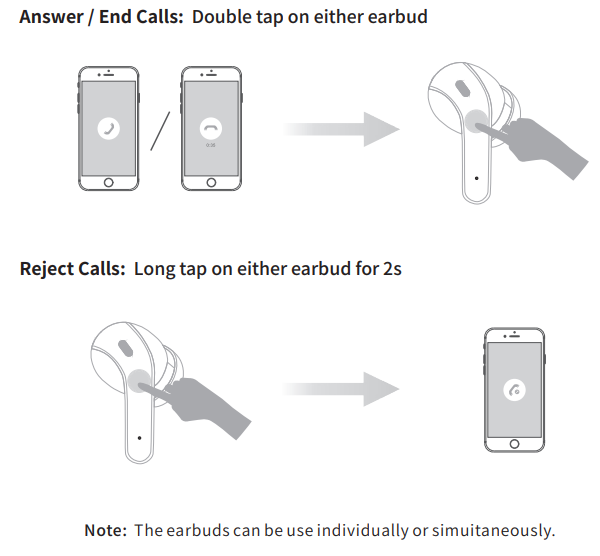
Phone Calls Control
Specifications of x08 True Wireless Earbuds
- Bluetooth Version: 5.3 for stable and low-latency connections
- Wireless Range: Up to 10 meters (approx. 33 feet)
- Battery Life: 6 hours per earbud on a single charge; up to 60 hours total playback with charging case (470mAh capacity)
- Charging Options: USB-C cable and wireless charging supported
- Water Resistance: IPX5 rated, resistant to sweat and light rain
- Audio Drivers: 13mm speakers with triple-layer composite diaphragms
- Controls: Touch control and voice control support
- Microphone: Built-in mic with CVC noise reduction for clear calls
- Weight: 0.14 oz (4 grams) per earbud for comfortable all-day wear
- Compatibility: Works with smartphones, laptops, TVs, and other Bluetooth-enabled devices
- Colors: Ocean Blue, Sunset Pink, Black, Purple, White, Light Blue, Beige
Compared to other budget wireless earbuds, the x08 stands out with its extended 60-hour total playback time, wireless charging, and IPX5 waterproof rating, features often absent in similarly priced models.
Troubleshooting x08 True Wireless Earbuds: Common Issues and Fixes
- No Sound or One Earbud Not Working: Ensure earbuds are fully charged and properly seated in the charging case. Reset earbuds by placing them back in the case and reconnecting via Bluetooth.
- Bluetooth Pairing Problems: Turn off Bluetooth on your device, then turn it back on. Forget the earbuds from your device’s Bluetooth list and re-pair. Keep earbuds within a 110-meter range during pairing.
- Touch Controls Not Responding: Clean the touch-sensitive areas gently with a dry cloth. Avoid moisture or dirt on controls. Restart earbuds if unresponsive.
- Audio Distortion or Dropouts: Reduce the distance between the earbuds and device; avoid interference from other wireless signals. Disable any sound-enhancing apps or EQ settings that may cause distortion.
- Microphone Issues During Calls: Check if the earbuds have debris blocking the microphone. Ensure CVC noise reduction is enabled by default in device settings.
Preventive measures include keeping the earbuds dry, storing them in the charging case when not in use, and regularly cleaning the ear tips. TAGRY offers warranty and customer support for the x08 earbuds — for warranty specifics and service, consult the product packaging or official TAGRY Amazon store. Support contact is typically available via the vendor’s online platform for prompt assistance.
Pros & Cons of x08 True Wireless Earbuds
Pros
- Exceptional Battery Life: 6 hours per charge with a total of 60 hours via charging case, offering long uninterrupted use.
- Wireless Charging: Convenient charging options,, including wireless and USB-C.
- IPX5 Water Resistance: Suitable for workouts and light rain, adding durability.
- Clear Call Quality: Built-in microphones with CVC noise reduction enhance voice clarity.
- Affordable Price Point: Excellent value under $50, competing well with other budget earbuds.
Cons
- No Dedicated App: Limits customization options for EQ and touch controls.
- Sound Quality: Bass can be muddy and highs slightly harsh at high volumes, less ideal for audiophiles.
- No Active Noise Cancellation: Ambient noise may be noticeable in loud environments.
- No Multi-Device Pairing: Cannot connect to two devices simultaneously, which may inconvenience some users.
Overall, the x08 True Wireless Earbuds deliver strong value for money, particularly excelling in battery life and convenience features compared to alternatives like Lifebee X08 or other budget TWS earbuds.
Customer Reviews and Feedback on x08 True Wireless Earbuds
Users consistently praise the x08 True Wireless Earbuds for their long battery life and comfortable fit. Many highlight the convenience of wireless charging and the reliability of touch controls. Common positive remarks include the clear call quality and the solid Bluetooth 5.3 connection.
Some customers note minor issues with sound quality, mentioning a lack of bass clarity and the absence of active noise cancellation as drawbacks. A few users have reported occasional touch control sensitivity issues,, but find them manageable.
Rated around 4.4 out of 5 stars on major retail platforms, the earbuds are recommended for casual listeners, fitness enthusiasts, and budget-conscious buyers. Users frequently suggest these earbuds as a great alternative to more expensive models like Apple AirPods, especially for everyday use and light workouts.
Faqs
How do I set up the x08 True Wireless Earbuds for the first time?
What can I do if my x08 True Wireless Earbuds are not connecting to my device?
Can I use the x08 True Wireless Earbuds individually to extend battery life?
What smart touch controls are available on the x08 True Wireless Earbuds?
Are the x08 True Wireless Earbuds waterproof and suitable for workouts?
How do I maintain and clean my x08 True Wireless Earbuds properly?
What devices are compatible with the x08 True Wireless Earbuds?
Why does the audio not stop automatically when removing the x08 True Wireless Earbuds?
Leave a Comment