
Setup: X7 Smart Watch TWS Headset User Manual
Content
x7 Smart Watch TWS Headset
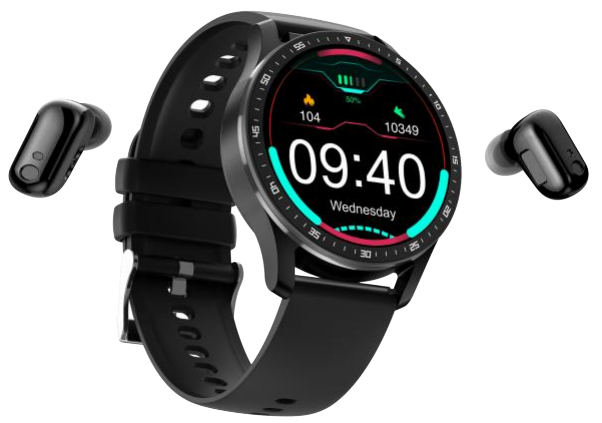
Introduction
Welcome to your ultimate guide to the x7 Smart Watch TWS Headset—a cutting-edge wearable that seamlessly blends the convenience of a smartwatch with the immersive experience of true wireless stereo (TWS) earbuds. This innovative 2-in-1 device is designed for tech-savvy users who demand versatility, style, and functionality in a single package.
The x7 Smart Watch TWS Headset stands out with its 1.32-inch high-resolution touchscreen, providing crisp visuals and intuitive navigation. With built-in Bluetooth 5.0, you can enjoy hands-free calling, music playback, and real-time notifications directly from your wrist. Health enthusiasts will appreciate the comprehensive fitness tracking, including heart rate monitoring, blood pressure, blood oxygen, and sleep analysis—all accessible via the vibrant display. The included TWS earbuds offer up to 3.5 hours of music playback, with easy touch controls for play, pause, skip tracks, and even summoning your smartphone’s voice assistant.
This device is ideal for active professionals, fitness buffs, and anyone who values convenience on the go. Whether you’re tracking workouts, managing calls, or streaming music, the x7 Smart Watch TWS Headset adapts to your lifestyle. Its multi-language support, multiple sports modes, and customizable watch faces make it a global companion for daily use
Priced competitively between $31 and $35, the x7 Smart Watch TWS Headset offers exceptional value, combining features typically found in separate smartwatches and wireless earbuds. It is widely available through major online retailers, making it accessible to a broad audience seeking a versatile, budget-friendly wearable solution.ion
Appearance Description
Overall Introduction
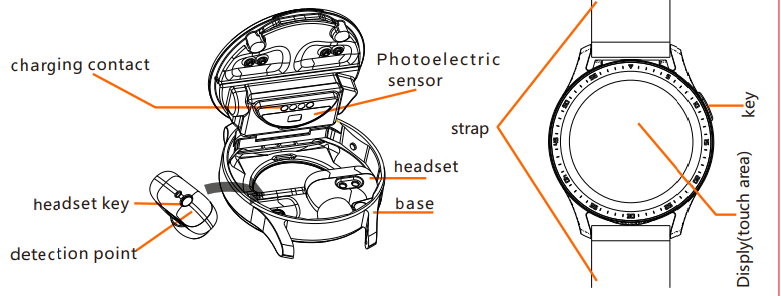
Packing List
- Bracelet strap x1,
- Charging cable x1,
- box x1
- Bluetooth headset x1,
- headphone head X2,
- User guidex1
Instructions for Initial Use
Introduction to Device
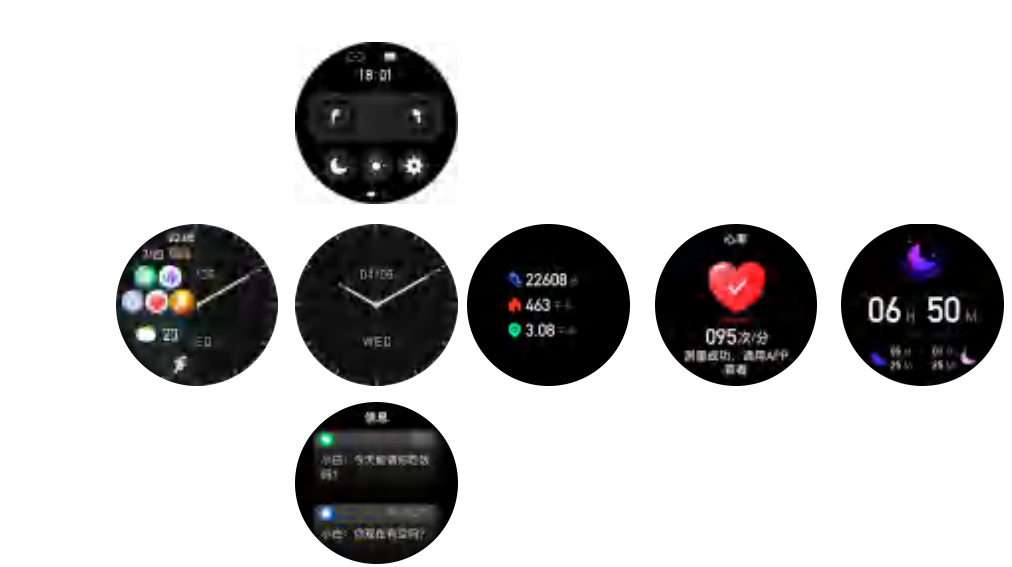
Function Interface
- After booting, enter the time interface, swipe up, down, left,t and right to enter the corresponding menu.
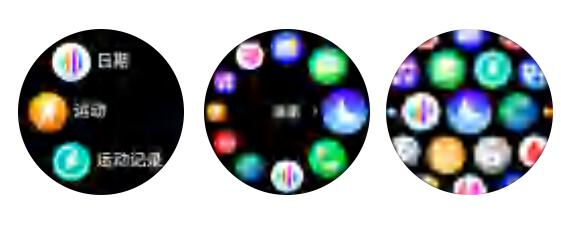
- In the main interface state, press the key to enter the submenu, and three styles are available.
Software download, install the app:
- Android phones can scan the QR code, or search for “FitCloudPro” in the application market to download and install.
- Apple phone can scan the QR code, or search for "FitCloudPro" in the App Store to download and install.

Bluetooth Connection between Bracelet and Mobile Phone (this device is a dual Bluetooth connection, 5.0/4.0 need to be connected once both are connected.)
- 5.0 Bluetooth connection is as follows.
- Turn on the Bluetooth of the bracelet: Take the headset out of the bracelet, and the Bluetooth of the bracelet will automatically turn on.
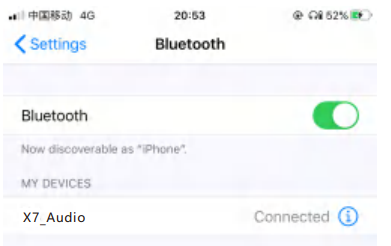
- Next, turn on the phone, click Settings, turn on Bluetooth, the phone's Bluetooth will automatically search for the Bluetooth number of the bracelet, find the Bluetooth number "X7_Audio" of the bracelet in the available devices below, a nd click to pair to complete the 5.0 Bluetooth connection.
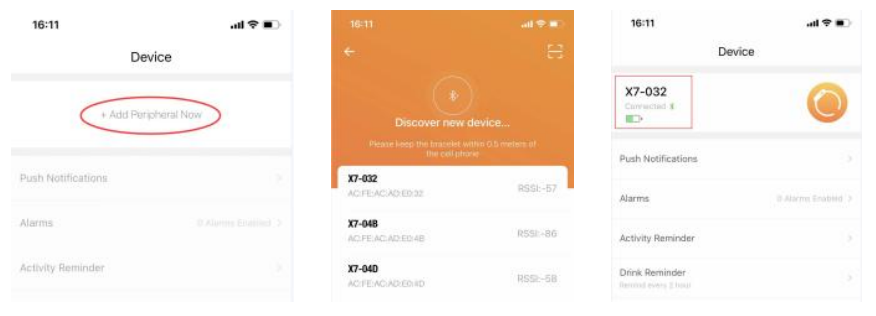
- Open the mobile APP "FitCloudPro", search for the device model "X7" in "Add Device" under the "Device" interface, and click to connect. After the connection is successful, the device model "X7 (connected)" will be displayed under "Device" in the APP.
Notes on Connection and Pairing
- Ensure that the Bluetooth of the mobile phone is turned off
- Ensure that the device has sufficient power, and please turn it on or charge it before use.
- Make sure that the device is within 50cm of the mobile phone when pairing and connecting.
- If the device cannot be found in the APP, please check in the mobile phone permission settings whether to allow "FitCloudPro" to use Bluetooth.
- When pairing the headset (Bluetooth 5.0), make sure that the headset is taken out of the base of the bracelet.
- If the bracelet or mobile phone has been paired with other Bluetooth devices during the period, you need to reconnect
- If there are multiple X7 bracelets, when the APP is connected to Bluetooth 4.0, you should pay attention to whether the Bluetooth ID address is consistent with the bracelet
Basic Parameters
- Main control chip: RTL8762D
- Body weight: 57g
- Bluetooth version: Bluetooth 5.0, Bluetooth 4.0
- Battery type: polymer lithium battery
- Battery capacity: Charging Module 250mAh ; Headset 30mAh .
- Charging voltage: 5V
- Charging current: 150mA
- Working temperature: -5~45°CC
- Waterproof: IP67 level
x7 Smart Watch TWS Headset: Troubleshooting
Encountering issues with yX7r x7 Smart Watch TWS Headset? This section provides practical solutions to common problems, helping you maximize your device’s performance.
Common Problems & Solutions
- Pairing Issues: Ensure Bluetooth is enabled on your smartphone. If the earbuds or watch won’t connect, reset both devices by holding the power button for 8 seconds.
- No Sound from Earbuds: Check battery levels and ensure the earbuds are properly seated in their charging slots. If issues persist, reset the earbuds as above.
- Touchscreen Unresponsiveness: Restart the device. If the problem continues, ensure the screen is clean and dry.
- Inaccurate Health Metrics: For reliable readings, wear the watch snugly and ensure sensors are clean. Calibrate health features via the companion app if available.
- Short Battery Life: Fully charge the device (1–2 hours). Reduce screen brightness and disable unnecessary notifications to extend your usage.ge
Error Codes & Fixes
While specific error codes are not detailed in available resources, most issues can be resolved by resetting the device, ensuring firmware is up to date, and re-pairing with your smartphone.
Preventive Measures
- Regularly clean charging contacts and earbuds.
- Avoid exposing the device to water beyond its “life waterproof” rating
- Update the device via the companion app when updates are available.
Warranty & Support
The x7 Smart Watch TWS Headset typically comes with a limited manufacturer’s warranty. For persistent issues, contact the retailer or visit the manufacturer’s website for support. Always keep your proof of purchase for warranty claims.
Contact Information
For further assistance, reach out to the retailer where you purchased your device or consult the included user manual for manufacturer contact details.
x7 Smart Watch TWS Headset: Pros & Cons
Advantages
- Versatile 2-in-1 Design: Combines a smartwatch and TWS earbuds for ultimate convenience—no need to carry separate devices
- Comprehensive Health Tracking: Monitors heart rate, blood pressure, blood oxygen, sleep, and more, making it ideal for fitness enthusiasts.
- Affordable Price: Priced between $31 and $35, it offers excellent value compared to buying standalone smartwatches and wireless earbuds.
- User-Friendly Interface: Full touchscreen with customizable watch faces and multi-language support
- Compact & Portable: Lightweight design (57g) with a premium feel, suitable for daily wear
Disadvantages
- Limited Battery Life: Earbuds offer only 3.5 hours of playback, which may be insufficient for long listening sessions
- No Built-in GPS: Lacks GPS tracking, limiting outdoor activity accuracy
- Basic Water Resistance: Only “life waterproof,” not suitable for swimming or submersion.
- No Voice Assistant: While it can wake your phone’s assistant, there’s no built-in voice assistant on the device itself
- Mixed Build Quality: Some users report a premium feel, while others note it’s heavier than expected.
Value for Money
The x7 Smart Watch TWS Headset delivers impressive features at a budget-friendly price, though it may not match the performance of high-end standalone devices. It’s an excellent choice for users seeking a versatile, affordable wearable with essential smart and health features.
Comparison with Alternatives
Compared to separate smartwatches and TWS earbuds, the x7 offers convenience and cost savings. However, those needing advanced fitness tracking, longer battery life, or swim-proofing may prefer premium alternatives from brands like Apple, Samsung, or Garmin.
x7 Smart Watch TWS Headset: Customer Reviews
User feedback on tX7 x7 Smart Watch TWS Headset highlights both its strengths and areas for improvement. Many customers praise its unique 2-in-1 design, noting how convenient it is to have both a smartwatch and wireless earbuds in one device.e The health and fitness tracking features receive positive remarks, especially for the price point, with users appreciating the heart rate, blood pressure, and sleep monitoring capabilities
Common complaints include the relatively short battery life of the earbuds and the lack of GPS, which limits their appeal for serious athletes.tes Some users mention the device feels heavier than expected, though others appreciate its premium build. Language support and customizable watch faces are frequently highlighted as standout features for international users.
Star ratings from various platforms generally fall in the 3.5 to 4 out of 5 range, reflecting good value for money but acknowledging some limitations. Testimonials often recommend the x7 Smart Watch TWS Headset for casual users and fitness beginners, while power users may want to consider more advanced alternatives. If you value convenience, affordability, and basic health tracking, this device is a solid choice—just be mindful of its battery and GPS limitations.
Leave a Comment