
Pairing & Setup: Xclear TT000082 True Wireless Earbuds User Manual
Content
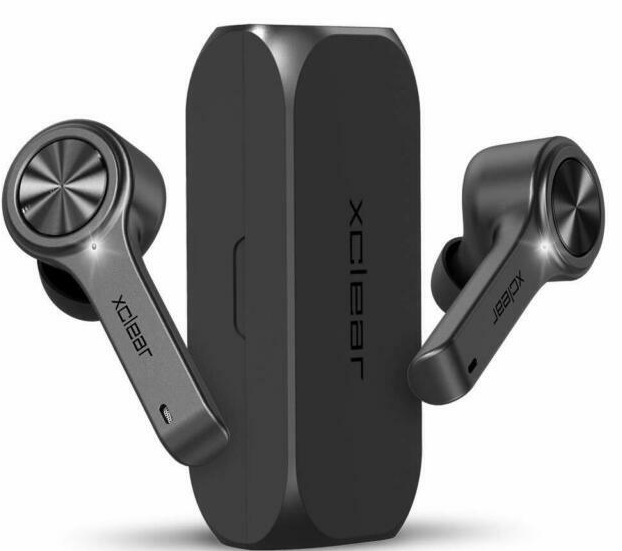
Xclear TT000082 True Wireless Earbuds
Introduction
The xclear TT000082 True Wireless Earbuds offer an immersive audio experience designed for music lovers, fitness enthusiasts, and everyday users seeking premium sound quality with wireless freedom. Featuring advanced Bluetooth 5.0 technology, these earbuds ensure seamless connectivity and crystal-clear calls, making them an ideal companion for on-the-go lifestyles. Whether you're streaming music, attending virtual meetings, or enjoying videos, the xclear TT000082 delivers balanced sound with a comfortable, secure fit tailored to various ear shapes.
These earbuds come with a compact, portable charging case that extends listening time up to 14 hours, combining convenience and endurance for all-day use. A built-in digital LED battery indicator provides real-time battery status for both earbuds and the charging case, ensuring you never run out of power unexpectedly. Priced competitively at approximately $49.99, the xclear TT000082 True Wireless Earbuds are widely available online and at select electronics retailers, offering great value for users seeking quality sound without breaking the bank.
Specifications
- Bluetooth Version: 5.0 for fast, stable wireless connectivity.
- Playtime: Up to 5 hours on a single charge; 14 hours total with charging case.
- Charging Case: Portable with Digital LED Battery Indicator showing precise battery percentage.
- Dimensions: Earbuds approx. 3.5 x 3.2 x 1.65 inches; lightweight at 1.44 ounces.
- Sound Quality: Premium sound with balanced highs, mids, and acceptable bass for casual listening.
- Fit and Comfort: Sleek in-ear design with multiple ear tip sizes for secure, comfortable wear during workouts and everyday activities.
- Controls: Multi-function buttons for playback, call management, and voice assistant activation.
Compared to similar true wireless earbuds in the $40-$60 range, the xclear TT000082 stands out for its reliable Bluetooth 5.0 performance, LED battery display, and an extended battery life that competes well with peers like Anker Soundcore Life and JLab Go Air models.
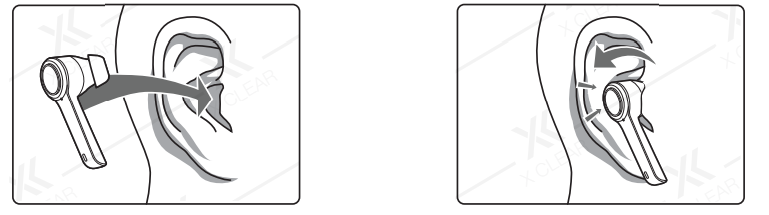
STEPS FOR WEARING THE EARBUDS
- STEP 1: Place the XClear Earbud inside your ear.
- STEP 2: Then, rotate the Earbud, back and away, to find a snug and comfortable fit. (Earbud fitting varies due to ear size).
EXAMPLES OF IMPROPER FIT
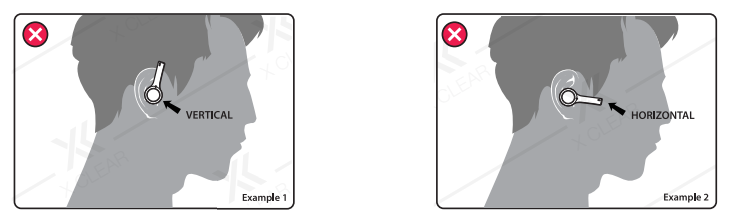
Do Not Rotate Earbuds Fully Horizontal (doing so WILL cause Earbuds to fall out).
ATTENTION: Earbuds will be activated if removed from the Charging Case or if the Charging Case reaches 0% battery. They can be turned off manually by holding the MFB buttons for 3-4 seconds.
Pairing
Open up the case to automatically Power ON the earbuds. LED Lights will flash,, and a voice prompt will say, “Pairing”.
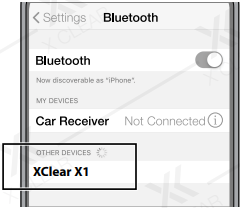
- Go to Settings. Go to Bluetooth. Select “XClear X1”. Earbuds are now connected.
Using The Multi-Function Button
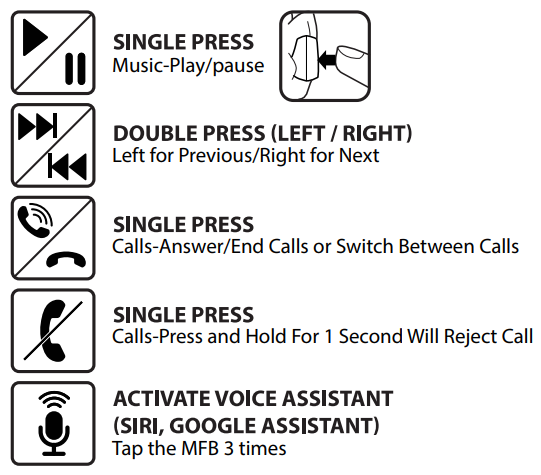
Factory Reset
Follow the 2-Step Process to perform a Factory Reset.
IMPORTANT: You MUST turn OFF the earbuds first, before you RESET them. The Factory Reset is a 2-Step Process.
- Step 1: TURN OFF
- Action: Hold MFB buttons for 3-4 seconds.
- Result: (LED Lights will blink signalling the earbuds are OFF).
- Step 2: RESET
- Action: Hold MFB buttons for 10-15 seconds.
- Result: (LED Lights will turn on, blink, then eventually stop).
COMPLETE
Earbuds are now RESET and enter the OFF state.
IMPORTANT: Please remember to DELETE your previous pairing history BEFORE you perform a Factory Reset. The Factory Reset DOES NOT remove pairing history.
Troubleshooting Guide for xclear TT000082 True Wireless Earbuds
- Issue: Earbuds won’t pair with the device.
Solution: Ensure Bluetooth is enabled, open the charging case to activate pairing mode indicated by flashing LED lights, and select “xclear TT000082” on your device’s Bluetooth list. If pairing fails, reset the earbuds by placing them back in the case and pressing the multi-function buttons per the he manual instructions. - Issue: One earbud is not producing sound.
Solution: Check battery level; charge the case if low. Remove and re-pair earbuds, ensuring both are fully charged and connected. - Issue: Poor call quality or audio dropouts.
Solution: Keep the device within 10 meters, minimize obstacles, and update the device firmware if available. Avoid interference from other Bluetooth devices.
Preventive tips include regular charging, keeping earbuds clean, and storing them in the provided case when not in use. The xclear TT000082 True Wireless Earbuds come with a standard 1-year warranty covering manufacturing defects. For further assistance, users can contact customer support at the manufacturer's website or the retailer from which the product was purchased.
Pros & Cons of xclear TT000082 True Wireless Earbuds
- Pros:
- High-quality Bluetooth 5.0 ensures stable connections and low latency.
- Compact charging with a convenient LED battery indicator for easy power management.
- Comfortable, secure fit suitable for workouts and extended wear.
- Competitive price point with good overall sound quality.
- Cons:
- Bass response may be underwhelming at higher volumes, less ideal for bass-heavy music genres.
- Not studio-grade audio quality, so audiophiles may find them lacking in detail.
- Limited advanced features like active noise cancellation or customizable EQ settings.
Overall, the xclear TT000082 earbuds provide excellent value for casual listeners and active users who prioritize comfort and battery life over high-end audio features. They compete well with alternatives in the budget true wireless category but lack some premium extras found in higher-priced models.
Customer Reviews and Feedback on xclear TT000082 True Wireless Earbuds
Users appreciate the xclear TT000082 True Wireless Earbuds for their reliable Bluetooth connection and comfortable fit, often highlighting the convenience of the LED battery indicator. Many users rate them around 4 out of 5 stars, praising the ease of pairing and portability of the charging case.
Common compliments include clear call quality and decent sound balance suitable for podcasts, calls, and casual music listening. However, some customers mention the bass performance as a minor drawback, especially at higher volumes. A few users have reported occasional pairing difficulties, but these are generally resolved through resetting the earbuds.
Overall, the earbuds receive positive recommendations for everyday use, workouts, and budget-conscious buyers seeking wireless freedom without sacrificing essential features.
Faqs
How do I set up xclear TT000082 True Wireless Earbuds for the first time?
Why won't my xclear TT000082 True Wireless Earbuds connect to my phone?
How do I perform a factory reset on xclear TT000082 True Wireless Earbuds?
Can I use xclear TT000082 True Wireless Earbuds with non-Bluetooth devices?
How do I improve the battery life of xclear TT000082 True Wireless Earbuds?
What should I do if my xclear TT000082 True Wireless Earbuds keep falling out?
How do I clean and maintain xclear TT000082 True Wireless Earbuds?
What are the key features of xclear TT000082 True Wireless Earbuds?
Leave a Comment