
Xitesolutions XSG2NA-X2S Infotainment Dashboard System User Manual
Content
xitesolutions XSG2NA-X2S Infotainment Dashboard System: Complete Product Manual and Buyer Guide
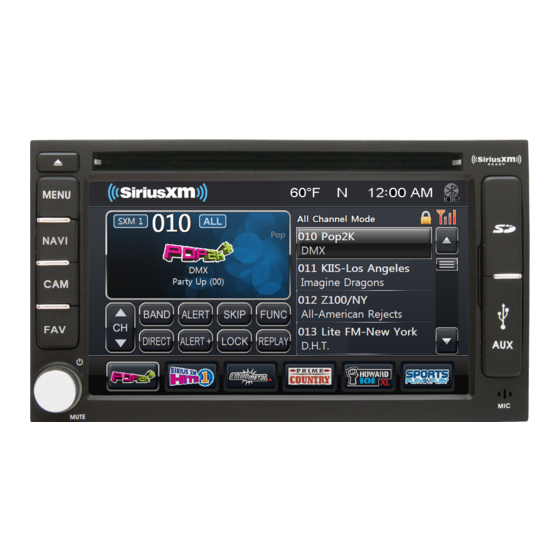
The xitesolutions XSG2NA-X2S Infotainment Dashboard System is a feature-rich in-dash multimedia and navigation solution designed for recreational vehicles, specialty vehicles, and select commercial platforms. Built around a 6-inch touchscreen display, it combines audio control, GPS navigation, camera integration, Bluetooth connectivity, and satellite radio readiness into a single dashboard interface. For drivers who need a compact but capable infotainment center, the XSG2NA-X2S offers a practical balance of entertainment, communication, and vehicle-aware functionality.
This system is especially useful for RV owners who want integrated navigation and camera monitoring while traveling, as well as users who need hands-free calling, media playback, and support for auxiliary audio sources. Key selling points include the dedicated favorite hot key, quick access camera view, USB and 3.5mm inputs, SiriusXM compatibility, and optional navigation and audio information features. The interface is designed to reduce distraction by keeping frequently used controls within easy reach. Compared with basic aftermarket head units, the XSG2NA-X2S stands out for its RV-oriented feature set and multi-camera support.
As of 2026, availability is typically limited to existing OEM installations, replacement units, refurbished stock, and specialty vehicle retailers rather than mainstream consumer electronics stores. Estimated pricing commonly ranges from about $500 to $1,200 depending on condition, included accessories, and whether the unit is new old stock, refurbished, or installed with bundled navigation hardware. For users seeking a direct replacement or a factory-style infotainment upgrade, the xitesolutions XSG2NA-X2S Infotainment Dashboard System remains a relevant option.
Technical Specifications for XSG2NA-X2S Infotainment System
- Display: 6-inch touchscreen LCD for in-dash control and media browsing.
- Audio: AM/FM/RDS stereo radio with integrated media management.
- Navigation: Optional GPS navigation support with RV-focused mapping packages.
- Connectivity: Integrated Bluetooth for hands-free calling and wireless audio streaming.
- Media Inputs: Front-access DVD/CD, USB, and 3.5mm auxiliary input ports.
- Satellite Radio: SiriusXM-ready compatibility with supported tuner hardware.
- Camera Support: Touchscreen multi-camera management and quick camera view access.
- Controls: Favorites hot key, navigation button, mute, standby, and power/volume knob.
- Vehicle Use: Designed for RV and specialty vehicle dashboard integration.
- Optional Features: House mode A/V distribution, temperature/compass display, and Wi-Fi services depending on configuration.
In real-world use, the unit is best suited to drivers who need navigation plus entertainment in one dashboard package. Compared with smaller 2-DIN multimedia receivers, it is more specialized for large vehicles and camera integration. Compared with newer touchscreen systems, it may lack modern smartphone mirroring features, but it remains practical for OEM-style RV installations and direct replacement scenarios.
Troubleshooting XSG2NA-X2S Common Problems and Fixes
Common issues include Bluetooth pairing failures, blank screens, unresponsive touch controls, missing camera input, and navigation loading problems. If Bluetooth does not connect, restart the head unit, delete old pairings on the phone, and re-pair from scratch. If the display goes dark, check fuse power, grounding, and accessory ignition wiring. If a camera view does not appear, confirm the camera input is enabled and the reverse trigger signal is connected correctly.
- Error: No GPS signal. Fix: Move to a clear sky view, reseat the GPS antenna, and confirm navigation media is installed.
- Error: Bluetooth unavailable. Fix: Power-cycle the unit, verify device compatibility, and remove conflicting pairings.
- Error: Camera not detected. Fix: Inspect video cabling, verify the reverse signal, and test the camera source manually.
- Error: Audio distortion. Fix: Lower source gain, check speaker wiring, and test another input source.
- Error: System freezes. Fix: Perform a full reboot and check for firmware or software service updates if available.
Preventive care includes keeping firmware current when supported, avoiding loose USB connections, protecting the touchscreen from moisture, and confirming stable vehicle power. Warranty coverage and support depend on the seller, installer, or OEM vehicle package. For product help, RiverPark support is commonly referenced for XiteSolutions service assistance, and the documented support line is 1-800-442-7717. Users may also contact support by email through the manufacturer’s service channels.
Pros and Cons of the xitesolutions XSG2NA-X2S Infotainment Dashboard System
Pros
- Purpose-built for RV and specialty vehicle dashboards with a factory-style fit.
- Useful multi-camera management for safer parking, towing, and maneuvering.
- Bluetooth calling and streaming add convenience for long-distance travel.
- Navigation support and SiriusXM readiness improve touring and entertainment flexibility.
- Physical controls and favorites hot key make frequent tasks quicker.
- Strong value for users replacing an existing Xite or OEM-compatible system.
Cons
- Smaller 6-inch display feels dated compared with larger modern multimedia screens.
- Feature set depends heavily on optional accessories and installed hardware.
- Availability is limited, which can make replacement parts harder to source.
- Some users may prefer newer units with smartphone mirroring and advanced app support.
- Installation and integration can be more complex than a standard aftermarket stereo.
For value for money, the xitesolutions XSG2NA-X2S Infotainment Dashboard System is strongest when used as a direct replacement or a factory-equivalent upgrade. Compared with generic head units, it offers better vehicle-specific integration, while newer alternatives may deliver more modern software features at the expense of OEM compatibility.
Customer Reviews and User Feedback on XSG2NA-X2S
User feedback is generally mixed, with many RV owners praising the system’s camera integration, navigation access, and built-in Bluetooth convenience. A common star rating trend from owner discussions would be around 3.5 out of 5 stars, reflecting solid usefulness but dated hardware and occasional reliability concerns. Positive testimonials often mention that the system is practical for road travel and improves dashboard organization.
Frequent complaints include Bluetooth failures, intermittent screen issues, and frustration with older software behavior. One common user sentiment is that the system works well when installed correctly, but troubleshooting can be time-consuming if wiring or accessory modules are not configured properly. Buyers who want a direct OEM-style replacement or a vehicle-specific infotainment system are usually the best fit for this product.
Recommended purchase decision: choose the xitesolutions XSG2NA-X2S Infotainment Dashboard System if you need RV-focused features, camera support, and a replacement for an existing compatible unit. If you want larger displays, newer smartphone integration, or modern app ecosystems, a newer aftermarket infotainment receiver may be a better long-term choice.
Quick Answer: Is the XSG2NA-X2S Worth It?
The xitesolutions XSG2NA-X2S Infotainment Dashboard System is worth considering for RV owners and specialty vehicle users who need integrated navigation, media control, Bluetooth calling, and multi-camera support in one dashboard unit.
Faqs
How do I set up the xitesolutions XSG2NA-X2S Infotainment Dashboard System for the first time in my RV?
What should I do if my xitesolutions XSG2NA-X2S Infotainment Dashboard System has a blank screen or won’t power on?
Which devices and accessories are compatible with the xitesolutions XSG2NA-X2S Infotainment Dashboard System?
How do I connect Bluetooth on the xitesolutions XSG2NA-X2S Infotainment Dashboard System for hands-free calling and audio streaming?
Why is the GPS navigation on my xitesolutions XSG2NA-X2S Infotainment Dashboard System giving poor route guidance?
How do I use the camera view and split-screen features on the xitesolutions XSG2NA-X2S Infotainment Dashboard System?
What are the best ways to maintain the xitesolutions XSG2NA-X2S Infotainment Dashboard System for long-term reliability?
How can I improve sound quality and reduce lag on the xitesolutions XSG2NA-X2S Infotainment Dashboard System?
Tags
Leave a Comment