
How to Use: Yorkville Sound Service LS801P User Manual
Content
Yorkville Sound Service LS801P: Professional Powered Subwoofer Manual and Guide
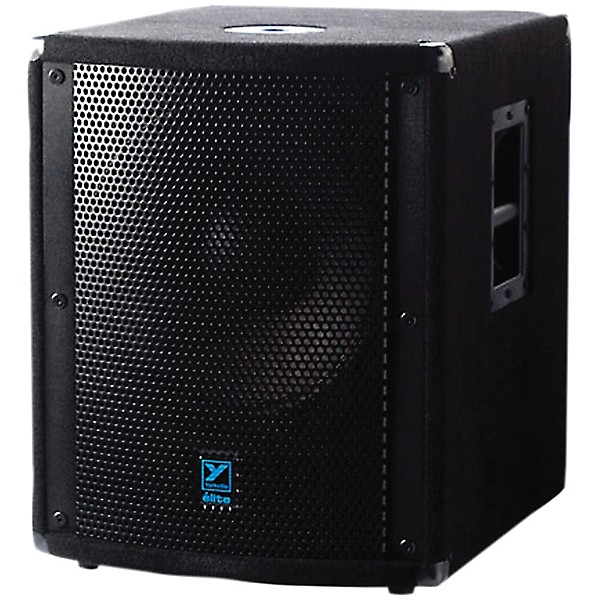
The Yorkville Sound Service LS801P is a rear horn-loaded active subwoofer designed for high-output live sound reinforcement, mobile DJs, houses of worship, and rental rigs that need strong low-end performance without sacrificing reliability. Built around a single 18-inch cast-frame woofer with a 4-inch voice coil, it delivers serious bass impact, making it a strong fit for concerts, dance events, and permanent installations where deep, controlled bass is essential. The yorkville Sound Service LS801P is widely recognized for its rugged construction, high SPL capability, and practical input flexibility, including line-level and speaker-level connections for integration with a wide range of PA systems.
One of the main advantages of this powered subwoofer is its ability to produce up to 140 dB peak SPL with 1500 watts of program power and 2500 watts peak output. That gives it enough headroom for demanding live environments while maintaining thermal, overcurrent, and clip protection. The enclosure uses durable plywood construction with protective finishing suited to road use, and the design emphasizes reliability for repeated transport and setup. Typical availability is through pro audio dealers, used gear marketplaces, and legacy inventory channels, since this model is older and often purchased secondhand. Estimated pricing usually falls in the used market range of about $500 to $900, depending on condition, finish, and included accessories. For buyers seeking a powerful, traditional powered sub with proven stage performance, the yorkville Sound Service LS801P remains a practical and respected option.
Specifications and Key Features of the Yorkville Sound Service LS801P
- System type: Rear horn-loaded subwoofer
- Amplification: Active powered design
- Program power: 1500 watts
- Peak power: 2500 watts peak
- Maximum SPL: 140 dB peak, 134 dB continuous
- Frequency response: 45 Hz to 150 Hz
- Driver: Single 18-inch cast-frame woofer with 4-inch voice coil
- Protection: Thermal, overcurrent, and clip limiting
- Inputs: Dual XLR line inputs and dual 1/4-inch line/speaker-level inputs
- Link outputs: XLR and 1/4-inch pass-through connections
- Enclosure: Heavy-duty plywood cabinet with perforated metal grille
- Dimensions: 23 x 27.5 x 32 in
- Weight: About 137.3 lb
Compared with smaller powered subs, the yorkville Sound Service LS801P offers greater output, deeper low-end authority, and more robust cabinet construction. Versus compact 15-inch models, it is better suited to larger venues and higher SPL applications, though it is heavier and less portable. For users who need maximum punch and stage-ready durability, it sits closer to a professional touring subwoofer than an entry-level PA speaker.
Setup Guide: How to Install and Connect the Yorkville Sound Service LS801P
Place the subwoofer on a flat, stable surface with enough ventilation around the rear panel and amplifier section. Keep the cabinet away from moisture, direct heat, and unstable stacking. Before powering on, confirm that the voltage setting and mains supply match your region. Because this is a high-output powered speaker, use a properly rated AC outlet and avoid daisy-chaining heavy loads from the same circuit.
Connect your mixer or processor to the XLR line inputs for standard balanced audio. If your system requires it, use the 1/4-inch inputs and select line-level or speaker-level operation according to the source signal. Use the link outputs to send audio to another subwoofer or to a full-range speaker chain. Start with the level control at a low setting, then raise it gradually while testing. If the bass sounds muddy, lower the crossover point on the source device or reduce gain. If the clip indicator lights frequently, reduce input level immediately.
Safety precautions include not blocking airflow, not operating the cabinet in wet conditions, and not moving the unit while powered. For best results, avoid running the sub at maximum output for long periods unless the system has sufficient power and signal headroom.
Troubleshooting the Yorkville Sound Service LS801P Subwoofer
If there is no sound, check the AC power, input cable, mixer output, and level control first. Verify that the source is sending signal and that the correct input type is selected. If the unit powers on but produces very low output, make sure the crossover settings are not filtering out too much bass and confirm that the source is not muted or routed incorrectly.
If distortion appears, lower the input gain and inspect the source signal for clipping. A flashing or solid clip indicator usually means the input is too hot or the amplifier is being pushed too hard. If thermal protection engages, let the unit cool, improve airflow, and reduce sustained output levels. If the subwoofer shuts down unexpectedly, check for overcurrent conditions, damaged cables, or excessive impedance load on linked devices.
Common preventive measures include regular cable inspection, safe transport, dust removal from vents, and avoiding overdriving the system. Since this is a legacy product, warranty coverage may be limited depending on seller or resale condition. For help, contact Yorkville Sound support through the company’s official service department or consult an authorized pro audio technician familiar with powered subwoofers.
Pros and Cons of the Yorkville Sound Service LS801P
Pros
- High output with strong low-frequency impact for live events
- Rear horn-loaded design improves bass efficiency
- Flexible inputs support both line-level and speaker-level integration
- Built-in protection helps safeguard the amplifier and driver
- Durable cabinet construction suits road use and rental environments
- Good value on the used market for buyers needing pro-grade bass
Cons
- Heavy cabinet makes transport and setup more demanding
- Older design lacks modern digital DSP controls found on newer subs
- Availability is limited and often depends on used inventory
- Less convenient for small venues or lightweight mobile rigs
- May require careful gain staging to avoid clipping in high-demand systems
For value for money, the yorkville Sound Service LS801P can be an excellent purchase if found in good condition at a fair used price. Compared with newer compact powered subs, it trades convenience for raw output and ruggedness. Buyers who prioritize sound reinforcement performance over portability will likely appreciate it most.
Customer Reviews and Real-World Feedback on the Yorkville Sound Service LS801P
Typical user feedback for the yorkville Sound Service LS801P is strongly positive, especially from DJs, sound technicians, and venue owners who want punchy, reliable bass. Common praise includes “hits hard,” “fills the room easily,” and “great for live shows,” with many users rating it around 4.5 out of 5 stars for performance and build quality. Reviewers often highlight its ability to keep up with loud tops and deliver consistent low end in larger spaces.
Frequent complaints focus on weight, size, and the age of the design. Some users wish it had lighter construction or more modern DSP features, while others mention that used units should be checked carefully for wear, fan noise, or amplifier condition. For buyers seeking a powerful legacy subwoofer at a reasonable price, it remains a recommended choice. For smaller mobile setups, a newer compact powered sub may be a better fit.
Frequently Asked Questions About the Yorkville Sound Service LS801P
What is the Yorkville Sound Service LS801P used for? It is used for live sound reinforcement, DJ systems, worship audio, and other applications that need strong sub-bass output.
Is the Yorkville Sound Service LS801P active or passive? It is an active powered subwoofer with built-in amplification.
How much does it weigh? It weighs about 137 pounds, so two-person handling is recommended.
Is it still worth buying? Yes, if high output and road durability matter more than portability and modern DSP features.
Faqs
How do I set up yorkville Sound Service LS801P for the first time?
Why is yorkville Sound Service LS801P producing low output or weak sound?
What connections and compatibility should I check before using yorkville Sound Service LS801P with other audio gear?
How can I reduce distortion or clipping on yorkville Sound Service LS801P during loud playback?
What are the most important features of yorkville Sound Service LS801P for live sound or installed audio use?
How do I optimize yorkville Sound Service LS801P performance for better sound quality?
What should I do if yorkville Sound Service LS801P has power issues or will not turn on?
How should I clean and maintain yorkville Sound Service LS801P for long-term reliability?
More yorkville manuals
Leave a Comment