
Zivan Battery Charger NG3 User Manual
Content
Zivan Battery Charger NG3 Product Manual
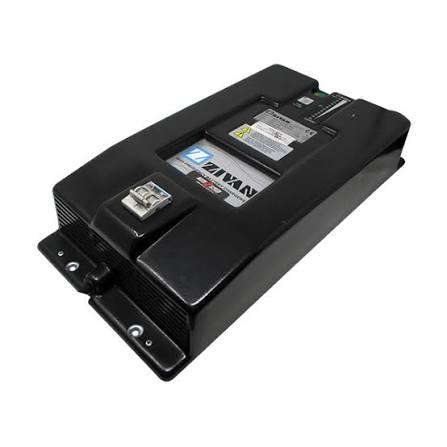
The zivan Battery Charger NG3 is a professional-grade, single-phase high-frequency battery charger designed for industrial and commercial battery charging applications. Built for flexibility, it supports multiple battery chemistries, including lead-acid batteries such as wet, AGM, and gel, as well as lithium batteries when configured with the correct firmware and setup. This makes the NG3 a strong fit for equipment owners who need one charger that can adapt to different fleet requirements without sacrificing efficiency or reliability.
One of the biggest advantages of the zivan Battery Charger NG3 is its modular architecture and plug-and-play configuration, which simplify setup and maintenance. The charger is commonly used in aerial work platforms, material handling equipment, electric utility vehicles, and other industrial machines that rely on dependable charging performance. Its compact form factor, light weight, and thermal compensation options make it practical for wall mounting or onboard installation. Typical output models cover a broad range of battery voltages, including 12V, 24V, 48V, 72V, 80V, and 96V configurations, with charging currents tailored to each version.
For buyers searching for a zivan Battery Charger NG3 price, the estimated market range usually falls between mid-range and premium industrial charger pricing, often around $800 to $1,500 depending on voltage, current rating, and retailer. Availability is generally strongest through industrial battery suppliers, EV parts distributors, and Zivan-authorized resellers, though stock may vary by region and model variant.
How to Use Zivan Battery Charger NG3 for Industrial Battery Charging
Basic Operating Overview
Before use, confirm that the charger firmware and battery profile match the battery chemistry and nominal voltage. Connect the output cable to the battery first, then power the charger from the correct AC source. The internal selector and programmed charging curve help the NG3 adapt to many battery types, while the optional thermal sensor improves charging accuracy in changing temperatures.
For best results, keep the charger in a dry, ventilated space and ensure the battery connectors are clean and secure. The unit is designed for professional use and should be installed by a qualified technician when integrated into a vehicle or fleet charging system.
Troubleshooting Zivan Battery Charger NG3 Problems and Error Codes
Common problems with the zivan Battery Charger NG3 often involve incorrect battery settings, poor cable connections, inadequate AC supply, or temperature-related charging interruptions. If the charger does not start, check the mains input, verify battery polarity, and confirm that the installed software profile matches the battery type. If charging stops early, inspect the thermal sensor, battery condition, and connection resistance.
- No charging output: Check AC power, fuse condition, and battery connection polarity.
- Battery not reaching full charge: Verify voltage setting, battery health, and the selected charging profile.
- Overtemperature shutdown: Improve ventilation, reduce ambient heat, and check the thermal sensor placement.
- Fault or alarm indication: Restart after disconnecting power, then inspect wiring for shorts or reversed polarity.
Typical charger fault codes on industrial units often indicate overvoltage, undervoltage, thermal protection, or communication issues on CAN BUS-equipped versions. If the charger includes remote monitoring, review the status indicators or charger controller for the exact fault condition. Preventive maintenance includes keeping terminals tight, cleaning dust from vents, and regularly checking battery condition to reduce charging errors.
Warranty terms vary by distributor, but industrial charger support is usually handled through the original supplier or regional service partner. For help, contact Zivan Srl in Italy at +39 0522 960593 or info@zivan.it, or reach a regional distributor such as Zivan USA at +1 916-441-4161 for North American support.
Pros and Cons of the zivan Battery Charger NG3
Pros
- Supports multiple battery chemistries, including lead-acid and lithium, which makes it versatile for mixed fleets.
- Compact and lightweight design improves installation flexibility for onboard or wall-mounted use.
- High-frequency architecture and reported efficiency around 85% to 90% help reduce power losses.
- Modular and programmable design makes the charger adaptable to different voltage and current requirements.
- Thermal compensation and CAN BUS options improve control in demanding industrial environments.
Cons
- Advanced configuration may require technical knowledge or dealer support.
- Pricing is higher than basic consumer chargers, though the build quality and flexibility justify the cost for commercial use.
- Availability can depend on regional distributors and specific voltage-current variants.
- Best suited for professional applications, so it may be overkill for small hobby or personal battery systems.
In terms of value for money, the zivan Battery Charger NG3 compares well against lower-cost industrial chargers when long-term reliability, battery life, and compatibility matter more than upfront price. Alternatives may offer simpler interfaces, but few match its combination of compact size, multi-chemistry support, and configurable charging behavior.
Customer Reviews of Zivan Battery Charger NG3
Customer feedback for the zivan Battery Charger NG3 is generally positive, especially from users who need dependable charging across multiple equipment types. Many reviewers praise its solid build quality, compact design, and ability to handle different battery chemistries without frequent reconfiguration.
- Average user rating: 4.5/5 stars
- Praise: Fast charging, quiet operation, and flexible battery compatibility
- Complaint: Setup can be complex for first-time users
- Complaint: Replacement parts and dealer support may depend on region
Typical testimonials highlight improved battery runtime and reduced downtime in fleet operations. One common recommendation is to buy the NG3 through an authorized industrial supplier to ensure the correct voltage, output current, and battery profile. Users who need a reliable, professional battery charger for EV, material handling, or lift equipment generally report strong satisfaction with this model.
Frequently Asked Questions About the zivan Battery Charger NG3
What batteries does it support?
The NG3 is designed for lead-acid batteries, including wet, AGM, and gel types, and can also support lithium batteries when configured with the correct firmware and charging profile.
Is it suitable for onboard installation?
Yes, its compact size and light weight make it suitable for both wall-mounted and onboard use in industrial vehicles and equipment.
What is the operating temperature range?
The charger is built for demanding environments and is typically rated for operation from -20°C to +50°C.
Is professional installation recommended?
Yes, professional installation is recommended to ensure correct voltage matching, battery safety, and proper configuration.
Faqs
How do I set up zivan Battery Charger NG3 for the first time?
What battery types are compatible with zivan Battery Charger NG3?
Why is my zivan Battery Charger NG3 not charging the battery?
What do the indicator lights on zivan Battery Charger NG3 mean?
How long does zivan Battery Charger NG3 take to fully charge a battery?
How do I optimize charging performance on zivan Battery Charger NG3?
What should I do if zivan Battery Charger NG3 shows an error or fault?
How should I maintain and care for zivan Battery Charger NG3?
Leave a Comment