
Zombiescat B5 ANC Wireless Earphone QCWS-B5 User Manual
Content
Zombiescat B5 ANC Wireless Earphone QCWS-B5: Complete Product Manual
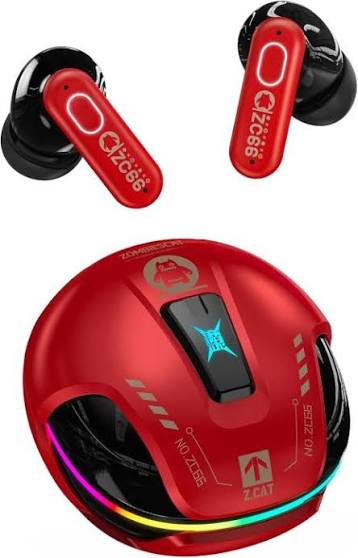
The zombiescat B5 ANC Wireless Earphone QCWS-B5 is a pair of true wireless stereo earbuds built for users who want active noise cancellation, strong call clarity, and everyday convenience in a compact in-ear design. With Bluetooth 5.4, dual-device connection, four microphones with ENC, and up to 48dB noise reduction, this model is positioned as a versatile option for commuting, remote work, casual gaming, and workout use. Dynamic RGB lighting and touch-style controls add a modern look, while the sealed in-ear fit helps improve passive noise isolation.
These earbuds are a practical choice for students, office users, travelers, and budget-conscious buyers looking for ANC earbuds without the cost of premium flagship models. The zombiescat B5 ANC Wireless Earphone QCWS-B5 typically falls in the affordable budget-to-midrange price tier, often appearing in the approximate $20 to $45 range depending on retailer, bundle, and regional availability. Availability is generally strongest through online marketplaces and import-focused electronics stores, where color options and included accessories may vary. If you need wireless earbuds that balance sound isolation, call quality, and battery life, this model delivers a feature set that is easy to recommend for daily use.
Specifications for zombiescat B5 ANC Wireless Earphone QCWS-B5
- Model: QCWS-B5
- Product type: ANC true wireless earbuds
- Bluetooth version: 5.4 for stable wireless connectivity and lower latency than older Bluetooth 5.0 earbuds
- Transmission distance: up to 10 meters in typical indoor use
- Driver size: 13mm dynamic drivers for fuller bass and wider sound output
- Frequency response: 20Hz to 20kHz
- Impedance: up to 32 ohms
- Sensitivity: about 117dB in some listings, with alternate retail specifications near 100dB depending on batch
- Noise cancellation: active noise cancellation up to -48dB
- Microphones: 4-mic ENC system for clearer voice pickup during calls
- Battery life: about 4 to 6 hours on the earbuds, with up to 24 hours total using the charging case
- Charging case battery: 400mAh
- Earbud battery: 40mAh each
- Charging time: about 1.5 hours for earbuds and case
- Supported codecs: SBC and AAC
- Water resistance: listed as waterproof for everyday sweat and light splash protection
- Controls: touch or button-based operation depending on retail version
Compared with similar budget ANC earbuds, the zombiescat B5 ANC Wireless Earphone QCWS-B5 stands out for its Bluetooth 5.4 support, multi-device connection, and 4-mic calling system. It competes best against other low-cost ANC TWS models that focus on battery life and basic noise reduction rather than premium app features or wireless charging.
Setup Guide: How to Pair and Use the QCWS-B5 Earbuds
Start by fully charging the earbuds and the charging case before first use. Open the case, remove the earbuds, and wait for pairing mode to activate automatically. On your phone, tablet, or laptop, enable Bluetooth and select the zombiescat B5 or QCWS-B5 device name from the available list. Once connected, test audio playback and call audio to confirm both earbuds are working correctly.
For best results, switch between ANC mode, transparency mode, and normal mode based on your environment. ANC works best on buses, trains, and in offices with steady background noise, while transparency mode is useful when you need to hear announcements or conversations. If the earbuds do not pair, place them back in the case, close the lid for a few seconds, then reconnect. If one earbud sounds low or disconnected, clean the charging contacts and reset the connection on the source device.
Safety tips are important: avoid charging near heat sources, do not expose the case to moisture, and keep the earbuds away from children. Use only compatible charging cables and stop using the product if the battery case becomes unusually hot or swollen.
Troubleshooting for zombiescat B5 ANC Wireless Earphone QCWS-B5
- Problem: Earbuds will not pair. Solution: turn Bluetooth off and on, reset the earbuds in the case, and remove old pairing records from your phone.
- Problem: One side has no sound. Solution: recharge both earbuds, clean the contacts, and verify that mono playback is not enabled on the device.
- Problem: ANC feels weak. Solution: check the seal of the ear tips, try a different tip size, and use the earbuds in quieter mode for comparison.
- Problem: Call quality is poor. Solution: avoid windy environments, speak closer to the microphones, and make sure the earbuds are not blocked by dirt or moisture.
- Problem: Battery drains too quickly. Solution: lower volume, disable RGB lighting when possible, and keep firmware-related settings stable by avoiding repeated disconnects.
There are no widely documented public error codes for this model, so most issues are solved through reset, re-pairing, and contact cleaning. Preventive care includes regular charging, storing the earbuds in the case when not in use, and avoiding full battery depletion. Warranty and support depend on the seller, so check the purchase page for return windows, replacement terms, and regional service options. If you need help, contact the retailer or marketplace support team using your order number and product model QCWS-B5.
Pros and Cons of the zombiescat B5 ANC Wireless Earphone QCWS-B5
Pros
- Effective ANC for everyday commuting and office use, especially for low-frequency background noise
- Bluetooth 5.4 offers modern connectivity and generally stable pairing
- 4-mic ENC improves voice clarity during calls and online meetings
- Compact true wireless design with a lightweight feel for extended wear
- Good battery balance for the price, with up to 24 hours total playback using the case
- Dynamic RGB lighting gives the earbuds a gaming-friendly style
Cons
- Sound tuning is more consumer-friendly than audiophile-accurate
- Battery life per charge is average rather than class-leading
- Retail specifications can vary slightly between sellers, which makes comparison shopping important
- Likely lacks premium extras such as wireless charging or advanced app equalizer controls
- Call performance is good for the price, but not always on par with flagship ANC earbuds
For value for money, the zombiescat B5 ANC Wireless Earphone QCWS-B5 is attractive if you want a feature-packed budget earbud rather than a premium-brand experience. Compared with higher-end alternatives, it offers strong core features at a lower cost, but buyers should expect simpler controls and fewer smart software features.
Customer Reviews of the zombiescat B5 ANC Wireless Earphone QCWS-B5
Customer feedback is generally positive, with many users rating the earbuds around 4 out of 5 stars for daily use, comfort, and noise cancellation. Common praise focuses on the secure in-ear fit, easy Bluetooth pairing, and useful ANC for travel and commuting. Users also like the modern RGB lighting and the fact that the earbuds feel convenient for music, calls, and gaming.
Common complaints include average microphone performance in windy outdoor conditions, battery life that may feel modest for heavy users, and occasional variation in build or sound tuning depending on the seller. A typical customer comment might be: “Great sound for the price and the noise canceling helps a lot on buses, but the mic is only average outside.” Another user might say: “Easy to connect, comfortable to wear, and good value if you want budget ANC earbuds.”
These earbuds are recommended for buyers who want an affordable ANC wireless headset for commuting, study sessions, and casual listening. If top-tier call quality or premium sound customization matters most, a higher-priced alternative may be a better fit.
Faqs
How do I set up zombiescat B5 ANC Wireless Earphone QCWS-B5 for the first time?
Why is my zombiescat B5 ANC Wireless Earphone QCWS-B5 not connecting to my phone?
How do I switch between ANC, transparency, and normal mode on zombiescat B5 ANC Wireless Earphone QCWS-B5?
What should I do if zombiescat B5 ANC Wireless Earphone QCWS-B5 sounds low or unbalanced?
Is zombiescat B5 ANC Wireless Earphone QCWS-B5 compatible with iPhone, Android, and laptops?
How can I improve battery life on zombiescat B5 ANC Wireless Earphone QCWS-B5?
Can I use zombiescat B5 ANC Wireless Earphone QCWS-B5 for calls and gaming?
How should I clean and maintain zombiescat B5 ANC Wireless Earphone QCWS-B5 safely?
Leave a Comment