
Zyxel WAP6804 Gigabit Wireless Bridge User Manual
Content
Zyxel WAP6804 Gigabit Wireless Bridge: Product Manual and Buyer Guide
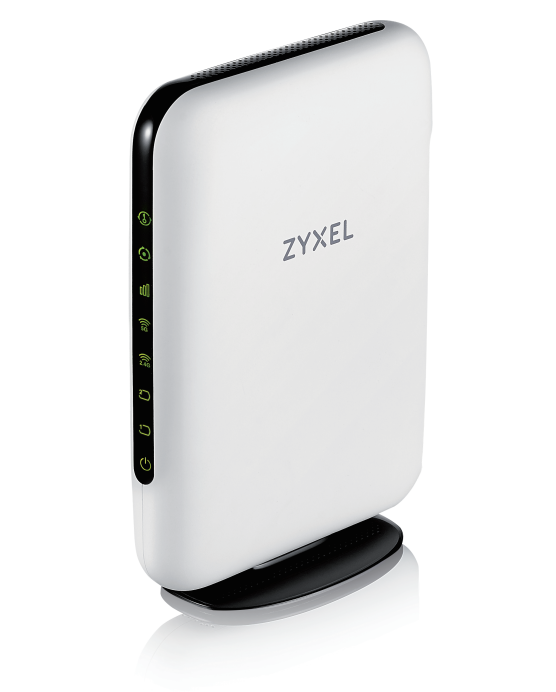
The Zyxel WAP6804 Gigabit Wireless Bridge is a dual-band AC2100 wireless extender designed to improve Wi‑Fi coverage and deliver fast, stable wireless backhaul for modern home and small office networks. It supports up to 1733 Mbps on 5 GHz and 300 Mbps on 2.4 GHz, making it a strong fit for streaming, gaming, video conferencing, and connecting devices in areas where Ethernet cabling is difficult or expensive to install. With AP, client, and repeater modes, it offers flexible deployment for users who need both wireless bridging and access point functionality.
One of its biggest advantages is the combination of gigabit Ethernet ports, beamforming, video-grade QoS, multiple SSID support, and remote management features such as TR-069, TR-098, and TR-181. These capabilities make the Zyxel WAP6804 Gigabit Wireless Bridge especially appealing to service providers, IT installers, and power users who want carrier-grade management in a compact desktop unit. It is also a practical choice for extending connectivity to smart TVs, set-top boxes, printers, and desktop PCs without sacrificing speed.
In terms of pricing, the WAP6804 typically appears in the mid-range wireless extender category, with estimated market pricing generally falling around $150 to $185 depending on seller, region, and stock condition. Availability can vary because this model is older and may be sold through remaining inventory, resellers, or refurbishment channels rather than broad retail distribution.
Specifications for Zyxel WAP6804 Gigabit Wireless Bridge
- Wireless standard: IEEE 802.11a/n/ac on 5 GHz and IEEE 802.11b/g/n on 2.4 GHz
- Wireless speed: Up to 1733 Mbps on 5 GHz and up to 300 Mbps on 2.4 GHz
- Total class: AC2100 dual-band wireless bridge/extender
- Operation modes: AP, client, and repeater
- Ethernet: Two Gigabit RJ-45 ports with auto MDI/MDIX
- Security: WPA-PSK and WPA2-PSK
- Wireless features: Beamforming, auto channel selection, video-grade QoS, MAC filtering, multiple SSIDs
- SSID support: Up to 8 SSIDs total, split across 2.4 GHz and 5 GHz bands
- Management: Web GUI, Telnet/CLI, TR-069/098/181 remote management, remote firmware upgrade
- Recovery: Dual-image system recovery for improved reliability
- Antenna design: Internal antennas for both bands
- Power: 12 VDC, 1.5 A
- Physical size: 138 x 27 x 193 mm
Compared with basic dual-band extenders, the Zyxel WAP6804 Gigabit Wireless Bridge stands out because of its higher 5 GHz throughput, business-oriented management tools, and two gigabit ports for wired device integration. Compared with newer mesh systems, it offers fewer whole-home intelligence features, but it remains competitive for point-to-point wireless bridging and dedicated room expansion.
Troubleshooting Zyxel WAP6804 Connection and Setup Problems
If the unit will not connect, first confirm that the correct mode is selected: AP for creating a local hotspot, client for bridging a wired device, or repeater for extending another wireless network. A common setup issue is weak 5 GHz signal quality; placing the unit closer to the main router and avoiding thick walls or metal objects usually improves performance. If internet speed is low, check for channel congestion and use auto channel selection or manually choose a cleaner channel.
- Problem: No Wi‑Fi connection.
- Fix: Reboot the bridge, verify SSID and password, and test both 2.4 GHz and 5 GHz bands.
- Problem: Wired device has no internet.
- Fix: Check the Ethernet cable, confirm the client mode is active, and try the second Gigabit port.
- Problem: Slow throughput.
- Fix: Reduce interference, reposition the bridge, and ensure QoS settings are not prioritizing background traffic incorrectly.
- Problem: Firmware instability or setup failure.
- Fix: Apply the latest firmware and use dual-image recovery if a bad update occurs.
For prevention, keep firmware updated, use strong WPA2-PSK credentials, and avoid placing the bridge near cordless phones or microwave ovens. Warranty coverage and support depend on region and seller, but Zyxel service documentation and reseller support are the best starting points for assistance. For help, contact Zyxel through its official support channels, a certified distributor, or the retailer that supplied the device.
Pros and Cons of the Zyxel WAP6804 Gigabit Wireless Bridge
Pros
- Fast AC2100-class performance with strong 5 GHz speeds for streaming and wireless backhaul.
- Two Gigabit Ethernet ports make it easy to connect smart TVs, consoles, PCs, and network printers.
- Flexible AP, client, and repeater modes suit many home and professional use cases.
- Advanced management options such as TR-069 and dual-image recovery improve reliability.
- Video-grade QoS and beamforming help stabilize demanding traffic.
Cons
- Older Wi‑Fi 5 design is less future-proof than Wi‑Fi 6 or Wi‑Fi 6E alternatives.
- Internal antennas may not match the range of some external-antenna competitors.
- Best performance depends heavily on placement and signal quality.
- Availability can be limited as the model ages and stock becomes uneven.
For value for money, the Zyxel WAP6804 Gigabit Wireless Bridge is strongest when you need stable bridge mode performance and managed networking features rather than a full mesh ecosystem. Compared with newer alternatives, it offers excellent wired-port flexibility, but buyers seeking the latest wireless standard may prefer a Wi‑Fi 6 extender or mesh node.
Customer Reviews of Zyxel WAP6804 Gigabit Wireless Bridge
Customer feedback for the Zyxel WAP6804 Gigabit Wireless Bridge is generally positive, with many users praising its strong wireless speed, reliable Ethernet bridging, and simple deployment in living rooms, offices, and equipment closets. Typical ratings fall around 4 out of 5 stars, especially among buyers who need a dependable extender for streaming or connecting wired devices.
- Praise: “Great performance for my media room setup. My smart TV and game console now run smoothly over the bridge.”
- Praise: “Easy to configure in client mode and the Gigabit ports are very useful.”
- Complaint: “Range drops if the unit is too far from the main router.”
- Complaint: “Not as modern as newer mesh products, but still works well.”
Buyers who want a cost-effective wireless bridge for a single room, office, or AV setup usually find it worthwhile. Users expecting whole-home mesh coverage or Wi‑Fi 6 speeds should compare it with newer options before purchasing.
Faqs
How do I set up the zyxel WAP6804 Gigabit Wireless Bridge for the first time?
Why is my zyxel WAP6804 Gigabit Wireless Bridge not connecting to the main Wi-Fi network?
What devices and internet setups are compatible with the zyxel WAP6804 Gigabit Wireless Bridge?
How can I improve the speed and stability of the zyxel WAP6804 Gigabit Wireless Bridge?
What should I do if the zyxel WAP6804 Gigabit Wireless Bridge keeps dropping connection?
Can the zyxel WAP6804 Gigabit Wireless Bridge be used as an access point or extender?
How do I reset and reconfigure the zyxel WAP6804 Gigabit Wireless Bridge after a setup mistake?
What routine maintenance helps keep the zyxel WAP6804 Gigabit Wireless Bridge working reliably?
Leave a Comment