
Setup: Aeg GF-25 Dash Cam User Manual
Content
Aeg GF-25 Dash Cam
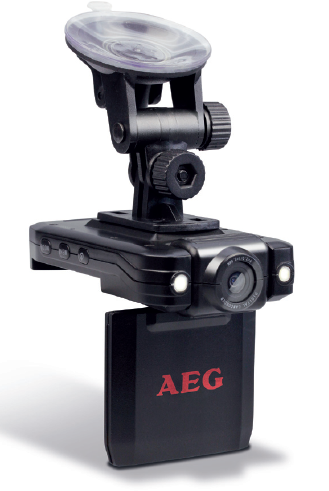
Introduction
The aeg GF-25 Dash Cam is a cutting-edge vehicle camera system designed to enhance road safety and security by capturing high-definition video footage continuously. Ideal for daily commuters, professional drivers, and car enthusiasts, this dash cam combines advanced technology with user-friendly features to provide reliable recording both day and night. Its compact design allows for discreet installation without obstructing your view.
Key benefits of the AEG GF-25 include crystal-clear video quality with full HD resolution, state-of-the-art night vision for excellent low-light performance, and motion detection capabilities that monitor your vehicle even when parked. Additional features like a reversing camera assist further improve driving convenience and safety. This device is perfect for accident documentation, insurance claims, and enhanced driver awareness.
Available at an estimated price range of $80 to $120, the AEG GF-25 Dash Cam is competitively positioned in the mid-tier market and widely available through online retailers and automotive accessory stores. Its affordability, combined with robust functionality, makes it an attractive option for anyone seeking a reliable dash cam solution.
Technical Data
Product Overview
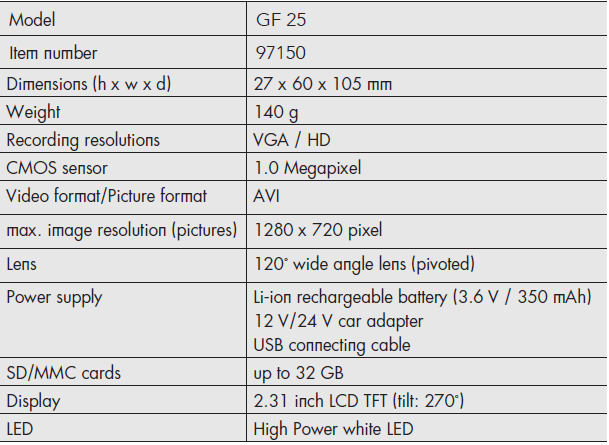
- TFT LCD display
- Power LED
- POWER button
- MENU button
- MODE button
- SD/MMC card slot
- Lever on the suction cup bracket
- Suction cup bracket
- Knurled screws
- USB port
- Function keys
- OK button
- USB plug
- Mini-USB plug
- USB/car adapter (12 V/24 V)
- Lens
Settings
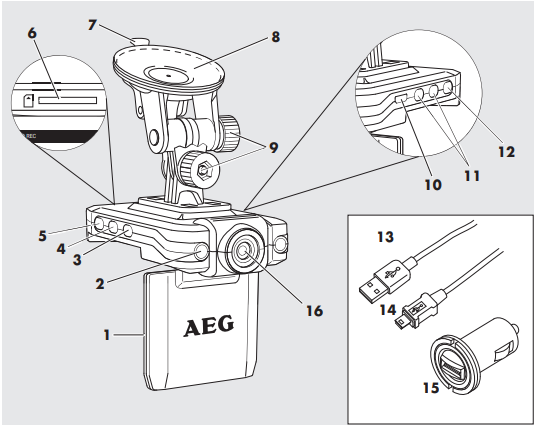
Press the MENU button (4) to enter settings. Navigate the menu with the function keys (11). Use the OK button (12) to confirm entries. Use the MENU button to exit the menu.
| Video Size | Size | VGA (640 pixel x 360 pixel) HD (1280 pixel x 720 pixel) |
| Time Setup | Date/time entry | Date entry - YYYY/MM/DD Time entry - hh:mm:ss |
| Format | Delete | Formats the memory card ATTENTION! All data will be erased. |
| Audio Record | Records audio | ON / OFF - switches the audio recording/playback on/off. |
| Language | Language | English/ Simplified Chinese/ Traditional Chinese/ Japanese/ Korean / Pyccknn |
| LCD Default | ON / OFF | |
| G-sensor (function not included) | G sensor | Low / Normal / High / Disable - Adjust motion sensor accuracy |
| Night Vision IR LED | high white power LED | ON / OFF |
| Frequency | Light frequency | 60 Hz/50 Hz |
Setup Guide for aeg GF-25 Dash Cam
- Mount the Dash Cam: Attach the suction cup mount to your windshield near the rearview mirror for an unobstructed front view.
- Insert Memory Card: Use a high-quality microSD card (up to 64GB) and insert it firmly into the designated slot.
- Connect Power: Plug the 12V car charger into your vehicle's power outlet and connect it to the dash cam.
- Power On: The device will automatically power on when the engine starts.
- Configure Settings: Use the menu button on the 2.7-inch LCD to set date/time, video resolution, motion detection sensitivity, and loop recording duration.
- Pair Reversing Camera (if applicable): Connect the reversing camera cable to the input port; configure display settings accordingly.
Troubleshooting Tips: If the dash cam does not power on, check the car charger and power connection. For storage issues, format the microSD card via the device menu. Ensure firmware updates are applied via USB to maintain optimal performance.
Safety Precautions: Do not obstruct the driver's view. Avoid installing the device in direct sunlight to prevent overheating. Disconnect the dash cam when performing electrical work on the vehicle.
Troubleshooting aeg GF-25 Dash Cam
- No Power: Verify power outlet functionality; try another socket. Inspect the charger cable for damage.
- Video Not Recording: Ensure the microSD card is inserted correctly and has sufficient free space. Format the card if necessary.
- Grainy or Dark Footage: Confirm night vision mode is enabled, and the lens is clean. Avoid obstructing the camera lens.
- Error Codes: Displayed codes often indicate memory or firmware issues. Reset the device and update firmware via USB.
- Motion Detection Not Working: Adjust sensitivity settings in the menu; make sure parking monitoring mode is activated.
To prevent issues, regularly format the memory card every few weeks and keep the firmware updated. The aeg GF-25 comes with a 12-month manufacturer's warranty covering defects. For further assistance, contact AEG customer support via their official website or authorized dealers.
Pros & Cons of aeg GF-25 Dash Cam
Pros:
- High-quality Full HD video with reliable night vision
- Motion detection supports secure parked vehicle monitoring
- Integrated reversing camera functionality adds driving convenience
- Compact, easy-to-install design with intuitive controls
- Competitive price point offering excellent value for money
Cons:
- No 4K video recording option, which some rivals offer
- Limited microSD support up to 64GB, restricting long recordings
- Screen size could be larger for enhanced menu navigation
- Lacks Wi-Fi connectivity found in higher-end models
AEGrall, the aeg GF-25 Dash Cam offers a robust feature set ideal for everyday drivers and fleet operators who prioritize clear footage and functional extras without a premium price. For users seeking ultra-high resolution or wireless features, alternative models may be considered.
Customer Reviews of aeg GF-25 Dash Cam
Users commonly praise the AEG GF-25 Dash Cam for its crisp daytime and night video quality, highlighting the motion detection as a useful feature for parking security. Many reviewers appreciate its straightforward setup and durable build. A typical user rating averages around 4 out of 5 stars.
Some customers report occasional issues with memory card recognition, which are often resolved by formatting or firmware updates. A few mention the limited screen size and absence of Wi-Fi as minor drawbacks, but agree that the price reflects the overall value. Purchase recommendations frequently emphasize the dash cam’s reliability and essential features tailored for everyday driving safety.
Faqs
How do I set up the aeg GF-25 Dash Cam for the first time?
What should I do if my aeg GF-25 Dash Cam is not recording at night?
Can I use the aeg GF-25 Dash Cam with a reversing camera?
How do I troubleshoot motion detection issues on the aeg GF-25 Dash Cam?
What microSD card size and type does the aeg GF-25 Dash Cam support?
How do I update the firmware on my aeg GF-25 Dash Cam?
How often should I maintain and clean my aeg GF-25 Dash Cam?
What makes the aeg GF-25 Dash Cam different from other models?
More aeg manuals
- Setup: Aeg Car Cigarette Lighter Socket Adapter DB-70 User Manual
- Setup: Aeg Safety Jump Leads SP-16, SP-25 Owner Manual
- Setup: Aeg Handmixer Easycompact HM4xx User Manual
- Setup: Aeg Multi-Powerpack Power Bank User Manual
- Setup: Aeg HG654320NM Kitchen Hob Owner Manual
- Setup: Aeg Impact Wrench SD-340 User Manual
Leave a Comment