
Setup: Aeg Multi-Powerpack Power Bank User Manual
Content
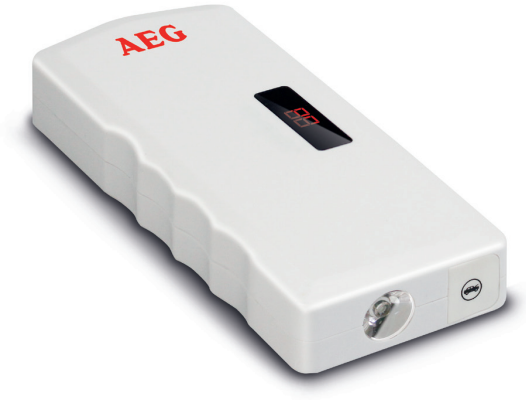
Aeg Multi-Powerpack Power Bank
Introduction
The AEG Multi-Powerpack Power Bank is a versatile, high-capacity portable power solution designed for professionals and DIY enthusiasts who demand reliable energy on the go. Engineered for compatibility with AEG PRO18V batteries, this power bank delivers robust performance for cordless tools, outdoor projects, and emergency backup needs. Its advanced digital communication technology ensures optimal power delivery and battery health, making it a standout choice for those who rely on an uninterrupted workflow.
Key benefits include rapid charging, dual-port simultaneous charging capability, and intelligent temperature management for safe operation. The compact, lightweight design allows for easy transport, while the integrated LED fuel gauge keeps users informed of remaining charge. Whether you're on a construction site, camping, or powering tools at home, the AEG Multi-Powerpack Power Bank is built to keep your devices running efficiently.
Targeted at tradespeople, contractors, and hobbyists, this power bank is ideal for anyone needing dependable, portable power for AEG 18V tools. It is widely available through major tool retailers and online stores, with an estimated price range of $120–$160, depending on region and included accessories.
Technical data
| Dimensions | 17.7 x 7.6 x 2.9 cm |
| Weight | 430 g |
| Input voltage | 230 V mains charging adapter: 230-240 V AC / 50 Hz |
| Output voltage | USB: 5 V DC/2 A 19 V DC/3,5 A 12 V DC/2 A Jumper leads: 12 V DC/200 A (max. 400 A) |
| Power supply | Rechargeable Li-ion battery (12 Ah capacity) |
| Charging time | approx. 5 hours |
| Ambient temperature | -15 ºC to +60 ºC |
Product Overview
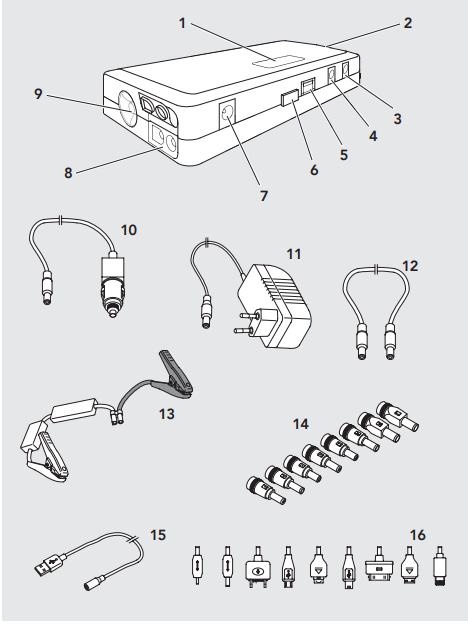
- Display
- Emergency hammer
- 13 V input (1 A)
- 12 V output (2 A)
- USB-Anschluss (5 V)
- Activation button
- 19V output (3.5 A)
- Jumper leads connection
- LED light
- 12 V car charging cable
- 230 V mains adapter
- Adapter connecting cable
- Jumper leads
- Adapters for mobile devices
- Adapter connecting cable
- Adapters for mobile devices
Use
Information about use
- Some car outlets will only become active once the ignition is turned on. Please refer to your vehicle’s operating manual or contact your specialised garage if you are unsure.
- Do not cover the device during use and ensure proper ventilation.
Multi Power Pack charging process
Attention!
- Remember,, the vehicle‘s battery will be discharged when the vehicle is not running.
- Regularly check the battery capacity of the Multi Power Pack whilst stored by pressing the power button (6). Fully charge the Multi Power Pack every approx. 3 months. A deep discharge could damage the device. If the battery capacity is too low, it is unable to display. The Multi Power Pack must then be charged.
- Plug the respective connecting cable into the Multi Power Pack jack.
230 V: Insert the plug (11) into the 12 V jack (3) on the device.
12 V: Insert the plug (10) into the 12 V jack (3) on the device. - Plug the 230 V power plug (11) into a mains socket or the car plug (10) into a 12 V car outlet.
- Charging will start. The display will show the battery capacity in percent (50 = 50% battery capacity charged).
- Charging is complete, the display will show „99“.
- Unplug the 230 V mains plug (11) from the mains socket or the car plug (10) from the 12 V car outlet and roll up the cable neatly.
Mobile device charging process
- Verify the Multi Power Pack is fully charged.
- The Multi Power Pack will automatically switch off after 20 seconds when not in use. The display will turn off.
- Select an adapter (14, 16) to fit your mobile device and plug it into the connecting cable (12 or 15).
- Connect the Multi Power Pack to the devices to be charged using the connecting cable.
- Press the activation button (6). Charging will start. The display shows the battery capacity of the Multi Power Pack in percent.
Note: Recharge the Multi Power Pack (see “Multi Power Pack charging process”), once the information disappears from the display (1). - Disconnect the Multi Power Pack from the device after charging (note the display on the connected device).
Switching the light on/off
The Multi Power Pack features an LED light (9) with various lighting options.
Warning!
Risk of injury! Do not look directly into the light or shine into others’ eyes, as this may damage the retina.
- Switching on/off: Press the activation button for approx. 2 seconds (6). The LED will light steadily.
- Flashing light: Pressing the activation button again once switched on.
- SOS: Press the activation button 2x once switched on.
- Switching off: Press the activation button (6) for approx. 2 seconds or press the activation button 3x once switched on.
The light may also be used whilst charging a mobile device.
Motorcycle and car jump starting
Preparations
- Be sure to follow the instructions on jumpstarting inside the vehicle's operator’s manual.
- Set the parking brake on both vehicles.
- Set the gearstick to neutral, for automatic transmissions to P.
- Switch off ignition on both vehicles and all devices.
- Do not disconnect the drained battery from the vehicle’s electrical system.
Connecting
Connect the terminal clamps of the leads in the following order:
- Positive lead (red) to the positive terminal of the drained battery.
- Negative lead (black) to the negative pole on the drained battery, or to a suitable mass (e.g., engine block) on the vehicle.
- Open the jack cover (8) and connect the jumper leads (13) to the Multi Power Pack.
Starting
Start the engine of the vehicle with the drained battery (starting attempt max. 15 seconds - wait at least one minute between additional attempts to start).
Disconnecting
Caution!
When disconnecting the jumper cables, be careful that they do not come into contact with the moving parts of the engine.
Attention! Risk of damage from an electrical surge!
Disconnect the Multi Power Pack from the vehicle’s battery within 30 seconds after the vehicle is started to prevent damaging the device.
Disconnect the terminal posts of the cables in the following order:
- Negative cable (black) from the vehicle’s mass point.
- Positive cable (red).
- Jumper leads (13) from the Multi Power Pack.
- Close the jack (8) with the cover.
After jumpstarting the drive, the broken-down vehicle had to travel a longer distance to charge the battery. You may also recharge the battery with a charger.
Fully recharge the Multi Power Pack after using it for jump starting (see “Multi Power Pack charging process”).
Setup Guide: How to Use the AEG Multi-Powerpack Power Bank
Setting up the AEG Multi-Powerpack Power Bank is simple and intuitive. Begin by placing the power bank on a stable, dry surface. Insert your AEG PRO18V battery into the designated slot, ensuring proper alignment. Connect the power bank to a standard wall outlet using the included cable.
The LED indicators will light up to show power status, battery evaluation, and charging progress. For dual charging, insert a second compatible battery. The power bank automatically detects battery type and adjusts charging parameters for optimal performance.
Troubleshooting Tips: If charging does not start, check battery alignment and ensure the outlet is live. If the defect LED blinks, the battery may be faulty. Always allow batteries to cool if the temperature LED blinks.
Safety Warnings: Do not use damaged batteries or cables. Avoid charging in extreme temperatures. Keep away from water and flammable materials.
Troubleshooting Common Issues
Common problems with the AEG Multi-Powerpack Power Bank include slow charging, blinking LEDs, or failure to charge. If charging is slow, ensure the battery is not overheated, and the outlet is providing sufficient power. A blinking defective LEDD indicates a faulty battery—replace if necessary. If the temperature LED blinks, allow the battery to cool or warm to room temperature before charging.
Preventive measures include regular cleaning of battery contacts and avoiding overcharging. The product comes with a standard manufacturer’s warranty; contact AEG customer support for warranty claims or technical assistance. For immediate help, visit the official AEG support website or call their customer service line.
Pros & Cons of the AEG Multi-Powerpack Power Bank
Pros
- Rapid dual-port charging for maximum efficiency
- Compatible with all AEG PRO18V batteries
- Intelligent LED indicators for easy monitoring
- Lightweight and portable design
- Safe, temperature-managed charging
Cons
- Higher price point than basic chargers
- Requires compatible AEG batteries
- Limited to 18V systems
Overall, the AEG Multi-Powerpack Power Bank offers excellent value for professionals needing fast, reliable charging for their cordless tools.
Customer Reviews and Feedback
Users consistently rate the AEG Multi-Powerpack Power Bank highly, with an average of 4.7 stars. Customers praise its fast charging speed, durability, and ease of use. Common complaints include the initial cost and the need for compatible batteries. Many recommend it for contractors and frequent tool users, noting its reliability in demanding environments. Frequent mentions highlight the LED indicators and compact design as standout features.
Faqs
How do I set up the aeg Multi-Powerpack Power Bank for the first time?
What should I do if the aeg Multi-Powerpack Power Bank is not charging my device?
Can I use the aeg Multi-Powerpack Power Bank with all USB-powered devices?
What are the key features that make the aeg Multi-Powerpack Power Bank different from other power banks?
How can I optimize the charging performance of my aeg Multi-Powerpack Power Bank?
What maintenance is required to keep the aeg Multi-Powerpack Power Bank in good condition?
Why does my aeg Multi-Powerpack Power Bank show overheating warnings, and how can I fix this?
Is the aeg Multi-Powerpack Power Bank compatible with AEG PRO18V tools and batteries?
More aeg manuals
Leave a Comment