
Setup & Pairing: Aftershokz Trekz Air Headphone User Manual
Content
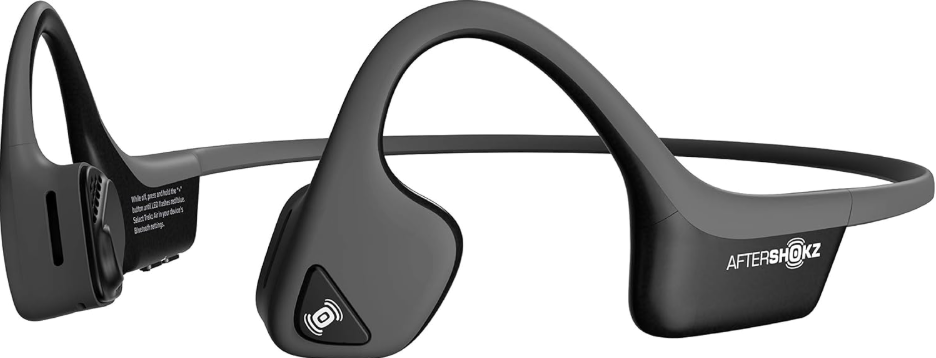
AfterShokz Trekz Air Headphones
Introduction
The AfterShokz Trekz Air Headphones are an innovative solution for those seeking a unique listening experience. These bone conduction headphones deliver sound through your cheekbones, allowing you to remain fully aware of your surroundings. This makes them ideal for outdoor enthusiasts, athletes, and anyone who wants to stay connected to their environment while enjoying music or podcasts. The Trekz Air is 20% lighter than its predecessors, featuring a durable titanium band and enhanced dual noise-canceling microphones for crystal-clear calls. With PremiumPitch+ technology, these headphones offer a premium audio experience with a wide dynamic range and rich bass. Priced around $119.95, they are available in four stylish colors and are compatible with Bluetooth 4.2 devices.
The AfterShokz Trekz Air Headphones are perfect for use cases such as jogging, hiking, or simply listening to music while still being able to engage with your surroundings. They are designed to be lightweight and comfortable, making them an excellent choice for extended use during workouts or outdoor activities.
Specifications
- Part number: AS650
- Frequency response: 20Hz~20KHz
- Sensitivity: 100 ÷ 3dB
- Speaker type: Bone conduction transducer
- Bluetooth® version: Bluetooth® v4.2
- Microphone: -40dB + 3dB
- Wireless range: 33 ft (10m)
- Wireless range: 33 ft (10m)
- Battery: Rechargeable lithium-ion
- Compatible profiles: A2DP, AVRCP, HSP, HFP
- Weight: 1.06 oz
- Continuous play: Up to 6 Hours
- Standby time: Up to 20 days
- Charge time: 2 hours
- Warranty: 2 years
Frequency band: 2400MHz~2483.5MHz - Maximum output power: 4dBm
- Maximum Charge Voltage: 5.25 V
- Water-resistance: IP55
- Speaker Impedance: 11.4 ohms
- Battery Capacity: 183 mAh
How To Set Up Trekz Air
- Charge
Charge the headphones with the included micro-USB cable. The LED light will turn from red to blue when charging is complete. - Pair
Start with your headphones off. Enter pairing mode by pressing and holding volume+ until Audrey says “pairing” and the LED light flashes red and blue. - Connect
Open your device’s Bluetooth® menu and select “Trekz Air By AfterShokz.” Audrey says “Connected,,” and the LED light will flash blue one time.
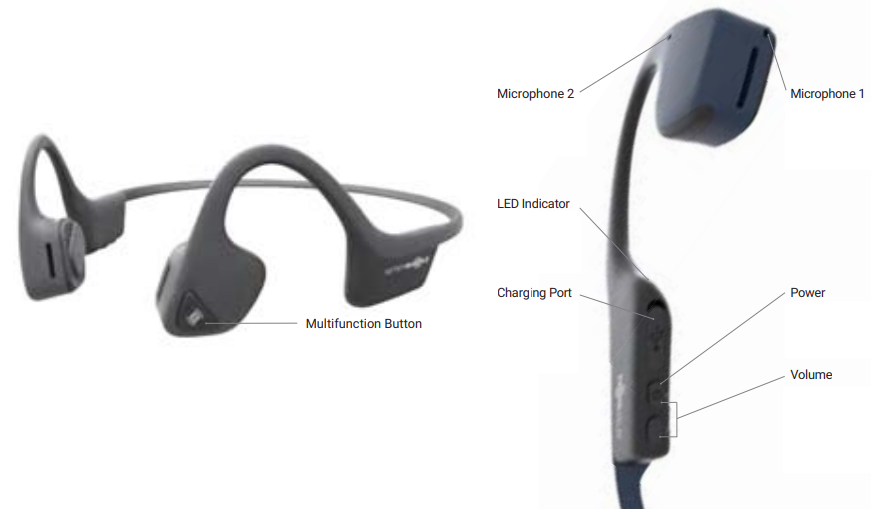
Multifunction Button (A)
.png)
Volume Up / Power Button (B); Volume Down Button (C)
;_volume_down_button_(c).png)
LED Indicator
- Solid red Charging
- Solid blue Charging complete
- Flashes red and blue Pairing mode
- Flashes blue Incoming call
- Flashes red every 2 minutes. Low battery
Multipoint Pairing
Multipoint pairing allows Trekz Air to be connected to two devices at once, allowing users to seamlessly transition between the two.
- Start with your headphones off.
- Press and hold volume+ until Audrey says “Pairing” and the LED light flashes red and blue.
- Press and hold the multifunction button and volume+ button for 3 seconds.
Audrey says, “Multipoint Enabled.” - Open your first device's Bluetooth menu and select Trekz Air by AfterShokz.
Audrey says “Connected” - Turn your headphones off.
- Re-enter pairing mode by pressing and holding volume+ until Audrey says “Pairing” and the LED light flashes red and blue.
- Open your second device's Bluetooth menu and select Trekz Air by AfterShokz. Audrey says, “Connected.”
- Turn your headphones off.
- Turn your headphones on. Your headphones are now connected to both devices.
How To Reset Your Headphones
- Start with your headphones off
- Enter pairing mode by pressing and holding volume+ until Audrey says “Pairing” and the LED light flashes red and blue.
- Press and hold the multifunction button, volume+ button,, and volume- button (all three buttons) simultaneously for 3-5 seconds, until you hear two beeps or feel vibrations.
- Turn your headphones off. Trekz Air is now reset and can be re-paired to your device.
Optional Accessories
Earplugs (D)
Use with headphones in environments where it is safe to block out ambient noise, such as on a train or airplane.
- Roll earplugs firmly between fingers and place in ears.
- To adjust EQ settings to reduce or enhance bass while wearing earplugs, press and hold the volume up and down buttons simultaneously.
- Switch EQ to normal condition when you take out the earplugs.
Troubleshooting
Common issues with the AfterShokz Trekz Air Headphones can be resolved by checking the following:
- Connection Issues: Ensure your device is in range and that Bluetooth is enabled. Restart both your headphones and device if necessary.
- Sound Quality: Adjust the EQ settings to optimize sound quality. If experiencing sound leakage, adjust volume levels.
- Microphone Issues: Use the dual noise-canceling feature to improve call quality.
For further assistance, register your product at register.aftershokz.com to activate your 2-year warranty. Contact AfterShokz support for any additional help.
Pros & Cons
Pros:
- Unique Design: Offers open-ear listening with bone conduction technology, ideal for outdoor activities.
- Lightweight and Durable: Weighs only 1.06 oz with a titanium band for enhanced durability.
- Advanced Features: Includes PremiumPitch+ for improved sound quality and dual noise-canceling microphones.
Cons:
- Sound Leaks: May leak sound in quiet environments.
- Less Bass: Some users find the bass lacking compared to traditional headphones.
- No Volume Limit Alerts: No physical volume limit, which may result in sound leakage.
Customer Reviews
The AfterShokz Trekz Air Headphones have received positive reviews for their unique design and functionality. Users praise the safety aspect of being able to hear their surroundings while listening to music. However, some users note that the sound quality, particularly bass, is not as robust as traditional headphones. Overall, these headphones are rated highly for their niche use cases, such as running or hiking.
For those interested in purchasing, the AfterShokz Trekz Air Headphone is a great choice for outdoor enthusiasts and athletes. With a star rating averaging around 4.5 out of 5, users appreciate the lightweight design and clear call quality.
Faqs
How do I set up and pair my aftershokz Trekz Air Headphone with a new device?
What should I do if my aftershokz Trekz Air Headphone is not pairing or connecting properly?
Can the aftershokz Trekz Air Headphone connect to multiple devices at the same time?
How do I properly wear the aftershokz Trekz Air Headphone for optimal bone conduction performance?
What are the best ways to maintain and clean my aftershokz Trekz Air Headphone to ensure longevity?
How can I adjust volume, control music playback, and answer calls on the aftershokz Trekz Air Headphone?
Which devices are compatible with aftershokz Trekz Air Headphone and are there any limitations?
What should I do if the battery of my aftershokz Trekz Air Headphone is not charging or showing incorrect charge levels?
More aftershokz manuals
Leave a Comment