
Setup: Aftershokz Trekz Titanium Headphones User Manual
Content
Aftershokz Trekz Titanium Headphones
Introduction
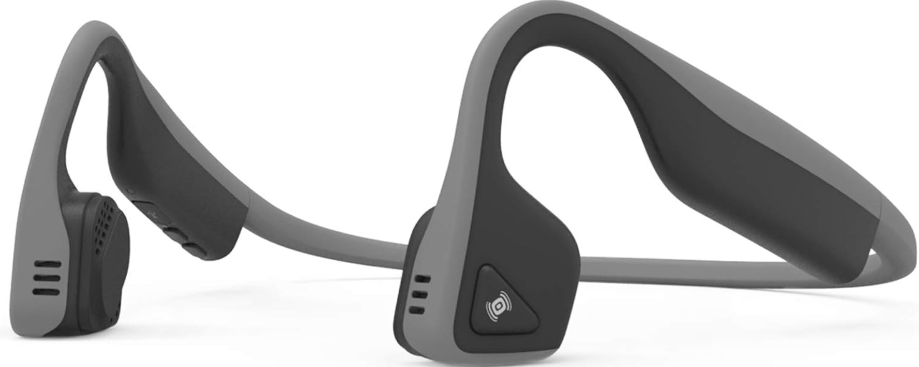
Experience a new era of audio with the Aftershokz Trekz Titanium Headphones, a revolutionary blend of bone conduction technology, open-ear comfort, and sports-ready durability. Designed for active lifestyles, these wireless open-ear headphones deliver music through your cheekbones, leaving your ears free to hear ambient sounds—perfect for runners, cyclists, and outdoor enthusiasts who value safety without sacrificing sound quality.
The Aftershokz Trekz Titanium Headphones are engineered with a lightweight, flexible titanium frame that is both sweatproof and weather-resistant, thanks to IP55 certification. Enjoy up to six hours of music and calls on a single charge, paired with dual noise-canceling microphones for crystal-clear voice quality during calls. PremiumPitch+ technology ensures a rich audio profile with dynamic bass, while LeakSlayer minimizes sound leakage, so your music remains private even at higher volumes.
These headphones are ideal for anyone seeking situational awareness—whether you’re jogging near traffic, cycling in the city, or simply want to stay connected to your surroundings. The open-ear design is also a great option for those who experience discomfort with traditional in-ear headphones. Available in multiple colors, the Aftershokz Trekz Titanium Headphones retail in the mid-range bracket, typically between $100 and $150, and are widely available through major electronics retailers and online marketplaces.
Specifications
- Part number
- AS600
- Speaker type
- Bone conduction transducer
- Frequency response
- 20Hz~20KHz
- Sensitivity
- 100 ÷ 3dB
- Microphone
- -40dB + 3dB
- Bluetooth® version
- Bluetooth® v4.1
- Compatible profiles
- A2DP, AVRCP, HSP, HFP
- Wireless range
- 33 ft (10m)
- Battery
- Rechargeable lithium ion
- Continuous play
- 6 hours
- Standby time
- 10 days
- Charge time
- 1.5 hours
- Weight
- 1.27 oz (36g)
- Warranty
- 2 years
Set up your Trekz Titanium
Charge
- Charge the headphones with the included micro-USB charging cable. The LED indicator will turn blue when charging is complete.
Pair
While off, press and hold the power button for 5 seconds to enter pairing mode. The LED indicator will flash blue and red repeatedly while in discovery.
Connect
Enable the Bluetooth® settings on your device and select “Trekz Titanium by AfterShokz”. The LED indicator will turn blue once connected.
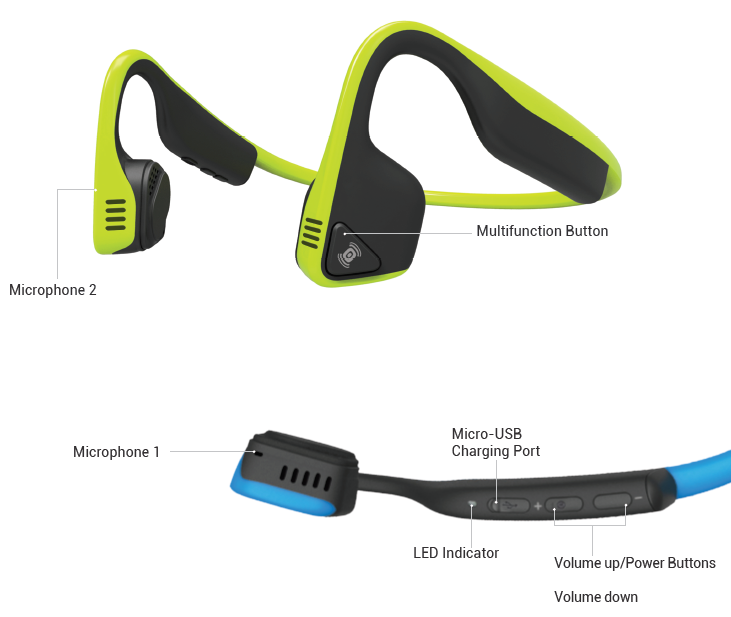
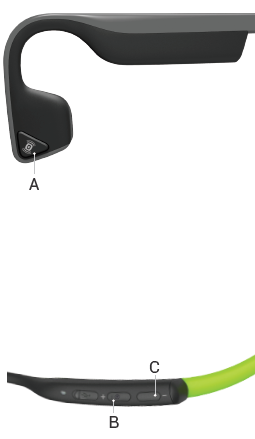
Multifunction Button (A)
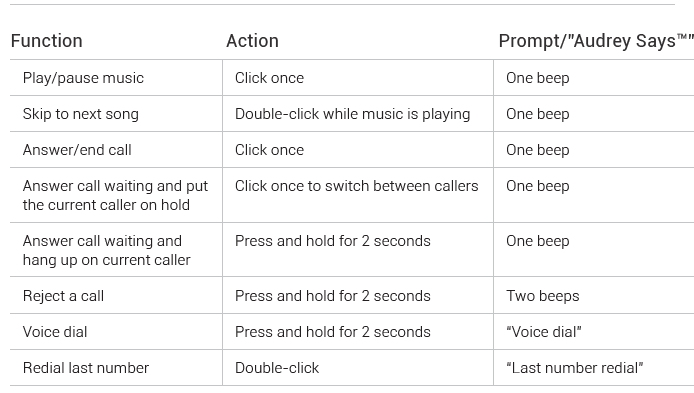
Volume Up/Power Button (B)
Volume Down Button (C)
Multipoint pairing
- Enter pairing mode
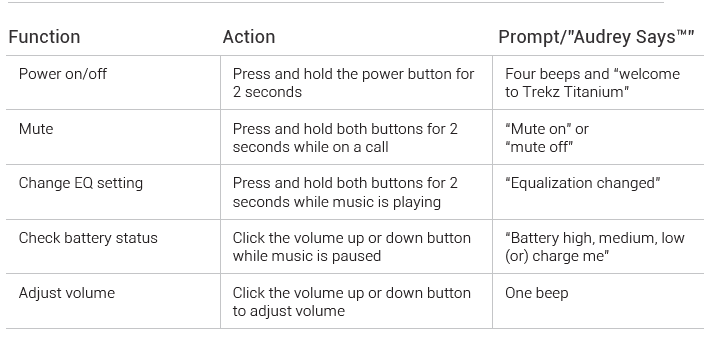
- Press the multifunction button and volume up/power button for 2 seconds (Audrey Says™ “multipoint enabled”)
- Audrey Says™ “connected”)
- Shut down
- Re-enter pairing mode
- Pair second device (Audrey Says™ “second device connected”)
- Turn the device off, then power bit ack on
Storage and maintenance
- Store the headphones in a cool and dry place. The working temperature should be 0~45°C(32~113°F). Working in cold/hot environments or highly humid areas may reduce the life of the battery.
- After storing the headphones for an extended period, charge the unit before using it again.
- The headphones are sweat-resistant, but are NOT waterproof. DO NOT submerge the headphones in water.
- Listening with headphones at a high volume may affect your hearing and may distort the audio.
- When cleaning the headphones, use a soft dry cloth.
- Do not charge your headphones immediately after exercising, as any sweat or moisture inside the charging port could lead to a circuit burning.
Troubleshooting Common Issues with Aftershokz Trekz Titanium Headphones
Common Problems and Solutions
Even the most reliable devices can encounter issues. Here are some common challenges users may face with their Aftershokz Trekz Titanium Headphones, along with actionable solutions:
- Connection Problems: If Bluetooth pairing fails, ensure the headphones are in pairing mode and your device’s Bluetooth is enabled. Reset the headphones by holding the power button for 8 seconds, then try reconnecting.
- Low Volume or Poor Sound Quality: Check for debris on the transducers. Clean gently with a dry cloth. Adjust the equalizer settings by pressing and holding the volume buttons to cycle through EQ presets.
- Battery Issues: If the battery drains quickly, make sure the headphones are fully charged using the included micro USB cable. Avoid exposing them to extreme temperatures, which can affect battery performance.
- Fit and Comfort: The headband may feel loose for some users. Adjust the position behind your head for a more secure fit. Note that wearing glasses may reduce comfort.
Error Codes and Fixes
If you encounter error codes (e.g., pairing failure, charging issues), consult the official aftershokz support site for specific troubleshooting steps. Most issues can be resolved by resetting the device or updating firmware.
Preventive Measures
To maximize performance and lifespan:
- Regularly clean the transducers and charging port.
- Avoid exposing headphones to excessive moisture or dust, despite their IP55 rating.
- Store in a cool, dry place when not in use.
Warranty and Support
Aftershokz Trekz Titanium Headphones come with a 2-year manufacturer’s warranty in many regions. For support, visit the official Aftershokz (now Shokz) website for live chat, email, or phone assistance. Always retain your proof of purchase for warranty claims.
Contact Information
For additional help, contact Shokz customer support via their official website’s “Contact Us” section, where you can find regional phone numbers and email addresses.
Pros & Cons of Aftershokz Trekz Titanium Headphones
Advantages
- Open-Ear Safety: Hear your surroundings while enjoying music—ideal for outdoor activities where situational awareness is crucial.
- Comfortable, Lightweight Design: The titanium frame is flexible and weighs just 36g, making it comfortable for long wear.
- Sweatproof and Durable: IP55 certification ensures resistance to sweat, dust, and light rain.
- Good Battery Life: Up to six hours of continuous use on a single charge.
- Clear Call Quality: Dual noise-canceling microphones deliver crisp voice calls, even in noisy environments.
Disadvantages
- Sound Quality Limitations: Bass response and overall audio clarity are not as strong as traditional headphones, especially in noisy environments.
- Fit Issues for Some Users: The headband may feel loose, and wearing glasses can be uncomfortable.
- Noise Isolation: Not suitable for environments with loud background noise, as the open-ear design lets in ambient sound.
- Battery Life: Six hours is sufficient for most workouts, but falls short of some competitors offering 8+ hours
Value for Money and Alternatives
The Aftershokz Trekz Titanium Headphones offer excellent value for athletes and outdoor enthusiasts who prioritize safety and comfort. For those seeking longer battery life or deeper bass, consider higher-end bone conduction models or traditional wireless earbuds.
Customer Reviews and Testimonials
Real users praise the Aftershokz Trekz Titanium Headphones for their innovative open-ear design, noting how they allow for greater awareness of traffic and surroundings during runs and bike rides. Many appreciate the comfort and secure fit, though some mention the headband could be tighter for high-intensity activities[2]. Sound quality receives mixed feedback—most find it good for podcasts and calls, but audiophiles may wish for richer bass.
Common complaints include occasional connectivity issues and the inability to wear glasses comfortably. Despite these, the majority of users recommend these headphones for their intended use, with average ratings around 4 out of 5 stars. Testimonials frequently highlight the peace of mind and convenience these headphones provide for active, safety-conscious listeners.
If you prioritize situational awareness and comfort over audiophile-grade sound, the Aftershokz Trekz Titanium Headphones are a strong purchase recommendation—especially for runners, cyclists, and commuters.
More aftershokz manuals
Leave a Comment