
Setup: Airthings Renew Air Purifier User Guide
Content
Airthings Renew Air Purifier
Introduction
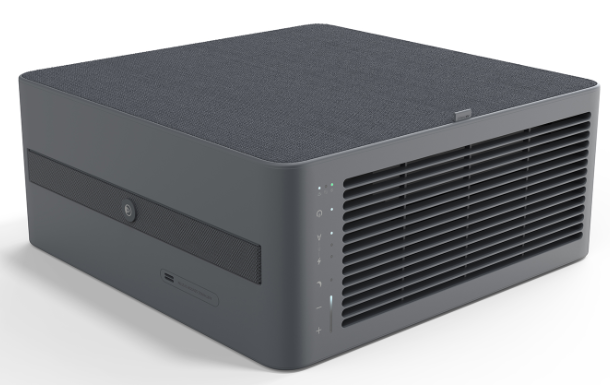
The Airthings Renew Air Purifier is a cutting-edge device designed to enhance indoor air quality, providing cleaner air, improved sleep, and peace of mind. This smart air purifier features a HEPA-13 filter, which removes up to 99.97% of particles as small as 0.3 microns, and an activated charcoal filter to capture gases and odors. The Renew is ideal for small to medium-sized spaces and is perfect for those seeking an efficient, energy-saving solution for maintaining high air quality.
Targeted at individuals and families seeking to improve their home environment, the Airthings Renew Air Purifier is especially beneficial for those with allergies or respiratory issues. It is available for purchase in the price range of $299.99 to €399, depending on the region. The device offers versatile design options, allowing it to fit seamlessly into any room, and can be controlled remotely via the Airthings app.
Breathe better, sleep better.
With a heritage of designing intelligent air quality solutions that are aesthetically low-impact, Airthings introduces Renew, the air purifier for bedrooms. Enjoy peaceful sleep and peace of mind with the 4-stage HEPA-13 cleaning system that removes particulate gases, and odors from your air. In silent mode, it’s so quiet you’ll hardly know it’s there. Set to Auto mode and take clean air for granted - the laser-based particulate sensor intelligently adjusts the fan speed according to the actual air quality, keeping your air clean and healthy. Ideal for bedrooms but effective in any room up to 525 sq ft, use the integrated strap handle to easily move Renew where you need it.
Key features and benefits
- GREAT FOR BEDROOMS
Renew makes sure you breathe clean air all night long. Silent mode, quiet running , and child lock make it great for bedrooms, and other rooms up to 525 sq ft (49 m2). - BLENDS IN NATURALLY, EASILY
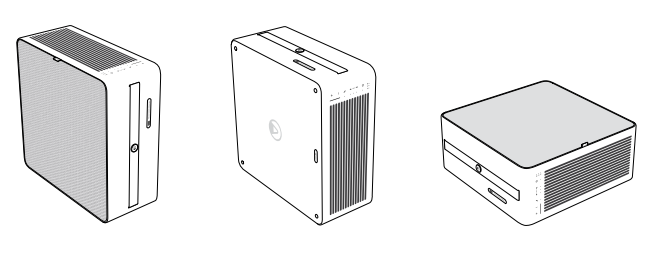
Understated, matte color inspired by nature. Versatile design so you can place it upright, lay it flat, or mount it on a wall. Built-in cable storage and strap handle. - LIBRARY-QUIET SILENT MODE
Sleep peacefully while Renew quietly keeps your air clean and particle-free. At just 23dB on Silent mode, it’s ultra-quiet, making it a top choice for bedrooms. - SET AND FORGET WITH AUTO MODE
High-precision, laser-based PM2.5 sensor detects changes in air quality and adjusts the fan speed accordingly, keeping your air clean while saving energy.y - EXTREME 4-STAGE CLEANING
Two washable pre-filters capture larger particulates. Then the HEPA-13 filter traps 99.97% of the remaining tiny particles. Finally, the activated charcoal filter removes chemicals and odors. - CONNECTED, SMART PURIFIER
Check air quality trends, reorder filters, and control the purifier from anywhere using the intuitive and free Airthings app.
Placement options
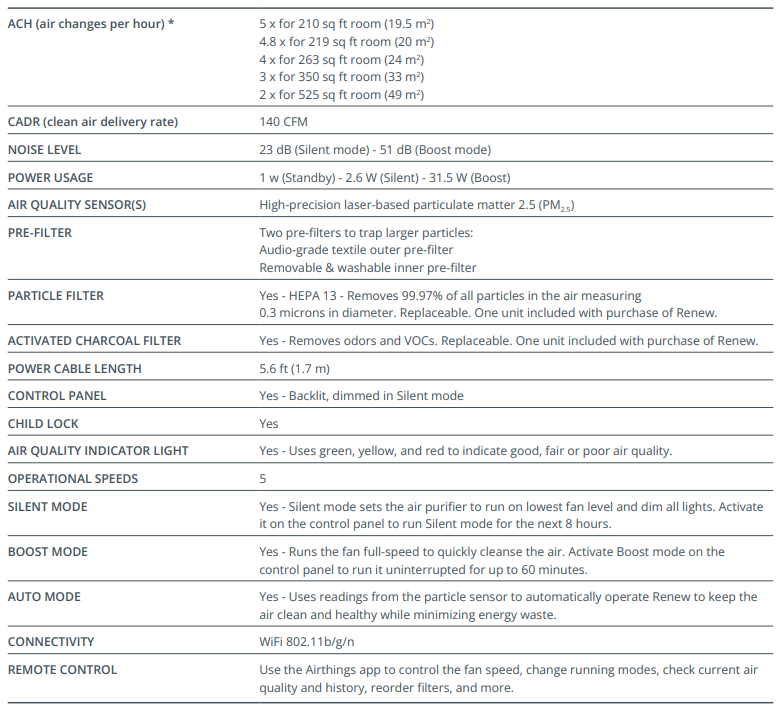
Specifications and features
- Performance specifications are based on the unit in the standard upright position. Performance may vary slightly when
- Renew is used in other placement positions.
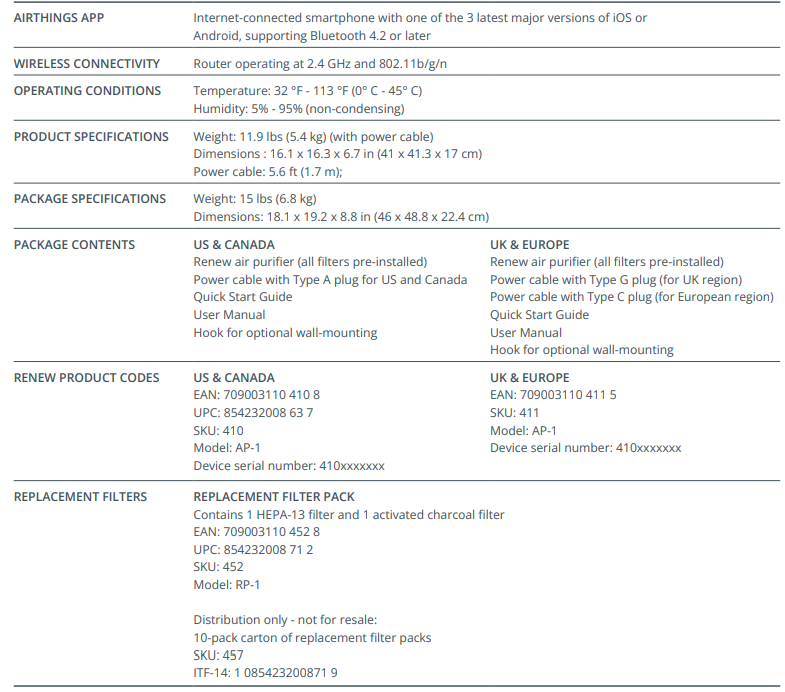
Product details & requirements
Setup Guide
Setting up the Airthings Renew Air Purifier is straightforward:
- Unboxing: Carefully unpack the device and ensure all components are included.
- Placement: Position the Renew in a central location to maximize air circulation.
- Connectivity: Download the Airthings app and connect the device to your Wi-Fi network for remote control.
- Configuration: Choose from Auto, Boost, or Silent modes based on your needs.
- Troubleshooting: If issues arise, check the device's connectivity and ensure the app is updated.
Safety Warning: Ensure proper ventilation and avoid placing the device near flammable materials.
Troubleshooting
Common issues with the Airthings Renew Air Purifier can often be resolved easily:
- Connection Issues: Restart the device and ensure stable Wi-Fi connectivity.
- Error Codes: Refer to the user manual or contact support for assistance.
- Preventive Measures: Regularly clean the pre-filters and replace the HEPA filter as needed.
- Warranty and Support: Contact Airthings customer support for warranty inquiries and technical assistance.
Pros & Cons
Pros:
- Effective Filtration: Removes nearly all particles and odors efficiently.
- Energy Efficiency: Low power consumption in Silent mode.
- Smart Features: Remote control via the app and air quality monitoring.
Cons:
- Noise in Boost Mode: Can be loud when operating at maximum capacity.
- Filter Replacement Costs: HEPA filters may need regular replacement.
Customer Reviews
Users generally praise the Airthings Renew Air Purifier for its quiet operation, efficient air purification, and user-friendly interface. Common complaints include the noise level in Boost mode and the cost of filter replacements. Overall, the device is well-regarded for its value and performance.
Recommendation: Ideal for those seeking a reliable, smart air purifier for small to medium-sized spaces.
Faqs
How do I set up the airthings Renew Air Purifier for the first time?
What should I do if the airthings Renew Air Purifier is not responding to app controls?
What are the main filtration features of the airthings Renew Air Purifier?
Can the airthings Renew Air Purifier be used in rooms larger than 525 square feet?
How do I optimize the airthings Renew Air Purifier’s performance for better air quality?
How often should I replace or clean filters in the airthings Renew Air Purifier?
What noise levels can I expect from the airthings Renew Air Purifier in different modes?
Is the airthings Renew Air Purifier compatible with smart home systems or voice control?
More airthings manuals
Leave a Comment