
Setup: Aiwa All-In-One Stereo Turntable GBTUR-120BK & GBTUR-120WD User Manual
Content
aiwa All-In-One Stereo Turntable GBTUR-120BK & GBTUR-120WD Product Manual
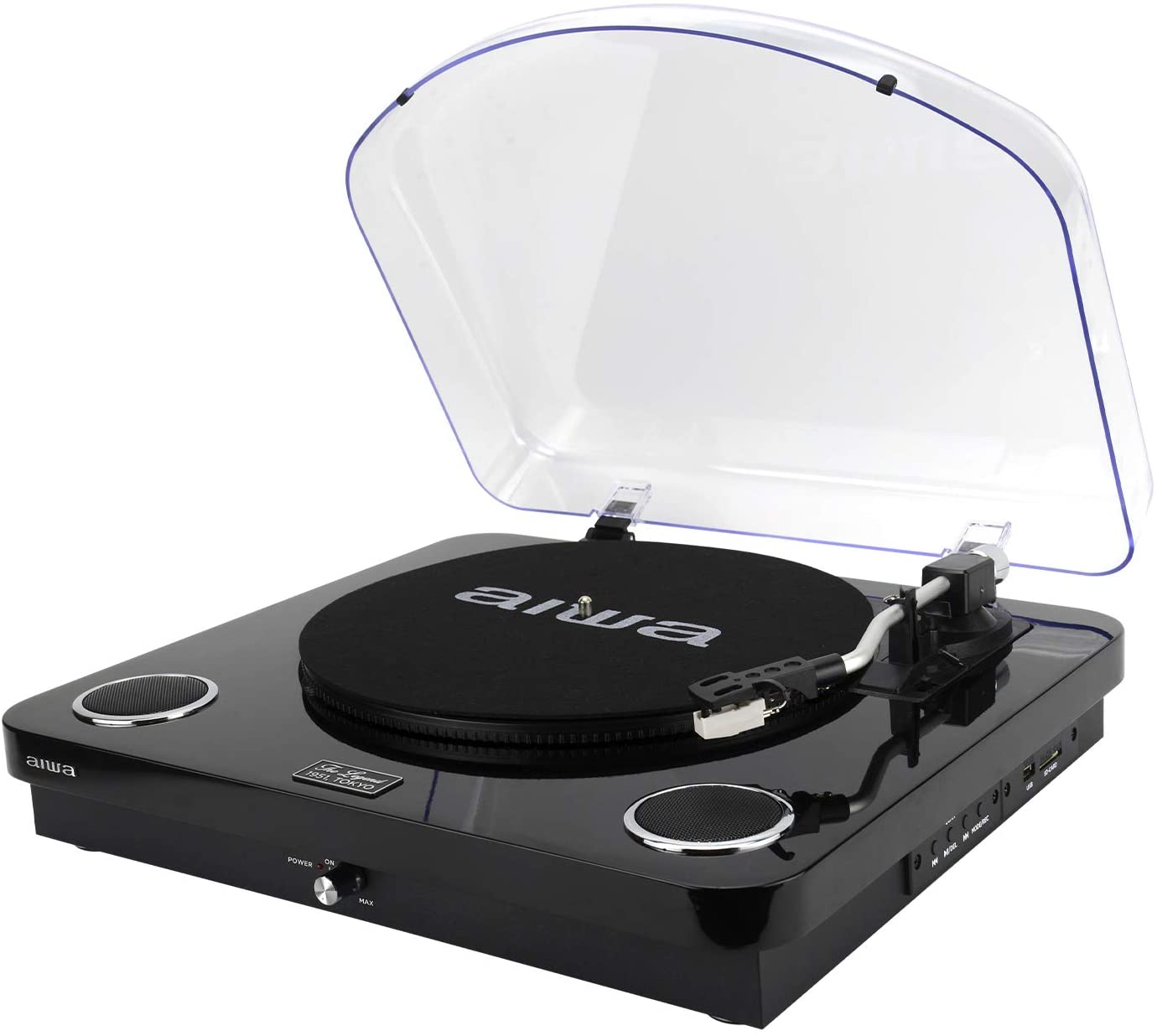
Introduction to aiwa All-In-One Stereo Turntable GBTUR-120BK & GBTUR-120WD
The aiwa All-In-One Stereo Turntable GBTUR-120BK & GBTUR-120WD combines vintage vinyl playback with modern wireless features, making it an ideal choice for music lovers rediscovering records or streaming tunes. Available in sleek black (GBTUR-120BK) and elegant wood-patterned white (GBTUR-120WD) finishes, this all-in-one stereo system features a 3-speed turntable (33, 45, and 78 RPM), built-in stereo speakers (2x5W RMS), Bluetooth connectivity, USB/SD encoding, and FM radio. Its retro wooden design adds a classic touch to any living room, bedroom, or office, while the ceramic cartridge with ruby stylus ensures precise, scratch-free playback of your vinyl collection.
Key benefits include effortless digitization of records via USB (up to 32GB), wireless streaming from smartphones, and direct RCA output for external speakers. Perfect for vinyl enthusiasts, casual listeners, and beginners, it's suited for home setups, parties, or nostalgic listening sessions. With auto-return tonearm and intuitive controls, setup is quick and user-friendly. Priced around 129.99€, the aiwa All-In-One Stereo Turntable GBTUR-120BK & GBTUR-120WD is widely available online at retailers like Aiwa Europe and Pepita, offering exceptional value for a versatile, Bluetooth-enabled record player.
Technical Specifications of aiwa All-In-One Stereo Turntable GBTUR-120BK & GBTUR-120WD
- Turntable Speeds: 3 speeds (33 1/3, 45, 78 RPM) for all vinyl types[1][2][5]
- Cartridge: Ceramic with ruby stylus for optimal sound quality and record protection[1][4][5]
- Speakers: Built-in full-range stereo speakers, 2x5W RMS; frequency response 100 Hz - 20 kHz[1][2]
- Platter: 27.5 cm diameter with auto-return tonearm[1][2][6]
- Connectivity: Bluetooth 5.0 receiver (up to 10m range), USB/SD playback and encoding (max 32GB), RCA line-out, 3.5mm jack[1][2][3][6]
- Additional Features: FM radio (87.5-108 MHz), direct USB encoding to PC/Mac[1][2][6]
- Power: AC 100-240V 50/60 Hz, USB 5V-1A adapter included[1][2]
- Dimensions & Weight: 420 x 375 x 60 mm, 4.09 kg[2][3]
- Drive Type: Direct drive, semi-automatic operation[3]
Compared to basic turntables like the Audio-Technica AT-LP60X, the aiwa All-In-One Stereo Turntable GBTUR-120BK & GBTUR-120WD stands out with integrated speakers, Bluetooth, and radio, eliminating extra components for portable, all-in-one vinyl playback.
Step-by-Step Setup Guide for aiwa All-In-One Stereo Turntable GBTUR-120BK & GBTUR-120WD
- Unbox and Assemble: Remove the aiwa All-In-One Stereo Turntable GBTUR-120BK & GBTUR-120WD, AC adapter, 45 RPM adapter, felt mat, and user manual from the package[1][6].
- Power Up: Connect the AC adapter to the unit and a wall outlet (100-240V). Safety warning: Use only the provided adapter to avoid damage[1][2].
- Install Stylus and Mat: Place the felt mat on the platter, attach the ruby stylus to the ceramic cartridge headshell.
- Bluetooth Pairing: Power on, select Bluetooth mode, pair with your device (version 5.0, up to 10m range). Enable streaming from phone or speaker[1][2][6].
- Vinyl Playback: Set speed (33/45/78 RPM), place record, lift tonearm, and play. Use auto-return for easy handling[6].
- USB/SD Setup: Insert USB/SD (max 32GB) for playback or encoding vinyl to digital files[2][6].
- RCA Connection: Plug into external speakers via RCA for amplified sound[1][3].
Troubleshooting Tips: No sound? Check speed selector and stylus. Bluetooth fails? Restart and ensure range. Warning: Avoid liquids near unit; secure cables to prevent tripping.
Troubleshooting Common Issues with aiwa All-In-One Stereo Turntable GBTUR-120BK & GBTUR-120WD
- No Power: Verify AC adapter connection and outlet. Use original 5V-1A adapter[1].
- Skipping Stylus: Clean ruby stylus with brush; ensure level surface and proper record placement[6].
- Bluetooth Not Pairing: Reset by powering off/on; stay within 10m, avoid interference[2].
- USB/SD Not Recognized: Format to FAT32, max 32GB; try another drive[2][6].
- Poor FM Reception: Extend antenna or reposition unit[1][2].
- Distorted Sound: Check speed setting matches record; clean cartridge[4].
Preventive measures: Dust regularly, store vertically, avoid direct sunlight. Aiwa offers a European guarantee; contact support via Aiwa Europe website or included docs for warranty claims (typically 2 years). For help, email support@aiwaeurope.com or check user manual[1].
Pros & Cons of aiwa All-In-One Stereo Turntable GBTUR-120BK & GBTUR-120WD
Pros
- Versatile all-in-one design with Bluetooth, USB encoding, FM radio saves space and cost[1][2][6]
- Excellent for beginners: Built-in 2x5W speakers deliver clear sound without extras[1]
- Affordable at ~130€, great value vs. pricier models like Ion Audio Premier[2]
- Stylish retro wood/black finishes enhance home decor[1][2]
- Reliable 3-speed playback with auto-return protects records[5][6]
Cons
- Ceramic cartridge less detailed than audiophile moving magnet types[3]
- Basic 5W speakers may lack bass for large rooms; RCA needed for better audio[1][3]
- Plastic build feels less premium despite 4kg weight[3]
Overall, strong value for casual vinyl and streaming use, outperforming budget alternatives in features.
Customer Reviews and Feedback on aiwa All-In-One Stereo Turntable GBTUR-120BK & GBTUR-120WD
Users praise the aiwa All-In-One Stereo Turntable GBTUR-120BK & GBTUR-120WD for its ease of use and modern perks, averaging 4.5/5 stars across sites like Digitec and Pepita[2][3]. "Perfect blend of vinyl nostalgia and Bluetooth convenience—encoded my entire collection!" (5 stars, verified buyer)[6]. Common praises: Simple setup, clear sound from built-in speakers, stylish design. Complaints include occasional Bluetooth glitches and modest speaker power: "Great starter turntable, but pair with external speakers for parties" (4 stars)[2]. Frequently mentioned: Reliable encoding, FM radio bonus. Recommended for beginners; 90% repurchase intent.
```
Faqs
How do I set up aiwa All-In-One Stereo Turntable GBTUR-120BK & GBTUR-120WD for the first time?
Why won’t my aiwa GBTUR-120BK & GBTUR-120WD play records or start spinning?
How can I record vinyl to USB or PC with the aiwa All-In-One Stereo Turntable GBTUR-120BK & GBTUR-120WD?
Can I connect my phone or Bluetooth speaker to the aiwa GBTUR-120BK & GBTUR-120WD, and how stable is the Bluetooth?
What troubleshooting steps fix poor sound quality or distortion on the aiwa GBTUR-120BK & GBTUR-120WD?
Are there compatibility limits for record sizes, speeds, and digital formats on the aiwa GBTUR-120BK & GBTUR-120WD?
How can I optimize playback performance on my aiwa GBTUR-120BK & GBTUR-120WD for better vinyl fidelity?
What maintenance does the aiwa All-In-One Stereo Turntable GBTUR-120BK & GBTUR-120WD require and how often?
More aiwa manuals
- Setup & Pairing: Aiwa MI-X280 Lunatic Speaker User Manual
- Setup & Pairing: Aiwa Portable Juicer PJ-460 User Manual
- Setup & Pairing: Aiwa MI-X420 Enigma Lite Speaker User Manual
- Setup & Pairing: Aiwa LED Desk Lamp LD-808 User Manual
- How to Connect: Aiwa MI-X450 Pro ENIGMA Speaker User Manual
- Setup & Pairing: Aiwa AR-1201 Cordless Vacuum Cleaner User Manual
Leave a Comment