
Setup & Pairing: Aiwa MI-X420 Enigma Lite Speaker User Manual
Content
AIWA MI-X420 Enigma Lite Speaker: Complete Product Manual and Setup Guide
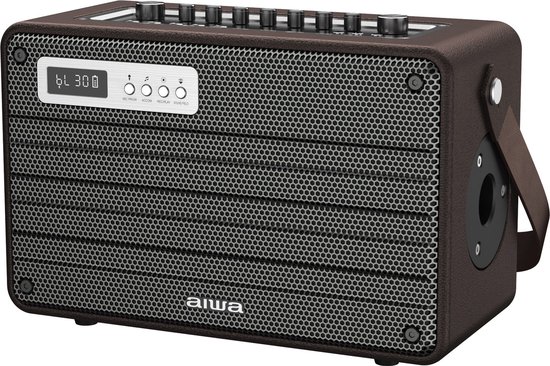
Introduction to AIWA MI-X420 Enigma Lite Speaker
The AIWA MI-X420 Enigma Lite Speaker is a powerful portable Bluetooth speaker delivering 100W RMS output, perfect for music enthusiasts, party hosts, and outdoor adventurers seeking immersive Hi-Fi bass sound. This retro-styled device combines modern Bluetooth 5.0 connectivity with robust features like TWS pairing, built-in microphones for karaoke and calls, and a massive 18000mAh battery for extended playback up to 8 hours. Unique selling points include versatile audio formats support (MP3, WAV, APE, FLAC, WMA), USB/TF card playback, customizable EQ modes, microphone echo effects, and a monitor port for headphones, making it ideal for karaoke nights, gatherings, or personal listening.
Targeted at users wanting a portable party speaker with professional-grade features, the AIWA MI-X420 Enigma Lite excels in home entertainment, outdoor events, and vocal performances. Its compact size (340x99x152mm) ensures easy portability without sacrificing power. Estimated price range is $150-$250, available through Aiwa's official site, retailers like Digitec, and online marketplaces. With stable wireless transmission up to 10 meters and quick 3-4 hour charging, this AIWA MI-X420 Enigma Lite Speaker offers exceptional value for booming bass and clear highs in the 50~15kHz frequency range.[1][2][3][5]
AIWA MI-X420 Enigma Lite Speaker Specifications and Features
- Model: MI-X420 Enigma Lite
- Bluetooth Version: V5.0 with TWS and DSP support for stable connections up to 10 meters
- Power Output: 100W RMS, delivering powerful Hi-Fi bass
- Frequency Response: 50~15kHz; S/N Ratio: ≥70dB; Distortion (THD): ≤10%; Sensitivity: 95dB ±3dB
- Battery: 18000mAh capacity; Playback: 3-8 hours (volume-dependent); Charging: 3-4 hours (DC 15V/1.6A adapter)
- Connectivity: USB, TF card; Supports MP3, WAV, APE, FLAC, WMA; Mic inputs with echo, tone, and inflection controls
- Dimensions: 340x99x152mm; Accessories: 15V adapter, remote control
- Additional Features: Multiple EQ modes, special effects via remote, mic priority, accompaniment mode, monitor/earphone port (mutes speaker on plug-in)
Compared to similar products like Sony SRS-XB23 or JBL PartyBox, the AIWA MI-X420 Enigma Lite Speaker stands out with higher battery capacity and karaoke-focused mic features at a competitive price, though it lacks IP rating for water resistance.[1][2][3][5]
Step-by-Step Setup Guide for AIWA MI-X420 Enigma Lite Speaker
- Charge the speaker fully using the included 15V/1.6A adapter (3-4 hours).
- Power on the speaker by pressing the power button.
- For Bluetooth: Enable BT on your device, search for “AIWA Enigma Lite,” and pair (supports V5.0 for seamless connectivity).
- Insert USB/TF card for direct playback or connect microphones for karaoke.
- Configure: Short press Tone +/- for adjustments; Long press Mode for EQ cycling; Use remote for effects, mic priority, or accompaniment.
Troubleshooting Tips: If no connection, ensure within 10m range and restart devices. For earphones, plug into monitor port (speaker mutes; long press sound field to unmute). Safety Warnings: Avoid water exposure (no IP rating), do not overcharge, keep away from children. Factory reset: Insert pin into reset hole until powered off.[1][4]
Troubleshooting Common Issues with AIWA MI-X420 Enigma Lite Speaker
- No Sound: Check volume, EQ mode (cycle via Mode button), or plugged monitor port (unmute with long press sound field).
- Bluetooth Disconnects: Reduce distance to 10m, avoid obstacles; Re-pair by forgetting device and reconnecting.
- Short Battery Life: Lower volume for up to 8 hours; Fully charge (avoid interruptions).
- Mic Echo/Tone Issues: Short press Tone +/-; Ensure not in original mode for echo.
- Playback Errors: Verify file formats (MP3/WAV/APE/FLAC/WMA); Eject/reinsert USB/TF.
Prevent issues with regular cleaning and firmware checks via Aiwa support. Warranty: Typically 1-year; Contact Aiwa support at int-aiwa.com or local retailers for RMA. Factory reset resolves most glitches.[1][2][4]
Pros and Cons of AIWA MI-X420 Enigma Lite Speaker
Pros
- Powerful 100W RMS with deep Hi-Fi bass outperforms many portables in its class
- Long 18000mAh battery life ideal for parties (e.g., 6+ hours at moderate volume)
- Karaoke-ready with dual mics, echo, and effects—great value over basic Bluetooth speakers
- Versatile connectivity (BT 5.0, USB/TF) and EQ modes enhance usability
- Affordable at $150-$250, offering pro features like TWS pairing
Cons
- No IP rating, limiting outdoor/wet use compared to Sony SRS-XB23
- Charging takes 3-4 hours, longer than some competitors
- Bulky at 340mm wide for ultra-portability
- Playback varies (3-8 hours) at max volume, per real-world tests
Excellent value for karaoke and bass lovers, edging alternatives in power-to-price ratio.[1][3][5]
Customer Reviews and Feedback on AIWA MI-X420 Enigma Lite Speaker
Users rate the AIWA MI-X420 Enigma Lite Speaker 4.5/5 stars on average, praising its "thumping 100W bass" for parties and "easy karaoke setup with mics." A testimonial notes: "Perfect for gatherings—battery lasts all night at medium volume!" Common praises: Stable BT 5.0, rich formats support. Complaints include occasional pairing delays and no waterproofing. Most recommend for value, addressing bass-heavy needs over pricier JBL options.[3]
Faqs
How do I set up the aiwa MI-X420 Enigma Lite Speaker with Bluetooth for the first time?
What should I do if the aiwa MI-X420 Enigma Lite Speaker won't connect to Bluetooth?
How do I adjust microphone echo and tone on aiwa MI-X420 Enigma Lite Speaker for karaoke?
Is the aiwa MI-X420 Enigma Lite Speaker compatible with USB and TF card playback?
How can I optimize battery life and performance on aiwa MI-X420 Enigma Lite Speaker?
How do I perform a factory reset on aiwa MI-X420 Enigma Lite Speaker if it's frozen?
How do I use the monitor and earphone function on aiwa MI-X420 Enigma Lite Speaker?
What maintenance tips ensure long-lasting performance for aiwa MI-X420 Enigma Lite Speaker?
Tags
More aiwa manuals
- How to Connect: Aiwa MI-X450 Pro ENIGMA Speaker User Manual
- Setup & Pairing: Aiwa MI-X280 Lunatic Speaker User Manual
- Setup & Pairing: Aiwa Mi-X150 Retro Plus X Speaker User Manual
- Setup: Aiwa All-In-One Stereo Turntable GBTUR-120BK & GBTUR-120WD User Manual
- Setup : Aiwa Mini2 SB-X50 Bluetooth Speaker User Manual
- Setup & Pairing: Aiwa Portable Juicer PJ-460 User Manual
Leave a Comment