
Setup & Pairing: Aiwa Mi-X150 Retro Plus X Speaker User Manual
Content
Introduction — aiwa Mi-X150 Retro Plus X Speaker
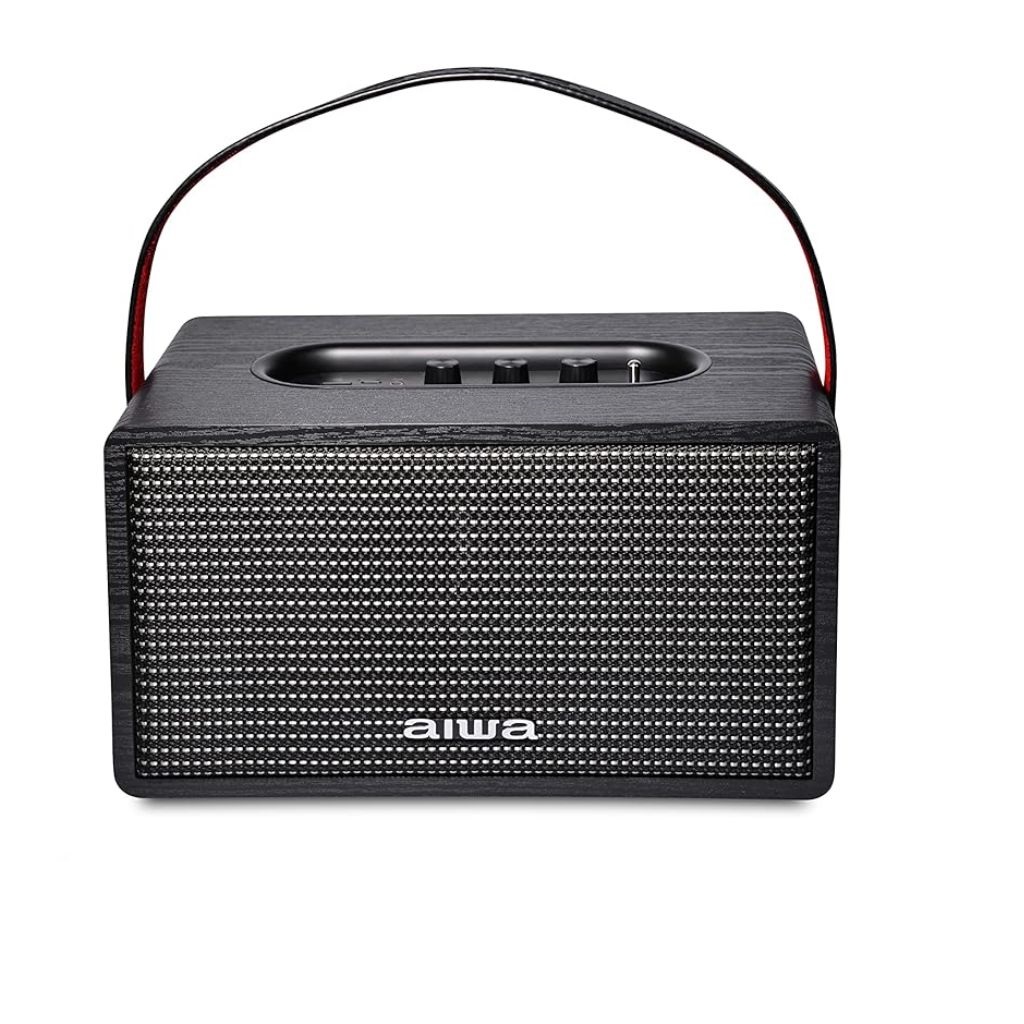
The aiwa Mi-X150 Retro Plus X Speaker is a vintage-styled wireless speaker that combines nostalgic wood-accent design with modern connectivity and portable battery power, aimed at users who want décor-friendly audio for home, small parties, and work-from-home setups. Aiwa positions this model as a statement piece that delivers room‑filling sound (up to a combined output around 60W) while offering Bluetooth 5.0, USB playback and an AUX input for flexible source options, plus a built‑in microphone for hands‑free calls[5][1].
Key benefits and unique selling points include retro wooden cabinet aesthetics, multi‑source playback (BT, USB, AUX), Type‑C charging, and a rechargeable 11.1V 6000mAh battery that supports on‑the‑go use. The speaker targets design‑conscious consumers, audiophiles who like warm, full-range sound without complex setups, and buyers upgrading from portable Bluetooth boxes to a more decorative home audio piece[5][4].
Typical use cases: living‑room background music, desktop audio for remote meetings, small gathering/party playback, and bedside or study listening. Estimated price range varies by retailer and region but commonly lists between INR ~17,000–25,000 (approx. retail/online prices reported around Rs.17,130 to Rs.24,990)[2][4][7]. Availability: sold through Aiwa India channels, select online stores and electronics retailers in markets where Aiwa distributes the Retro Plus X[5][1].
Specifications — Technical details & performance
- Model: aiwa Mi-X150 Retro Plus X (MI-X150 Retro Plus X)[5][1]
- Dimensions: 300 × 180 × 180 mm; Weight: ~3.55 kg (speaker only)[5][1]
- Battery: Built‑in Lithium‑ion 11.1V / 6000 mAh; Playback ≈ 5 hours at 100% volume; Charging time ≈ 9 hours via USB‑C DC 5V/2A[1][5][8]
- Power & Output: Active surround configuration, quoted total output around 60 W (manufacturer/retailer listings)[1][7]
- Connectivity: Bluetooth v5.0, AUX‑in (3.5 mm), USB playback, USB‑C charging; built‑in microphone for calls[5][1]
- Materials & Design: Wood/accent finishing for retro look; vintage control layout and grille styling[1][6]
- Signal‑to‑Noise Ratio & Channels: Typical consumer SNR ~60 dB; stereo with multi‑driver arrangement (retailer listings indicate two output channels)[1]
- Included Accessories: USB‑C cable, instruction manual, warranty card[1]
- Comparison: Versus compact portable Bluetooth speakers (JBL/UE), the aiwa Mi‑X150 focuses more on decorative home audio, higher mass/size and fuller low‑end rather than ultimate portability; versus bookshelf active speakers, it trades some fidelity for retro styling and integrated battery portability[4][6].
Setup Guide — How to get started with your aiwa Mi-X150 Retro Plus X Speaker
Follow these steps for first‑time setup and everyday use.
- Unbox and inspect: Remove speaker and accessories (USB‑C cable, manual, warranty card). Place on a stable, vibration‑free surface away from direct heat or moisture[1].
- Charge before first use: Connect USB‑C to a 5V/2A charger; full charge typically takes ~9 hours. Battery indicator or LED will show charging status (refer to the quick guide included)[1][5].
- Power on and pairing: Press the power button to switch on. Enable Bluetooth on your phone or source device and select “MI‑X150 Retro Plus X” (or similar) from the BT list to pair via Bluetooth 5.0[5].
- Alternate inputs: For wired playback use the AUX‑in (3.5 mm) or USB source for direct music playback from USB drives where supported[1].
- Configuration options: Adjust volume and any tone/treble/bass controls on the unit as needed; for clearer voice calls, use the built‑in mic and reduce music volume during calls[1].
- Troubleshooting tips: If pairing fails, power cycle the speaker and the source, remove prior Bluetooth pairings on your device, or move closer to the speaker. If playback is intermittent, ensure battery has sufficient charge and that no Bluetooth interference is nearby[5][6].
- Safety & precautions: Do not expose the speaker to water; avoid extreme temperatures; do not attempt to open the cabinet (risk of electric shock and voiding warranty). Use only the supplied or suitable USB‑C charger rated 5V/2A[1].
Troubleshooting — Common issues and fixes for the aiwa Mi-X150 Retro Plus X
- No power / won’t turn on: Ensure USB‑C cable and charger are functional; charge at 5V/2A for at least 30 minutes and try again. If still unresponsive, reset by holding power button (refer to manual) or contact support if battery is defective[1][5].
- Bluetooth pairing fails: Delete existing pairing on your phone, restart both devices, ensure speaker is in pairing mode and within 1–2 m range; update smartphone Bluetooth drivers if available[5][6].
- Low battery life: Playback time is rated about 5 hours at maximum volume; reduce volume or disable unnecessary features to extend battery life. If battery drains unusually fast, allow full charge and calibrate by full discharge/charge cycle once[1][8].
- Distorted or poor sound: Reduce volume to check for clipping; test an alternate source (AUX/USB) to isolate whether distortion is from Bluetooth compression or the speaker electronics[4].
- Error indicators / codes: The product uses basic LED indicators rather than numeric error codes—refer to the printed manual for LED status interpretations; persistent faults warrant service[1].
- Preventive measures: Keep firmware/phone OS updated, avoid overcharging long‑term, place the speaker on a steady surface and keep vents unobstructed[5].
- Warranty & support: Manufacturer warranty details included with purchase—contact Aiwa India customer support or your retailer for warranty claims and authorized service center information[5][1].
Pros & Cons — Honest assessment of the aiwa Mi-X150 Retro Plus X Speaker
Pros
- Retro aesthetic with wooden accents provides excellent room decor integration and premium feel; ideal for users wanting style plus sound[1][6].
- Multi‑source playback (Bluetooth 5.0, USB, AUX) and hands‑free calling increase daily usability and connectivity options[5][1].
- Robust build and heavier chassis yield better low‑frequency response than many ultra‑portable speakers; quoted 60W active output offers strong room‑filling sound[1][7].
Cons
- Battery life is modest (~5 hours at 100% volume), and long charging time (~9 hours) may disappoint heavy portable users[1][8].
- Larger size and weight (~3.55 kg) reduce portability compared with lightweight travel speakers; not IP‑rated for outdoor use[5][1].
- Price positioning (reported between ~Rs.17k–25k) may be higher versus similarly featured compact Bluetooth speakers, though justified by design and power[2][4][7].
Value-for‑money & alternatives
- Good value if you prioritize retro styling and a fuller sound over extreme portability; consider bookshelf active speakers or powered monitors (for pure audio fidelity) or compact JBL/UE models (for battery life and portability) as alternatives depending on priorities[4][6].
Customer Reviews — Real user feedback and recommendations
Customer feedback for the aiwa Mi-X150 Retro Plus X Speaker commonly praises its attractive vintage design, solid build and warm sound signature suited for living rooms and decorative audio setups; many reviewers note the satisfying low end and overall presence[4][3].
Common complaints include the relatively short battery runtime at high volumes and long recharge times, plus the speaker’s weight and size limiting true portability[1][8]. Star ratings from retailer listings and reviews typically land in the 4/5 range, with users recommending the speaker for home use rather than travel or outdoor parties[7][4].
Representative testimonial: “Looks and sounds classy — great center‑piece for the living room, Bluetooth is reliable, but I keep it plugged in for long sessions due to limited battery life.” (approx. paraphrase of public reviews)[4][8].
Faqs
How do I set up the aiwa Mi-X150 Retro Plus X Speaker for the first time?
Why won't my aiwa Mi-X150 Retro Plus X Speaker connect to Bluetooth?
How long does the battery last on aiwa Mi-X150 Retro Plus X Speaker and how to charge it?
What devices are compatible with aiwa Mi-X150 Retro Plus X Speaker?
How do I use the built-in microphone on aiwa Mi-X150 Retro Plus X Speaker for calls?
How can I optimize sound quality on aiwa Mi-X150 Retro Plus X Speaker?
How do I clean and maintain aiwa Mi-X150 Retro Plus X Speaker?
What if aiwa Mi-X150 Retro Plus X Speaker won't turn on or charge?
More aiwa manuals
- Setup : Aiwa Mini2 SB-X50 Bluetooth Speaker User Manual
- How to Connect: Aiwa MI-X450 Pro ENIGMA Speaker User Manual
- Setup: Aiwa AT-X80Q True Wireless Earphones User Manual
- Setup & Pairing: Aiwa MI-X420 Enigma Lite Speaker User Manual
- Setup & Pairing: Aiwa AT-X80H True Wireless Earphones Owner Manual
- Setup & Pairing: Aiwa MI-X280 Lunatic Speaker User Manual
Leave a Comment