
How to Use: Audio-Technica ATH-CKS50TW2 Wireless Headphones User Manual
Content
Audio-Technica ATH-CKS50TW2 Wireless Headphones: Deep Bass, Long Battery Life, and Everyday Reliability
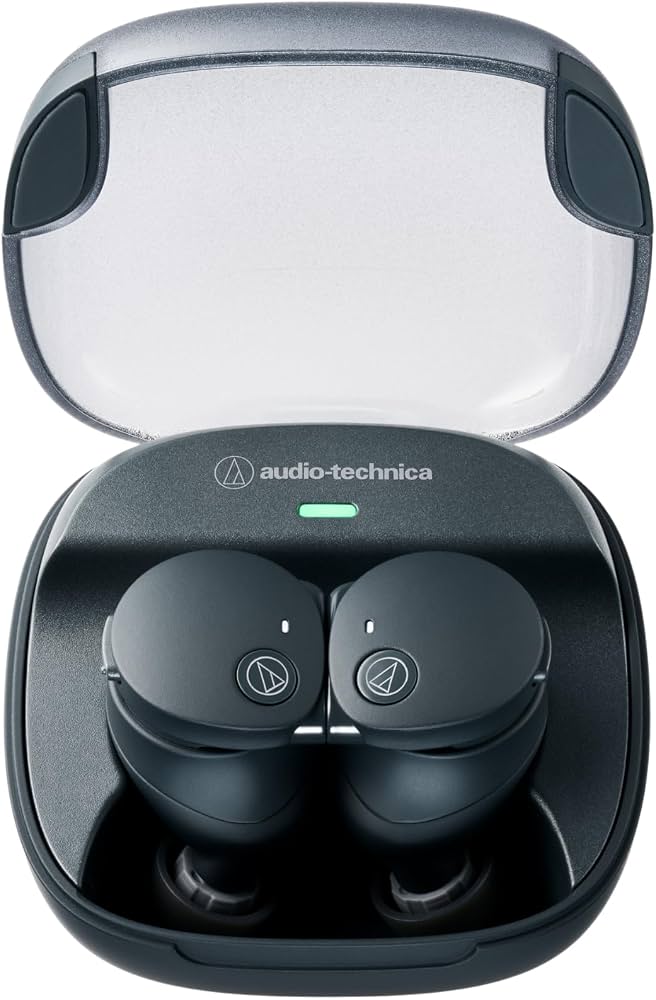
The Audio-Technica ATH-CKS50TW2 Wireless Headphones are true wireless earbuds designed for listeners who want powerful bass, dependable battery life, and practical features for daily use. Built around Audio-Technica’s SOLID BASS tuning, these wireless earbuds aim to deliver a rich low-end response without sacrificing clarity in vocals and instruments. They are a strong fit for commuters, casual listeners, gym users, and remote workers who need a secure, durable, and easy-to-use audio solution.
One of the biggest selling points of the ATH-CKS50TW2 is its exceptional endurance. The earbuds are rated for up to 25 hours of playback on their own and up to 65 hours with the charging case, making them a standout option for travel and all-day listening. With active noise cancellation enabled, total battery life remains strong at up to 40 hours with the case. Other highlights include Bluetooth 5.3, LE Audio support, IP55 water and dust resistance, wireless charging, and 9 mm dynamic drivers. These features make the model especially appealing for users who want premium convenience without moving into the highest price tier.
At launch, the estimated price range was around $149 in the US, while current retail pricing can vary by region, dealer, and promotions. Availability is generally good through Audio-Technica’s own store and major electronics retailers, with some regional stock differences. For shoppers searching for the best wireless earbuds for battery life, bass performance, and everyday versatility, the ATH-CKS50TW2 offers a compelling balance of features and value.
Specifications for Audio-Technica ATH-CKS50TW2 Wireless Headphones
- Driver size: 9 mm dynamic drivers
- Frequency response: 5 Hz to 20,000 Hz
- Sensitivity: 110 dB/mW
- Impedance: 20 ohms
- Bluetooth version: 5.3
- Codec support: SBC, AAC, and LC3
- Battery life: up to 25 hours per charge, up to 65 hours total with the case
- Battery life with noise cancellation: up to 15 hours per charge, up to 40 hours total with the case
- Charging time: about 2.5 hours for the earbuds, about 4 hours for the case by USB, about 7.5 hours for wireless charging
- Water and dust resistance: IP55 on the earbuds
- Weight: about 7.2 g per earbud, about 51.5 g for the charging case
- Microphone type: MEMS
- Wireless range: approximately 10 m in line-of-sight conditions
Compared with many similarly priced true wireless earbuds, the ATH-CKS50TW2 stands out for far longer battery life and stronger bass-focused tuning. While some competitors emphasize ultra-compact charging cases or advanced app features, Audio-Technica focuses on sound performance, endurance, and practical durability.
Detailed Description of the Audio-Technica ATH-CKS50TW2 True Wireless Earbuds
The Audio-Technica ATH-CKS50TW2 Wireless Headphones are engineered as everyday true wireless earbuds with a strong emphasis on low-frequency performance. Their 9 mm dynamic drivers are tuned for deep, impactful bass that works well with hip-hop, EDM, pop, gaming audio, and movies. At the same time, the earphones still provide a balanced enough presentation for podcasts and voice calls.
In real-world use, the earbuds are built for long sessions. The long battery life reduces charging anxiety, while the IP55 rating helps protect against sweat, light rain, and dust during workouts or commutes. The MEMS microphones support voice calls and virtual meetings, making the model useful for remote work and mobile communication. The wireless charging case adds extra convenience, especially for users who prefer drop-and-go charging.
The build quality feels practical rather than flashy, with a compact, durable case and a secure in-ear fit. The included ear tips in multiple sizes help improve comfort and seal. For users who prioritize consistent performance, bass depth, and low-maintenance daily use, these wireless earbuds are a dependable choice.
Setup Guide: How to Pair Audio-Technica ATH-CKS50TW2 Wireless Headphones
Setting up the ATH-CKS50TW2 is straightforward. Start by fully charging the earbuds and case using the USB-C cable or a compatible wireless charger. Once charged, remove the earbuds from the case so they enter pairing mode automatically. Open the Bluetooth settings on your phone, tablet, or laptop, then select the headphones from the available device list.
After pairing, test audio playback and call quality. If you want to use codec or sound options supported by your device, check the settings in your operating system or companion app if available in your region. For best results, choose the ear tip size that creates a firm seal, since fit directly affects bass response and passive isolation.
If pairing fails, place the earbuds back in the case, close the lid, and try again after restarting Bluetooth on the source device. Safety-wise, avoid charging in hot, wet, or dusty environments, and do not expose the case to water. The earbuds are IP55-rated, but the charging case is not designed for moisture exposure.
Troubleshooting the ATH-CKS50TW2 Wireless Earbuds
If one earbud does not connect, place both units in the case for several seconds, then remove them together and retry pairing. If sound cuts out, move closer to the source device and reduce interference from walls, routers, or multiple wireless devices. Since the normal wireless range is around 10 meters, obstacles can shorten performance.
If battery life seems shorter than expected, check whether noise cancellation, high volume, or repeated charging cycles are increasing power use. A full reset and firmware update, if available, can resolve intermittent issues. There are no widely reported universal error codes for the model, so most issues are handled through standard Bluetooth reset and device re-pairing steps.
Preventive care matters: keep the charging contacts clean, store the earbuds in the case when not in use, and avoid leaving them in extreme temperatures. For warranty questions or product support, use Audio-Technica’s official customer support channels or the retailer where the product was purchased. If the issue involves hardware failure, check the warranty terms for repair or replacement options.
Pros and Cons of Audio-Technica ATH-CKS50TW2 Wireless Headphones
Pros
- Excellent battery life for true wireless earbuds, making them ideal for long trips and busy workdays
- Strong bass performance that suits modern music genres and casual entertainment
- Bluetooth 5.3 and LE Audio support for modern wireless connectivity
- IP55 protection adds confidence for workouts and outdoor use
- Wireless charging improves convenience in daily charging routines
Cons
- Not the smallest or lightest option compared with ultra-compact alternatives
- Bass-heavy tuning may be less suitable for listeners who prefer a neutral sound signature
- The charging case is functional rather than premium in appearance
- Advanced smart features may be less extensive than some competing earbuds
Overall, the value for money is strong if battery life and bass are top priorities. Compared with alternatives in the same segment, the ATH-CKS50TW2 is especially attractive for users who want reliable endurance and energetic sound rather than a minimalist design.
Customer Reviews of the Audio-Technica ATH-CKS50TW2 Wireless Headphones
Customer feedback for the Audio-Technica ATH-CKS50TW2 Wireless Headphones is generally positive, with many users praising the long battery life, comfortable fit, and powerful bass. A common rating pattern is around 4 to 4.5 stars out of 5, especially among buyers who use earbuds for commuting, gaming, and extended listening sessions.
Typical praise includes remarks such as “the battery lasts all week,” “the bass has real impact,” and “pairing was quick and simple.” Common complaints usually mention that the sound is not fully neutral and that the case is slightly larger than some competing models. Users who want a brighter, more analytical sound sometimes prefer other earbuds, but buyers seeking a bass-forward tuning usually feel satisfied.
For most shoppers, the ATH-CKS50TW2 is a strong recommendation if endurance, comfort, and punchy audio are more important than ultra-light design or studio-style tuning. It is especially appealing for frequent travelers, students, and anyone who wants dependable wireless earbuds with minimal charging interruptions.
Faqs
How do I set up audio-technica ATH-CKS50TW2 Wireless Headphones for the first time?
Why are my audio-technica ATH-CKS50TW2 Wireless Headphones not pairing with my phone?
What should I do if audio-technica ATH-CKS50TW2 Wireless Headphones sound low or unbalanced?
Can I use audio-technica ATH-CKS50TW2 Wireless Headphones with Windows, Mac, and Android devices?
How do I get the best battery life from audio-technica ATH-CKS50TW2 Wireless Headphones?
What features of audio-technica ATH-CKS50TW2 Wireless Headphones matter most for everyday listening?
How do I clean and maintain audio-technica ATH-CKS50TW2 Wireless Headphones safely?
Why does one earbud disconnect from audio-technica ATH-CKS50TW2 Wireless Headphones during calls or music playback?
More audio-technica manuals
- How to Use: Audio-Technica ATH-M50xBT2 Wireless Headphones User Manual
- How to Setup : Audio-Technica AT-LP120XUSB Direct-Drive Turntable User Manual
- How to Use: Audio-Technica ATH-SQ1TW Wireless Headphones User Manual
- How to Use: Audio-Technica AT-LP120XBT-USB Wireless Direct-Drive Turntable User Manual
- Audio-Technica ATH-ANC9 QuietPoint Noise-Cancelling Headphones User Manual
- How to Use: Audio-Technica AT-LP60XBT Automatic Wireless Turntable User Manual
Leave a Comment