
How to Pair: Avantree Wireless Headphone Transmitter Set BTHT-4189 User Manual
Content
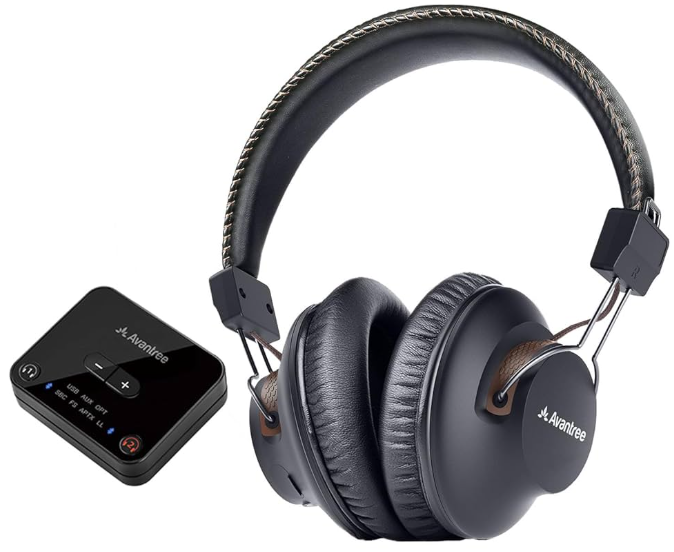
Avantree Wireless Headphone Transmitter Set BTHT-4189
Introduction
The Avantree Wireless Headphone Transmitter Set BTHT-4189 is a cutting-edge solution designed for seamless audio experiences, especially for TV watching. This innovative set combines high-quality Bluetooth headphones with a top-of-the-line Audikast transmitter, offering a range of up to 100 feet and low audio latency of less than 40 milliseconds. This feature ensures that audio and visuals are perfectly synchronized, making it ideal for both TV and movie enthusiasts. The plug-and-play functionality simplifies setup, eliminating the need for complex pairing processes. The Avantree HT4189 is perfect for anyone seeking a hassle-free listening experience, whether watching TV, gaming, or enjoying music.
Targeted at both casual viewers and tech-savvy users, this set is compatible with a wide range of devices, including TVs, PCs, and gaming consoles, via optical, AUX/3.5mm, or RCA connections. With an estimated price range of $60 to $100, the Avantree HT4189 is competitively priced and widely available across various online platforms.
Key Benefits and Use Cases
- Seamless Connectivity: Offers a stable connection with a range of up to 100 feet.
- Low Latency: Features FastStream Bluetooth technology for less than 40ms audio delay.
- Multi-Device Compatibility: Supports various audio output ports for easy integration with multiple devices.
- Long Battery Life: Provides up to 40 hours of playtime, ensuring extended listening sessions.
Specifications
Here are the key technical specifications of the Avantree Wireless Headphone Transmitter Set BTHT-4189:
- Range and Connectivity: Up to 100 feet with Bluetooth Class I technology.
- Audio Latency: Less than 40 milliseconds using FastStream Bluetooth technology.
- Battery Life: Up to 40 hours of continuous playback.
- Compatibility: Supports optical, AUX/3.5mm, and RCA audio output ports.
- Multi-Headphone Support: Can connect up to two pairs of headphones simultaneously.
In comparison to similar products, the Avantree HT4189 stands out for its extended range, low latency, and ease of use, making it a top choice for those seeking a reliable wireless headphone solution.
Overview
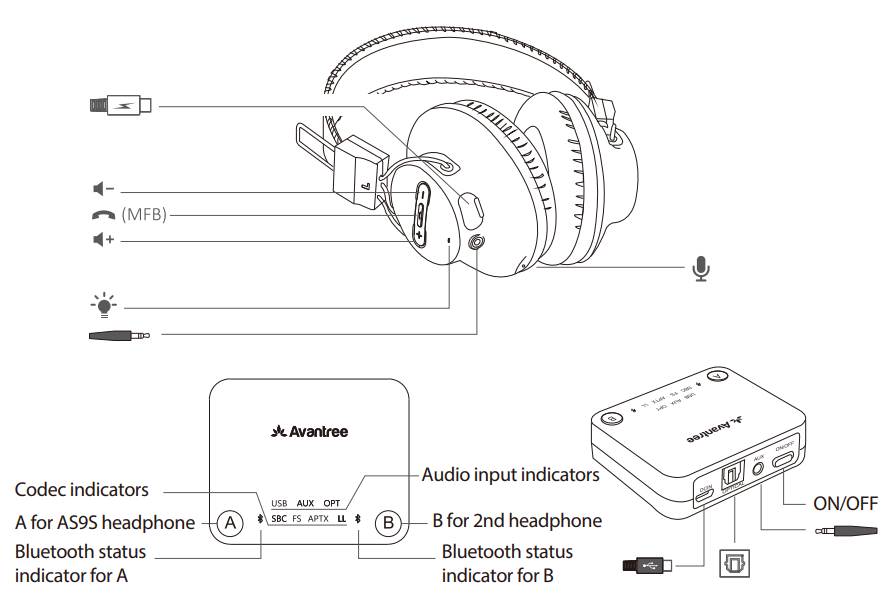
LED Indication & Voice Prompts
LED indicators of the transmitter(Audikast)

LED indicators & voice prompts of headphones(AS9S)
-table_b.png)
Turn on HT4189
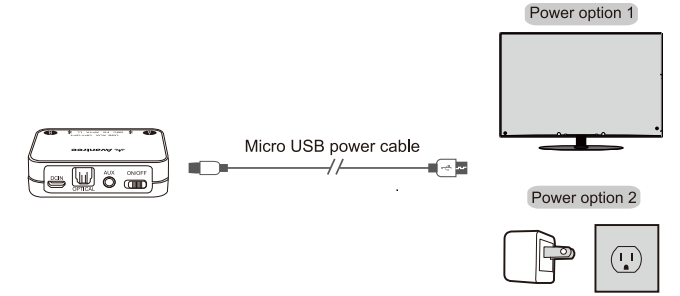
Powering up the transmitter
Powering up the transmitter with the USB cable provided. Connect it either to a TV USB port or any other USB charger that supports 5V/500mA-2A.
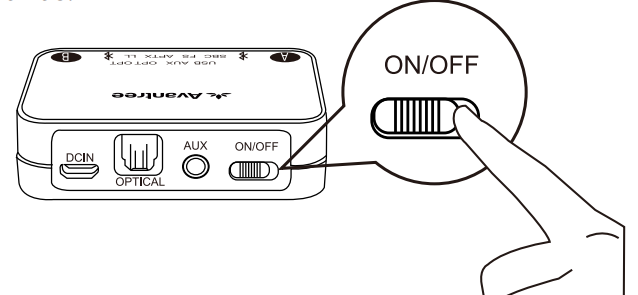
Turn on both devices: Turn on the transmitter – Slide the on/off switch to the “ON” position,  close to A flashes BLUE once per 2 seconds.
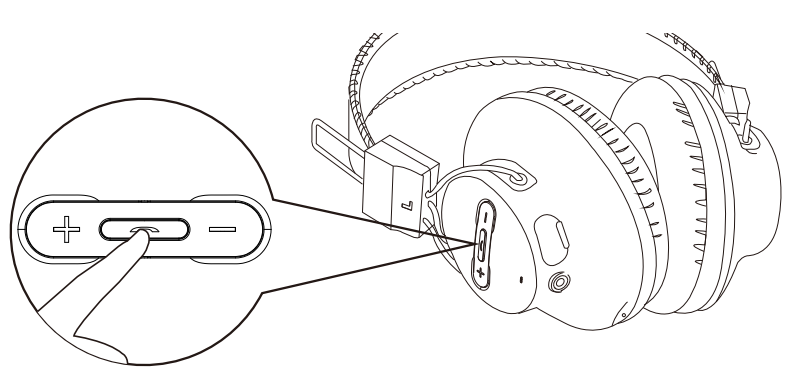
Turn on the headphones: Press and hold for 2 seconds until you see the first sight of BLUE light.
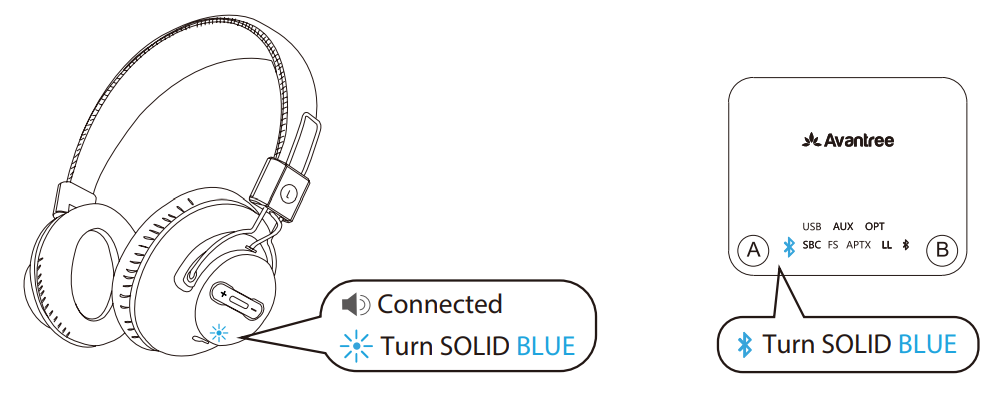
They will auto-reconnect. The indicators are: 1) Headphones say “Connected”. 2)close to A on the transmitter and LE the D on the headphoturnsturn SOLID BLUE.
Use HT4189 with your TV
Check your TV's output options before resetting it up..
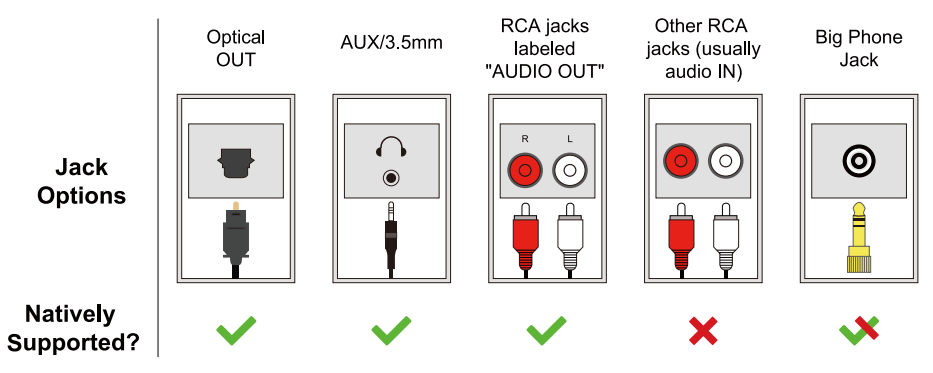
- HT4189 works with OPTICAL output, AUX 3.5mm output, and RCA (labeled “AUDIO OUT”) output.
TVs with OPTICAL audio out
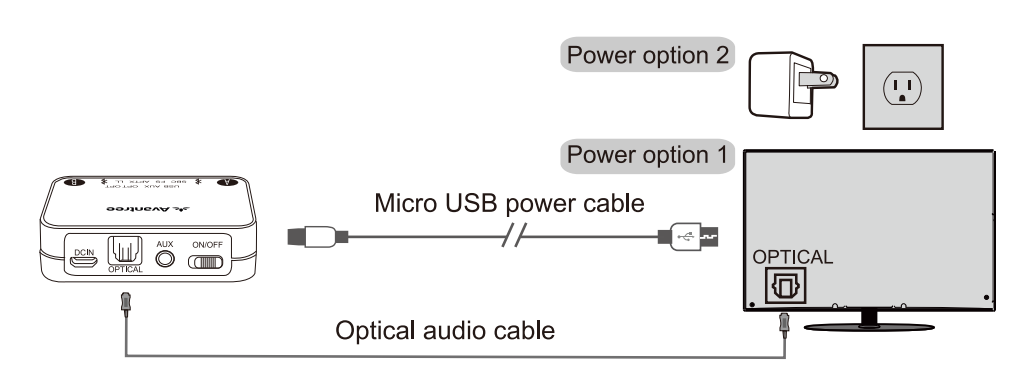
After turning on HT4189 and connecting cables, you should be able to hear sound from your headphones; if not,
- Ensure your TV speaker is set to “External Speaker”.
- Ensure TV audio format is set to “PCM” or “Dolby/DTS” is OFF(This is IMPORTANT)
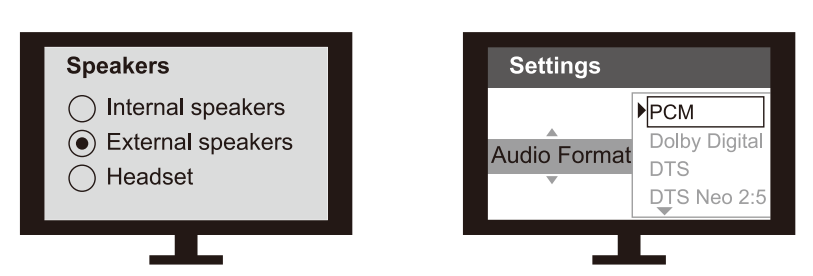
- Note: The Settings menu may be different depending on different TV brands and models.
TV with AUX 3.5mm Audio Out
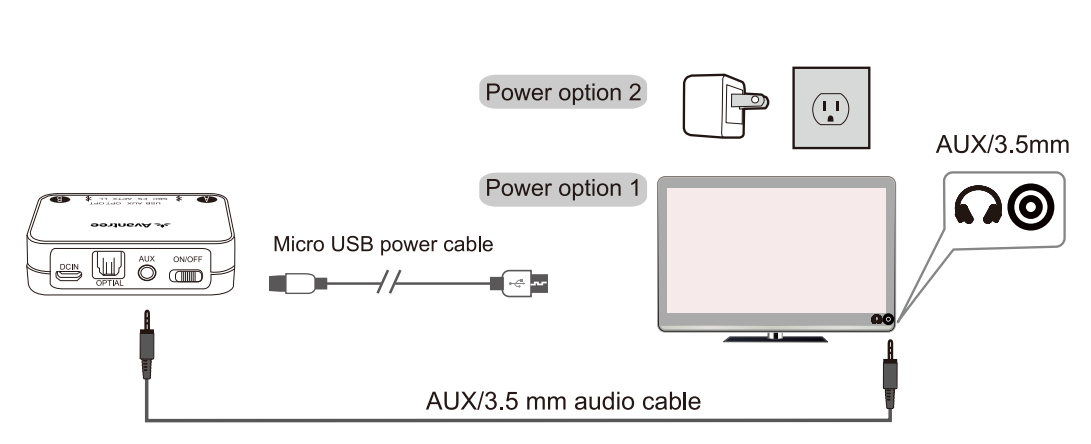
After turning on HT4189 and connecting cables, you should be able to hear sound from your headphones; if not, ensure your TV speaker is set to “Headset.”

Note: The settings may be different depending on different TV brands and models.
TVs with RCA audio out(Red/White ports labeled “AUDIO OUT”)

After turning on HT4189 and connecting cables, you should be able to hear sound from your headphones; if not,
- Ensure the use of TV Red/White ports labeled “AUDIO OUT”; other Red/White ports are incorrect.
- Ensure your TV speaker is set to “External Speaker”.

Note: The Settings menu may be different depending on different TV brands and models.
Use HT4189 with your AV Receiver with a 6.35mm PHONE jack
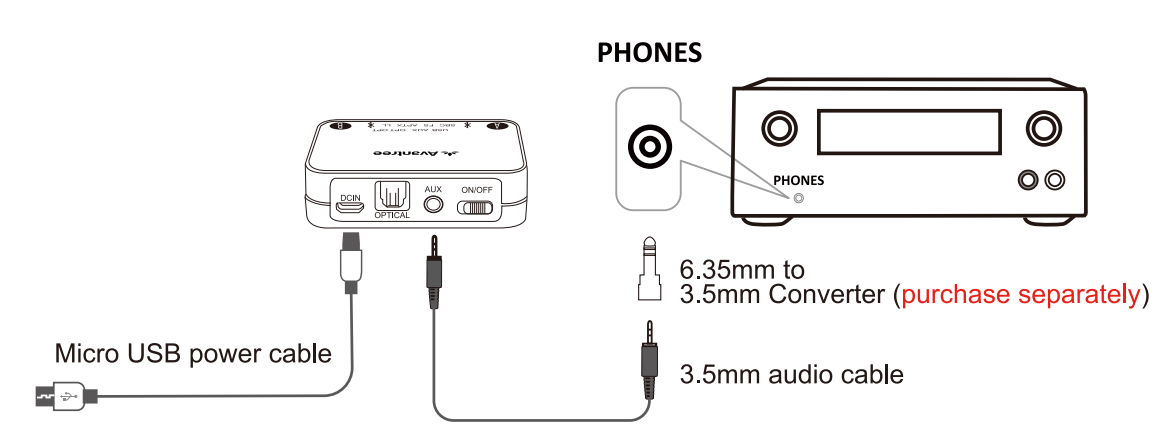
Notes:
- HT4189 is not compatible with ANY RCA(L/R) ports on your AV Receiver; ONLY use the BIG 6.35mm PHONE OUT on the front side of your AV Receiver with the 6.35mm to 3.5mm adapter.
- Do NOT set the volume of your AV Receiver too high.
- Plug wired ear buds into the port on the AV receiver; check whether the sound is normal.
Use HT4189 with your PC/Laptop
- The HT4189 transmitter supports Micro USB digital audio input from your PC/Laptop.
- This delivers much better audio quality compared to plugging it into the standard 3.5mm AUX analog port.
- Connect the transmitter to PC/laptop via the included Micro USB data/charging cable.
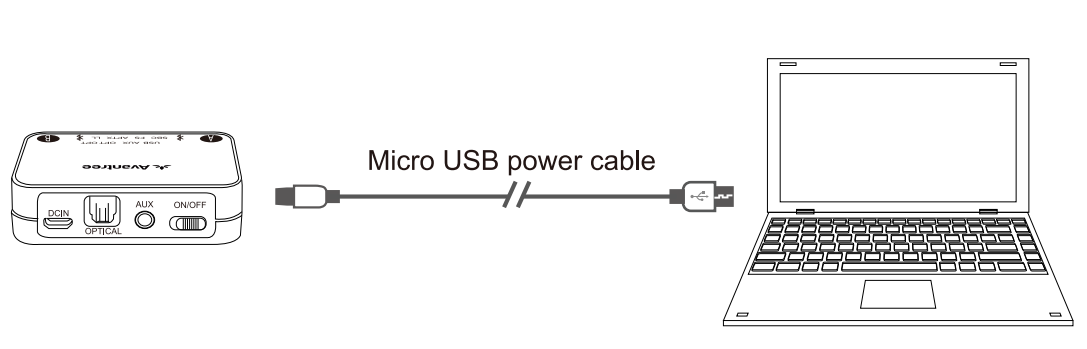
Note: The connecting cable must have both DATA SYNC and charging capabilities.
After turning on HT4189 and connecting cables as above, you should be able to hear sound from your headphones; If not:
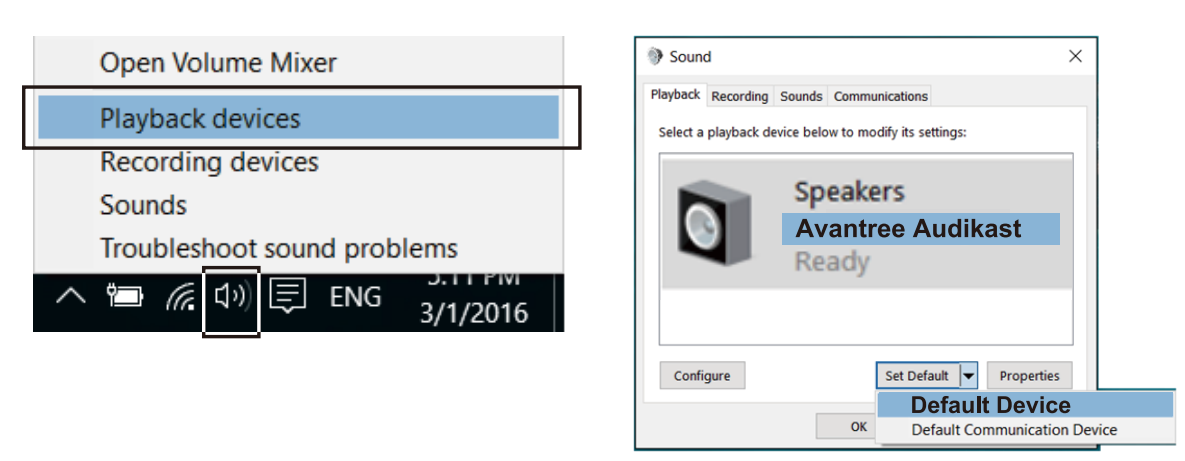
- Set as default "Playback device" on PC/laptop - Right-click the speaker icon in the bottom-right of the taskbar and select “Playback devices”.
- Set the “Avantree Audikast” as the “Default Device”.
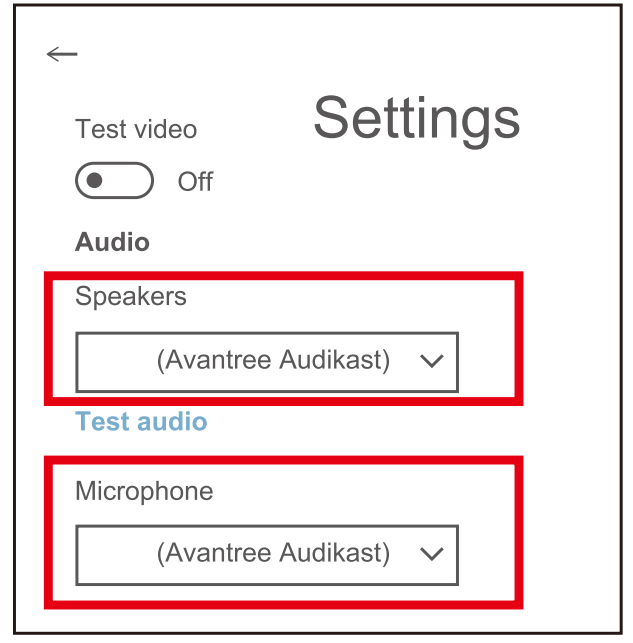
For Skype audio settings, please select “Avantree Audikast” for both Speakers and Microphone.
Use the headphones independently with the cellphone.
Headphones AS9S can be separately used with a cell phone. Please follow the step-by-step instructions below:
- Ensure the transmitter is off.
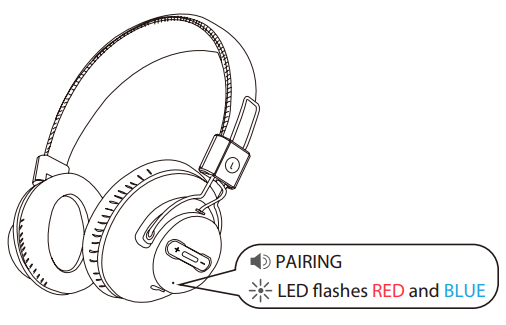
- Enter the headphones into PAIRING MODE - from the OFF state, press and hold the MFB for 5 seconds until the LED flashes RED and BLUE alternately, and you hear “Pairing” from the headphones.
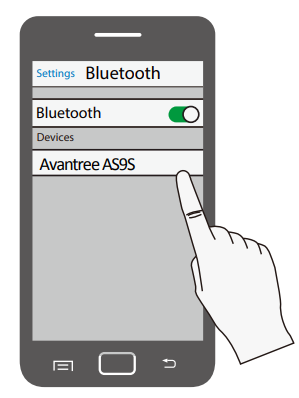
Turn on Bluetooth on your smartphone or tablet. Find & select “AS9S” to pair and connect.
Avantree Wireless Headphone Transmitter Set BTHT-Use the headphone independently with cellphone-A
Add a 2nd pair of headphones..
- Power up the transmitter, then turn on the HT4189 headphones and transmitter - they will connect automatically. Now, turn off the headphones.
- Enter the transmitter into PAIRING MODE manually - press and hold B for 2 secondsclose to B ashes BLUE and RED alternately.
- Place your 2nd headphones into Bluetooth PAIRING MODE (please refer to your 2nd headphones’ user manual).
- Keep the devices close to each other and wait. Once connected,close to B on the transmitter will turn SOLID BLUE.
- Now turn back on the first headphone; it should auto-reconnect to the transmitter.
Reconnect: Next time, the 2nd headphone will also auto-reconnect to the transmitter once turned on. Otherwise, click B once on the transmitter to initiate the reconnecting, and close to B flashes BLUE once per 2 seconds.
Clear paired history
- Clear the paired history of the transmitter.. After powering on, press and hold BOTH A and B together for 7 seconds, both will be on BLUE for 2 seconds, then A enters pairing mode automatically,close to A flashes RED and BLUE alternately.
- Clear the paired history of the headphones. After turning on, press and hold both “+” and “-” for 10 seconds until the RED and BLUE LEDs are BOTH on for 2 seconds (looks PINK) - now all the paired history of the headphones is cleared. It then enters pairing mode automatically with the LED flashing alternately RED and BLUE.
Headphone charging
Please charge the headphones if you hear the “low battery” voice prompt. You can charge using a phone charger (5V/500mA-2A output), PC USB port, TV USB port,t or any other USB outlet using the included USB cable. It takes about 3.5 hours to fully charge the headphones. The LED will turn RED during charging and turn off once charging is complete.
Troubleshooting
Common issues and their solutions:
- No Audio: Ensure the transmitter is properly connected to the audio output and that both devices are turned on.
- Interference: Move the transmitter away from other wireless devices to minimize interference.
- Pairing Issues: Restart both the headphones and transmitter to initiate automatic pairing.
For further assistance, Avantree offers comprehensive warranty and support options. Contact their customer service for any additional help or questions.
Pros & Cons
Pros:
- Extended Range: Offers a reliable connection up to 100 feet.
- Low Latency: Ensures synchronized audio and visuals.
- Easy Setup: Plug-and-play design simplifies use.
- Long Battery Life: Supports extended listening sessions.
Cons:
- Dependence on Transmitter: Requires the transmitter for optimal use with non-smart devices.
- Interference: May experience interference from other wireless devices.
Overall, the Avantree HT4189 provides excellent value for money, offering a reliable and immersive audio experience.
Customer Reviews
The Avantree Wireless Headphone Transmitter Set BTHT-4189 has received positive feedback for its ease of use and performance. Users praise its ability to provide clear and synchronized audio, making it ideal for both TV and gaming applications. Some users have noted that the transmitter can be sensitive to interference, but overall, the set is highly recommended for those seeking a hassle-free wireless listening experience.
Star Rating: 4.5/5
Recommendation: For anyone looking for a reliable wireless headphone solution with low latency, the Avantree HT4189 is a top choice.
Faqs
How do I set up the avantree Wireless Headphone Transmitter Set BTHT-4189 with my TV for the first time?
What should I do if my avantree Wireless Headphone Transmitter Set BTHT-4189 is not pairing with the headphones?
Can I use the avantree Wireless Headphone Transmitter Set BTHT-4189 with smart TVs that have built-in Bluetooth?
What are the audio output options compatible with the avantree Wireless Headphone Transmitter Set BTHT-4189?
How far can I move away from the transmitter before audio cuts out on the avantree Wireless Headphone Transmitter Set BTHT-4189?
How do I optimize audio latency and synchronization on the avantree Wireless Headphone Transmitter Set BTHT-4189?
Can I connect a second pair of headphones to the avantree Wireless Headphone Transmitter Set BTHT-4189?
What maintenance is recommended to keep my avantree Wireless Headphone Transmitter Set BTHT-4189 performing well?
Tags
More avantree manuals
Leave a Comment