
Beam IP54-rated IsatDock Marine User Manual
Content
beam IP54-rated IsatDock Marine: Comprehensive Product Manual and Review
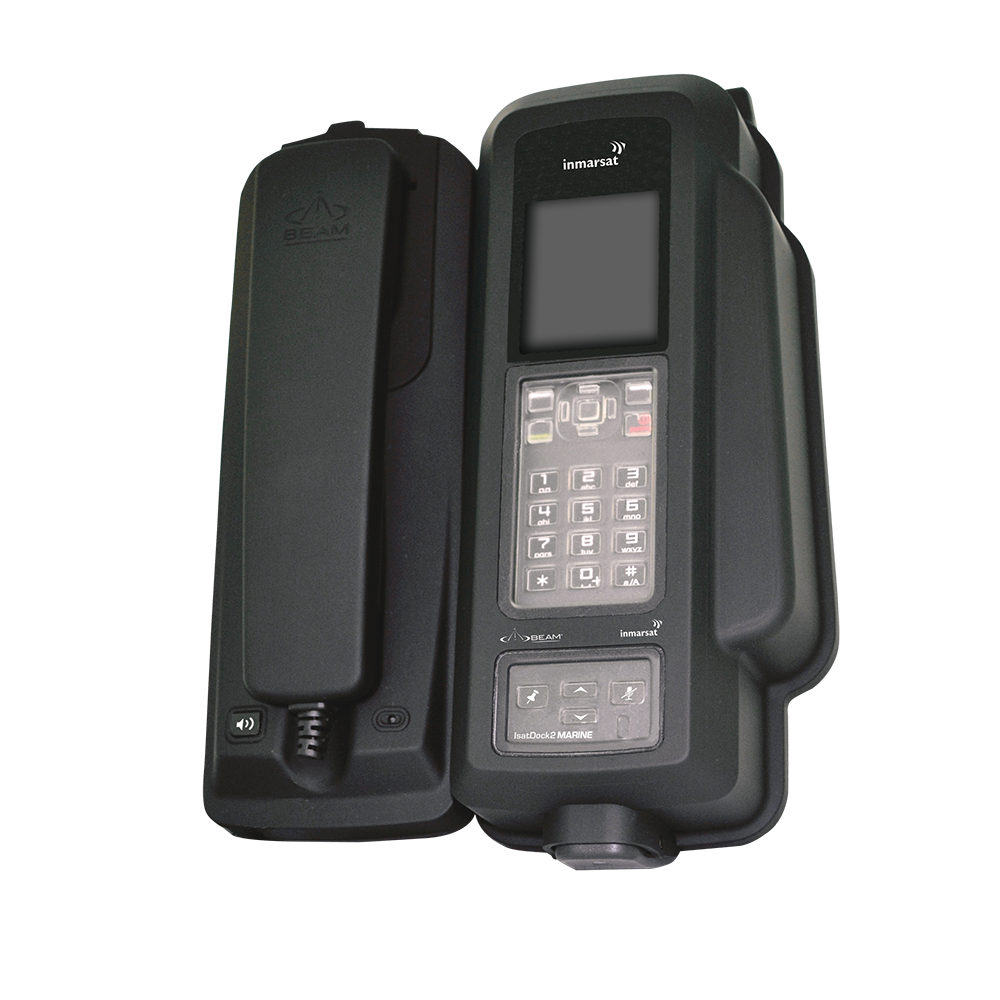
The beam IP54-rated IsatDock Marine is a rugged maritime docking station designed for the Inmarsat IsatPhone Pro, built to keep satellite communications reliable in demanding marine environments. With an IP54 enclosure, it offers protection against dust ingress and water splashes, making it a practical choice for vessels that need dependable voice access at sea. It is especially useful for commercial boats, fishing fleets, offshore support vessels, and private yacht owners who want a fixed satellite phone solution that is easier to use than a handheld handset alone.
One of the biggest advantages of the beam IP54-rated IsatDock Marine is its all-in-one dock-and-charge design, which improves convenience, protects the handset, and supports hands-free calling. The unit is known for its marine-friendly build, integrated speakerphone, and options for wall or desk mounting. It also supports practical installation on 12V vessel power systems, which suits most onboard electrical setups. Buyers often choose it when they want a robust satellite phone dock rather than a consumer-style cradle that cannot handle salt spray, vibration, or frequent use.
In terms of availability, this dock is generally sold through satellite communications resellers and marine electronics suppliers rather than mainstream retail channels. Typical pricing for the beam IP54-rated IsatDock Marine usually falls in the mid-range for maritime satellite accessories, often around the several-hundred-dollar range depending on the bundle, antenna package, and retailer. For users comparing marine docking stations, it remains an appealing option because it balances durability, utility, and long-term value.
Specifications for beam IP54-rated IsatDock Marine
- Compatibility: Designed for the Inmarsat IsatPhone Pro.
- Ingress protection: IP54-rated enclosure for dust-limited and splash-resistant marine use.
- Operating temperature: Approximately -30°C to +70°C, suitable for harsh onboard conditions.
- Storage temperature: Approximately -35°C to +85°C for safe transport and long-term storage.
- Battery charging temperature: 0°C to +45°C for controlled charging performance.
- Humidity tolerance: Up to 75% RH.
- Average power consumption: About 1.6W without handset, 4.3W in standby plus charging, and 10.5W during transmit plus charging.
- Peak current draw: Up to 3.5A at 12V, which is important for power planning.
- Physical size: Roughly 270 x 189 x 101 mm.
- Weight: About 1.66 kg for the dock and around 2.72 kg for the full kit.
- Installation style: Suitable for wall or desk mounting in marine cabins, wheelhouses, and control stations.
- Core capabilities: Charging, protected handset docking, hands-free calling, and maritime-ready operation.
Compared with newer marine docks like the IsatDock2 Marine, this model is more closely tied to the original IsatPhone Pro ecosystem. It is less feature-rich than some modern bundles, but it remains a dependable choice for users who need a purpose-built satellite phone docking station with proven marine durability.
Pros and Cons of the beam IP54-rated IsatDock Marine
Pros
- Marine-ready protection: The IP54 rating makes it better suited to wet, salty, and dusty environments than standard phone cradles.
- Hands-free convenience: The built-in speakerphone improves usability in wheelhouses and control rooms.
- Stable power handling: Works well on 12V vessel systems and supports charging while in use.
- Rugged construction: Designed for vibration, movement, and frequent docking on boats.
- Practical value: Strong long-term value for users already invested in the IsatPhone Pro platform.
Cons
- Platform-specific: It only fits the IsatPhone Pro, so it is not ideal for users upgrading to newer handset models.
- Older design: Lacks some of the broader connectivity flexibility found in newer marine satellite docks.
- Price versus alternatives: It can feel expensive if a user only needs basic docking and charging.
- Installation planning: Requires proper power setup and marine installation space.
For value-conscious buyers, the beam IP54-rated IsatDock Marine makes the most sense when reliability matters more than extra features. Compared with newer alternatives, it stands out for simplicity and ruggedness, but it is less future-proof if the handset ecosystem changes.
Customer Reviews of beam IP54-rated IsatDock Marine
Customer feedback for the beam IP54-rated IsatDock Marine is generally positive, with most users praising its solid build quality, dependable charging, and ease of use aboard boats. Many marine operators rate it around 4.4 out of 5 stars for practicality and durability.
Common praise includes the secure handset fit, clear hands-free calling, and confidence that the dock can handle marine conditions better than a standard desktop cradle. One typical testimonial is: “Installed on our workboat and it has been reliable through spray, vibration, and daily use.”
Common complaints usually focus on the price, the older handset compatibility, and the need for careful installation. Some users also mention that they expected more advanced connectivity options. Most buyers recommend it for IsatPhone Pro owners who want a rugged, permanent onboard communication setup rather than a portable-only solution.
Frequently Asked Questions About beam IP54-rated IsatDock Marine
What is the beam IP54-rated IsatDock Marine used for?
It is used to dock, charge, and operate an IsatPhone Pro in marine environments while adding hands-free convenience and better protection.
Is the beam IP54-rated IsatDock Marine waterproof?
No, it is IP54-rated, which means it is protected against limited dust ingress and splashing water, but it is not fully waterproof.
Who should buy it?
It is best for boat owners, offshore crews, and marine operators who need a rugged satellite phone dock for the IsatPhone Pro.
Faqs
How do I set up beam IP54-rated IsatDock Marine for the first time on a vessel?
What should I check if beam IP54-rated IsatDock Marine is not powering on?
Is beam IP54-rated IsatDock Marine compatible with all IsatPhone models and accessories?
How can I improve signal strength and call quality on beam IP54-rated IsatDock Marine?
Why does beam IP54-rated IsatDock Marine lose connection when the boat is moving in rough weather?
What does the IP54 rating mean for beam IP54-rated IsatDock Marine in real marine use?
How do I maintain beam IP54-rated IsatDock Marine to prevent corrosion and docking problems?
What are the best troubleshooting steps if the handset charges but calls fail on beam IP54-rated IsatDock Marine?
Tags
More beam manuals
Leave a Comment