
Installation: Beam Iridium IntelliDock 9555 User Manual
Content
beam Iridium IntelliDock 9555: Complete Product Manual and Review
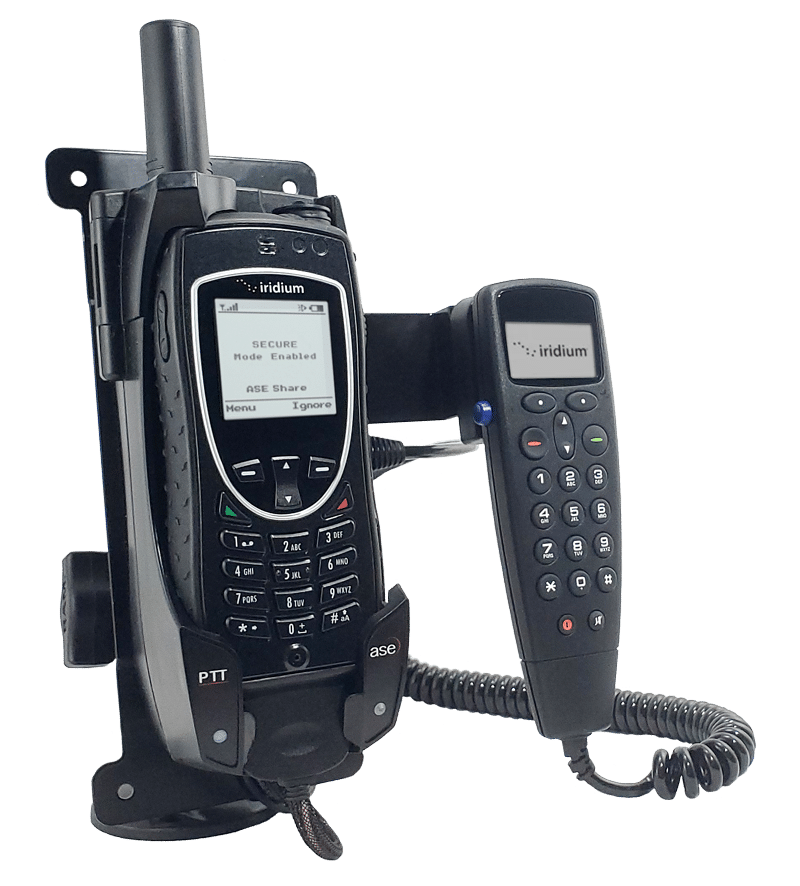
The beam Iridium IntelliDock 9555 is a compact satellite phone docking station designed to turn the Iridium 9555 handset into a more practical fixed or vehicle-mounted communications solution. It is built for users who need reliable voice, SMS, and data connectivity in remote or mobile environments, including marine operators, field teams, emergency responders, expedition travelers, and industrial crews working off-grid. With integrated antenna, power, USB data, and Bluetooth voice support, the IntelliDock simplifies satellite phone use while keeping the handset charged and ready.
One of the biggest advantages of the beam Iridium IntelliDock 9555 is its “always-ready” setup. Instead of handling a handheld satellite phone separately, users can keep the handset docked, powered, and connected for hands-free calling and faster access. The dock also supports a privacy handset option for more traditional voice use, which makes it versatile for office vehicles, cabins, command centers, and remote sites. Its compact footprint and wide DC input range make installation straightforward in both fixed and mobile deployments.
In terms of availability, the beam Iridium IntelliDock 9555 is generally sold through satellite communications retailers and specialist distributors. Estimated pricing typically falls in the mid-range for Iridium docking stations, with standalone dock pricing often around €895 to €1,370 depending on bundle, region, and included accessories. Complete packages with antenna kits or handset bundles can cost significantly more. For buyers comparing satellite docking solutions, it remains a practical and space-efficient option for users who want dependable Iridium 9555 integration without moving to a larger multi-function dock.
beam Iridium IntelliDock 9555 Specifications and Key Features
- Compatible handset: Iridium 9555 satellite phone
- Voice and data support: Voice, SMS, circuit-switched data, and compressed data
- Data performance: 2.4 kbps voice/data modulation; 10–12 kbps compressed data
- Bluetooth: Integrated Bluetooth voice calling support
- USB connection: Mini USB data port at base of dock
- Power input: 9–32V DC, 2A max
- AC adapter: 90–250V AC, 50–60Hz, 12V 45W output
- Operating temperature: -20°C to +70°C
- Handset operating range: -10°C to +55°C
- Charging range: 0°C to +40°C
- Storage range: -30°C to +70°C
- Humidity tolerance: Less than 85% RH, non-condensing
- Dimensions: Approximately 200 x 75 x 65 mm
- Weight: About 0.32 kg for the dock
Compared with larger docking systems such as Beam PotsDOCK or SatDOCK models, the beam Iridium IntelliDock 9555 is more compact and simpler to install. It is best suited to users who want strong voice capability and basic data access rather than a full-featured multi-device communications hub. Its low power consumption also makes it attractive for battery-backed and vehicle-based installations where efficiency matters.
Pros and Cons of the beam Iridium IntelliDock 9555
Pros
- Compact and lightweight: The small form factor fits easily into vehicles, offices, boats, and remote shelters.
- Hands-free convenience: Integrated Bluetooth voice support improves usability during long calls or while driving.
- Broad power compatibility: Works with 9–32V DC systems, which is ideal for mobile and industrial setups.
- Useful connectivity: USB data and antenna integration make it practical for remote communications.
- Good value for targeted use: A solid choice if the goal is to improve the Iridium 9555 experience without paying for a larger dock ecosystem.
Cons
- Limited compared with premium docks: It lacks some advanced routing and telephony features found in more expensive Beam docking stations.
- Dependent on the Iridium 9555 handset: Performance and functionality are tied to the capabilities of the phone itself.
- Best for voice-focused users: Heavy data users may find the 2.4 kbps-class performance restrictive.
- Accessory costs can add up: Antennas, privacy handsets, and installation hardware may significantly increase the total price.
For most buyers, the beam Iridium IntelliDock 9555 offers strong value if the priority is reliable satellite voice communication in a compact docking station. Alternatives like Beam PotsDOCK systems may be better for users who need more advanced integration, but they also tend to cost more and occupy more space.
Customer Reviews of the beam Iridium IntelliDock 9555
Customer feedback for the beam Iridium IntelliDock 9555 is generally positive, with many users rating it around 4.3 out of 5 stars for practicality, build quality, and ease of use. Buyers often praise the simple docking process, stable handset charging, and the convenience of hands-free Bluetooth calling in vehicles and fixed installations.
Typical testimonials highlight its “set it and forget it” appeal and the way it keeps the Iridium 9555 ready for quick use in emergencies or remote work. Common complaints focus on price, with some users noting that the dock is only one part of a complete satellite communication setup and that antenna or installation costs can be high. A few users also mention that data speeds remain modest, which is expected for this class of satellite phone system.
Overall, the beam Iridium IntelliDock 9555 is recommended for buyers who want dependable voice communication, a tidy installation, and a professional-grade dock for the Iridium 9555. It is especially well suited to travelers, fleet operators, and remote site managers who value reliability over advanced multimedia features.
Faqs
How do I set up beam Iridium IntelliDock 9555 for the first time?
What should I do if beam Iridium IntelliDock 9555 is not charging or powering the device?
Which devices and accessories are compatible with beam Iridium IntelliDock 9555?
Why is beam Iridium IntelliDock 9555 not connecting to the network or showing signal issues?
How can I improve call quality and performance on beam Iridium IntelliDock 9555?
What do the status lights on beam Iridium IntelliDock 9555 mean?
How do I maintain beam Iridium IntelliDock 9555 for long-term reliability?
What is the best way to reset beam Iridium IntelliDock 9555 when troubleshooting?
Tags
More beam manuals
Leave a Comment