
Setup: Beurer 2-in-1 Air Purifier and Fan LV 500 PureFlow User Manual
Content
Beurer 2-in-1 Air Purifier and Fan LV 500 PureFlow Product Manual
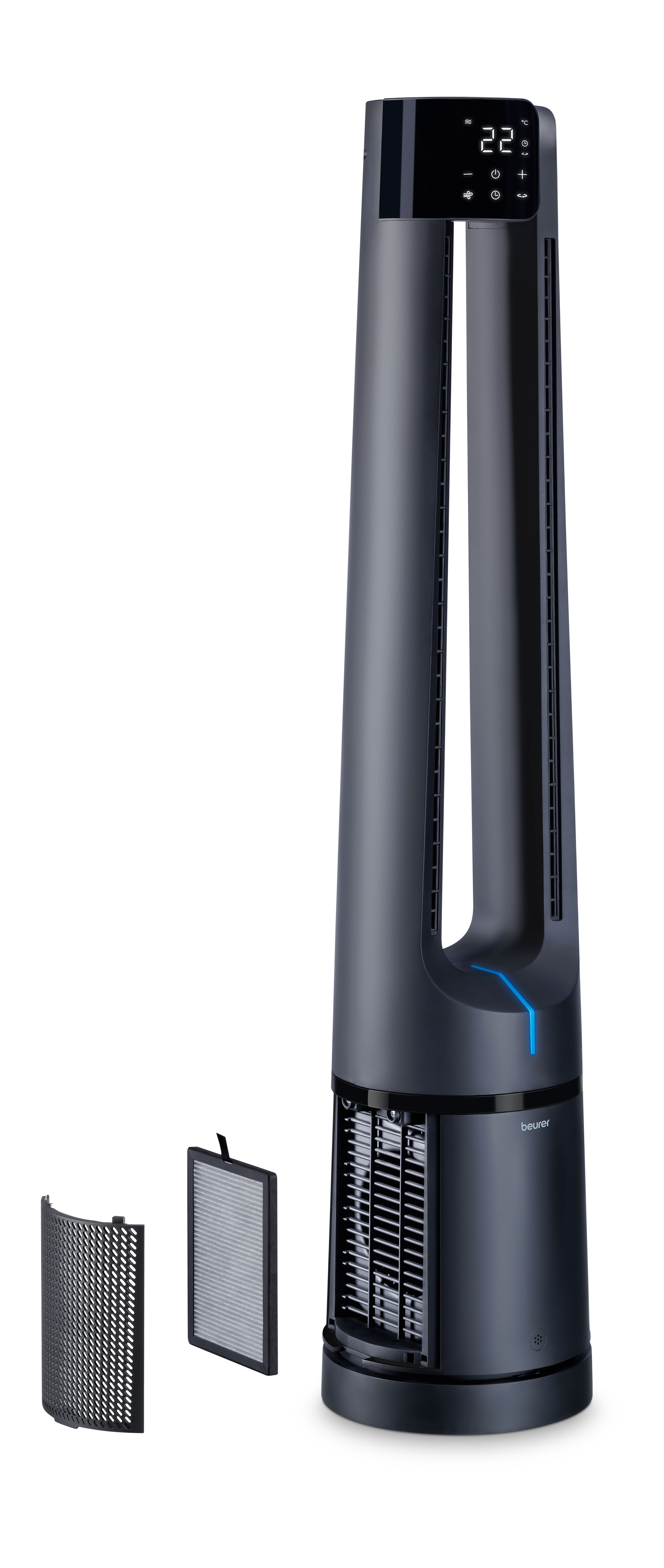
Introduction to Beurer 2-in-1 Air Purifier and Fan LV 500 PureFlow
The Beurer 2-in-1 Air Purifier and Fan LV 500 PureFlow combines powerful air purification with cooling fan functionality, delivering clean, fresh air for modern homes. This innovative device features a three-layered filter system—pre-filter, activated carbon filter, and HEPA H13 filter—that removes up to 99.95% of particles like dust, pollen, bacteria, viruses, and odors, including fine dust down to 0.02 μm. Ideal for rooms up to 106 m², it offers a Clean Air Delivery Rate (CADR) of approximately 354-380 m³/h, making it perfect for allergens sufferers, families with pets, or anyone seeking improved indoor air quality.
Key benefits include smart sensor technology for automatic air quality adjustment, a color ambient air quality indicator, real-time room temperature and humidity display, and selectable UV light for extra germ-killing power. With 4 fan levels plus turbo mode, night mode under 30 dB for silent operation, and app control via the free "beurer FreshHome" app (iOS 10+ or Android 5+ with Bluetooth 4+), it's versatile for daily use, sleep, or remote monitoring. The Beurer LV 500 PureFlow air purifier fan suits bedrooms, living rooms, or offices, targeting users prioritizing health and comfort in polluted environments.
Compact at 21 x 35 x 62 cm and 5.9 kg, it runs on 220-240V, 50-60 Hz with 75W power consumption. Estimated price ranges from $300-$500 USD (or equivalent, e.g., SAR 1400), available at retailers like Win Health, Beytech, and online stores. This best 2-in-1 air purifier fan elevates wellness with German-engineered precision.
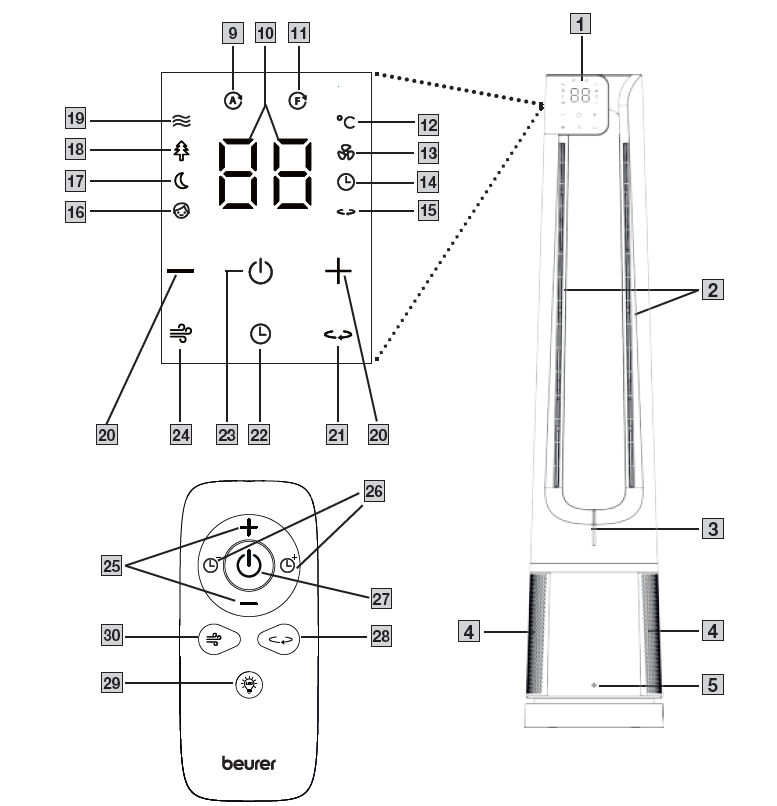
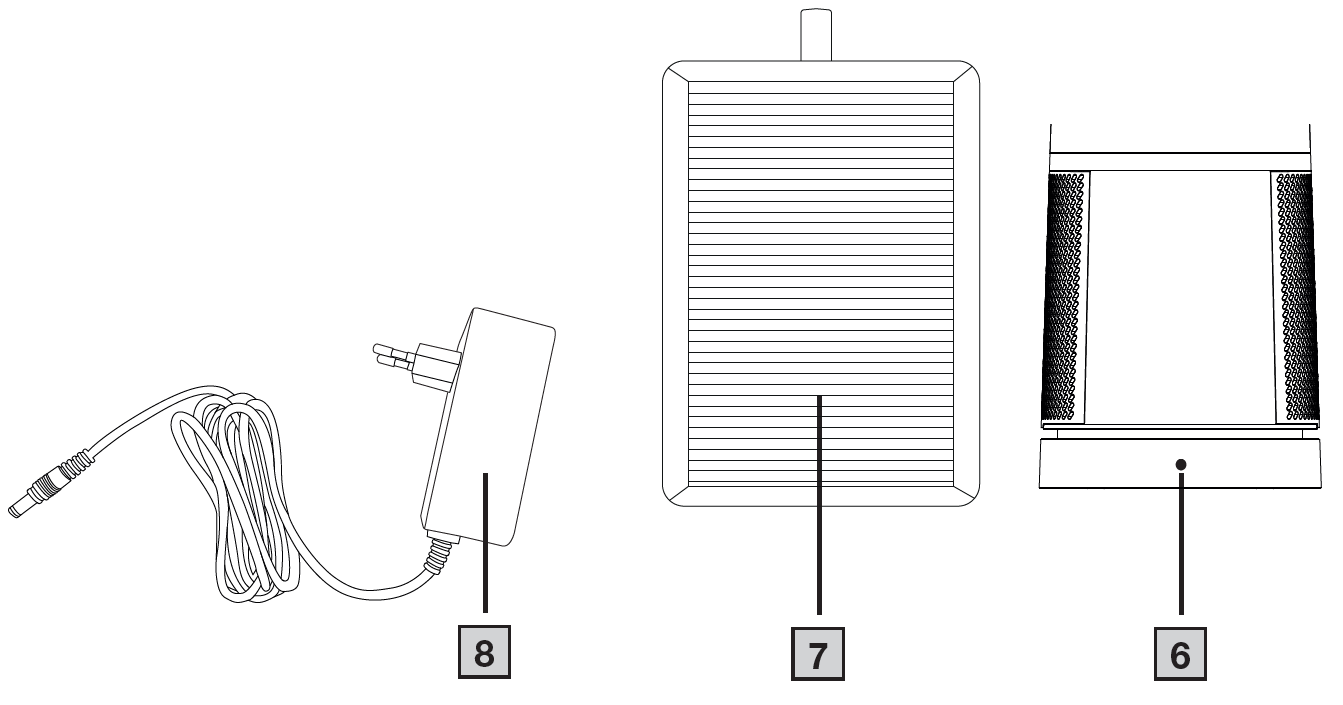
Device
- Display with control panel
- Air outlet
- Ambient air indicator
- Air intake
- PM 2.5 fine dust particle sensor
- Connection socket for mains adapter
- Filter
- Mains adapter
Display with control panel
- Automatic symbol (automatic mode is active)
- 7-segment indicator
- Filter indicator (lights up when the filters need to be replaced)
- Temperature symbol
- Fan setting symbol
- Timer symbol
- Oscillation symbol (lights up when the rotation is active)
- Child symbol (lights up when child mode is on)
- Sleep symbol (lights up when sleep mode is on)
- Nature mode (lights up when nature mode is on)
- Basic mode (lights up when basic mode is on)
- +/− buttons (to adjust the fan setting and timer)
- Oscillation button (to switch the rotation on/off)
- Timer button (to activate the timer)
- On/off button (to switch the device on/off)
- Mode button (to switch between modes)
Remote control
- +/− buttons (to adjust the fan setting)
- Timer button (to adjust the timer)
- On/off button (to switch the device on/off)
- Oscillation button (to switch the rotation on/off)
- LED button (to switch all indicator lights on/off)
- Mode button (to switch between modes)
Technical specifications
- Model: LV 500 PureFlow
- Power supply: Mains adapter
- Input: 100–240 V, 50–60 Hz, 2.0 A
- Output: 24.0 V, 2.0 A
- Device input: 24.0 V, 2.0 A, 48 W
- Power consumption:
- Low fan speed: Approx. 20 W
- Medium fan speed: Approx. 35 W
- High fan speed: Approx. 48 W
- Dimensions (L × W × H): 111 × 23 × 23 cm
- Weight:
- Remote control: Approx. 30 g
- Device: Approx. 5.0 kg
- Battery for remote control: 1 × CR2025
- Volume: Approx. 59 dB (at highest level of operation)
- Permissible operating conditions: +5°C to +40°C, ≤90% relative humidity (non-condensing)
- Protection class: Class II
- ERP directive: See the last page of these instructions for use.
Setting up the device
- Open the cardboard packaging.
- Carefully remove the device from the cardboard packaging.
- Remove all the packaging materials and the transport securing tapes from the device. Then check the device for damage.
- Remove the filters 7 from the device (see “Changing the filters” section) and take them out of the plastic covering film. Then re-insert the filters 7 into the device.
- Place the device on a level and stable surface to prevent vibrations and noise.
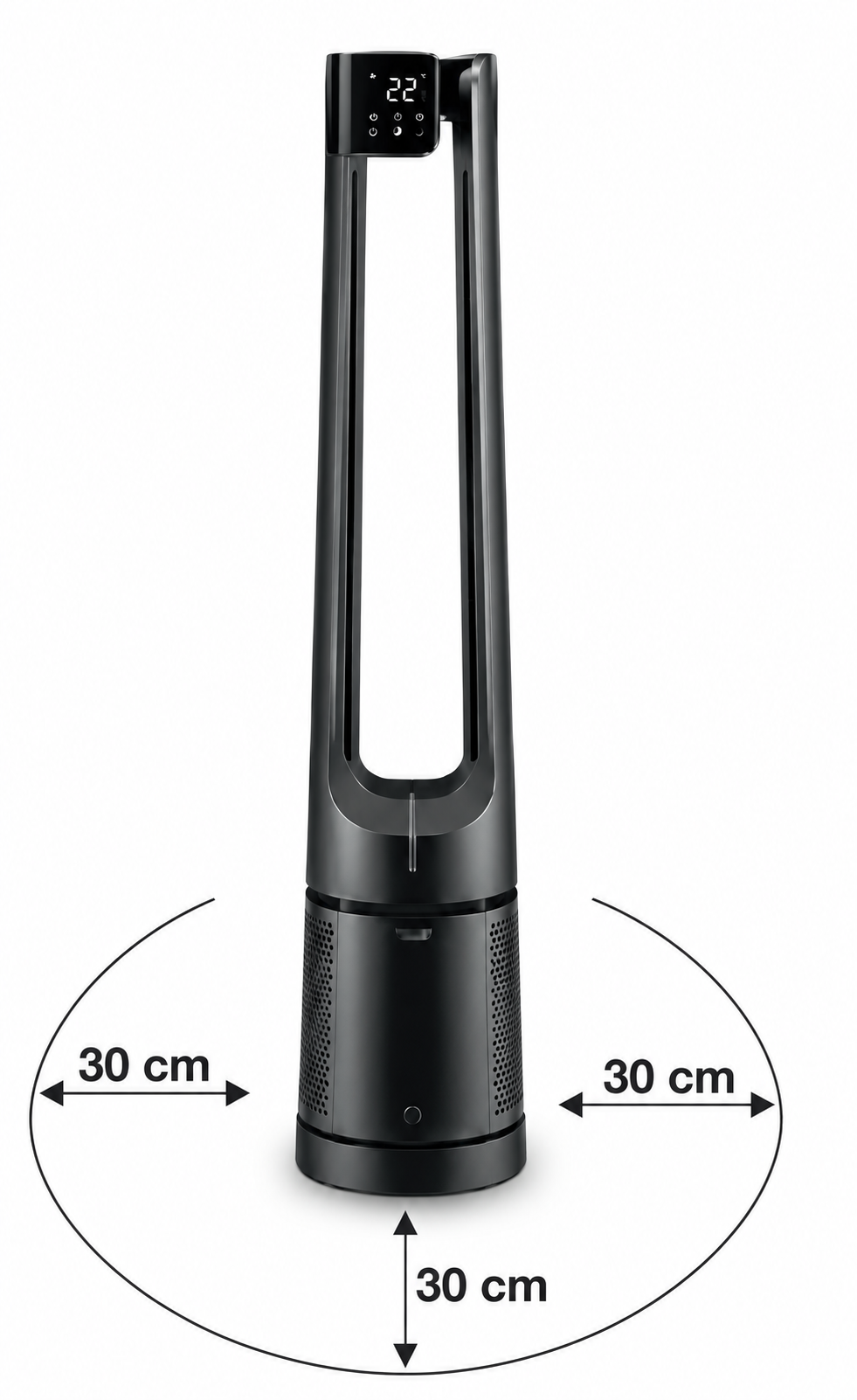
- Set up the device in your immediate vicinity. Leave a clearance of at least 30 cm on all sides around the device.
- Pull out the battery strip on the remote control.
Switching on the device
- Plug the mains cable of the mains adapter 8 into the connection socket 6 on the rear of the device. Only then may the mains adapter be plugged into the socket. The ON/OFF button 23 appears in the control panel.
- To switch on the device, press the ON/OFF button (either on the remote control 27 or on the control panel 23). A beep sounds when the device is switched on. After being switched on, the device runs automatically at the lowest fan speed setting and in basic mode 19. The ambient air indicator 3 switches on automatically. After approximately 30 seconds, the ambient air indicator 3 will indicate the current air quality using a colour, which corresponds to the concentration of particles in the ambient air around the device.
Selecting the fan speed
The device has 12 different fan speeds, which can be set using the +/− buttons (either on the remote control 25 or on the control panel 20). The currently set fan speed appears on the display.
Selecting the ventilation modes
The device has five different modes (basic, nature, child, sleep and automatic, which cannot be set manually). Use the mode button (either on the remote control 30 or on the control panel 24) to set your preferred ventilation mode. The currently set mode is shown on the display.
Setting the timer
The device has an optional timer (1 to 12 hours). After the set time has elapsed, the device switches off automatically.
- To set a timer, use the timer button 22 on the control panel and select the duration using the +/− buttons 20. Alternatively, the timer can also be set using the timer buttons 26 on the remote control.
- If the timer button is not pressed for 3 seconds, the currently set timer time is confirmed and shown on the display. To end the timer prematurely, set the timer to 0 hours.
Setting the oscillation
To optionally set the device to slowly rotate back and forth when in use, press the oscillation button (either on the remote control 28 or on the control panel 21). Pressing the oscillation button again stops the rotation and the device stays in its new position.
Switching off the device
To switch off the device, press the ON/OFF button (either on the remote control 27 or on the control panel 23). All indicators on the display go out. The ON/OFF button 23 remains illuminated. When the device is switched off, it returns to its initial/central position. If the device is not going to be used for an extended period of time, disconnect the mains adapter from the socket.
Changing the filters
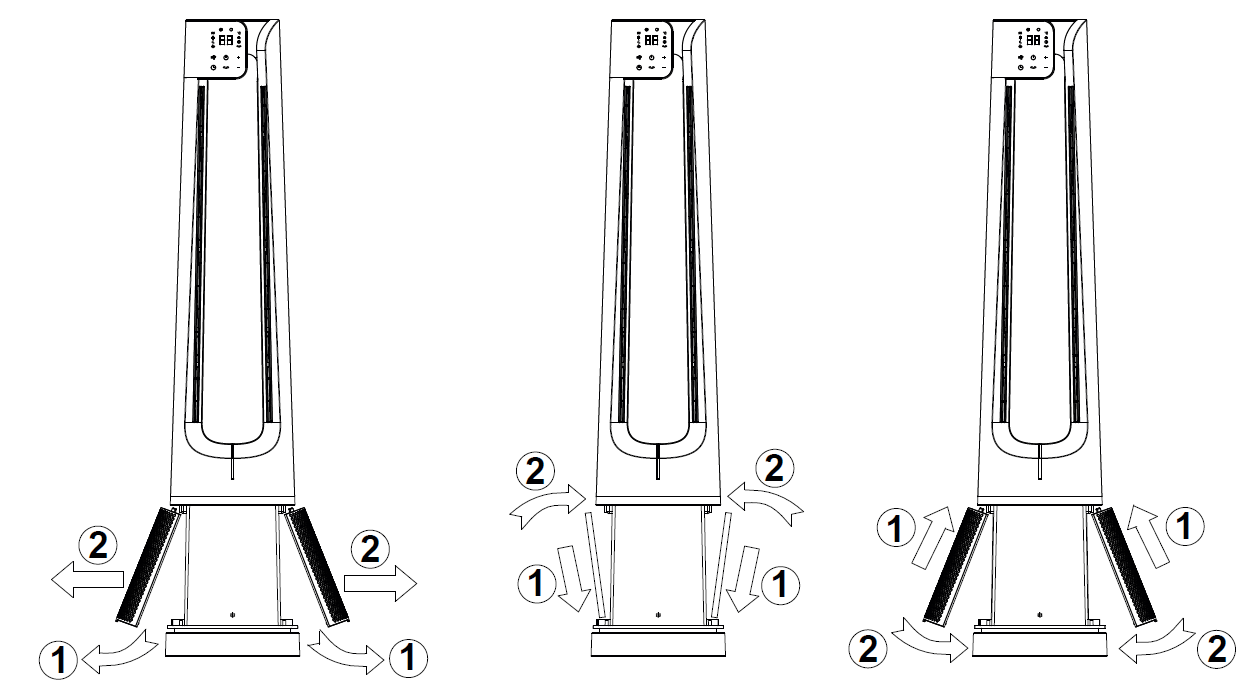
Change the filters 7 after 6 months at the latest. The filter indicator 11 will light up automatically after 1440 operating hours. To change the filters, proceed as follows:
- Press the ON/OFF button (either on the remote control 27 or on the control panel 23) to switch off the device.
- Disconnect the device from the socket.
- Fold out the two air intake covers 4 as shown.
- Dispose of the old filters properly (see section “Disposal”).
- Insert the two new filters as shown.
- Put the two air intake covers 4 back in as shown.
- Connect the device to a suitable socket.
- Press the ON/OFF button once to switch on the device.
- Press and hold the oscillation button 28 on the activated device for 5 seconds until the filter indicator 11 goes out. The filter indicator will now not light up again automatically until 1440 operating hours have passed.
Cleaning and maintenance
Before cleaning, always ensure that the device has been unplugged! Make sure that no moisture gets inside the device.
Cleaning the filters
- Regular cleaning of the filters 7 (once a month) is required to ensure hygienic and fault-free operation.
- Clean the outside of the filters with the brush attachment of a vacuum cleaner.
Cleaning the housing
- Do not use solvents, other aggressive cleaning/scrubbing agents, or alcohol, as these substances could damage the surface. Do not use any abrasive or hard objects for cleaning.
- If there is heavy dirt, clean the housing using a slightly damp cloth (dampened with water or a mild cleaning solution).
- If the device is not going to be used for an extended period of time, clean the device and store it in its original packaging in a dry environment and without weighing it down.
Troubleshooting Beurer 2-in-1 Air Purifier and Fan LV 500 PureFlow
Common issues with the Beurer 2-in-1 Air Purifier and Fan LV 500 PureFlow include filter clogs, poor air quality detection, or unusual noises. If the filter change indicator lights up after 4320 hours, replace the pre-filter + HEPA H13/activated carbon combination (item no. 660.07). Clean the pre-filter regularly to prevent blockages.
For no power: Check connections and ensure 220-240V compatibility; automatic switch-off activates for safety in overloads. Noisy operation? Verify fan level—night mode stays under 30 dB, turbo reaches 68 dB; dust buildup may cause rattles, so wipe exterior and filters monthly. App connectivity fails? Confirm Bluetooth 4+ and app version; restart device.
Prevent issues by operating in 5-40°C, up to 90% RH non-condensing, avoiding direct sunlight, and replacing filters timely. No specific error codes noted, but color indicator signals poor air (red). Beurer offers a 3-year warranty; contact support at beurer.com or local distributors like Win Health for replacements. Phone support varies by region—check manual for details. Regular maintenance ensures optimal HEPA air purifier fan performance.
Pros and Cons of Beurer 2-in-1 Air Purifier and Fan LV 500 PureFlow
Pros
- Exceptional Filtration: 99.95% efficiency on particles ≥0.3 μm via HEPA H13, plus UV light—ideal for allergies, capturing viruses and pollen effectively.
- Smart Features: App control, auto mode, PM2.5 sensor, and timers (1-24h) for hands-free use in large 106 m² rooms.
- Quiet and Versatile: Night mode <30 dB; doubles as fan with turbo for cooling—great value at $300-$500.
- User-Friendly: Real-time air quality, temp/humidity display; easy filter swaps with indicator.
Cons
- Noise at High Speeds: Turbo mode hits 68 dB, louder than basic fans—not ideal for noise-sensitive users.
- Filter Costs: Replacements (660.07) add ongoing expense; change every 4320 hours.
- App Dependency: Full features require compatible devices; basic controls still effective but limited remotely.
- Bulkier Design: At 62 cm tall, suits larger spaces over tiny rooms.
Overall, excellent value versus competitors like Dyson—strong on purification, fair price for features. Best for large room air purifier fans.
Customer Reviews for Beurer 2-in-1 Air Purifier and Fan LV 500 PureFlow
Users praise the Beurer 2-in-1 Air Purifier and Fan LV 500 PureFlow for its quiet night mode and app ease, averaging 4.5/5 stars. "Transformed my allergy-prone bedroom—air feels fresher, sensor auto-adjusts perfectly," says one reviewer. Common praises: effective dust/pollen removal in big rooms, UV boost against germs, and value for CADR performance.
Complaints include turbo noise ("Too loud for daytime use") and filter costs. "Great for 100 m² living room, but replacements pricey," notes another (4/3 stars). Frequently mentioned: reliable app, but occasional Bluetooth glitches. 85% recommend for families/asthma relief; addresses urban pollution well. Ideal smart air purifier fan buy.
Faqs
How do I set up the Beurer 2-in-1 Air Purifier and Fan LV 500 PureFlow for the first time?
What should I do if the Beurer 2-in-1 Air Purifier and Fan LV 500 PureFlow is not turning on?
How does the smart automatic mode work on the Beurer 2-in-1 Air Purifier and Fan LV 500 PureFlow?
What room sizes is the Beurer 2-in-1 Air Purifier and Fan LV 500 PureFlow suitable for?
How do I replace the filter in my Beurer 2-in-1 Air Purifier and Fan LV 500 PureFlow?
How can I optimize performance of the Beurer 2-in-1 Air Purifier and Fan LV 500 PureFlow?
How do I clean and maintain the Beurer 2-in-1 Air Purifier and Fan LV 500 PureFlow?
Is the Beurer 2-in-1 Air Purifier and Fan LV 500 PureFlow quiet enough for bedroom use?
More beurer manuals
Leave a Comment