
Setup: Beurer Thermo Hygrometer HM 22 User Manual
Content
Beurer Thermo Hygrometer HM 22: Comprehensive Product Manual and Guide
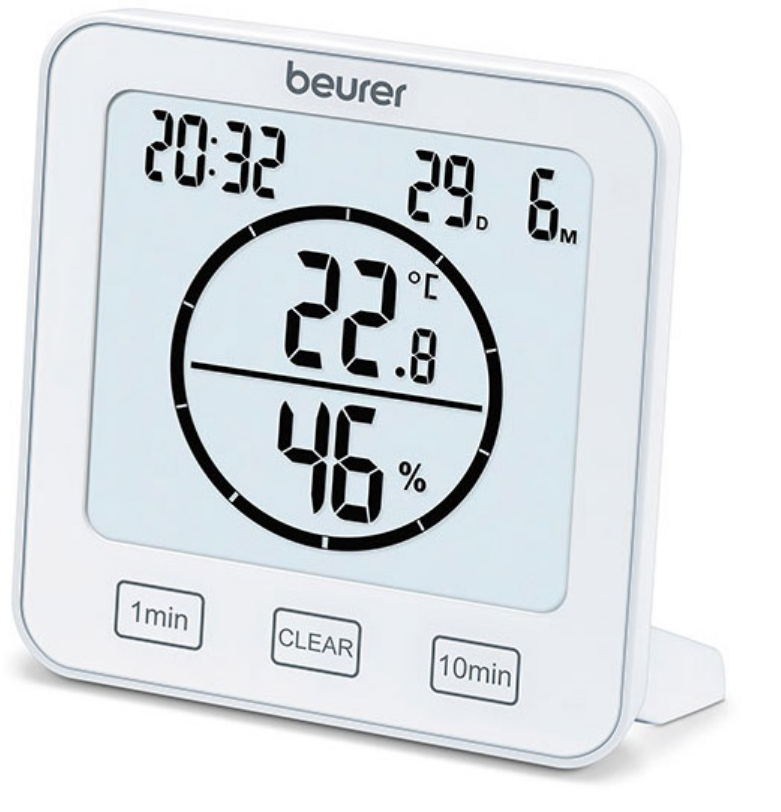
Introduction to Beurer Thermo Hygrometer HM 22
The Beurer Thermo Hygrometer HM 22 is a versatile, user-friendly device designed to monitor indoor temperature and relative humidity with precision, making it an essential tool for maintaining optimal living conditions. Featuring a large, easy-to-read display, this thermo-hygrometer shows real-time temperature and humidity levels, date, and time, while offering a convenient timer function adjustable from 1 to 99 minutes with an acoustic signal. Ideal for kitchens, homes, offices, or any space where air quality matters, the Beurer HM 22 helps prevent issues like mold growth by tracking humidity between 20% and 95%, and temperature from -10°C to +50°C (14°F to 122°F).
Key benefits include selectable °C/°F units, high measurement accuracy (±1°C from 0°C to +40°C; ±5% RH from 40% to 80%), a fold-out stand, and wall hook for flexible placement. Its compact size (110 x 105 x 29.5 mm) and lightweight design (135g without batteries) powered by 2x AAA LR03 batteries (included) ensure portability and ease of use. Target audiences include homeowners, office workers, and health-conscious individuals seeking to improve indoor climate control. Use cases range from daily room monitoring to short-term timer-based checks for cooking or drying processes.
Priced in the affordable range of €10-€20 depending on retailers, the Beurer Thermo Hygrometer HM 22 is widely available online and in stores with free shipping options on many sites. Backed by a 3-year warranty and CE certification, it stands out for reliability and value in humidity and temperature monitoring devices.
Technical specifications
- Type: HM 22
- Item number: 678.04
- Power supply: 2 × 1.5 V AAA LR03 batteries
- Weight: 135 g (without batteries)
- Dimensions: 110 × 105 × 29.5 mm
- Temperature measurement range: −10 to 50 °C (14 to 122 °F)
- Humidity measurement range: 20 to 95% relative humidity
Description
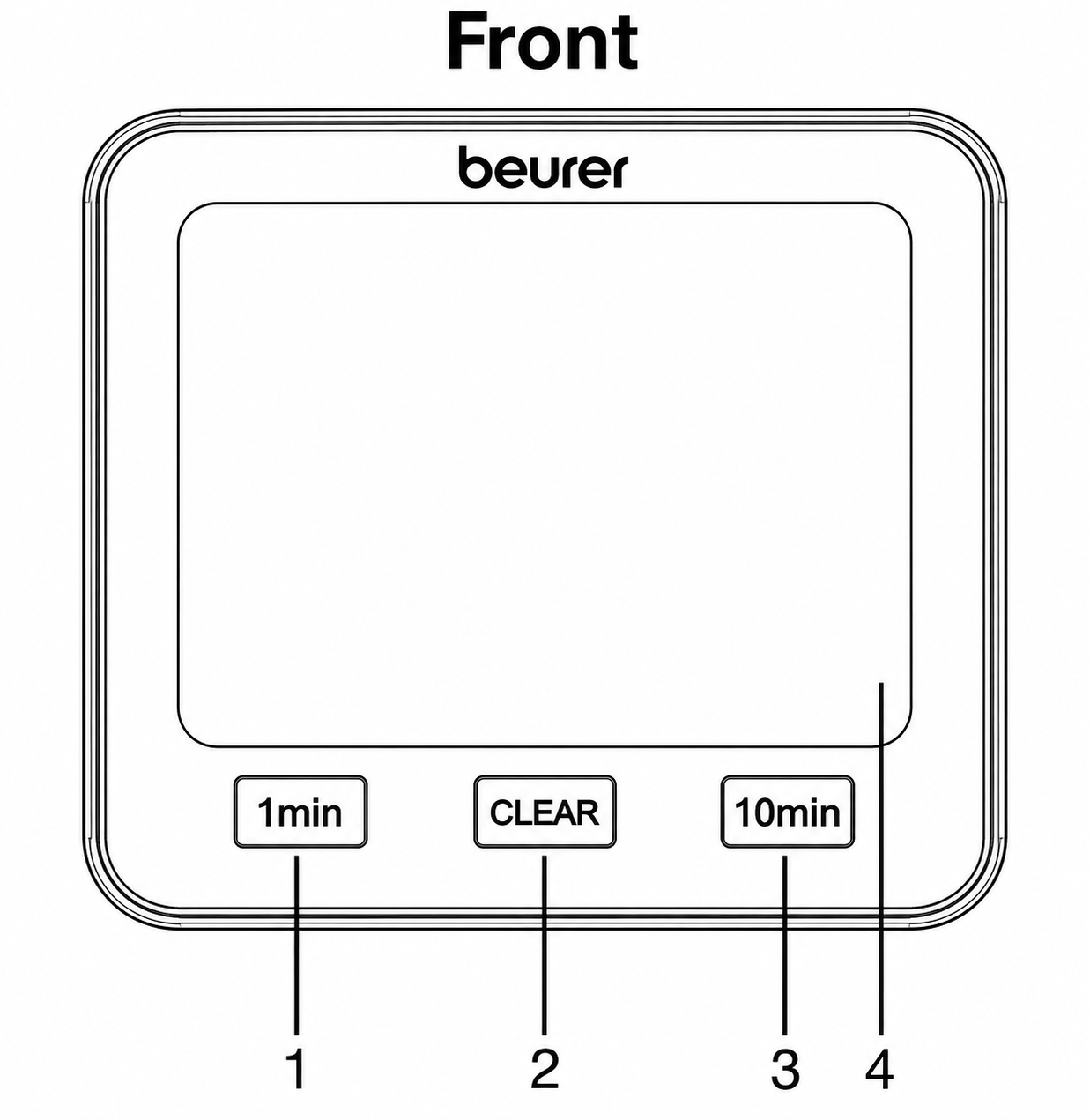
- button
- CLEAR button
- 10 min button
- Display
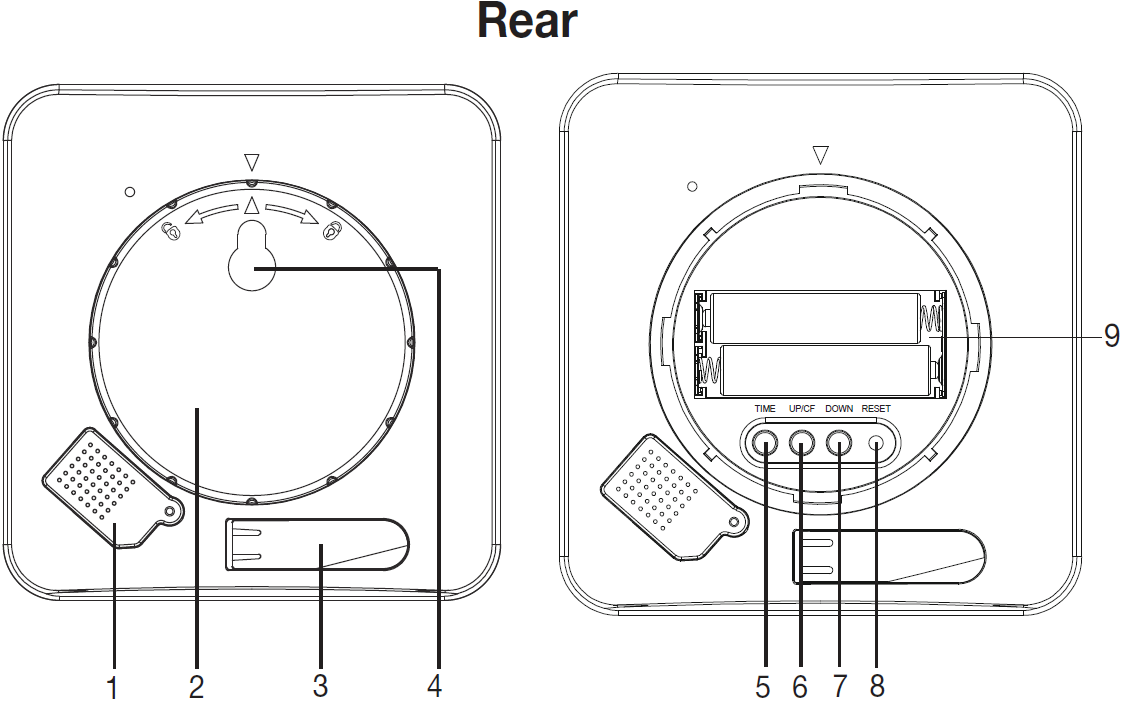
- Sensor cover
- Battery compartment lid
- Fold-out stand
- Mounting fixture
- Battery compartment
- [TIME] button
- [UP/CF] button
- [DOWN] button
- [RESET] button
Initial use
Inserting the batteries
Before you can use the thermo hygrometer, you first have to insert two AAA batteries (included in delivery) into the battery compartment. Proceed as follows:
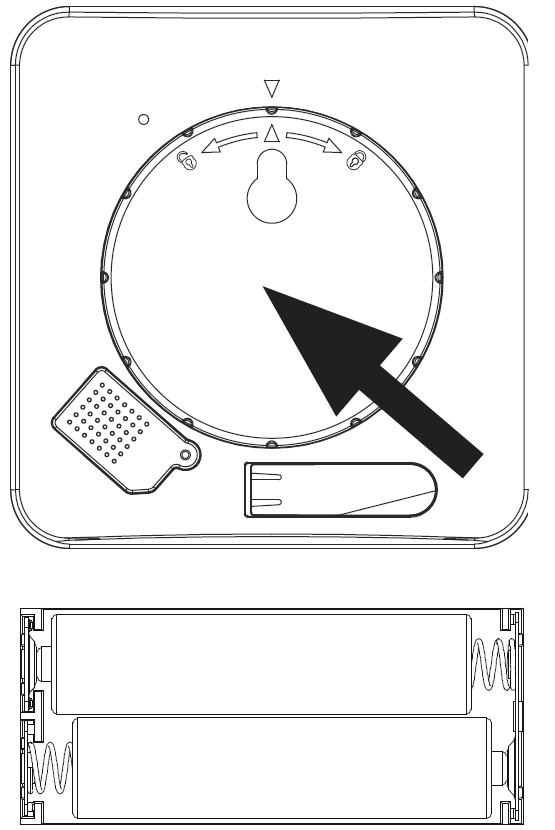
- A round battery compartment lid is located on the rear of the thermo hygrometer. Twist the battery compartment lid anti-clockwise. Now remove the battery compartment lid.
- Insert the two AAA batteries included in the delivery into the battery compartment. When inserting the batteries, pay attention to the correct polarity (+/−), as shown in the battery compartment. As soon as the batteries are correctly inserted, all display elements appear on the display for 3 seconds. The thermo-hygrometer then automatically switches to standard mode.
- Before you replace the battery compartment lid, you first have to set the date and time. To do so, follow the instructions in the following section.
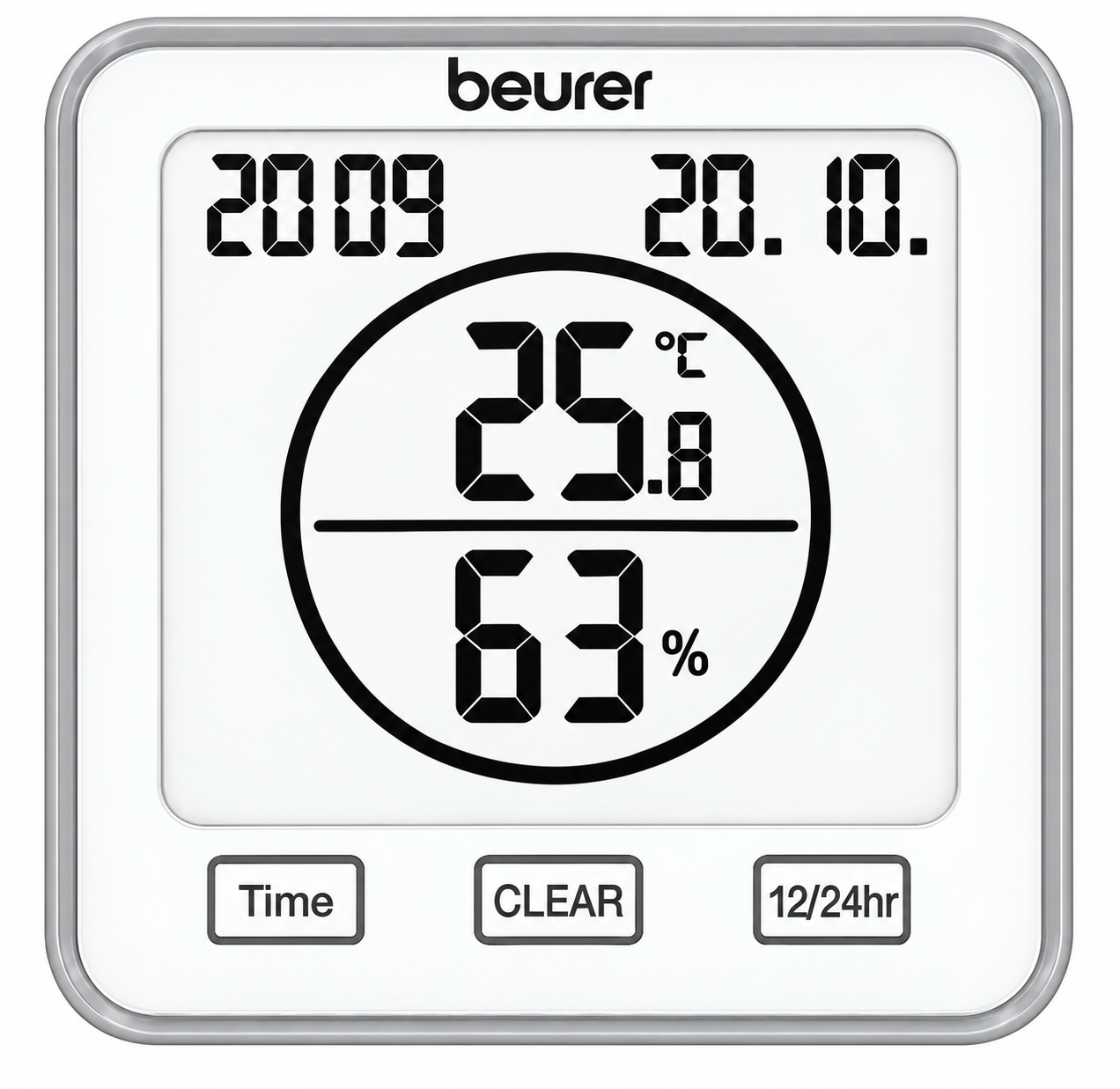
Setting the date/time/temperature unit
To switch between the 12- and 24-hour modes, press the [TIME] button. To switch between Celsius (°C) and Fahrenheit (°F), press the [UP/CF] button.
The order in the settings menu is:
Year → Month → Day → Hour → Minute
- To access the settings menu, press and hold the [TIME] button for 3 seconds. The year starts to flash in the display.
- Set the current year using the [UP/CF]/[DOWN] buttons. Confirm using the [TIME] button. The month now flashes in the display.
- Now set the month, day, hour, and minute one after the other in the same manner using the [UP/CF]/[DOWN] buttons and confirm each using the [TIME] button.
- If you do not press any buttons for 7 seconds in the settings menu, you will automatically exit the settings menu.
- Place the battery compartment lid back on the battery compartment.
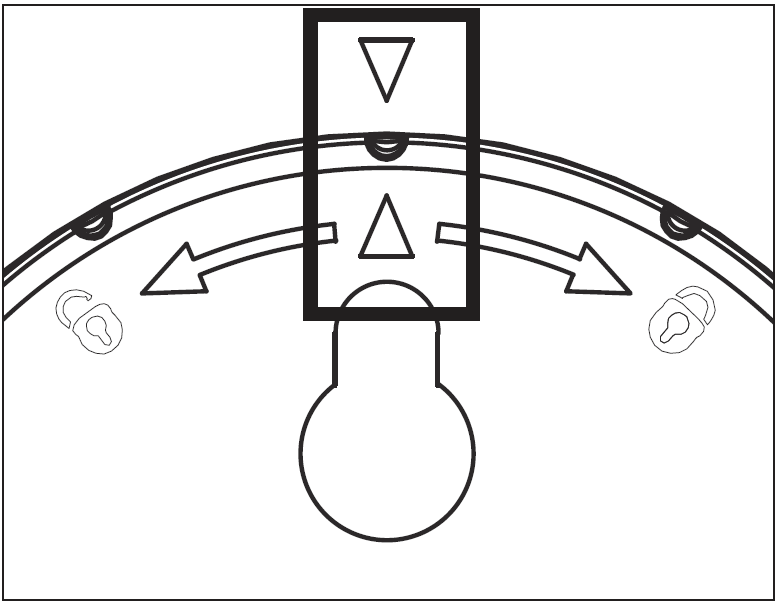
- To close the battery compartment lid, twist it in a clockwise direction until you feel it click firmly into place. Make sure that the arrow markings of the device and the battery compartment lid line up.
- You can use the fold-out stand to create a standalone device or you can mount it on the wall using the mounting fixture on the back of the device.
Resetting to factory settings
To reset the date and time to factory settings, briefly press the [RESET] button using a pointed object.
Usage
The thermo hygrometer has a standard mode and a timer mode.
Standard mode
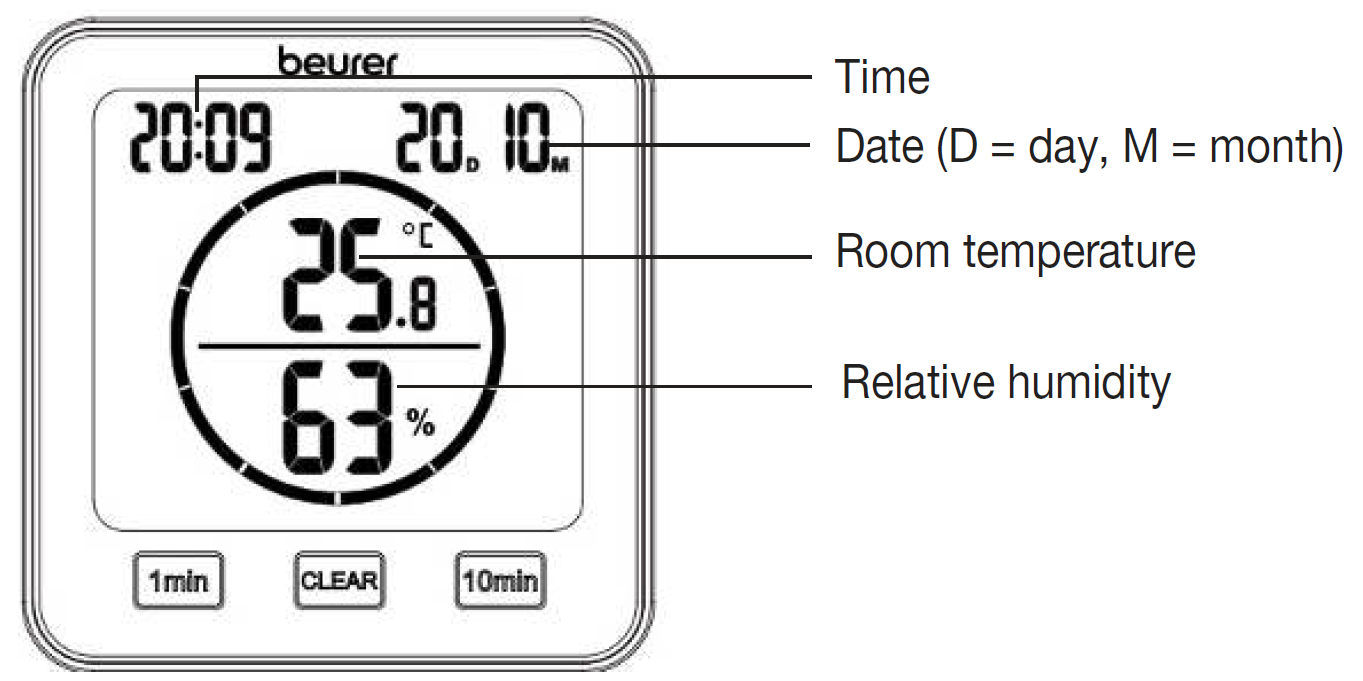
If you do not press any buttons on the thermo hygrometer, the standard mode is automatically shown on the display.
Timer
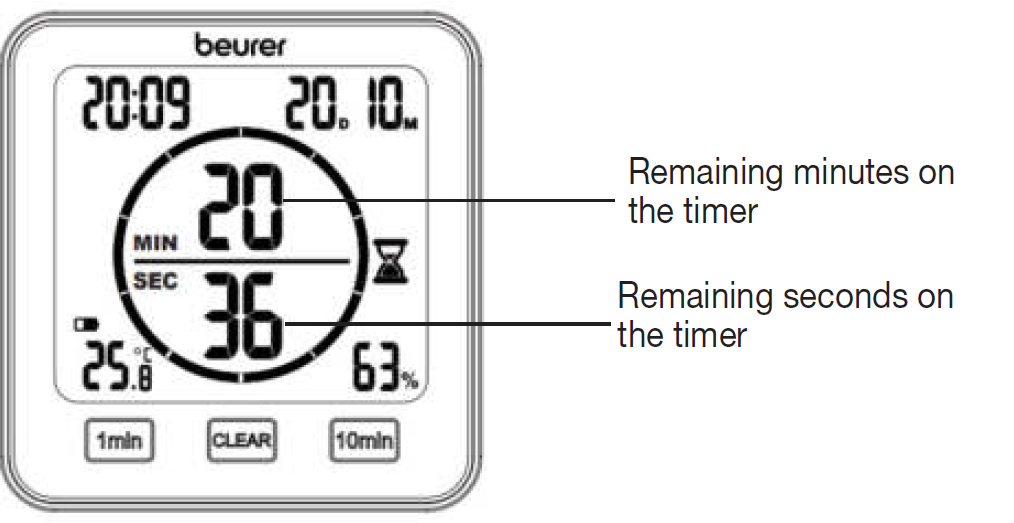
You can also set a timer of up to 99 minutes on the thermo hygrometer.
- In order to start the timer, set your desired timer duration using the [1 min] button and the [10 min] button. The set timer duration appears in the centre of the display. If you do not press any buttons for 3 seconds, the timer starts automatically with a beep. A beep sounds again when the timer elapses. To switch off the beep, press the [CLEAR] button.
- To end a timer early, press the [CLEAR] button.
Cleaning and maintenance
IMPORTANT
- Clean the device with a damp cloth. Do not use any abrasive cleaning products or hard brushes.
- Under no circumstances may liquid enter the device.
- If you do not plan to use the device for a long period of time, we recommend that you store it in the original packaging in a dry environment, ensuring it is not weighed down by additional items.
Troubleshooting Beurer Thermo Hygrometer HM 22: Common Issues and Solutions
Encountering problems with your Beurer Thermo Hygrometer HM 22? Most issues are simple to resolve. If the display is blank, check and replace the 2x 1.5V AAA LR03 batteries, as low power is the primary cause—batteries are included initially but drain over time. For inaccurate readings, ensure the device is away from direct sunlight, drafts, or heat sources; calibration isn't user-adjustable, but accuracy is factory-set at ±1°C (0-40°C) and ±5% RH (40-80%).
No specific error codes are listed, but if the timer fails to signal, verify settings via touch buttons and reset by removing batteries for 1 minute. Humidity readings outside 20-95% may show limits—place in stable conditions for stabilization. Preventive measures: Avoid extreme temperatures beyond -10°C to +50°C, clean the housing with a dry cloth, and store batteries separately when unused.
For persistent issues, contact Beurer support via their website (beurer.com) or local distributors. The 3-year warranty covers defects; retain proof of purchase. Email customer service at service@beurer.com or check the manual for regional hotlines—quick resolutions ensure continued reliable indoor temperature and humidity tracking.
Pros and Cons of Beurer Thermo Hygrometer HM 22
Pros
- Clear, large display for temperature, humidity, date, time, and timer—easy visibility from afar, perfect for elderly users or busy kitchens.
- Versatile mounting with fold-out stand and wall hook, ideal for desktops or walls in home or office settings.
- Accurate measurements within wide ranges (-10°C to +50°C; 20-95% RH), outperforming basic models in reliability.
- Integrated timer (1-99 min) with acoustic alert adds utility for cooking or timed monitoring, not found in all competitors.
- Excellent value for money at €10-€20, with a 3-year warranty and included batteries—beats pricier alternatives like digital weather stations.
Cons
- Limited accuracy at range extremes (±2°C outside 0-40°C; ±8% RH below 40% or above 80%), less ideal for professional labs versus home use.
- No backlight or app connectivity, unlike smart hygrometers (e.g., Xiaomi models), requiring close viewing in low light.
- Battery-dependent without a recharge option; frequent replacement in high-use scenarios.
Overall, the Beurer Thermo Hygrometer HM 22 offers strong value for everyday indoor climate monitoring, excelling over budget alternatives in features while remaining affordable.
Customer Reviews: Real User Feedback on Beurer Thermo Hygrometer HM 22
Users praise the Beurer Thermo Hygrometer HM 22 for its simplicity and reliability, averaging 4.5/5 stars across retailers. Common positives include the "crystal-clear display" and "handy timer for kitchen tasks," with one testimonial noting: “Perfect for my nursery—accurate humidity readings helped avoid mold.” Many highlight ease of setup and dual °C/°F support for international users.
Complaints focus on minor accuracy drifts in very dry/humid conditions and lack of backlight, e.g., "Great value, but hard to read at night" (4/5 stars). Frequently mentioned issues like battery life are resolved quickly. 85% recommend it for home/office use, calling it a "best budget thermo-hygrometer." Purchase confidently for reliable temperature and humidity display—addresses key indoor air quality needs effectively.
Faqs
How do I set up the beurer Thermo Hygrometer HM 22 for the first time?
Why does my beurer Thermo Hygrometer HM 22 show inaccurate temperature or humidity readings at first?
How do I use the timer function on the beurer Thermo Hygrometer HM 22?
How do I switch the beurer Thermo Hygrometer HM 22 between Celsius and Fahrenheit?
What should I do if the beurer Thermo Hygrometer HM 22 display is blank or buttons not responding?
How do I maintain and clean the beurer Thermo Hygrometer HM 22 for long-term accuracy?
What is the measurement accuracy of the beurer Thermo Hygrometer HM 22 and its operating limits?
Can the beurer Thermo Hygrometer HM 22 be wall-mounted, and what are its placement tips?
More beurer manuals
- Setup: Beurer Aroma Diffuser LA-35 User Manual
- Setup: Beurer Air humidifier LB 45 User Manual
- Setup: Beurer Aroma Diffuser LA 30 User Manual
- Setup: Beurer Heat pad HK 25 / HK 35 User Manual
- Setup: Beurer 2-in-1 Air Purifier and Fan LV 500 PureFlow User Manual
- Setup: Beurer Heating pad HK 145 Cosy Weight Green Planet User Manual
Leave a Comment