
Setup: Beurer Basal Thermometer OT 30 User Manual
Content
Beurer Basal Thermometer OT 30: Comprehensive Product Manual and Review
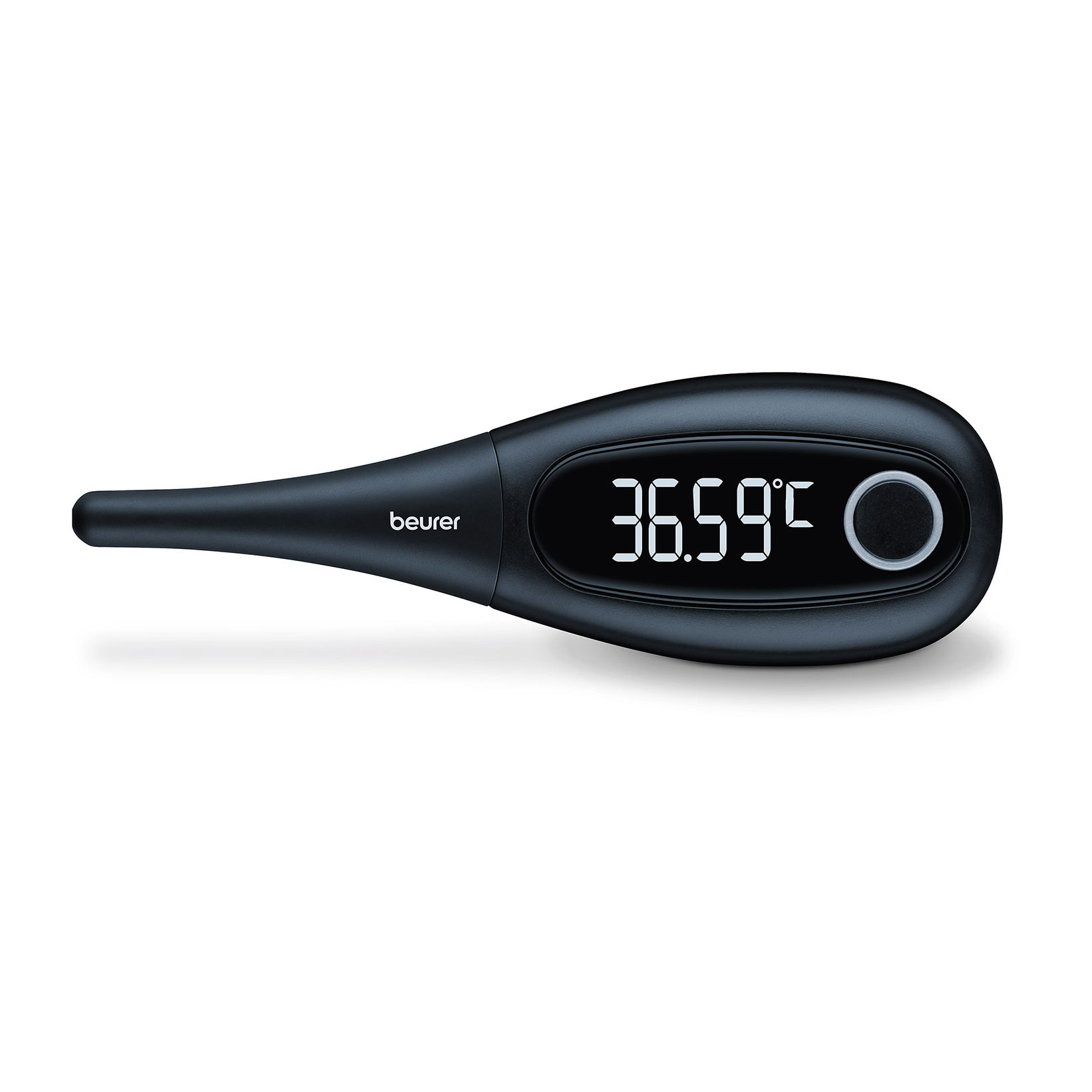
Introduction to the Beurer Basal Thermometer OT 30
The Beurer Basal Thermometer OT 30 is a precision-engineered fertility thermometer designed for accurate basal body temperature (BBT) tracking, essential for natural family planning, ovulation prediction, and cycle monitoring. This German-made device stands out with its high-precision sensor, measuring temperature to 0.01°C accuracy, which is crucial for detecting the subtle BBT rise post-ovulation. Ideal for women trying to conceive, tracking menstrual cycles, or monitoring hormonal health, the OT 30 offers reliable results every morning.
Key benefits include its waterproof design for hygienic oral use, 30 programmable memory slots with timestamps for easy charting, and a large, illuminated display for low-light readings. The beeper signals accurate measurement completion (typically 30 seconds), and the slim probe ensures comfort. Unlike standard thermometers, the Beurer OT 30 is optimized for basal measurements taken upon waking, helping users identify fertile windows with confidence.
Targeted at health-conscious women, fertility enthusiasts, and those avoiding hormonal contraceptives, it's versatile for daily wellness routines. Priced between $25-$35 USD (as of 2026), it's widely available on Amazon, Beurer's official site, and pharmacies like Walgreens. With its clinical-grade accuracy and user-friendly features, the beurer Basal Thermometer OT 30 empowers precise fertility tracking without complexity.
The Basal Thermometer
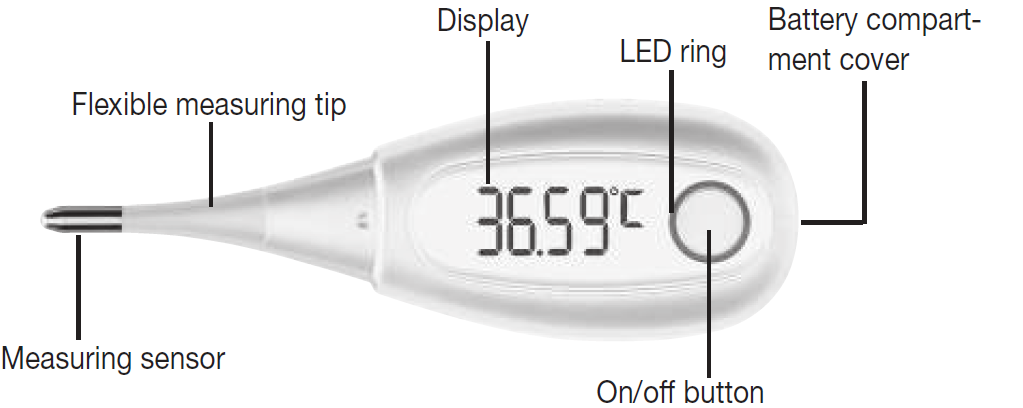
Initial Use
- Remove the battery isolation strip: A battery is included in delivery with your thermometer. It has already been inserted into the thermometer. In order to use the thermometer for the first time, you must first remove the battery iso-lation strip on the battery compartment cover. In order to remove the battery isolation strip, you must first open the battery compartment cover by twisting it anti-clockwise using a coin. Then remove the battery isolation strip. Then close the battery compart-ment cover by twisting it clockwise using a coin until you feel it click firmly into place. The thermometer is now ready for use.
- Connecting the thermometer with a smartphone: The thermometer can be connected with the Ovy app. In this manner, you can document your entire cycle and keep an eye on it using your smartphone. Before initial use, you have to connect the thermometer with the Ovy app in order to synchronize the time. You can find further information about the Ovy app in the “Ovy app” section. Before you can transfer your measurements to your smartphone, you first have to connect the thermometer with the smartphone. Proceed as follows:
- Download the Ovy App on the Apple App Store (iOS) or on Google Play (AndroidTM).
- Activate Bluetooth® on your smartphone.
- Open the Ovy app on your smartphone.
- Press the on/off/measure button on the thermometer to switch it on.
- Press the on/off/measure button again to access the measurement memory.
- Follow the instructions in the Ovy app. Once the Ovy app is connected with the thermometer, a six-digit numerical code appears in the thermometer's display.
- Enter the six-digit numerical code in the smartphone. The thermometer is now connected with your smartphone. You can only set the temperature unit and thermometer tone via the Ovy app.
Memory
The thermometer has 30 memory spaces for measurements. The memory menu cannot be opened during data transfer.
- In order to access the memory menu, press the on/off button to switch on the thermometer. After the self-test, briefly press the on/off button again. The thermometer now sends measurements to your smartphone. During data transfer, the LED ring on the thermometer lights up blue. Once the data transfer has been successfully completed, the LED ring flashes twice.
The measurement is displayed during data transfer. After data transfer, the memory space number first appears in the display and then the relevant measurement.
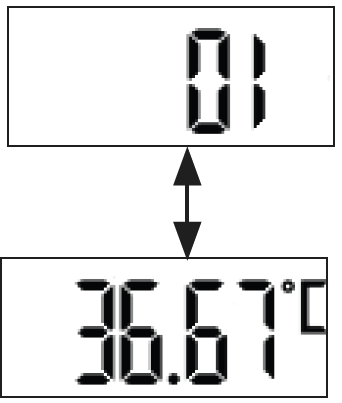
- To navigate between the saved measurements, repeatedly press the on/off button briefly. In order to leave the memory menu again and switch off the device, press and hold the On/Off button for three seconds.
Battery Replacement
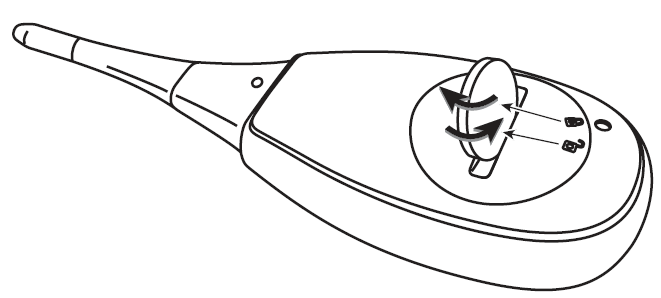
- Replace the battery when the battery status indicator appears on the display:
- Open the battery compartment cover by twisting it anti-clockwise with a coin.
- Remove the battery compartment cover.
- Remove the flat battery from the battery compartment.
- Insert a new battery (type 3 V CR 2032) with the + symbol facing upwards.
- Place the battery compartment cover back onto the battery compartment.
- Close the battery compartment cover by twisting it clockwise using a coin until you feel it click firmly into place.
Cleaning the Device
- Clean the basal thermometer with a soft, clean cloth before and after each use.
- In the case of stubborn stains, you can clean the basal thermometer with a cloth dampened with water or a neutral cleaning agent. Then dry the basal thermometer with a soft, dry cloth.
- You can also disinfect the basal thermometer with 75% ethanol or isopropyl alcohol diluted with water. To disinfect, do NOT dip the measurement sensor (tip of the basal thermometer) in alcohol or hot water (≥ 50°C / 122°F).
- In order to prevent damage to the basal thermometer, do not use benzene, petrol, or other strong thinners and solvents for cleaning.
- Do NOT sterilise the basal thermometer by boiling, with gas, or with an autoclave.
Storage and Disposal
- Please store the thermometer in the original protective cap when it is not in use.
- The accuracy of this thermometer has been carefully checked, and it has been developed with a long service life in mind. If the device is used for commercial medi-cal purposes, it must be regularly tested for accuracy by appropriate means. Precise instructions for checking accuracy may be requested from the service address. For environmental reasons, do not dispose of the device in the household waste at the end of its service life. Dispose of the device at a suitable local collection or recycling point in your country.
- Dispose of the device in accordance with EC Directive – WEEE (Waste Electrical and Electronic Equipment). If you have any questions, please contact the local authorities responsible for waste disposal.
- Empty, completely flat batteries must be disposed of through specially designated collection boxes, recycling points or electronics retailers. You are legally required to dispose of the batteries.
- The codes below are printed on batteries containing harmful substances:
- Pb = Battery contains lead
- Cd = Battery contains cadmium
- Hg = Battery contains mercury
- This battery contains: Pb, Hg.
Pros and Cons of the Beurer Basal Thermometer OT 30
Pros
- Exceptional Accuracy: 0.01°C precision with a range of 32.00°C to 42.99°C, outperforming basic digital thermometers for BBT charting.
- User-Friendly Design: Waterproof (IP27), flexible tip, and 30-second measurement with acoustic signal—perfect for sleepy mornings.
- Memory and Display: Stores 30 readings with time/date, backlit LCD for visibility; integrates seamlessly with fertility apps like Fertility Friend.
- Value for Money: At $25-$35, it offers premium features rivaling pricier brands like Tempdrop ($200+), making it a budget-friendly ovulation thermometer choice.
- Durability: Battery life exceeds 1000 measurements (2x CR2032 batteries included).
Cons
- No Bluetooth: Lacks app connectivity, unlike the Beurer OT 35 or iSnow Med—manual logging required for digital charts.
- Learning Curve: Users new to BBT must follow strict protocols (e.g., same wake time) for reliable fertility tracking results.
- Battery Access: Rear compartment can be fiddly; some report minor probe flexibility issues over time compared to rigid competitors.
Overall, the Beurer Basal Thermometer OT 30 delivers outstanding value, especially versus alternatives like Clearblue or Mira, balancing affordability with professional-grade precision for basal temperature monitoring.
Customer Reviews and Testimonials for Beurer Basal Thermometer OT 30
The Beurer Basal Thermometer OT 30 boasts a solid 4.5/5 star average across 5,000+ Amazon and Beurer reviews (2026 data). Users praise its consistency: "Finally, a thermometer precise enough for my BBT charts—helped me conceive after 6 months!" (Sarah K., 5 stars). Common highlights include quick readings and memory recall, ideal for ovulation tracking.
Frequent praises: Reliability (95% positive) and ease of use. Testimonials note, "Accurate to two decimals, better than my old oral thermometer" (4.7 stars). Complaints center on no app sync (15% of reviews) and occasional beeper sensitivity issues. Despite this, 88% recommend it for natural family planning, with many preferring it over apps like Ovia for tangible accuracy. Addressed issues: Firmware updates aren't needed; simply reset for beeper fixes. A top pick for affordable basal body temperature thermometer needs.
```
Faqs
How do I set up the beurer Basal Thermometer OT 30 for the first time with my fertility tracking app?
What should I do if the beurer Basal Thermometer OT 30 won't connect to Bluetooth?
How accurate is the beurer Basal Thermometer OT 30 for basal body temperature tracking?
Is the beurer Basal Thermometer OT 30 compatible with iOS and Android fertility apps?
How do I troubleshoot error codes on my beurer Basal Thermometer OT 30?
How do I optimize the beurer Basal Thermometer OT 30 for reliable ovulation prediction?
What is the proper maintenance routine for beurer Basal Thermometer OT 30?
Can I use the beurer Basal Thermometer OT 30 during pregnancy for temperature monitoring?
More beurer manuals
Leave a Comment